Ngwaahịa gafereview
The CYCPLUS AL2 is a high-performance, portable tire inflator designed for quick and efficient inflation. Its compact size, powerful motor, and dual power supply options make it an ideal tool for maintaining optimal tire pressure for various vehicles and inflatable items. The device features an intuitive dual LED display, preset inflation modes, and an automatic shut-off function for precise and safe operation.
Akụkụ ndị bụ isi:
- Ọnụ ego ngwa ngwa: Equipped with a powerful motor providing 36L/Min airflow, capable of inflating a small car tire (28-36 PSI) in approximately 60 seconds.
- Dual-Use Power Supply: Operates on a built-in 3*2600mAh battery (7800mAh total capacity) or via a 12V car power cord, ensuring usability even when the battery is low.
- Ngosipụta LED abụọ: Clear digital display shows both real-time and preset pressure values with an accuracy of ±1 PSI.
- Ọrụ akpaaka: Features 4 preset modes (bicycle, motorcycle, car, ball) and allows custom pressure settings up to 150 PSI. Automatically stops when the target pressure is reached.
- Ọkụ ọkụ ọkụ mberede: Integrated LED light for illumination during night-time use or emergencies.

Image: The CYCPLUS AL2 Portable Tire Inflator with its digital display.

Image: Close-up of the inflator's dual LED display showing real-time and preset pressure values.
Nhazi na Nchaji
Ọdịnaya ngwugwu:
Before first use, please verify all components are present:
- Inflator Unit (AL2)
- Akpa Nchekwa EVA
- -Dị-C Nchaji USB
- Igwe ọkụ ụgbọ ala 12V
- Air Tube (short)
- Air Tube (long)
- Agba bọọlụ
- Presta Valve nkwụnye
- Akwụkwọ ntuziaka onye ọrụ

Image: Diagram showing all items included in the CYCPLUS AL2 package.
Nchaji mbụ:
For optimal performance, fully charge the inflator before its first use. Charging takes approximately 3 hours using the provided Type-C cable and a compatible power adapter (not included). The battery indicator on the display will show charging progress.
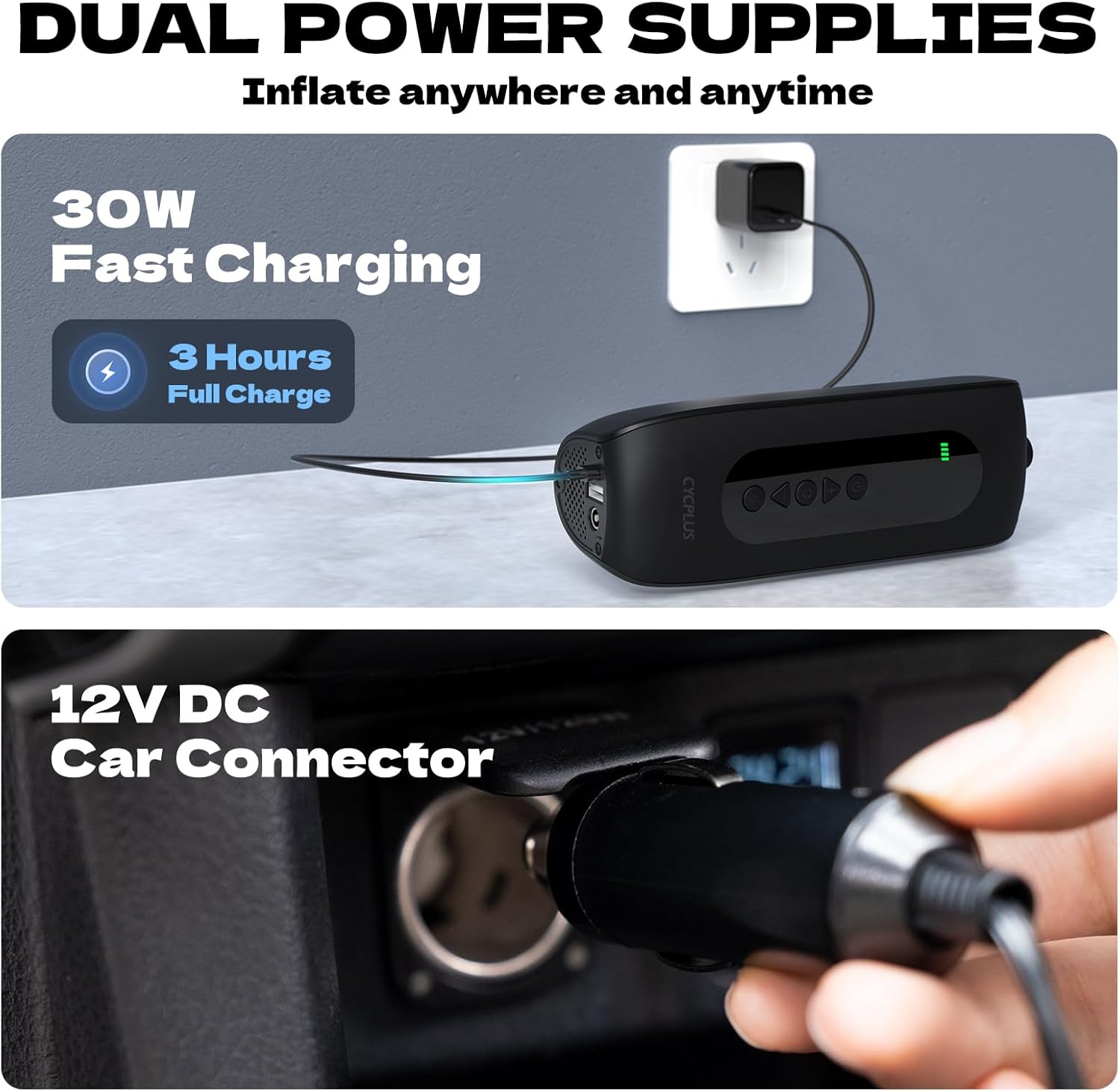
Image: The inflator being charged via USB-C and connected to a 12V car power outlet.
Ntuziaka ọrụ
Connecting the Air Tube:
- Select the appropriate air tube (short or long) for your application.
- Screw one end of the air tube firmly into the inflation port on the top of the inflator.
- Attach the other end of the air tube to the valve stem of the item you wish to inflate. Ensure a secure connection to prevent air leakage.

Image: The CYCPLUS AL2 inflator connected to a car tire valve.
Usoro onu oriri:
- Ike Na: Press the power button to turn on the inflator. The dual LED display will illuminate.
- Họrọ Ụdị: Use the mode button to cycle through the 4 preset inflation modes: Bicycle, Motorcycle, Car, and Ball. Each mode has a default pressure setting.
- Adjust Pressure (Optional): If the preset pressure is not suitable, use the '+' and '-' buttons to adjust the target pressure value. The inflator supports pressures up to 150 PSI.
- Malite onu oriri: Press the inflation button to begin inflating. The real-time pressure will be displayed and increase as the item inflates.
- Nchekwa onwe: Ngwa inflọta ahụ ga-akwụsị ozugbo ozugbo e ruru nrụgide ebumnuche edobere.
- Kwụpụ: Carefully disconnect the air tube from the valve stem and then from the inflator.

Image: Visual representation of the inflator's application modes for cars, motorcycles, bikes, and balls.
Iji ọkụ LED:
Press the light button to turn on the integrated LED light. This feature is useful for illuminating the work area in low-light conditions or as an emergency light.

Image: The CYCPLUS AL2 inflator with its LED light activated, illuminating a car tire at night.
Product Introduction Video:
Video: Official product introduction for the CYCPLUS AL2 Tire Inflator, demonstrating its features and ease of use.
Nlekọta
- Nhicha: Jiri akwa dị nro hichaa mpụta nke inflator. Ejila kemịkalụ siri ike ma ọ bụ ihe mkpocha abrasive.
- Nchekwa: Store the inflator and its accessories in the provided EVA case in a cool, dry place, away from direct sunlight and extreme temperatures.
- Nlekọta batrị: To prolong battery life, charge the device at least once every three months if not in regular use. Avoid fully depleting the battery for extended periods.
Nchọpụta nsogbu
Okwu na azịza ndị nkịtị:
- Inflator anaghị agbanye: Ensure the battery is charged. If using the 12V car cord, ensure it is securely connected and the car's power outlet is functional.
- Ọnụ ego efu na-eji nwayọ ma ọ bụ na ọ naghị arụ ọrụ: Check that the air tube is securely connected to both the inflator and the valve stem. Ensure the valve stem is not damaged. Verify the target pressure is set correctly and is within the device's operating range (up to 150 PSI).
- Ọgụgụ nrụgide na-ezighi ezi: Ensure the air tube is fully screwed onto the valve stem. If the issue persists, compare the reading with a known accurate pressure gauge.
- Batrị na-apụ ngwa ngwa: Ensure the device is fully charged before use. Extreme temperatures can affect battery performance. If battery life significantly degrades, contact customer support.
- Device overheats: The inflator may become warm during prolonged use. Allow it to cool down before continuing operation. If it overheats excessively or emits smoke/unusual odors, immediately power off and disconnect, then contact customer support.
Nkọwapụta
| Njirimara | Nkọwapụta |
|---|---|
| Aha Nlereanya | AL2 |
| Ụdị | CYCPLUS |
| Oke nrụgide | 150 PSI |
| Ike ikuku | 36 elekere |
| Isi Iyi Ike | Battery Powered; Corded Electric (12V) |
| Ụdị batrị | Lithium Polymer (3*2600mAh) |
| Oge Nchaji | Ihe ruru. awa 3 |
| Ọkwa mkpọtụ | 78 dB |
| Ibu Ibu | 670 Grams (1.48 pound) |
| Ihe onwunwe | Aluminom |
| Ngwa gụnyere | Air tube, Ball needle, Presta Valve adaptor, Type-C charge cable |
Akwụkwọ ikike na nkwado
Ozi akwụkwọ ikike:
The CYCPLUS AL2 Portable Tire Inflator comes with a Akwụkwọ ikike nke afọ 1 site na ụbọchị azụrụ ya. Akwụkwọ ikike a na-ekpuchi ntụpọ nrụpụta na ọrụ aka n'oge ojiji nkịtị. Ọ naghị ekpuchi mmebi sitere na ojiji na-ezighị ezi, ihe mberede, mgbanwe na-akwadoghị, ma ọ bụ mmebi nkịtị.
Nkwado ndị ahịa:
For any questions, technical assistance, or warranty claims, please contact CYCPLUS official after-sales support. Refer to the contact information provided on the product packaging or the official CYCPLUS websaịtị.
Biko dowe ihe akaebe nke ịzụrụ ihe maka nkwado akwụkwọ ikike.


