Okwu mmalite
Daalụ maka ịzụrụasing the PUREMIC S3 Portable Bluetooth Karaoke Machine. This manual provides detailed instructions for setting up, operating, and maintaining your device. Please read this manual thoroughly before use to ensure proper function and to maximize your enjoyment of the product.
Kedu ihe dị na Igbe ahụ
Chọpụta na ihe niile dị na ngwugwu:
- Ọkà okwu Bluetooth x 1
- UHF Wireless Microphone x 2
- Leather Bag x 1
- Speaker Charger x 1
- Microphone Charger x 1
- Akwụkwọ ntuziaka onye ọrụ x 1

Image: All components included in the PUREMIC S3 package.
Ngwaahịa gafereview na Atụmatụ
The PUREMIC S3 is a portable karaoke system designed for high-quality audio and versatile use. Key features include:
- Ụda imikpu: Equipped with a 5.25-inch woofer and two 1-inch tweeters for clear, powerful sound.
- Igwe igwe ikuku: Two UHF wireless microphones for singing.
- Voice Elimination: One-touch vocal elimination feature on microphones.
- Mmetụta ụda: Eight entertainment sound effects (Children, Monster, K.T.V., etc.).
- Batrị na-adịte aka: Built-in 10,000 mAh rechargeable battery providing up to 8 hours of playtime for the speaker and 10 hours for microphones.
- Nchekwa ike: Automatic power-down after 15 minutes of inactivity.
- Njikọta dị iche iche: Bluetooth 5.0, AUX input, USB port for playback and recording.
- Ọkụ na-agbanwe agbanwe: Six adjustable lighting modes with 128 LED colors that synchronize with music.
- Enwere ike ibugharị: Lightweight, compact design with a swivel handle and included leather carrying bag.
- Nguzogide mmiri: IPX4 rated for splash resistance.
- Njikọ NFC: Quick pairing with Android devices via NFC.
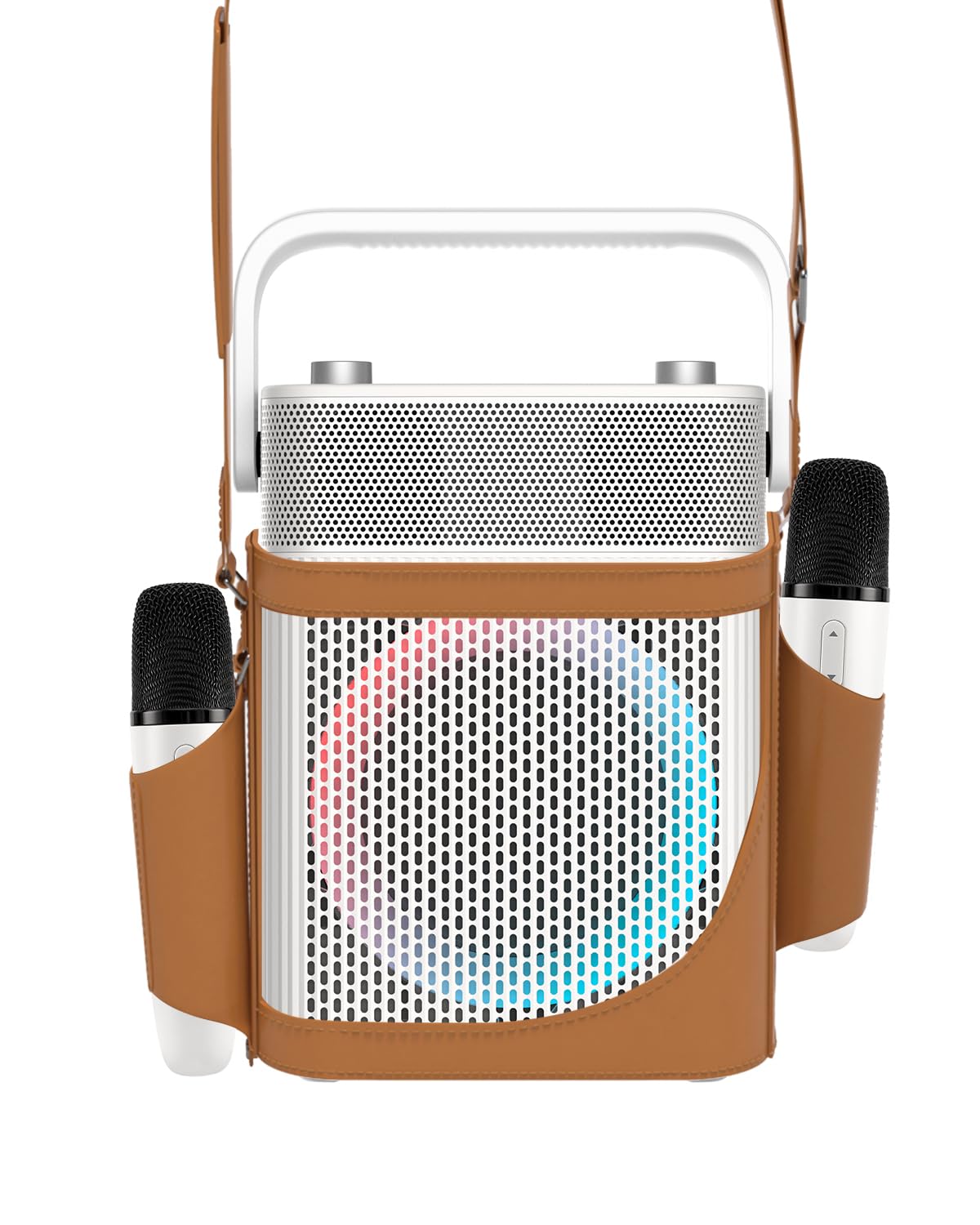
Foto: N'ihu view of the PUREMIC S3 Karaoke Machine, highlighting its design and LED lights.
Ntuziaka nhazi
1. Ịchaji ngwaọrụ
Tupu i jiri ya nke mbụ, chajie igwe okwu na igwe okwu niile.
- Ọkà okwu: Connect the speaker charger to the "Charge Port" on the back of the speaker. The charging indicator will show progress.
- Igwe okwu: Place the UHF wireless microphones into their dedicated charging holders on top of the speaker. The microphones will begin charging automatically.

Image: Close-up of the speaker's rear panel, indicating the Charge Port, Aux-in Port, and USB Port.
2. Ịgbanye / gbanyụọ
- Ọkà okwu: Press and hold the Power On/Off button on the control panel until the device powers on or off.
- Igwe okwu: Press and hold the power button on each microphone to turn them on or off. They will automatically pair with the speaker when both are powered on.
Ntuziaka ọrụ
1. Njikọ Bluetooth
- Turn on the PUREMIC S3 speaker.
- Pịa BT button on the speaker's control panel to enter Bluetooth pairing mode. The Bluetooth indicator will flash.
- On your device (smartphone, tablet, TV, computer), enable Bluetooth and search for "PUREMIC S3".
- Select "PUREMIC S3" from the list of available devices to pair. A confirmation sound will indicate a successful connection.
NFC Pairing (Android devices only): For quick pairing, ensure NFC is enabled on your Android smartphone. Tap your phone gently against the NFC area on the speaker's control panel. Your phone will prompt you to connect to the PUREMIC S3.

Image: Demonstrates NFC pairing with an Android phone on the PUREMIC S3 speaker.
2. ntinye AUX
To connect devices via AUX cable:
- Connect one end of a 3.5mm AUX cable (not included) to the AUX-in port on the back of the PUREMIC S3.
- Connect the other end to the audio output jack of your device (e.g., TV, MP3 player).
- Ọkà okwu ga-agbanwe ozugbo gaa na ọnọdụ AUX.

Image: PUREMIC S3 connected to a TV via AUX, showing karaoke lyrics on screen.
3. Ịkpọgharị na Ndekọ USB
Insert a USB drive into the USB port on the back of the speaker for music playback or to record your performance.
- Nkpọghachi: The speaker will automatically detect and play audio files site na USB mbanye.
- Edekọ: Pịa REC button on the control panel to start recording. Press it again to stop recording. Recordings will be saved to the USB drive.
4. Ọrụ igwe okwu
The wireless microphones offer several features:
- Volume/Echo: Use the dedicated knob on the speaker to adjust microphone volume and echo effect.
- Vocal Elimination: Press the designated button on the microphone for one-touch vocal elimination from music tracks.
- Mmetụta ụda: The microphones feature 8 different sound effects (Children, Monster, Male, Female, Original, Concert, Live, K.T.V.). Cycle through these effects using the microphone's controls.

Image: Visual representation of the 8 sound effects available on the PUREMIC S3 microphones.
5. Njikwa Ọkà Okwu
The speaker's control panel includes:
- Gbanyụọ/ Gbanyụọ: Pịa ma jide ka ịgbanwuo/ gbanyụọ.
- Volume/Echo Knob: Rotate to adjust overall volume and microphone echo.
- bọtịnụ BT: Na-eme ka ọnọdụ njikọta Bluetooth rụọ ọrụ.
- Bọtịnụ BASS: Toggles bass sound enhancement.
- Bọtịnụ kwusi: Pauses/resumes playback.
- Bọtịnụ REC: Initiates/stops recording to USB.
- Bọtịnụ Mmetụta Ọkụ: Cycles through 6 different lighting modes.
- Pre/Next Song Knob: Rotate to skip tracks.

Foto: Zuru ezu view of the speaker's control panel, showing all buttons and their functions.
6. TWS Pairing (True Wireless Stereo)
If you have two PUREMIC S3 speakers, you can pair them for a true wireless stereo experience:
- Gbaa mbọ hụ na agbanyere igwe okwu abụọ a na ejighi ya na ngwaọrụ Bluetooth ọ bụla.
- On one speaker, press and hold the Bluetooth button until you hear a pairing tone.
- Repeat this step on the second speaker.
- The speakers will automatically connect to each other. Once paired, connect your device to one of the speakers via Bluetooth.

Image: Two PUREMIC S3 speakers set up for TWS, providing double stereo sound in a room.
Nlekọta
- Nhicha: Wipe the speaker and microphones with a soft, dry cloth. Do not use abrasive cleaners or solvents.
- Nchekwa: Chekwaa ngwaọrụ ahụ n'ebe dị jụụ, kpọrọ nkụ na-adịghị na ìhè anyanwụ kpọmkwem na oke okpomọkụ.
- Nlekọta batrị: To prolong battery life, fully charge the device before long periods of storage and recharge it every 3 months.
- Nguzogide mmiri: The speaker is IPX4 rated, meaning it is resistant to splashes. Do not submerge the device in water. Ensure all ports are securely covered when exposed to moisture.
Nchọpụta nsogbu
| Nsogbu | Ihe nwere ike ime | Ngwọta |
|---|---|---|
| Enweghị ike | Batrị agwụla. | Charge the speaker and microphones using the provided chargers. |
| Enweghị ike ijikọ site na Bluetooth | Bluetooth is not enabled on your device or speaker is not in pairing mode. Device is too far. | Ensure Bluetooth is active on your device. Press the BT button on the speaker. Move device closer to the speaker. |
| Enweghị ụda sitere na igwe okwu | Microphones are off or not paired. Microphone volume is too low. | Turn on microphones. Ensure they are charged. Adjust microphone volume knob on the speaker. |
| Mgbagwoju anya ụda | Volume is too high. Microphone is too close to the speaker. | Reduce the volume. Increase distance between microphone and speaker. |
| Ntugharị USB anaghị arụ ọrụ | A naghị edozi draịva USB nke ọma ma ọ bụ anaghị akwado ya file ụdị. | Ensure USB drive is formatted to FAT32. Use supported audio formats (e.g., MP3). |
Nkọwapụta
| Njirimara | Nkọwa |
|---|---|
| Nọmba nlereanya | S3 |
| Ibu Ibu | 8.82 pound |
| Akụkụ ngwaahịa | 5.91 x 7.72 x 10.2 sentimita asatọ |
| Ụdị batrị | 1 batrị lithium ion (chọrọ) |
| Ike batrị | 10,000 mAh (Speaker) |
| Oge egwuregwu | Up to 8 hours (Speaker), Up to 10 hours (Microphones) |
| Ngwa dakọtara | Smartphones, Televisions, iPads, Tablets, Computers |
| Ụdị njikọ | 3.5 mm Jack (AUX), USB |
| Ọnụọgụgụ ọnụ okwu | 3 (1x 5.25-inch woofer, 2x 1-inch tweeters) |
| Mpụta Wattage | 300 Watt |
| Isi Iyi Ike | Akwanyere batrị |
| Voltage | 5 volts (DC) |
| Mmiri Nguzogide | IPX4 |
| Njirimara Pụrụ Iche | Light Up Speaker, NFC |
Akwụkwọ ikike na nkwado
For warranty information and technical support, please refer to the warranty card included in your package or contact PUREMIC customer service through their official websaịtị ma ọ bụ onye na-ere ahịa ebe a zụrụ ngwaahịa ahụ.
Nkwado n'ịntanetị: Visit the PUREMIC Store on Amazon for additional product information and support resources: PUREMIC Store


