Okwu mmalite
Welcome to the GOBOULT UFO True Wireless Earbuds user manual. These earbuds are designed to provide a superior audio experience with features like extended playtime, low latency gaming, advanced noise cancellation, and robust bass drivers. Please read this manual carefully to ensure proper use and optimal performance of your device.
Kedu ihe dị na Igbe ahụ
- GOBOULT UFO True Wireless Earbuds
- Akpa nchaji ikuku
- Type-C Fast Charging Cable
- Ụzọ Mgbakwunye Eartips
- Akwụkwọ ntuziaka onye ọrụ
- Akwụkwọ ikike kaadị
Ngwaahịa gafereview
The GOBOULT UFO earbuds feature a distinctive design with integrated breathing LEDs on both the earbuds and the charging case. They are equipped with 13mm drivers for rich bass and Quad Mic ENC for clear calls.

Image: GOBOULT UFO Earbuds and Charging Case. This image highlights key features such as Bluetooth 5.3 connectivity, 48 hours of playtime, Quad Mic ENC, 13mm drivers, 45ms low latency, and Type-C fast charging.
Igwe ọkụ na-eku ume
The breathing LEDs on the case and earbuds provide visual feedback for various actions, including opening/closing the case, charging, and when buds are connected.

Image: The GOBOULT UFO charging case and earbuds displaying their distinctive breathing LED lights, which indicate various operational states.
Ogo ọdịyo
Experience high-fidelity sound with precision-tuned 13mm drivers, ensuring clear audio across all frequencies and rich bass. The Quad Mic ENC (Environmental Noise Cancellation) system ensures crystal-clear, interference-free calls.
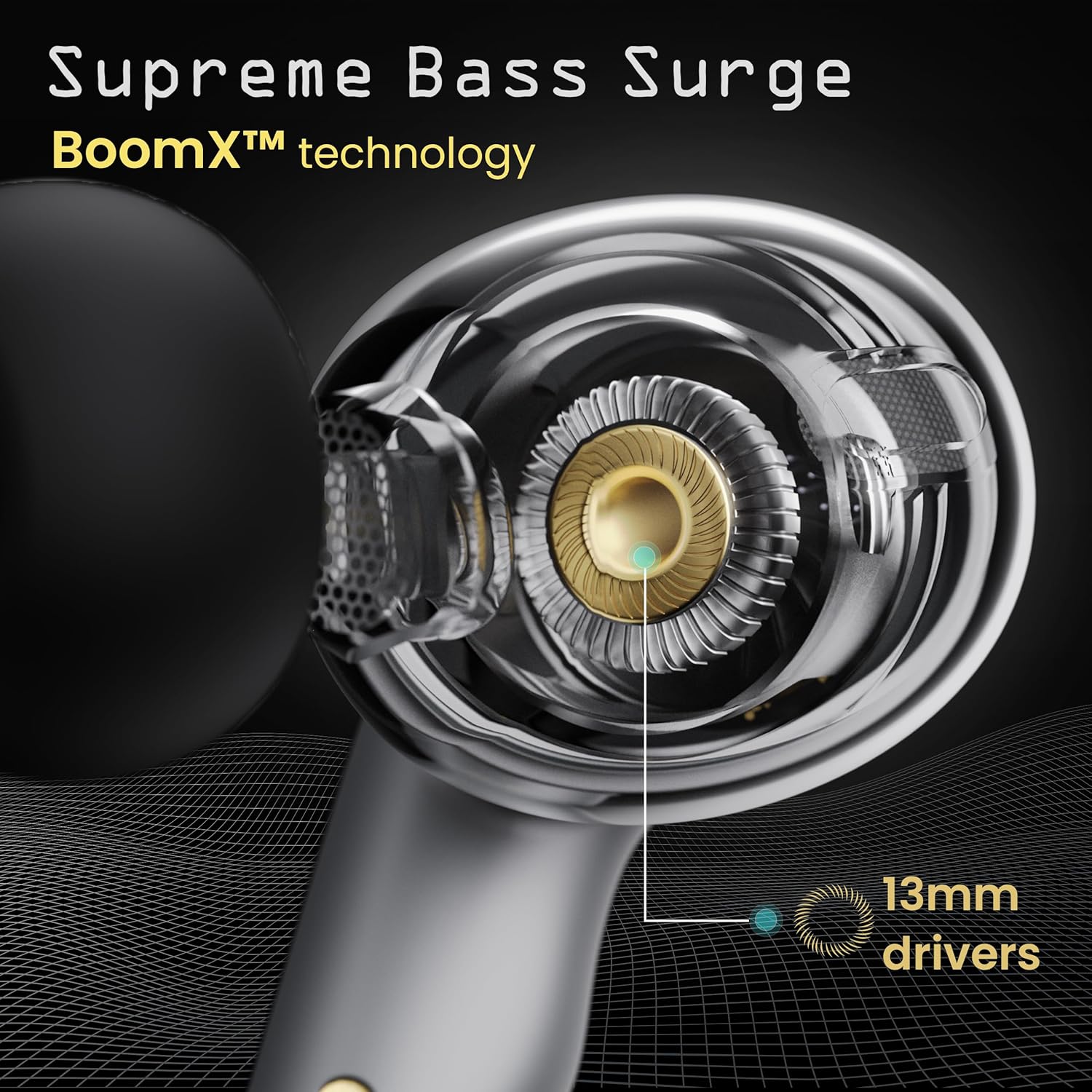
Image: A close-up of a GOBOULT UFO earbud, highlighting the 13mm drivers responsible for supreme bass surge.

Foto: nkọwa zuru ezu view of a GOBOULT UFO earbud, showcasing the AI-powered Quad Mic AI-ENC technology for high-definition call clarity and Zen™ mode for silence.
Melite
Mmakọ izizi
- Mepee igbe nchaji. Igwe ntị ga-abanye na ọnọdụ njikọta na-akpaghị aka.
- Na ngwaọrụ gị (smartphone, mbadamba, wdg), gbanye Bluetooth.
- Chọọ maka "GOBOULT UFO" in the list of available Bluetooth devices and select it to connect.
- Once connected, you will hear an audio prompt, and the LED indicators on the earbuds will change.
The earbuds utilize Bluetooth 5.3 for stable and efficient connection, featuring Blink & Pair™ technology for fast pairing.

Image: GOBOULT UFO Earbuds illustrating stable connectivity with Bluetooth 5.3 and fast pairing technology.
Nkwado ngwa
Enhance your experience by downloading the dedicated GOBOULT app. The app allows you to:
- Switch between 6 Equalizer Modes.
- Hazie njikwa mmetụ aka.
- Rename your earbuds.
- Nweta ntọala na atụmatụ ndị ọzọ.
Ntuziaka ọrụ
Njikwa mmetụ
The GOBOULT UFO earbuds feature intuitive touch controls on each earbud.
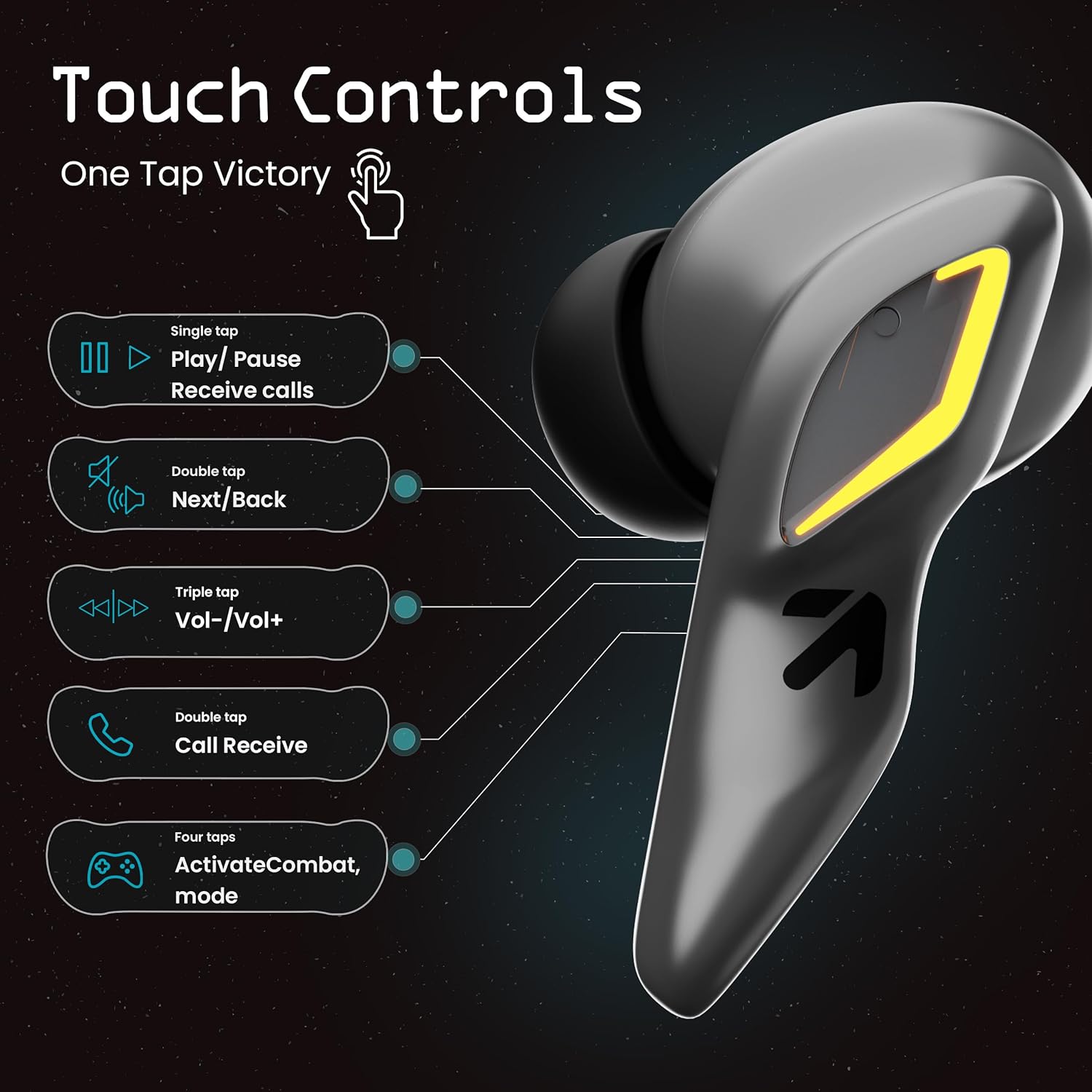
Image: A visual guide to the touch controls on the GOBOULT UFO Earbuds, detailing single, double, triple, and four-tap functions.
- Single Mgbata: Play/Pause music, Receive calls.
- Ugboro abụọ Mgbata: Next/Back track.
- Mmaji Atọ: Olu elu/ala.
- Four Taps: Activate Combat Mode (Gaming Mode).
- Ogologo Pịa: Activate Voice Assistant (Google Assistant, Siri).
Gaming Mode (Combat Mode)
Activate Combat Mode for an ultra-low latency experience of 45ms, ideal for gaming. Tap the earbud four times to toggle this mode.

Image: The GOBOULT UFO Earbuds case open, highlighting the Combat Gaming Mode with 45ms ultra-low latency, activated by four taps.
Onye enyemaka olu
Long press the touch control area on either earbud to activate your device's voice assistant (e.g., Google Assistant, Siri).

Image: GOBOULT UFO Earbuds demonstrating the long-press gesture to activate the voice assistant feature.
Ịchaji
The GOBOULT UFO earbuds offer up to 48 hours of total playtime with the charging case.
Ịchaji akpa na ntị ntị
- Tinye ntị ntị n'ime akpa nchaji. Gbaa mbọ hụ na ha nọkwasịrị nke ọma.
- Connect the Type-C fast charging cable to the charging port on the case and to a power source.
- Ihe ngosi LED na ikpe ahụ ga-egosi ọkwa nchaji.
- A full charge for the earbuds and case takes approximately 100 minutes.
- With Type-C fast charging, a 10-minute charge can provide up to 1.5 hours of playtime.
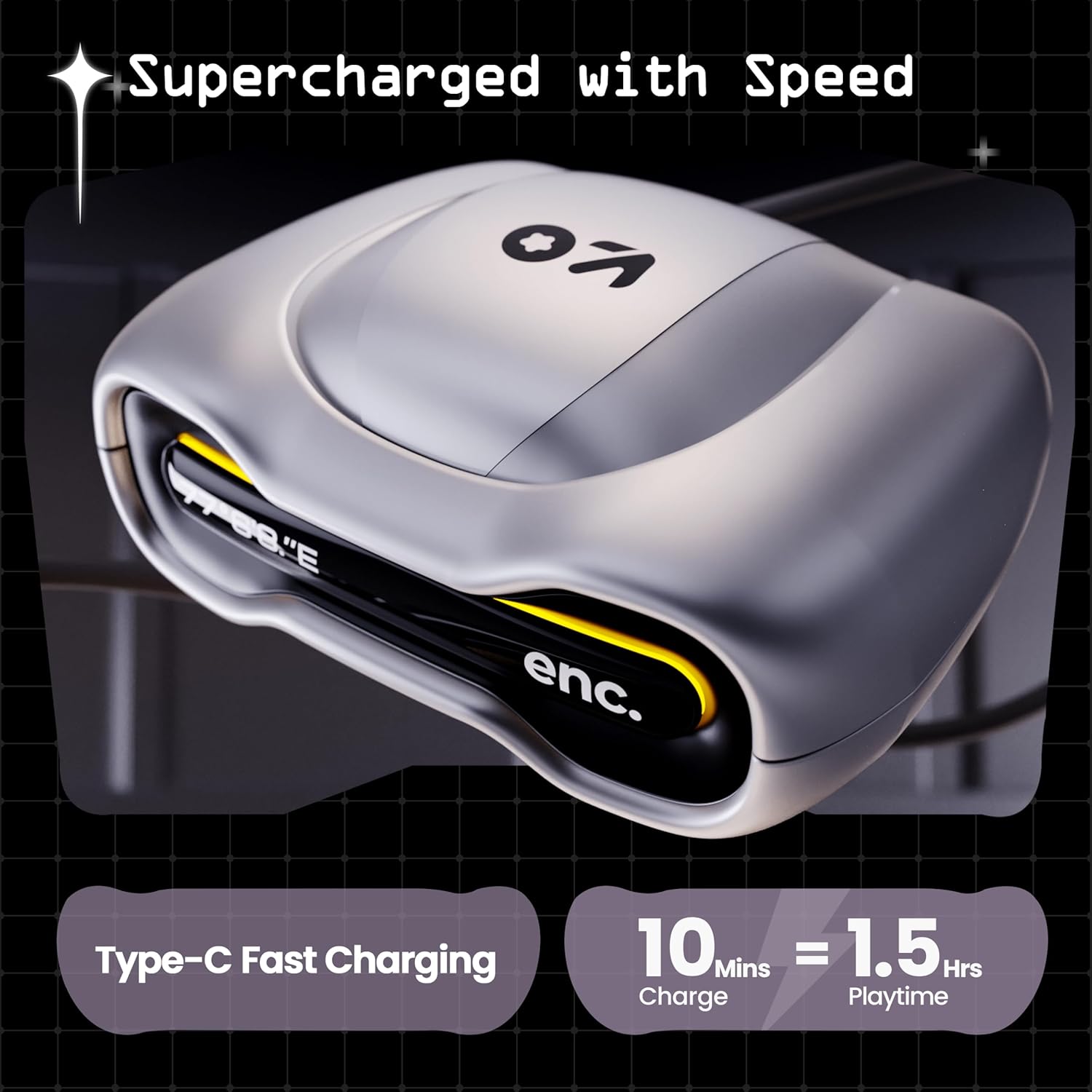
Image: The GOBOULT UFO charging case, illustrating its Type-C fast charging capability, providing 1.5 hours of playtime from a 10-minute charge.
Nlekọta
Mmiri Nguzogide
The GOBOULT UFO earbuds are IPX5 water-resistant, making them sweatproof, rainproof, and splashproof. This protection allows for use during workouts or in light rain.

Image: GOBOULT UFO Earbuds on a metallic surface, indicating their IPX5 water resistance, making them suitable for sweat, rain, and splashes.
Nhicha
Iji nọgide na-arụ ọrụ nke ọma ma na-adị ọcha, na-ehicha ntị ntị gị na ihe mkpuchi chaja gị mgbe niile.
- Use a soft, dry, lint-free cloth to wipe the earbuds and case.
- Maka unyi isi ike, ntakịrị dampen akwa na mmiri. Zere iji kemịkalụ siri ike ma ọ bụ ihe na-emebi emebi.
- Hụ na kọntaktị chaja dị na ntị ekwe ntị na akpa ahụ dị ọcha ma ghara inwe ihe ruru unyi.
- Allow all components to dry completely before placing earbuds back in the case or charging.
Nchọpụta nsogbu
If you encounter any issues with your GOBOULT UFO earbuds, please refer to the following common solutions:
- Enweghị ụda: Ensure earbuds are charged and properly connected to your device. Check device volume.
- Okwu ijikọ: Make sure Bluetooth is enabled on your device. Try forgetting the device in your Bluetooth settings and re-pairing. Ensure earbuds are fully charged.
- Otu ntị anaghị arụ ọrụ: Place both earbuds back in the case, close it, and then open it again. This often resets the connection.
- Ogo oku na-adịghị mma: Ensure microphones are clean. Check for strong Bluetooth connection.
- Njikwa mmetụ anaghị anabata: Hụ na mkpịsị aka gị dị ọcha ma kpọọ nkụ. Gbalịa ịmalitegharịa ntị ntị site n'itinye ha n'ime akpa ahụ wee wepụ ha.
For further assistance, please contact GOBOULT customer support.
Nkọwapụta
| Njirimara | Nkọwa |
|---|---|
| Aha Nlereanya | UFO (Airbass Earbuds) |
| Ụdị Bluetooth | 5.3 |
| Oge egwuregwu | Ruo elekere 48 (ya na igbe nchaji) |
| Oge Latịn | 45 Milliseconds (Gaming Mode) |
| Ndị ọkwọ ụgbọ ala | 13mm Ndị ọkwọ ụgbọ ala dị ike |
| Igwe okwu | Quad Mic ENC (Environmental Noise Cancellation) |
| Mmiri Nguzogide | IPX5 (Sweatproof, Rainproof, Splashproof) |
| Nchaji ọdụ ụgbọ mmiri | Ụdị-C Nchaji ngwa ngwa |
| Oge Nchaji | Ihe ruru. Nkeji 100 |
| Oke Bluetooth | 10 mita |
| Nzaghachi ugboro ugboro | 20 Hz |
| Mmetụta | 115 dB |
| Mgbochi | 32 ohms |
| Ibu Ibu | 60 grams |
| Akụkụ ngwaahịa | 4.7 x 9 x 10 cm |
| Ihe onwunwe | Ọla |
Akwụkwọ ikike na nkwado
Ozi akwụkwọ ikike
The GOBOULT UFO True Wireless Earbuds come with a Akwụkwọ ikike nke Onye nrụpụta afọ 1 from the date of purchase. Please retain your proof of purchase for warranty claims. The warranty covers manufacturing defects. It does not cover damage caused by misuse, accidents, or unauthorized modifications.
Nkwado ndị ahịa
For any questions, technical support, or warranty claims, please contact GOBOULT customer service.
Onye nrụpụta: Exotic Mile Pvt. Ltd.
adreesị: B67 Wazirpur Industrial Area, New Delhi 110052, India.
Please refer to the warranty card included in your product packaging for specific contact details and procedures.


