Okwu mmalite
Welcome to the user manual for your Lamax Street2 Bluetooth Speaker. This guide provides essential information for setting up, operating, maintaining, and troubleshooting your device. Please read this manual carefully before using the speaker and keep it for future reference.
Ozi nchekwa
To ensure safe and proper operation, please observe the following safety guidelines:
- Ewepụla ngwaọrụ ahụ na oke okpomọkụ, ìhè anyanwụ kpọmkwem, ma ọ bụ oke iru mmiri.
- Do not immerse the device in water. It is designed to be splash-resistant, not waterproof.
- Keep the speaker out of reach of children and pets.
- Jiri naanị waya chaja na ihe nkwụnye ọkụ akwadoro iji gbochie mmebi ma hụ na nchekwa dị.
- Agbalịla ịgbasa, rụzie, ma ọ bụ gbanwee ọkà okwu ahụ n'onwe gị. Kpọtụrụ ndị ọrụ ọrụ ruru eru maka enyemaka.
Ngwaahịa gafereview
The Lamax Street2 is a portable Bluetooth speaker designed to deliver powerful sound with convenience. Its compact size, splash resistance, and long battery life make it ideal for various environments.
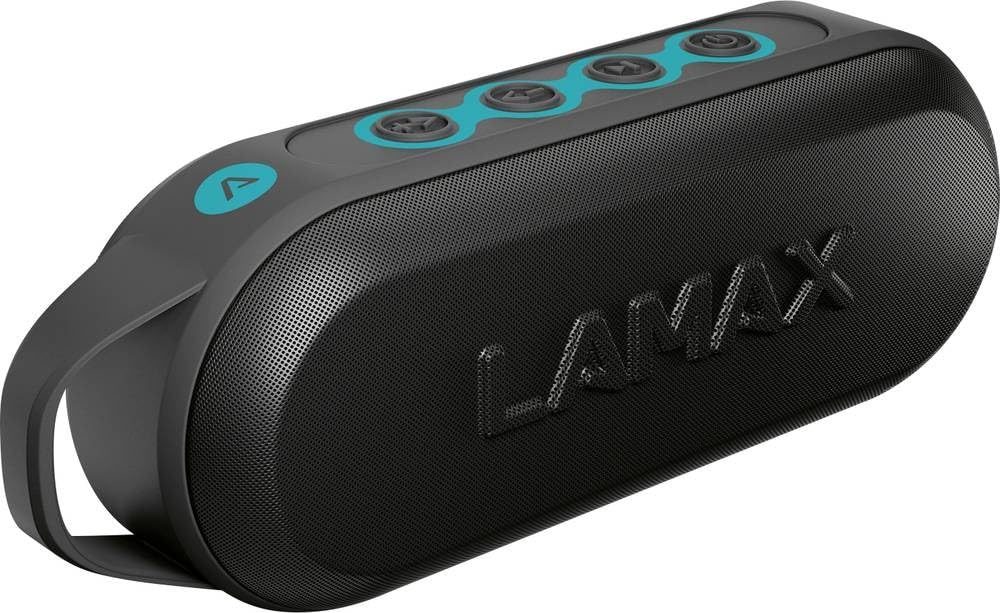
This image displays the front of the Lamax Street2 Bluetooth Speaker, showing its main body, control panel, and a sturdy carrying loop for portability.
Key features of your Lamax Street2 speaker include:
- Ụda dị elu: Enjoy clear and powerful audio output.
- Ike 15W: Delivers robust sound performance.
- Bluetooth Bluetooth: For stable and efficient wireless connectivity.
- Ezi stereo ikuku ikuku (TWS): Pair two Street2 speakers for an immersive stereo experience.
- Mgbochi Mgbasa: E mere ya ka ọ ghara ịdaba n'ihe ndị na-asọ asọ, nke mere ka ọ dị mma maka iji ya eme ihe n'èzí.
- Ogologo ndụ batrị: Extended playtime for uninterrupted music.
- Enwere ike ibugharị: Features a fixed eyelet and carabiner for easy transport.
Melite
1. gingchaji Okwu Okwu
Before using your Lamax Street2 speaker for the first time, ensure it is fully charged.
- Jikọọ eriri chaja enyere na ọdụ chaja nke ọkà okwu.
- Jikọọ nsọtụ nke ọzọ nke eriri na ihe nkwụnye ọkụ USB (anaghị etinye ya) ma ọ bụ ọdụ ụgbọ USB nke kọmputa.
- The charging indicator light will illuminate. It will typically turn off or change color once the speaker is fully charged.
2. Ịgbanye / gbanyụọ
To turn the speaker on or off:
- Ike Na: Press and hold the power button for approximately 3 seconds until you hear a power-on sound.
- Gbanyụọ: Press and hold the power button for approximately 3 seconds until you hear a power-off sound.
3. Njikọ Bluetooth
To connect your Lamax Street2 to a Bluetooth-enabled device:
- Ensure the speaker is powered on and in pairing mode. The LED indicator will typically flash rapidly.
- On your smartphone, tablet, or other Bluetooth device, enable Bluetooth and search for available devices.
- Select "LAMAX Street2" from the list of found devices.
- Ozugbo ejikọtara ya, ọkà okwu ga-ewepụta ụda nkwenye, ihe ngosi LED ga-akwụsịkwa ọkụ ma nọgide na-esi ike.
4. Ezi Ikuku Stereo (TWS) Pairing
To pair two Lamax Street2 speakers together for a stereo sound experience:
- Ensure both Lamax Street2 speakers are powered on and are not connected to any other Bluetooth device.
- On one of the speakers, press and hold the TWS button (often indicated by a chain-link icon) for 2-3 seconds.
- The speakers will automatically search for and pair with each other. A confirmation sound will indicate successful TWS pairing.
- Now, connect your primary device (smartphone, etc.) to the primary speaker via Bluetooth as described in the "Bluetooth Pairing" section.
Onye na-arụ ọrụ
Njikwa ntọala
- Bọtịnụ ike: Press and hold for 3 seconds to turn the speaker on or off.
- Bọtịnụ Kwụsị/Kwụsị: Pịa otu ugboro ka ịkpọọ ma ọ bụ kwụsịtụ ịkpọghachi ọdịyo.
- Elu elu (+): Pịa otu ugboro ka iwelie olu. Pịa ma jide ka ịgafe na egwu na-esote.
- Mpịakọta ọnụ (-): Press once to decrease the volume. Press and hold to skip to the previous track.
- Call Button (if available): Press once to answer an incoming call or end an ongoing call. Press and hold to reject an incoming call.
Nhọrọ njikọta
- Bluetooth: The primary method for wireless audio streaming from your devices.
Nlekọta
Proper care and maintenance will extend the life of your Lamax Street2 speaker.
- Nhicha: Gently wipe the speaker's surface with a soft, dry, lint-free cloth. Do not use abrasive cleaners, solvents, or chemical sprays.
- Nchekwa: Mgbe a naghị eji ya mee ihe ruo ogologo oge, chekwaa ọkà okwu n'ebe dị jụụ, nke kpọrọ nkụ na-adịghị na ìhè anyanwụ kpọmkwem na oke okpomọkụ.
- Nlekọta batrị: To maintain optimal battery performance, avoid fully discharging the battery frequently. Charge the speaker regularly, even if not in active use.
Nchọpụta nsogbu
If you encounter issues with your Lamax Street2 speaker, refer to the following table for common problems and solutions.
| Nsogbu | Ngwọta |
|---|---|
| Ọkà okwu anaghị agbanwuo. | Hụ na batrị ahụ chajị. Jikọọ ọkà okwu ahụ na isi iyi ike wee nwaa ọzọ. |
| Enweghị ike ijikọ site na Bluetooth. | Ensure the speaker is in Bluetooth pairing mode (flashing LED). Turn off and on your device's Bluetooth. Move closer to the speaker and ensure no other devices are connected. |
| Enweghị ụda ma ọ bụ obere olu. | Check volume levels on both the speaker and your connected device. Ensure the speaker is correctly paired and not muted. |
| Ọdịmma ụda adịghị mma ma ọ bụ njikọ na-adịghị agafe agafe. | Move your device closer to the speaker to minimize interference. Ensure there are no major obstacles between the devices. Disconnect and re-pair the Bluetooth connection. |
Nkọwapụta
Technical specifications for the Lamax Street2 Bluetooth Speaker:
- Aha nlereanya: Okporo ụzọ2
- Ntuziaka onye nrụpụta: LMXST2
- Akara: Lamax
- Teknụzụ Njikọta: Bluetooth 5.0
- Ike mmepụta: 15 Watt
- Ụkpụrụ mmepụta ụda: Stereo
- Ụdị nkwụnye: Ugwu okpokoro
- Isi mmalite ike: Akwanyere batrị
- Atụmatụ pụrụ iche: Bluetooth, Splash Resistance
- ASIN: B0CV5TH488
Akwụkwọ ikike na nkwado
The Lamax Street2 Bluetooth Speaker is covered by a limited warranty. For detailed information regarding warranty terms, conditions, and duration, please refer to the warranty card included with your product or visit the official Lamax websaịtị.
For technical assistance, troubleshooting, or to inquire about warranty claims, please contact Lamax customer support. You can typically find contact information on the official Lamax websaịtị ma ọ bụ site na onye na-ere ahịa ebe ịzụrụ ngwaahịa ahụ.


