pTron Dynamo Arc 10000mAh Power Bank User Manual
Model: Dynamo Arc
1. Okwu mmalite
Thank you for choosing the pTron Dynamo Arc 10000mAh Power Bank. This device is designed to provide portable and efficient charging for your electronic devices, featuring both wired and wireless charging capabilities. Please read this manual carefully before using the product to ensure safe and optimal performance.
2. Ozi nchekwa
To prevent damage to the product or injury to yourself and others, please observe the following safety precautions:
- Etinyela ebe nchekwa ọkụ eletrik n'ebe okpomọkụ dị oke elu (karịa 60°C/140°F) ma ọ bụ ìhè anyanwụ kpọmkwem.
- Emela ka ọ gbawaa, mepee, ma ọ bụ gbalịa ịrụzi ebe nchekwa ọkụ eletrik.
- Debe ụlọ akụ ọkụ ka ọ ghara ịdị na mmiri, mmiri, na ihe ndị na-ere ọkụ.
- Do not drop, hit, or subject the power bank to strong impacts.
- Ensure proper ventilation when charging the power bank or devices.
- Debe ebe ụmụaka na-apụghị iru.
- Tụfuo ụlọ akụ ike nke ọma dịka iwu obodo siri dị.
3. Ngwaahịa gafereview
Familiarize yourself with the components of your pTron Dynamo Arc Power Bank:

Foto 3.1: Ihu na Akụkụ View of the Power Bank. Shows the digital display, wireless charging pad on the front, and integrated charging cables (Type-C, Lightning, Micro USB) on the side.

Ọgụgụ 3.2: Zuru ezu View of Ports and Controls. Indicates the Power On/Off button, Digital Display, Type-C Input/Output port, USB Output 1, USB Output 2, and Micro USB Input port.
Akụkụ ndị bụ isi:
- 10000mAh Li-Polymer Battery: High capacity for multiple charges.
- 22.5W Fast Charging (USB): Provides rapid charging for compatible devices.
- 20W PD (Power Delivery) Charging (Type-C): Fast charging for PD-compatible devices.
- 15W Qi Wireless Charging: Convenient wireless charging for Qi-enabled devices.
- Mpụta ọtụtụ: 2 x USB-A, 1 x Type-C, and integrated cables (Type-C, Lightning, Micro USB) for versatile charging.
- Ntinye otutu: Type-C and Micro USB for recharging the power bank.
- Ngosipụta Digital: Na-egosi pasentị batrịtage na ọkwa nchaji.
- Multi-Protection Chipset: Built-in safeguards against overcharge, over-discharge, overcurrent, overvoltage, na mkpirisi okirikiri.
4. Nhazi
Before first use, it is recommended to fully charge your pTron Dynamo Arc Power Bank.
Nchaji mbụ:
- Connect the power bank to a power source (e.g., wall adapter, computer USB port) using either a Type-C cable (via the Type-C input port) or a Micro USB cable (via the Micro USB input port).
- Ngosipụta dijitalụ ga-egosi ọganihu chaja, na-egosi pasentị batrịtage.
- Once the display shows "100%", the power bank is fully charged and ready for use. This typically takes 4-5 hours.
5. Ntuziaka ọrụ
5.1. Ịchaji Power Bank
Iji fanye ụlọ akụ ọkụ:
- Use a compatible USB wall adapter (not included) and connect it to the power bank via the Type-C input or Micro USB input port.
- The digital display will illuminate and show the current battery percentage, indicating that charging is in progress.
5.2. Charging Devices (Wired)
The power bank offers multiple wired output options:
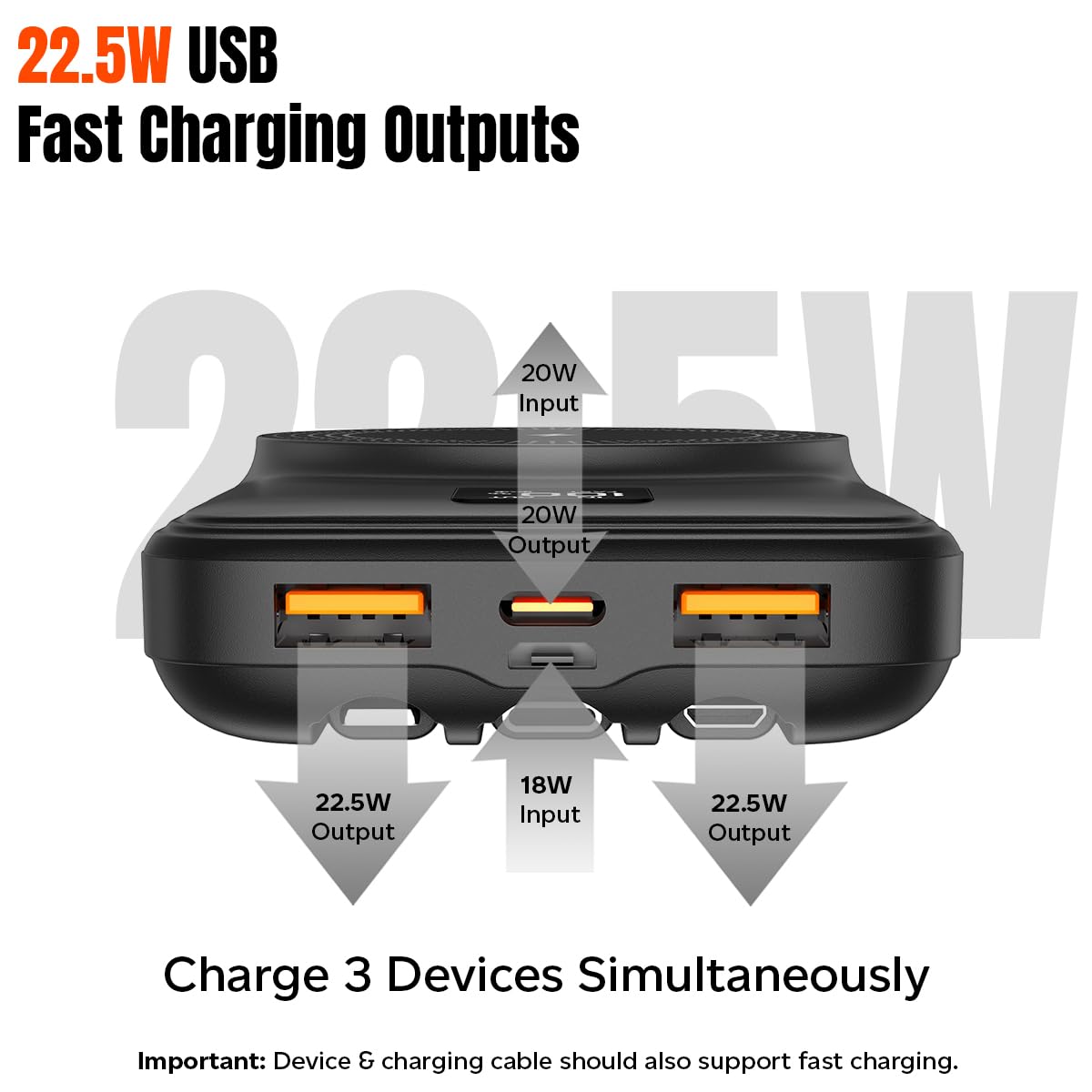
Figure 5.1: Wired Charging Outputs. Illustrates the two USB-A outputs (22.5W max each) and the Type-C output (20W PD) for simultaneous charging.
- Using USB-A Outputs: Connect your device's charging cable to either USB Output 1 or USB Output 2 on the power bank.
- Using Type-C Output: Connect your device's Type-C charging cable to the Type-C port on the power bank.
- Iji eriri arụnyere n'ime: Select the appropriate integrated cable (Type-C, Lightning, or Micro USB) and connect it directly to your device.
- The power bank will automatically begin charging your device. The digital display will show "OUT" and the battery percentage.
5.3. Charging Devices (Wireless)
The power bank supports 15W Qi wireless charging:
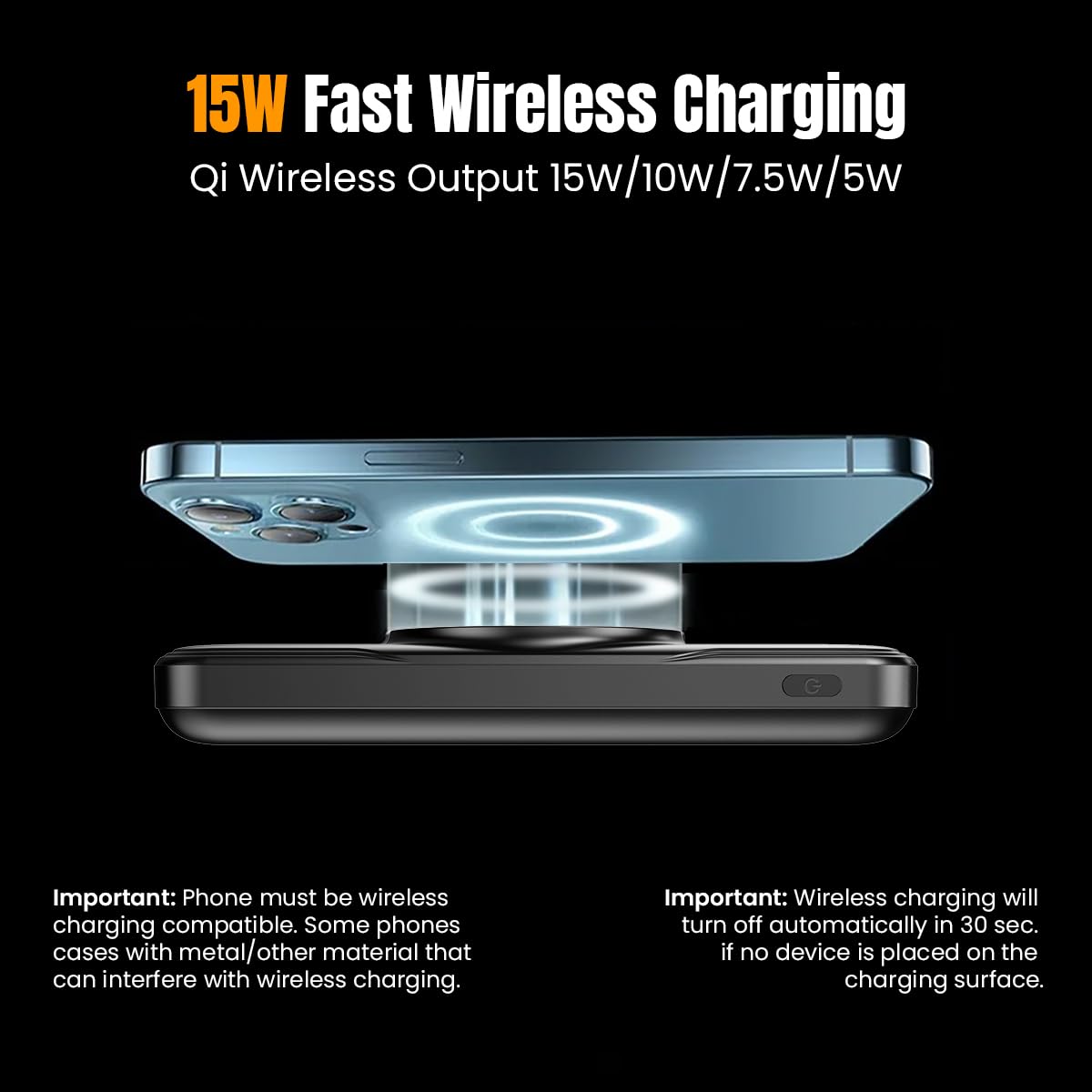
Figure 5.2: Wireless Charging. Shows a smartphone being wirelessly charged on the power bank's charging pad.
- Ensure your device is Qi wireless charging enabled.
- Place your Qi-enabled device centrally on the wireless charging pad of the power bank.
- The power bank will automatically detect your device and begin wireless charging. The digital display will show a wireless charging icon.
- Mara: Wireless charging will turn off automatically in 30 seconds if no device is placed on the charging surface. Phone cases with metal or excessive thickness (more than 4mm) may interfere with wireless charging.
5.4. Understanding the Digital Display
The digital display provides real-time information:
- Batrị Percentage: Shows the remaining charge of the power bank (0-100%).
- "IN" Indicator: Appears when the power bank is being recharged.
- "OUT" Indicator: Appears when the power bank is charging an external device via wired connection.
- "FAST" Indicator: Appears when fast charging is active (both input and output).
- Wireless Charging Icon: Appears when a device is being wirelessly charged.
6. Nlekọta
Proper care will extend the life of your power bank:
- Jiri akwa dị nro hichaa ụlọ akụ ike. Ejila kemịkalụ siri ike ma ọ bụ ihe abrasive.
- Chekwaa ụlọ akụ ọkụ ahụ n'ebe dị jụụ, kpọrọ nkụ na-adịghị na ìhè anyanwụ kpọmkwem na oke okpomọkụ.
- Ọ bụrụ na ejighị ya ogologo oge, kwụọ ụgwọ ụlọ akụ ọkụ opekata mpe otu ugboro n'ọnwa atọ iji kwado ahụike batrị.
7. Nchọpụta nsogbu
If you encounter issues with your power bank, refer to the following common problems and solutions:
| Nsogbu | Ihe nwere ike ime | Ngwọta |
|---|---|---|
| Ụlọ akụ ọkụ anaghị akwụ ụgwọ | Charging cable or adapter faulty; Power bank fully charged; Input port issue. | Try a different charging cable and adapter. Ensure the power bank is not already at 100%. Check if the input port is clean and undamaged. |
| Ngwaọrụ anaghị akwụ ụgwọ site na ụlọ akụ ọkụ | Power bank battery empty; Cable faulty; Device not compatible; Loose connection. | Recharge the power bank. Try a different charging cable. Ensure your device is compatible. Check for secure connections. |
| Nchaji ikuku anaghị arụ ọrụ | Device not Qi-enabled; Misalignment; Phone case interference; Foreign objects on pad. | Ensure device supports Qi. Realign device on the center of the pad. Remove thick or metallic phone cases. Remove any objects from the charging pad. |
| Nchaji nwayọ | Cable not fast-charge compatible; Device not supporting fast charge; Multiple devices charging simultaneously. | Use a fast-charge compatible cable. Ensure your device supports fast charging. Charging multiple devices may reduce individual charging speeds. |
| Ngosipụta dijitalụ anaghị arụ ọrụ | Agbanyụrụ ụlọ akụ ike; arụghị ọrụ nke ọma. | Press the power button to activate the display. If it remains unresponsive, contact customer support. |
8. Nkọwapụta
| Njirimara | Nkọwapụta |
|---|---|
| Nọmba nlereanya | Dynamo Arc |
| Ụdị batrị | Li-Polymer |
| Ike batrị | 10000mAh |
| Ntinye Micro USB | 5V/2A, 9V/2A, 12V/1.5A |
| Ntinye Ụdị-C | 5V/3A, 9V/2.22A, 12V/1.5A |
| Ụdị-C mmepụta | 5V/3A, 9V/2.22A, 12V/1.67A |
| USB 1 or USB 2 Output | 5V/3A, 9V/2.2A, 5V/4.5A, 12V/1.67A (22.5W max.) |
| Mbupute ikuku | 5W, 7.5W, 10W, 15W kacha. |
| Atụmatụ pụrụ iche | Digital Display, Fast Charging, Over Charging Protection, Short Circuit Protection, Wireless Charging, Built-in Cables |
| Akụkụ | 15.7 x 10.7 x 3.3 cm |
| Ibu Ibu | 230 g |
| Agba | Nwa |
9. Akwụkwọ ikike na nkwado
The pTron Dynamo Arc Power Bank comes with a 1-year manufacturer warranty from the date of purchase, covering manufacturing defects only.
Maka nkwado ndị ahịa, biko kpọtụrụ:
- Ekwentị: 040-67138888
- Email: support@ptron.in


