Okwu mmalite
Welcome to the SENTRY Ultra-Light Bluetooth Earbuds user manual. These earbuds are designed to provide a seamless and immersive audio experience, perfect for active lifestyles. With an ultra-light design, LED power display, and intelligent touch controls, you can enjoy high-quality sound and convenient operation. Please read this manual carefully to ensure proper use and maintenance of your new earbuds.
Ihe ngwugwu
- SENTRY Ultra-Light Bluetooth Earbuds (Left and Right)
- Akpa Nchaji enwere ike ibugharị
- Igwe nchaji USB
- Akwụkwọ ntuziaka onye ọrụ
Njirimara ngwaahịa
- Ngosipụta ike LED: Transparent design on the charging case allows real-time battery monitoring.
- Nhazi kọmpat: Ultra-compact and space-saving, making them highly portable.
- Bass Acoustic Design: Advanced dynamic drivers deliver crystal-clear audio with enhanced bass and treble.
- Njikwa mmetụ ọgụgụ isi: Effortlessly manage volume, music tracks, calls, and voice assistants.
- Stable Connections: Advanced Bluetooth technology ensures lag-free and reliable performance.
Ngwaahịa gafereview
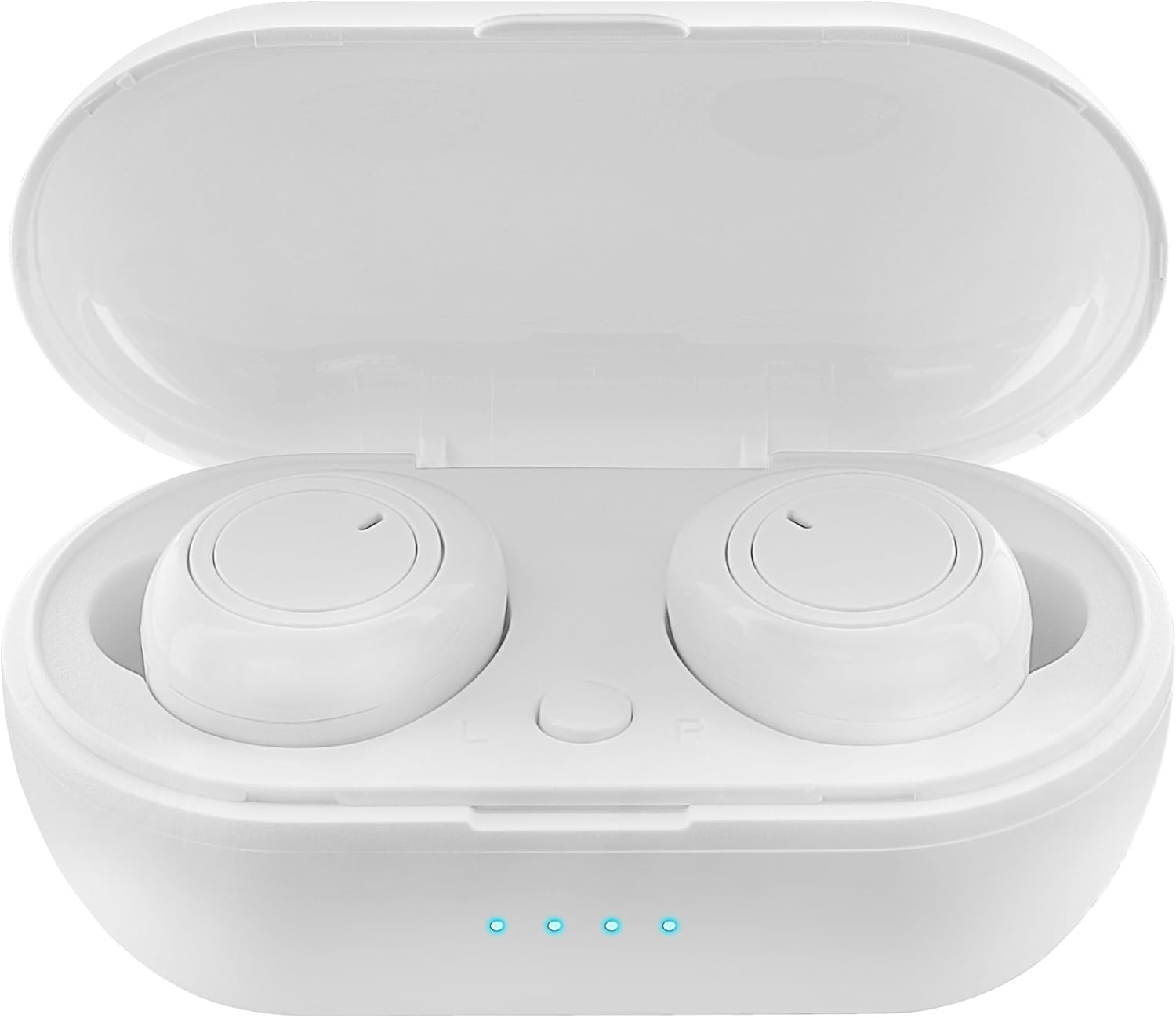
Figure 1: Earbuds in Charging Case with LED Indicators. The charging case features a transparent lid and three blue LED lights indicating battery status.

Figure 2: Individual Earbuds (Front View). Each earbud features a circular touch control area for easy operation.

Figure 3: Individual Earbuds (Side View). The ergonomic design ensures a comfortable and secure fit in the ear.
Melite
1. Ịchaji ihe ntị na akpa
- Tinye ntị ntị n'ime akpa nchaji. Gbaa mbọ hụ na ha nọ ọdụ nke ọma.
- Jikọọ eriri USB na nchaji na ọdụ ụgbọ mmiri na akpa ahụ yana na isi iyi ike (dịka ọmụmaatụ, eriri USB nkwụnye, ọdụ ụgbọ USB kọmputa).
- The LED display on the charging case will indicate the charging status. A full charge is indicated when all lights are solid.
- Allow approximately 1-2 hours for a full charge of both earbuds and the case.
2. Ijikọ na ngwaọrụ gị
- Mepee igbe chaja. Ekwe ntị ndị a ga-abanye na ọnọdụ njikọta na akpaghị aka (nke ọkụ na-enwu na ekwe ntị na-egosi).
- Na ekwentị gị ma ọ bụ ngwaọrụ Bluetooth nyere gị aka, gaa na ntọala Bluetooth.
- Chọọ maka new devices and select "SENTRY Earbuds" (or similar name) from the list.
- Once connected, the earbud lights will stop flashing, and you will hear a confirmation tone.
- Igwe ntị ntị ga-ejikọta ya na ngwaọrụ ejikọtara ikpeazụ na-akpaghị aka mgbe ewepụrụ ya na ikpe ahụ, ọ bụrụ na agbanyere Bluetooth na ngwaọrụ ahụ.
Ntuziaka ọrụ
Your SENTRY Ultra-Light Bluetooth Earbuds feature intelligent touch controls for easy management of your audio and calls.
| Ọrụ | Omume |
|---|---|
| Kpọọ/kwụsịtụ egwu | Otu mgbata na ntị ntị |
| Track na-esote | Pịa na ntị ntị aka nri ugboro abụọ |
| Egwu gara aga | Kpatụ ntị ugboro abụọ n'akụkụ aka ekpe |
| Zaa/Kwụsị Oku | Otu mgbata na ntị ntị |
| Jụ oku | Pịa ma jide otu ntị ntị maka sekọnd 2 |
| Mee ka onye enyemaka olu rụọ ọrụ | Pịa ugboro atọ na ntị ntị |
| Elu elu | Press and hold Right earbud |
| Mpịakọta ọnụ | Press and hold Left earbud |
Nlekọta
- Nhicha: Jiri akwa dị nro, kpọrọ nkụ, akwa enweghị lint iji hichaa ntị ntị na akpa chaja. Ejila kemịkalụ siri ike ma ọ bụ ihe abrasive.
- Nchekwa: Mgbe ejighị ya, chekwaa earbuds n'ime akpa nchaji ha iji chebe ha ma debe ha ebubo. Chekwaa n'ebe dị jụụ, kpọrọ nkụ na-adịghị na ìhè anyanwụ kpọmkwem na oke okpomọkụ.
- Nlekọta batrị: Ka ịgbatị ndụ batrị ogologo, zere ịchaji ekwe ntị na chaja ugboro ugboro. Na-ana ha ebubo mgbe niile, ọbụlagodi na ọ bụghị iji ya eme ihe mgbe niile.
- Nguzogide mmiri: These earbuds are not water resistant. Avoid exposure to water, sweat, or high humidity.
Nchọpụta nsogbu
- Igwe ntị anaghị ejikọta: Ensure both earbuds are charged. Place them back in the case, close the lid, then open it again to re-enter pairing mode. Check your device's Bluetooth settings and try reconnecting.
- Naanị otu earbud na-arụ ọrụ: Try placing both earbuds back in the charging case, closing the lid, and then taking them out again. This often re-syncs them.
- Enweghị ụda: Lelee ọkwa olu dị na ngwaọrụ gị na ekweisi gị. Hụ na ejikọrọ ekweisi gị nke ọma na ngwaọrụ gị.
- Nsogbu ịchaji: Ensure the charging cable is securely connected to both the case and the power source. Try a different USB port or charger. Clean the charging contacts on the earbuds and inside the case.
- Ogo ụda adịghị mma: Ensure the earbuds are properly seated in your ears. Try cleaning any debris from the earbud grilles.
Nkọwapụta
| Njirimara | Nkọwa |
|---|---|
| Aha Nlereanya | 5002-407 |
| Teknụzụ Njikọta | Ikuku (Bluetooth) |
| Teknụzụ nzikọrịta ozi ikuku | Bluetooth |
| Ogologo afọ (Nkọwa) | Okenye |
| Oge Nchaji | Approximately 1-2 Hours (for earbuds and case) |
| Ngwa dakọtara | Smartphones, Apple Devices |
| Ụdị njikwa | Njikwa Mgbasa ozi |
| Njirimara USB | Enweghị eriri |
| Ọkwa Nguzogide mmiri | Ọ bụghị mmiri na-eguzogide |
| Oke ugboro ugboro | 20Hz - 20kHz |
| Usoro njikwa | Metụ aka |
| Ndụ batrị | Ruo elekere 12 (ya na igbe nchaji) |
| Ụdị ọkwọ ụgbọ ala ọdịyo | Ọkwọ ụgbọala dị ike |
| Agba Agba | Ọcha |
| Ụdị ntị | Gburugburu |
| Ụdị | SENTRY |
| Agba | Ọcha |
| Ntinye ntị | Na Ntị |
| Ụdị Ihe | Na Ntị |
| Njikwa mkpọtụ | Ọ dịghị |
Akwụkwọ ikike na nkwado
SENTRY products are designed for reliability and performance. For information regarding warranty coverage and customer support, please refer to the warranty card included with your product or visit the official SENTRY websaịtị. Ị nwekwara ike ịga na SENTRY Store on Amazon maka ozi ngwaahịa ọzọ na akụrụngwa nkwado.


