1. Okwu mmalite
The ZEBRONICS Riser Party DJ Speaker is designed to deliver a powerful audio experience with versatile connectivity and entertainment features. This manual provides detailed instructions for setting up, operating, and maintaining your speaker to ensure optimal performance.
2. Ihe ngwugwu
Biko lelee igbe maka ihe ndị a:
- 1 x ZEBRONICS Riser Party DJ Speaker
- 1 x Njikwa anya
- 2 x Igwe okwu UHF ikuku
- 1 x eriri ọkụ

Image: ZEBRONICS Riser Party DJ Speaker with included accessories.
3. Ngwaahịa gafereview
3.1 Njikwa Panel kacha elu
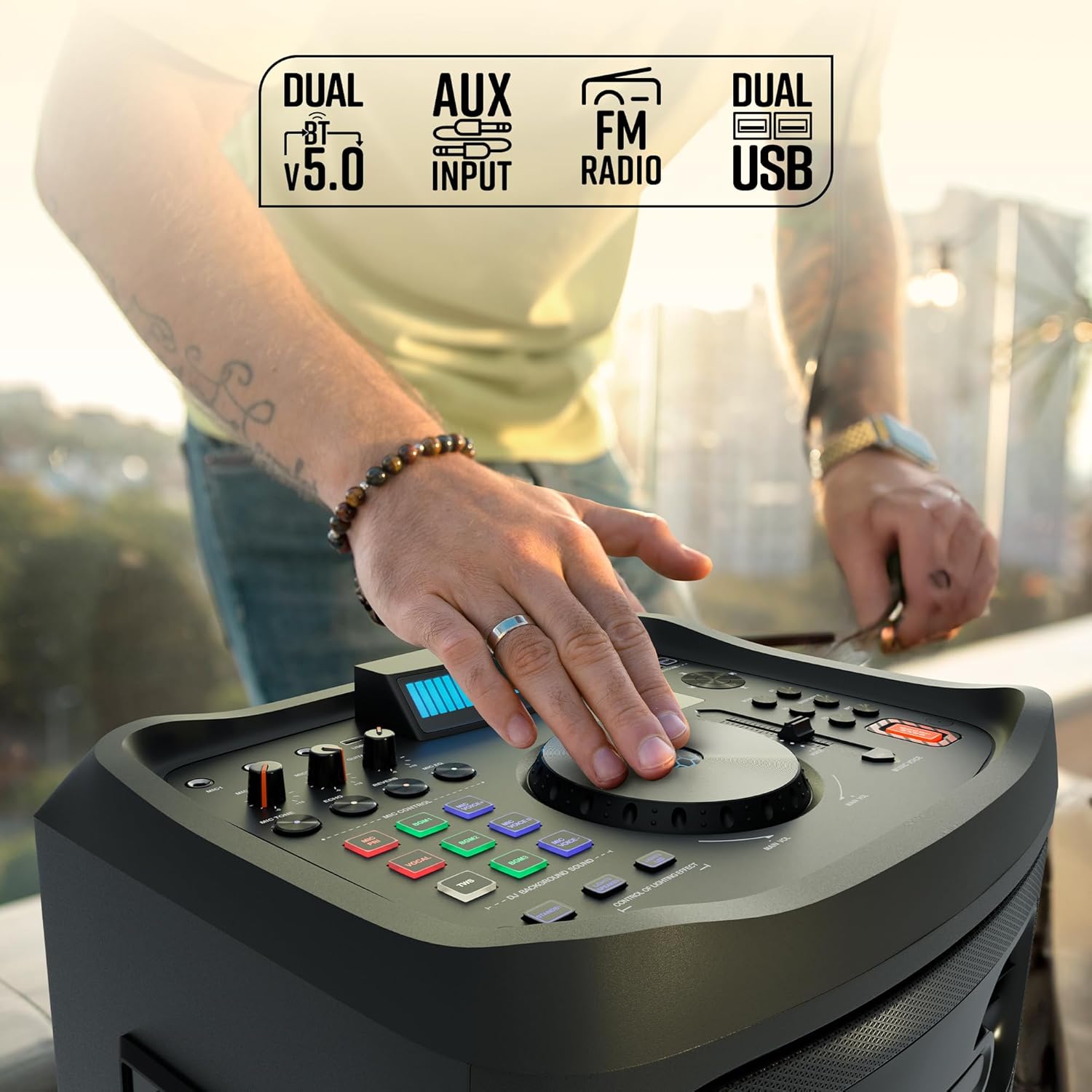
Foto: Zuru ezu view of the speaker's top control panel.
The top panel features various controls for audio adjustment, input selection, and special functions:
- Isi Mpịakọta Isi: Adjusts the overall speaker volume.
- Microphone Volume Knobs (MIC1, MIC2): Controls the volume for each connected microphone.
- Guitar Volume Knob: Adjusts the volume for the connected guitar.
- Echo/Reverb/Mic Tone Knobs: Fine-tune microphone effects.
- Bọtịnụ ụkpụrụ: Cycles through input sources (Bluetooth, USB, AUX, FM, HDMI ARC).
- Njikwa Bass/Treble: Adjusts low and high frequencies.
- EQ bọtịnụ: Na-ahọrọ ụdị nhazi nhazi nke edobere.
- Bọtịnụ njikwa mgbasa ozi: Play/Pause, Skip Track, Repeat.
- DJ BGM Effects: Buttons for activating various DJ background sound effects.
- Ikanam Display: Shows current mode, track information, and other settings.
- Njikwa ọkụ: Buttons to manage the speaker's LED lighting effects.
- Bọtịnụ nkwalite Bass: Enhances low-frequency output.
- Music Pitch Control: Adjusts the pitch of the music playback.
- Mic Pitch Control: Adjusts the pitch of the microphone input.
3.2 Njikọ azụ azụ

Image: Rear panel connections of the speaker.
The rear panel provides essential connection ports:
- Ntinye ike: Connects the power cable to an electrical outlet.
- ọdụ ụgbọ mmiri USB (x2): For USB drive playback and charging.
- Ntinye AUX: 3.5mm jaak maka ijikọ ngwaọrụ ọdịyo mpụga.
- HDMI (ARC) Port: For connecting to compatible TVs or audio systems.
- Ntinye gita: 6.3mm jack for connecting a guitar.
- MIC Inputs (x2): 6.3mm jacks for wired microphones (in addition to wireless mics).
4. Nhazi
4.1 Njikọ ike
- Connect the provided power cable to the Power Input port on the rear of the speaker.
- Tinye nsọtụ nke ọzọ nke eriri ọkụ n'ime oghere eletrik ọkọlọtọ.
- Ensure the power switch on the speaker is in the 'OFF' position before connecting to power.
4.2 Ntinye mbu
Place the speaker on a stable, flat surface. For optimal sound dispersion, position it in an open area, away from walls or corners that might obstruct audio. The speaker is designed for floor standing use.
5. Ntuziaka ọrụ
5.1 Gbanyụọ ma ọ bụ gbanyụọ
To power on the speaker, flip the power switch located on the rear panel to the 'ON' position. The LED display will illuminate. To power off, flip the switch back to 'OFF'.
5.2 Njikọ Bluetooth
- Turn on the speaker. The default mode is usually Bluetooth. If not, press the 'Mode' button until 'BT' appears on the LED display.
- Na ekwentị mkpanaaka gị, gbanye Bluetooth wee chọọ ngwaọrụ dị.
- Select 'ZEBRONICS Riser' from the list of devices.
- Once paired, the speaker will indicate a successful connection, and you can play audio from your device.
5.3 USB playback
- Fanye draịva USB nwere ọdịyo MP3 files into one of the USB ports.
- Press the 'Mode' button until 'USB' appears on the LED display.
- The speaker will automatically begin playing audio files from the USB drive. Use the media control buttons to navigate tracks.
Ntinye AUX 5.4
- Connect an external audio device (e.g., smartphone, MP3 player) to the AUX input port using a 3.5mm audio cable.
- Press the 'Mode' button until 'AUX' appears on the LED display.
- Kpọọ ọdịyo site na ngwaọrụ ejikọrọ gị.
Igwe redio FM 5.5
- Press the 'Mode' button until 'FM' appears on the LED display.
- Use the media control buttons to scan for and select FM radio stations.
5.6 HDMI ARC Connection
- Connect an HDMI cable from the HDMI ARC port on the speaker to the HDMI ARC port on your television.
- Press the 'Mode' button until 'HDMI ARC' appears on the LED display.
- Ensure your TV's audio output settings are configured for HDMI ARC.
5.7 Guitar Input
- Connect your guitar to the 'Guitar Input' 6.3mm jack on the rear panel.
- Adjust the 'Guitar Vol' knob on the top panel to control the guitar's volume.
5.8 Microphone Input and Karaoke

Foto: Ofeview of microphone and karaoke features.
- Igwe igwe ikuku: Insert batteries into the provided UHF wireless microphones. Turn them on. They will automatically connect to the speaker.
- Igwe okwu waya: Connect wired microphones to the 'MIC1' or 'MIC2' 6.3mm jacks.
- Adjust the 'MIC1 Vol' and 'MIC2 Vol' knobs to control microphone volume.
- Use the 'Echo', 'Reverb', and 'Mic Tone' knobs to add effects to your vocals.
- The 'Instant Karaoke Maker' function allows you to sing along to music.
- Utilize the 'Mic Pitch Control' for vocal adjustments.
Ọrụ TWS (Ezigbo Stereo Ikuku) 5.9

Image: Two speakers demonstrating the TWS function for stereo sound.
To connect two Zeb-Riser speakers for a true wireless stereo experience:
- Hụ na ekwenti abụọ ahụ na-agba ọkụ ma na-arụ ọrụ na Bluetooth, mana ejikọbeghị ha na ngwaọrụ ọ bụla.
- On one of the speakers (this will be the primary speaker), press and hold the 'TWS' button.
- The primary speaker will search for the secondary speaker and connect automatically.
- Once connected, the LED display will indicate TWS mode. You can now pair your mobile device to the primary speaker via Bluetooth, and audio will play in stereo through both units.
5.10 DJ Effects
The speaker includes 3 DJ BGM (Background Music) Effects. Press the corresponding buttons on the top panel to activate these effects during playback.
5.11 LED Light Controls

Image: LED display and light control section.
The speaker features dynamic LED lights. Use the 'Lights Speaker' and 'Lights LED' controls on the top panel to customize or turn off the lighting effects.
5.12 Ndozi ọdịyo
Use the 'Bass/Treble' knobs to adjust the low and high frequencies of the audio output. The 'EQ' button allows you to cycle through various preset equalizer modes to suit different music genres.
6. Nlekọta
Iji hụ na ọkà okwu gị dị ogologo ma rụọ ọrụ nke ọma:
- Clean the speaker's exterior with a soft, dry cloth. Avoid using abrasive cleaners or solvents.
- Keep the speaker away from direct sunlight, excessive heat, dust, and moisture.
- Do not block the ventilation openings on the speaker.
- Chekwaa ọkà okwu n'ebe dị jụụ ma kpọọ nkụ mgbe ọ naghị eji ya ogologo oge.
7. Nchọpụta nsogbu
| Nsogbu | Ihe nwere ike ime | Ngwọta |
|---|---|---|
| Enweghị ike | Power cable not connected; Power switch off; Power outlet faulty. | Ensure power cable is securely connected; Turn power switch ON; Test power outlet with another device. |
| Enweghị ụda | Volume too low; Incorrect input mode; Device not playing audio; Cables loose. | Increase volume; Select correct input mode; Check audio playback on source device; Secure all audio cables. |
| Bluetooth anaghị ejikọ | Igwe okwu anaghị arụ ọrụ n'ụdị njikọta; Bluetooth agbanyụrụ; Igwe okwu ejikọlarị na ngwaọrụ ọzọ. | Ensure speaker is in BT mode; Turn device Bluetooth on/off; Disconnect from other devices and try again. |
| Igwe okwu anaghị arụ ọrụ | Mic volume low; Batteries dead (wireless mic); Mic not connected (wired mic); Faulty mic. | Increase mic volume; Replace batteries; Ensure wired mic is fully inserted; Test with another mic if possible. |
| Mgbagwoju anya ụda | Volume too high; Source audio quality poor; Speaker placed too close to interference. | Reduce volume; Use high-quality audio source; Relocate speaker away from electronic devices. |
8. Nkọwapụta
| Njirimara | Nkọwa |
|---|---|
| Aha Nlereanya | Zeb-Riser |
| Ike mmepụta (RMS) | 210W |
| Nha ọkwọ ụgbọ ala | 25.4cm (Full-range), 7.62cm (Tweeter) |
| Njikọta | Dual BT v5.0, USB x 2, FM, AUX, HDMI (ARC) |
| Ntinye | Guitar Input, Dual 6.3mm MIC Input |
| Igwe okwu | Dual Wireless UHF Mic |
| Atụmatụ pụrụ iche | Instant Karaoke Maker, TWS Function, 3x DJ BGM Effects, Colorful LED lights, Dynamic Visualizer, 3D EQ, 12x Music Pitch Control, 24x Mic Pitch Control, Bass Boost |
| Ụdị nkwụnye | Ala guzo |
| Isi Iyi Ike | Igwe ọkụ eletrik |
| Ibu Ibu | 12.5 n'arọ |
| Akụkụ ngwaahịa (LxWxH) | 38.3 x 46 x 73 cm |
9. Akwụkwọ ikike na nkwado
This product comes with a standard manufacturer's warranty. For detailed warranty information, service, or technical support, please refer to the warranty card included in your package or visit the official ZEBRONICS websaịtị. Debe akwụkwọ nnata ịzụrụ maka akwụkwọ ikike.


