Okwu mmalite
This manual provides comprehensive instructions for the PowerA Enhanced Wireless Controller, designed for use with Nintendo Switch, Nintendo Switch Lite, Nintendo Switch – OLED Model, and Nintendo Switch 2. Please read this manual thoroughly before use to ensure proper setup and operation.
Ihe ngwugwu
- PowerA Enhanced Wireless Controller (Pikachu Vibrant)
- 10ft (3m) eriri USB-C
- Akwụkwọ ntuziaka (akwụkwọ a)
Atụmatụ njikwa
The PowerA Enhanced Wireless Controller offers a range of features for an optimized gaming experience:
- Ikuku Njikọ: Utilizes Bluetooth 5.0 technology for seamless connection.
- Batrị enwere ike ịchaji: Internal lithium-ion battery provides up to 30 hours of gameplay per charge.
- Bọtịnụ Egwuregwu Dị Elu: Two mappable buttons for custom control configurations.
- Njikwa ngagharị: Integrated motion sensors for intuitive gameplay.
- Nhazi Ergonomic: Superior ergonomics for extended comfortable gaming sessions.
- Smooth Thumbsticks: Embedded anti-friction rings ensure precise thumbstick control.
Mara: This controller does not support HD rumble, IR camera, or Amiibo NFC functionality.
Nhazi njikwa
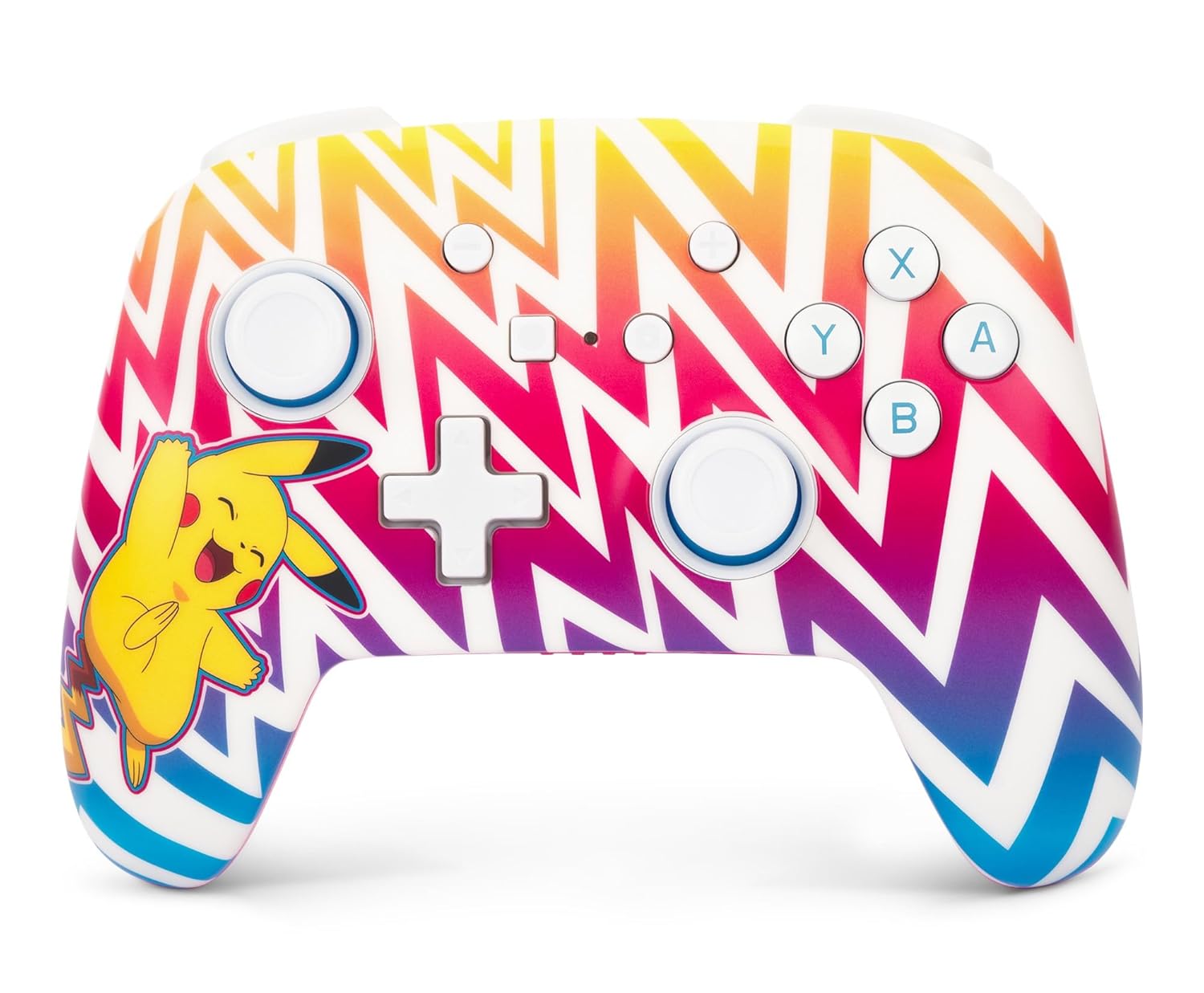
Foto nke 1: N'ihu view of the PowerA Enhanced Wireless Controller, featuring a vibrant Pikachu design on a zigzag pattern. Shows the left and right analog sticks, D-pad, A/B/X/Y buttons, Home button, Capture button, Plus and Minus buttons, and indicator lights.

Foto nke 2: Azu view of the PowerA Enhanced Wireless Controller. This image highlights the two mappable Advanced Gaming Buttons (AGB) located on the grips, and the program button in the center.

Foto nke 3: N'elu view of the PowerA Enhanced Wireless Controller. This perspective shows the L, R, ZL, and ZR shoulder buttons, along with the USB-C charging port located between the ZL and ZR buttons.
Melite
Ịchaji njikwa
- Connect the small end of the included USB-C cable to the USB-C port on the top of the controller.
- Connect the large end of the USB-C cable to a USB power source (e.g., Nintendo Switch dock, USB wall adapter, computer USB port).
- The LED indicator lights on the front of the controller will illuminate to show charging status. All four LEDs will be solid when fully charged.
- A full charge provides up to 30 hours of gameplay. Actual battery life may vary based on usage.

Foto nke 4: Akụkụ view of the controller with the USB-C charging cable connected to the port on the top edge.
Ijikọ ya na Nintendo Switch
Follow these steps to pair your PowerA Enhanced Wireless Controller with your Nintendo Switch console:
- Hụ na agbanyere ma melite njikwa Nintendo Switch gị na ngwanrọ sistemụ kachasị ọhụrụ.
- Site OMlọ menu, họrọ "Ndị njikwa", mgbe ahụ "Gbanwee njide/Iwu".
- On the PowerA controller, press and hold the Bọtịnụ SYNC (small button next to the USB-C port) for at least three seconds. The LED indicator lights will begin to flash.
- Once the controller is successfully paired, the player LED(s) corresponding to the controller number will remain solid.
- Pịa Bọtịnụ ụlọ on the controller to return to the HOME Menu and begin playing.
The controller can be used whether the Nintendo Switch is docked or in handheld mode.
Ntuziaka ọrụ
Programming Advanced Gaming Buttons (AGB)
The controller features two mappable Advanced Gaming Buttons (AGB) on the back. These can be programmed on-the-fly:
- Pịa Bọtịnụ mmemme (small white button on the back, between the AGBs). The Program LED will flash, indicating the controller is in programming mode.
- Press the button you wish to map (e.g., A, B, X, Y, L, R, ZL, ZR, D-pad directions, Left Stick Click, Right Stick Click).
- Pịa Advanced Gaming Button (AGB L or AGB R) you want to assign the function to. The Program LED will stop flashing, indicating the AGB has been successfully programmed.
- To clear an AGB assignment, repeat steps 1-2, but instead of pressing a button to map, press the Program Button again to exit programming mode without assigning a new function.
Njikwa ngagharị
This controller supports motion controls in compatible Nintendo Switch games. No special setup is required; motion controls will function automatically when supported by the game.
Nlekọta
- Nhicha: Jiri ákwà dị nro ma kpọọ nkụ hichaa ihe njikwa ahụ. Zere iji kemịkalụ siri ike ma ọ bụ ihe ndị na-emebi ihe.
- Nchekwa: Chekwaa onye njikwa ahụ n'ebe dị jụụ, kpọrọ nkụ na-adịghị na ìhè anyanwụ kpọmkwem na oke okpomọkụ.
- Nlekọta batrị: Iji mee ka batrị dị ogologo, zere iwepụ ihe njikwa ahụ kpamkpam mgbe niile. Chajie ya mgbe niile, ọbụlagodi na ọ naghị arụ ọrụ mgbe niile.
Nchọpụta nsogbu
- Njikwa anaghị ejikọta:
- Gbaa mbọ hụ na akwụchara onye njikwa ya nke ọma.
- Verify the Nintendo Switch console is powered on and within range.
- Repeat the pairing process as described in the "Pairing with Nintendo Switch" section.
- If issues persist, try restarting both the controller and the Nintendo Switch console.
- Buttons or joysticks not responding:
- Check if the controller is properly connected to the console.
- Ensure no debris is obstructing the buttons or joysticks.
- Test the controller in another game or on the Switch's controller test menu to isolate the issue.
- Ndụ batrị dị mkpụmkpụ:
- Hụ na e nwere chajị zuru oke nke njikwa ahụ tupu ejiri ya.
- Battery life can be affected by game intensity and environmental factors.
- If battery life significantly degrades over time, contact customer support.
Nkọwapụta
| Nọmba nlereanya | NSGP0262-01 |
| Njikọta | Bluetooth 5.0 |
| Ụdị batrị | Lithium-ion nwere ike ịgbanye |
| Ndụ batrị | Up to 30 hours per charge (approximate) |
| Akụkụ | 6.02 x 4.41 x 2.48 sentimita asatọ |
| Ibu | 8 ounces (ihe dị ka gram 227) |
| Ndakọrịta | Nintendo Switch, Switch Lite, Switch – OLED Model, Switch 2 |
| USB gụnyere | 10ft (3m) eriri USB-C |
Ozi akwụkwọ ikike
PowerA na-akwado ngwaahịa niile na Akwụkwọ ikike dị afọ 2. For detailed warranty terms and conditions, please refer to the official PowerA websaịtị ma ọ bụ kpọtụrụ nkwado ndị ahịa.
Nkwado
For further assistance, technical support, or warranty claims, please visit the official PowerA support website or contact their customer service department. Contact information can typically be found on the PowerA webngwugwu saịtị ma ọ bụ ngwaahịa.
Akụrụngwa dị n'ịntanetị: www.powera.com/support


