1. Okwu mmalite
This manual provides detailed instructions for the safe and effective use of your Codnida Baby Monitor, Model YM-MWM553+MWZ553C-EU. Please read this manual thoroughly before operating the device and retain it for future reference. This baby monitor is designed to provide secure and reliable surveillance of your child, offering features such as a 5.5-inch 2K HD display, PTZ camera control, two-way audio, and environmental monitoring.
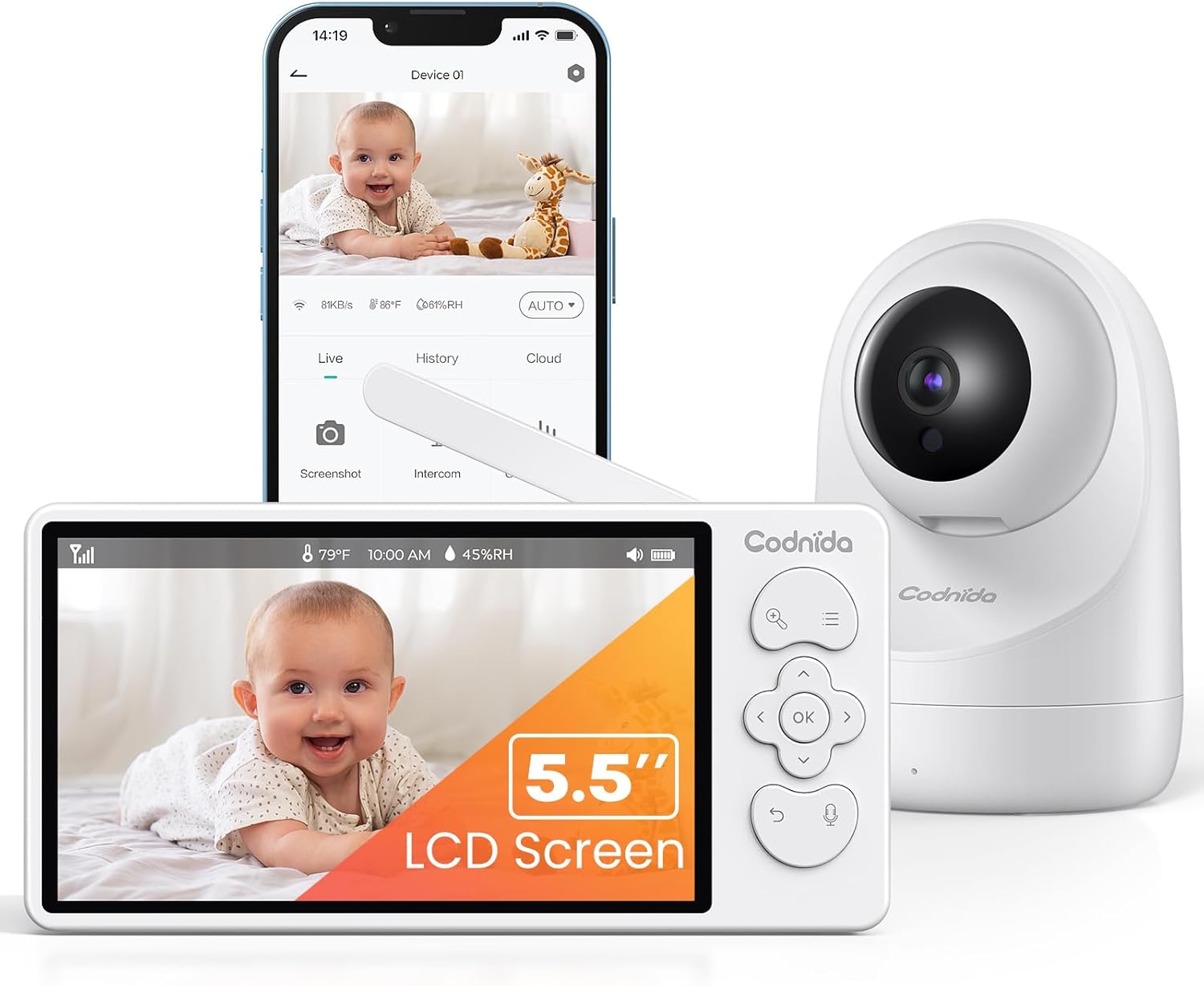
Image 1.1: Codnida Baby Monitor system, showing the monitor, camera, and smartphone interface.
2. Ihe ngwugwu
Chọpụta na ihe niile dị na ngwugwu:
- Baby Monitor (Parent Unit)
- Baby Camera (Baby Unit)
- Power Adapters (2x, for monitor and camera)
- USB Charging Cables (2x)
- Ngwa Mgbidi Maka Mgbidi (skru na arịlịka)
- Akwụkwọ ntuziaka (akwụkwọ a)

Image 2.1: All components included in the Codnida Baby Monitor package.
3. Ngwaahịa gafereview
3.1 Ngalaba Nne na Nna (Nleba anya)
The parent unit features a 5.5-inch LCD screen for live video feed, control buttons for camera functions, and a built-in microphone and speaker for two-way audio communication.
- Ihuenyo LCD: 5.5-inch 2K HD display.
- bọtịnụ njikwa: Navigation, OK, Menu, Talk, Zoom.
- Antenna: For wireless signal transmission.
- Igwe okwu: Maka ọdịyo ụzọ abụọ.
- Ọkà okwu: For listening to your baby and lullabies.
- Ike Port: USB-C for charging.
- Batrị: Integrated 4000mAh rechargeable battery.
3.2 Ngalaba ụmụaka (igwefoto)
The baby unit is equipped with a 3MP 2K HD camera, infrared LEDs for night vision, and a temperature/humidity sensor.
- Igwefoto oghere: 3MP 2K HD resolution.
- Igwe ọkụ infrared: For clear night vision up to 8 meters.
- Igwe okwu: To detect baby's sounds.
- Ọkà okwu: To play lullabies and enable two-way audio.
- Temperature/Humidity Sensor: Monitors room environment.
- Ike Port: USB-C for continuous power.
- Oghere Nkwanye: Maka ịgbanye mgbidi.
4. Nhazi
4.1 Ịchaji Ngalaba Nne na Nna
Before first use, fully charge the parent unit for approximately 8 hours. Connect the provided USB charging cable to the parent unit's power port and the power adapter to an electrical outlet. The battery indicator on the screen will show charging status.

Image 4.1: Charging the parent unit and expected battery life.
4.2 Powering the Baby Unit
The baby unit requires continuous power. Connect the provided USB charging cable to the baby unit's power port and the power adapter to an electrical outlet. Ensure the cable is placed safely away from the baby's reach.
4.3 Ntinye igwefoto
Place the baby unit (camera) in a location that provides a clear view of your baby. Ensure it is at least 1 meter (3 feet) away from the baby's crib to prevent any entanglement hazards with the power cord. The camera can be placed on a flat surface or mounted to a wall using the provided kit.
- Maka kacha mma viewing, position the camera to capture the entire crib area.
- Avoid placing the camera near heat sources or direct sunlight.
- Ensure the camera is within the monitor's transmission range (up to 700 meters in open areas).
4.4 Njikọ mbụ
The Codnida Baby Monitor uses FHSS technology for a secure, direct connection without requiring Wi-Fi or an app for basic operation. Simply power on both the parent unit and the baby unit. They should automatically connect. If they do not connect, refer to the troubleshooting section for pairing instructions.

Image 4.2: Secure FHSS connection between monitor and camera.
5. Ntuziaka ọrụ
5.1 Gbanyụọ ma ọ bụ gbanyụọ
- Ngalaba Nne na Nna: Press and hold the power button until the screen turns on/off.
- Ngalaba nwa: The baby unit powers on automatically when connected to power.
5.2 Ndụ View and VOX Mode
The monitor defaults to live view, continuously displaying video from the camera. To conserve battery, you can activate VOX (Voice Operated eXchange) mode.
- Ụdị VOX: In VOX mode, the monitor screen remains black. It will automatically light up and display video when sound or motion is detected in the baby's room.
- To activate/deactivate VOX mode, navigate through the menu settings on the parent unit.

Image 5.1: VOX mode for power saving and automatic activation.
5.3 Camera Control (PTZ & Zoom)
The camera offers Pan, Tilt, and Digital Zoom (PTZ) functions, allowing you to adjust the viewn'akuku remotely.
- Pan/Tit: Use the directional buttons on the parent unit to move the camera lens horizontally (350 degrees) and vertically (90 degrees).
- Mbugharị dijitalụ: Press the zoom button to activate 2x or 4x digital zoom for a closer view nke nwa gi.
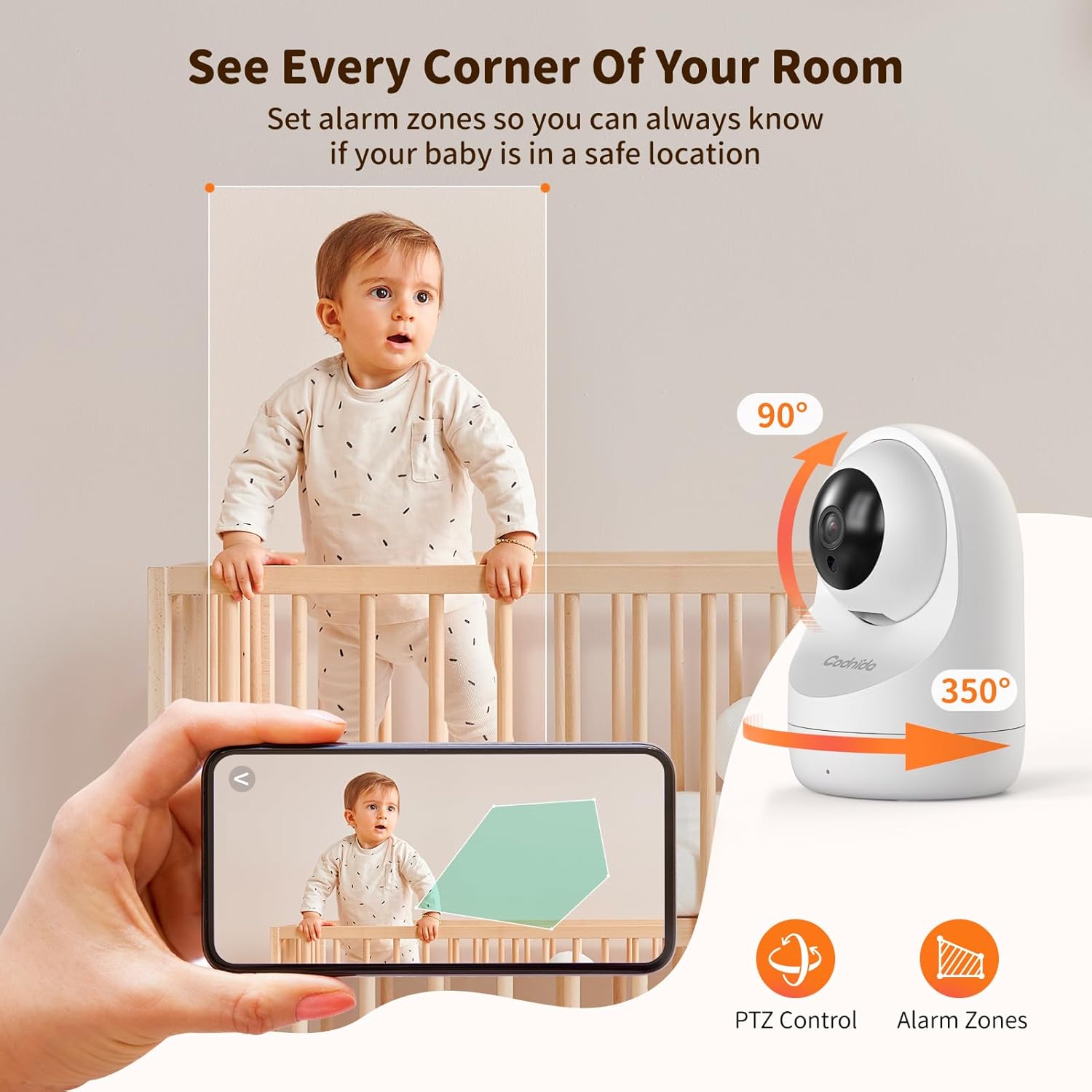
Image 5.2: PTZ control and alarm zone setup.
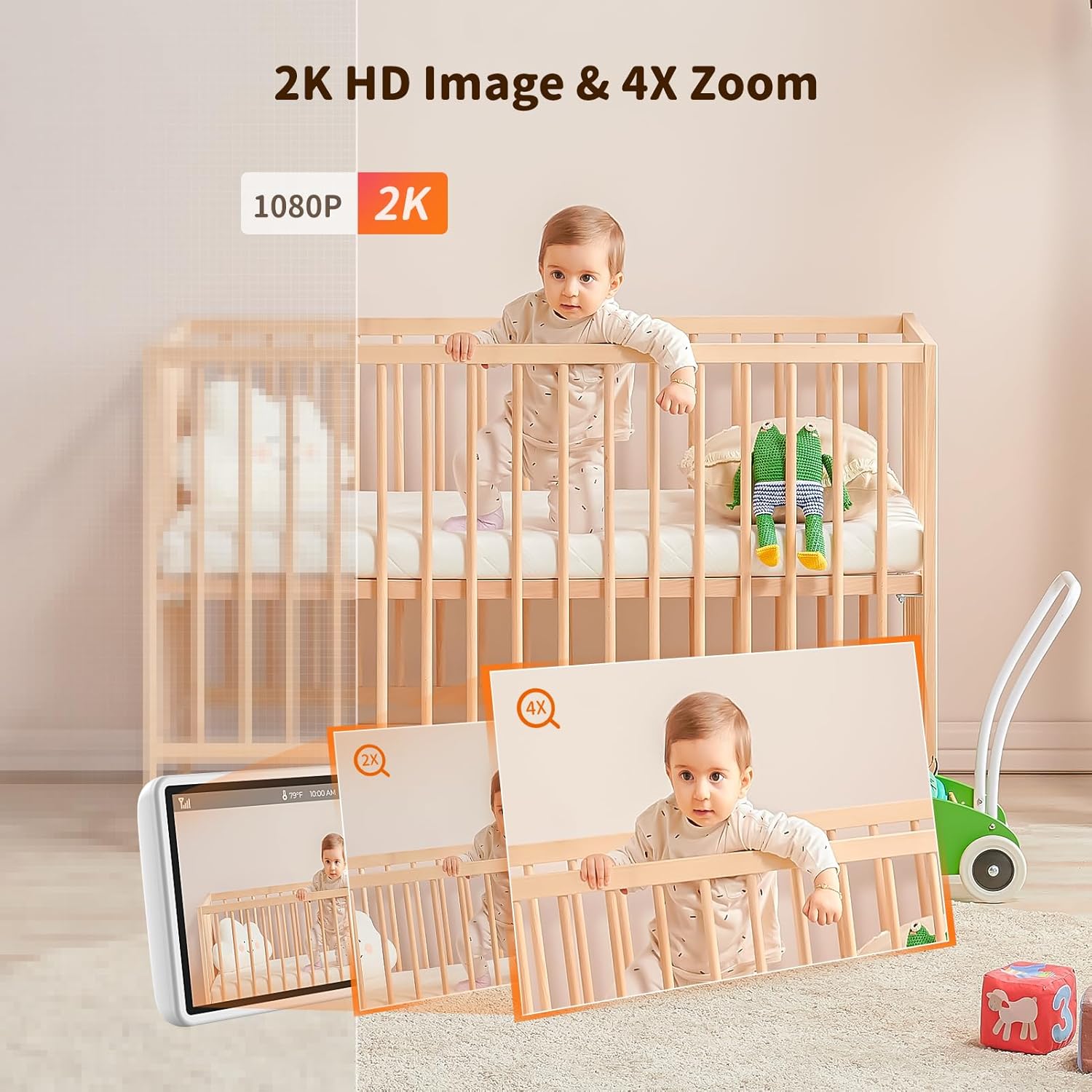
Image 5.3: 2K HD image quality and 4x digital zoom.
5.4 Two-Way Audio and Lullabies
Communicate with your baby or play soothing lullabies directly from the parent unit.
- Audio Ụzọ Abụọ: Press and hold the 'Talk' button on the parent unit to speak to your baby through the camera's speaker. Release the button to listen.
- Lullabies: Access the menu to select and play built-in lullabies. You can adjust the volume and set a timer for playback.

Image 5.4: Two-way audio communication.

Image 5.5: Night vision and lullaby function.
5.5 Atụmatụ Nlebaanya
- Nlekọta okpomọkụ na iru mmiri: The baby unit continuously monitors the room's temperature and humidity. These readings are displayed on the parent unit. You can set alert thresholds in the menu.
- Ihe ncheta inye nri: Set up feeding reminders through the parent unit's menu to help maintain a consistent feeding schedule.
- Alarm Zones: Kọwaa mpaghara akọwapụtara n'ime igwefoto view as alarm zones. The monitor will alert you if motion is detected within these zones.

Image 5.6: Temperature and humidity detection.

Image 5.7: Feeding reminder function.
5.6 Recording to SD Card
The Codnida Baby Monitor supports Micro SD cards (FAT32 format, up to 256GB) for video recording. Insert the Micro SD card into the designated slot on the parent unit. You can initiate recording manually or set it to record automatically upon motion/sound detection via the menu settings.
6. Nlekọta
6.1 Nhicha
To clean the monitor and camera units, use a soft, dry cloth. Do not use abrasive cleaners or solvents. For the camera lens, use a lens cleaning cloth to avoid scratches.
6.2 Nlekọta batrị
- Avoid fully discharging the parent unit's battery frequently.
- Charge the parent unit regularly to maintain battery health.
- Debe ngwaọrụ ahụ n'ebe dị jụụ ma kpọọ nkụ ma ọ bụrụ na ejirighị ya ruo ogologo oge.
7. Nchọpụta nsogbu
If you encounter issues with your Codnida Baby Monitor, please refer to the following common solutions:
| Nsogbu | Ihe nwere ike ime | Ngwọta |
|---|---|---|
| No image/sound on monitor | Units not powered on, out of range, or not paired. | Ensure both units are powered. Move units closer. Re-pair units via menu settings (refer to manual for specific steps). |
| Imagedị mma adịghị mma | Low light, dirty lens, interference. | Ensure adequate lighting. Clean camera lens. Move units away from other electronic devices. |
| Monitor loses connection frequently | Out of range, signal interference, obstacles. | Move units closer. Reduce obstacles (walls, furniture). Avoid placing near thick walls or metal structures. |
| Batrị na-agbapụ ngwa ngwa | Continuous live view, high brightness, aging battery. | Activate VOX mode. Reduce screen brightness. Ensure full charge before use. |
| Temperature/Humidity readings incorrect | Sensor obstruction, extreme environmental conditions. | Ensure sensor is not covered. Allow time for sensor to adjust to room conditions. |
8. Nkọwapụta
| Njirimara | Nkọwa |
|---|---|
| Nọmba nlereanya | YM-MWM553+MWZ553C-EU |
| Ngosipụta nha | 5.5 sentimita asatọ |
| Mkpebi vidiyo | 2K HD (1296p) |
| Mkpebi igwefoto | 3 megapixels |
| Teknụzụ ikuku | FHSS (Ugboro ugboro Hopping gbasaa ụdịdị dị iche iche) |
| Nzipu Range | Ruo mita 700 (ebe mepere emepe) |
| Oke ọhụụ abalị | Ruo mita 8 |
| Pan/Tilt Angle | Pan 350°, gbadaa 90° |
| Dijitalụ mbugharị | 4x |
| Batrị nkeji nne na nna | 4000mAh Lithium-ion (1 AAA included for internal components) |
| Nkwado nchekwa | Micro SD card up to 256GB (FAT32 format) |
| Atụmatụ pụrụ iche | Two-Way Audio, Motion Detector, VOX Mode, Temperature/Humidity Sensor, Lullabies, Feeding Reminder |
| Ihe onwunwe | Plastic |
| Akụkụ (L x W x H) | 10 x 5 x 5 cm |
| Ibu | 860 grams |
9. Akwụkwọ ikike na nkwado
Codnida offers a 1-afọ akwụkwọ ikike for this product and a 30-ụbọchị nloghachi amụma. For any questions regarding your baby monitor or other Codnida products, please contact customer support through your Amazon account:
- Navigate to "Your account"
- Select "Your orders"
- Locate your Codnida Baby Monitor order
- Click on "Ask a question"
Our support team will assist you with any inquiries or issues you may have.


