Okwu mmalite
This manual provides detailed instructions for the safe and efficient use of your OttLite Wellness Series Wireless Charging LED Table Lamp. Nke a lamp features OttLite's exclusive ClearSun LED technology, designed to reduce eyestrain, along with convenient wireless charging and a USB charging port. Please read this manual thoroughly before operating the lamp ma jide ya maka ntụnye aka n'ọdịnihu.
Ntuziaka nchekwa dị mkpa
To reduce the risk of fire, electric shock, or injury to persons, please observe the following:
- Ejila eriri ma ọ bụ plọg mebiri emebi.
- Ejila ọrụ lamp if it has been dropped or damaged.
- Anwala ịgbanwe lamp.
- Jiri naanị ihe nkwụnye ọkụ enyere.
- Debe lamp pụọ na mmiri ma ọ bụ mmiri mmiri ndị ọzọ.
- Nke a lamp bụ naanị maka ime ụlọ.
- Isi ọkụ ọkụ LED anaghị agbanwe agbanwe.
Ihe ngwugwu
- OttLite Wellness Series Wireless Charging LED Table Lamp
- Ihe nkwụnye ọkụ
Melite
- Wepu ihe Lamp: Jiri nlezianya wepụ ihe niile dị na nkwakọ ngwaahịa.
- Njikọ Ike: Insert the power adapter plug into the power input port located on the back of the lamp base. Plug the other end of the adapter into a standard 110V AC wall outlet.
- Debe ọnọdụ Lamp: Debe lamp on a stable, flat surface. Ensure the power cord is not pinched or obstructed.
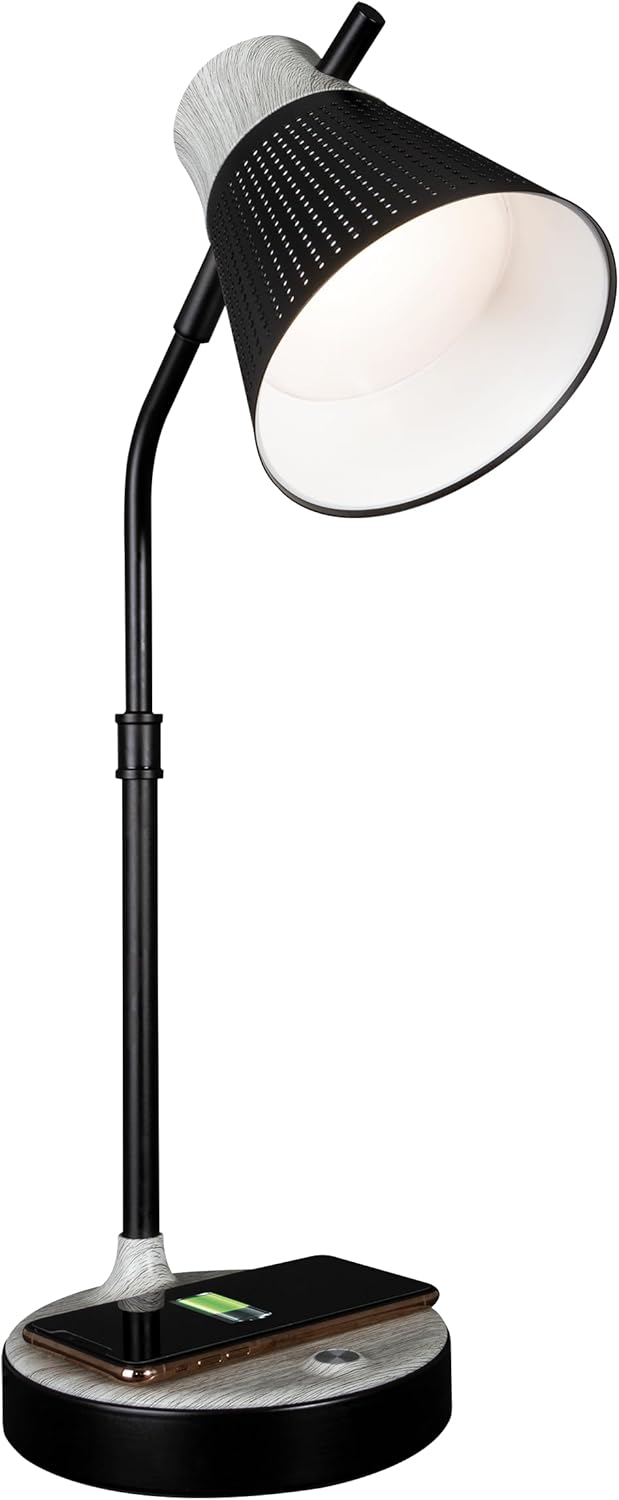
Ndị lamp dị njikere ugbu a maka ọrụ.
Ntuziaka ọrụ
1. Njikwa/Mgbanyụ Ike na Njikwa Ọcha
Ndị lamp features touch-sensitive controls located on the base.
- Ka ịgbanwuo/gbanyụọ: Lightly touch the power icon on the lamp isi.
- Iji dozie ihie: Site na lamp on, repeatedly touch the power icon to cycle through three brightness levels.

2. Color Temperature Settings
Ndị lamp offers three distinct color temperature modes:
- ClearSun Natural Daylight: Provides a balanced spectrum for reduced eyestrain.
- Ọcha na-ekpo ọkụ: A softer, warmer light ideal for relaxation.
- Ọcha na-egbuke egbuke: A crisp, clear light suitable for tasks requiring focus.
To switch between color temperatures, touch the mode icon on the lamp base. Cycle through the available options to select your preferred light.

3. Na-edozi Lamp
Ndị lamp features a flexible neck and an adjustable shade for precise light placement.
- Olu na-agbanwe agbanwe: Jiri nwayọ gbagọọ lamp neck to direct light where needed.
- Ndo nwere ike idozi: The shade can be moved up, down, and side-to-side to optimize illumination.

4. Nchaji ikuku
Ndị lamp base includes a Qi-compatible wireless charging pad.
- Place your Qi-compatible device (e.g., smartphone) directly onto the charging pad on the lamp isi.
- Ensure the device is centered on the charging pad for optimal connection.
- A charging indicator on your device will confirm that charging has begun.

5. USB Nchaji Port
A 5V, 2.1A USB charging port is integrated into the lamp base for charging additional devices.
- Connect your device's USB charging cable to the USB port on the back of the lamp isi.
- Connect the other end of the cable to your device (e.g., headphones, smartwatch, tablet).

Nlekọta
- Nhicha: Gbanyụọ ike tupu ị sachaa ya. Jiri ákwà dị nro ma kpọọ nkụ hichaa ya.amp. Ejila ihe nchacha abrasive ma ọ bụ ihe mgbaze.
- Nlekọta LED: The LED light source is designed for long-term use and does not require replacement. Avoid direct contact with the LED panel.
Nchọpụta nsogbu
| Nsogbu | Ihe nwere ike ime | Ngwọta |
|---|---|---|
| Lamp adịghị agbanye. | Ejikọghị ihe nkwụnye ọkụ ma ọ bụ ụzọ adịghị mma. | Ensure power adapter is securely plugged into the lamp and a working wall outlet. Test the outlet with another device. |
| Nchaji ikuku anaghị arụ ọrụ. | Device not Qi-compatible or not properly aligned. | Verify your device supports Qi wireless charging. Reposition the device on the charging pad, ensuring it is centered. Remove any thick phone cases. |
| Nchaji USB anaghị arụ ọrụ. | USB cable faulty or device not compatible. | Try a different USB cable. Ensure the device is compatible with 5V, 2.1A charging. |
| Ọkụ na-enwu ma ọ bụ na-agbanweghi agbanwe. | Loose power connection or electrical interference. | Check all power connections. Move the lamp pụọ na ngwaọrụ eletrọniki ndị ọzọ nwere ike ibute nsogbu. |
Nkọwapụta
- Nọmba nlereanya: CSAQABG9-SHPR
- Akara: OttLite
- Akụkụ ngwaahịa: 6.88"D x 6.88"W x 25"H (adjustable height)
- Ibu ihe: 4.99 pound
- Isi mmalite ike: Igwe ọkụ eletrik (110V AC)
- Ụdị isi iyi ọkụ: LED (Teknụzụ ClearSun)
- Wattage: 10 watt
- Usoro njikwa: Metụ aka
- Atụmatụ pụrụ iche: Wireless Charging, USB Charging Port, Flexible Neck, Adjustable Shade, 3 Brightness Settings, 3 Color Temperatures
- Ihe: Ọla, Osisi
- Imecha Type: Agba
- Ojiji ime ụlọ/n'èzí: Naanị ime ụlọ

Ozi akwụkwọ ikike
OttLite products are manufactured to high-quality standards. For specific warranty details, including coverage period and terms, please refer to the warranty card included with your purchase or visit the official OttLite websaịtị. Debe ihe akaebe nke ịzụrụ maka akwụkwọ ikike.
Nkwado ndị ahịa
If you have any questions, require assistance, or need to report an issue with your OttLite Wellness Series Wireless Charging LED Table Lamp, please contact OttLite customer support through their official websaịtị ma ọ bụ ozi kọntaktị enyere na nkwakọ ngwaahịa gị.
Maka ozi ndị ọzọ, gaa na OttLite Store.


