EarFun Wave Pro Active Noise Canceling Headphones - User Manual
Ụdị: HP200
Aha: EarFun
Ngwaahịa gafereview
The EarFun Wave Pro Active Noise Canceling Headphones are designed to provide an immersive audio experience with advanced noise cancellation and high-fidelity sound. They feature a comfortable, ergonomic design suitable for extended wear, making them ideal for travel, work, or daily listening.

Image: EarFun Wave Pro Active Noise Canceling Headphones in Black.
Kedu ihe dị na Igbe ahụ
Your EarFun Wave Pro package includes all necessary components for immediate use and convenient storage.
- EarFun Wave Pro Bluetooth Headphones
- Ikpe njem
- AUX Audio USB
- USB-C USB
- Akwụkwọ ntuziaka onye ọrụ

Image: The EarFun Wave Pro headphones, travel case, USB-C charging cable, and AUX audio cable.
Melite
Ịchaji ekweisi
Before first use, fully charge your EarFun Wave Pro headphones. Connect the provided USB-C cable to the charging port on the left earcup and plug the other end into a compatible USB power source. The LED indicator will show charging status.

Image: EarFun Wave Pro headphones indicating 80 hours of playtime with ANC off, 55 hours with ANC on, and 10 hours from a 10-minute quick charge.
Video: An unboxing video of the EarFun Wave Pro headphones, demonstrating the initial setup and contents.
Ijikọ na Ngwaọrụ gị
For first-time pairing, press and hold the MFB (Multi-Function Button) for 2 seconds to power on the headphones. They will automatically enter pairing mode. Activate Bluetooth on your device (smartphone, tablet, etc.) and select "EarFun Wave Pro" from the list of available devices. For subsequent pairings or connecting to a new device, you may need to unpair from the previous device or quickly press the MFB button three times to enter pairing mode.
Video: A detailed guide on how to operate the EarFun Wave Pro headphones, including pairing instructions.
Multipoint Njikọ
The EarFun Wave Pro headphones support multipoint connection, allowing you to connect to two devices simultaneously. Manage your connections via the custom EarFun App or manually switch between devices. Note: Multipoint connection and LDAC cannot be simultaneously enabled due to chip limitations. When LDAC is activated, the multipoint connection will automatically turn off, and vice versa.

Image: EarFun Wave Pro headphones connected to both a smartphone and a laptop, illustrating the multipoint connection feature.
Njikọ Ahịrị
The headphones can be used with the included 3.5mm AUX audio cable for a wired connection. When connected via AUX, the headphones will automatically power off, disabling ANC, touch controls, and microphones. This is useful when battery is low or for devices without Bluetooth.
Ntuziaka ọrụ
Njikwa agafelaview
The EarFun Wave Pro headphones feature intuitive physical buttons for easy control. On the bottom of the right earcup, you will find the power button, volume up/down controls, and a dedicated button for Active Noise Cancellation (ANC) modes. The 3.5mm AUX port is also located here. The USB-C charging port is on the bottom of the left earcup.

Image: Right earcup controls including power, volume, and ANC buttons, plus the AUX port.
Nkagbu Noise nọchiri anya (ANC)
Experience superior sound isolation with EarFun's QuietSmart 2.0 Active Noise Canceling Technology, which can reduce external noise by up to 45dB. The headphones utilize 5 advanced ANC microphones to monitor and counteract various frequencies. You can switch between different ANC modes (Normal, Ambient Sound, Wind Noise Cancelling, Comfort ANC, Strong ANC) using the dedicated ANC button on the earcup or through the EarFun Audio App.
Image: Visual representation of 45dB noise reduction by the headphones.
Sound Quality and LDAC
The EarFun Wave Pro delivers Hi-Res Audio with powerful 40mm DLC composite dynamic drivers. Supporting LDAC codec, these headphones transfer 3x more detail than standard Bluetooth headphones, providing rhythmic bass, warm mids, and crisp highs. (Note: LDAC is only compatible with Android devices and must be activated in the app settings.)

Image: A user enjoying music with EarFun Wave Pro headphones, highlighting Hi-Res Audio and LDAC support.

Image: Detailed diagram of the 40mm DLC Dynamic Driver within the headphones.
EarFun App Customization
Personalize your listening experience using the custom EarFun Audio App, available on Google Play and the App Store. The app allows you to select noise canceling modes, customize touch controls, manage multipoint connections, adjust EQ levels, and receive firmware updates.
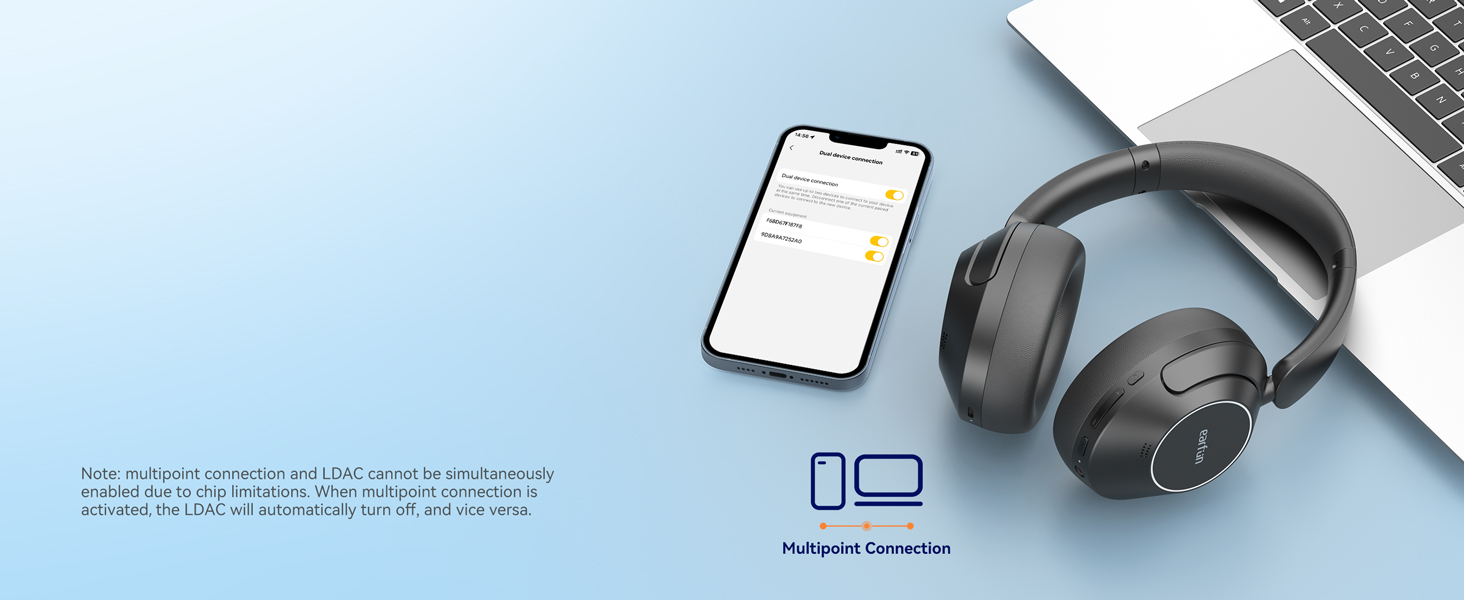
Image: Screenshots of the EarFun Audio App, demonstrating various customization features like EQ and control settings.
Ọrụ oku
Equipped with 5 AI-powered microphones and Advanced ENC Technology, the EarFun Wave Pro headphones ensure crystal-clear calls. These features work together to dramatically reduce background noises and amplify your voice, providing excellent clarity during hands-free conversations.

Image: A person using EarFun Wave Pro headphones for a call, with a graphic illustrating how AI technology separates voice from background noise.
Nlekọta
To ensure the longevity and optimal performance of your EarFun Wave Pro headphones, regular maintenance is recommended. Keep the headphones clean and dry. Avoid exposing them to extreme temperatures or humidity. Store them in the provided travel case when not in use to protect them from dust and physical damage.
Nkasi obi na dabara adaba
The headphones are designed for all-day comfort with soft and supple memory foam earpads that securely fit around your ears. The adjustable headbands and multi-angle rotating ear cups allow for a customized fit for various head shapes without discomfort. The foldable design also makes them easy to transport and store.
Image: EarFun Wave Pro headphones showcasing ergonomic features like adjustable headband, multi-angle rotation, and memory foam earcups for comfort.
Nchọpụta nsogbu
If you encounter any issues with your EarFun Wave Pro headphones, refer to the common problems and solutions below.
- Okwu njikọta: If the headphones do not pair, ensure they are in pairing mode (LED indicator flashing). Try unpairing them from any previously connected devices and then re-attempt pairing.
- LDAC playback interruption: If you experience playback interruption with LDAC, try reducing the distance between the headphones and your device (within 2 meters) or disable LDAC in the app settings.
- Wired connection behavior: When using the AUX cable, ANC, touch controls, and microphones are disabled. This is normal operation.
- Headphones not powering off: If the headphones do not power off, try plugging them into a charger. This action can sometimes reset the power state.
Nkọwapụta
| Aha Nlereanya | EarFun Wave Pro |
| Njikwa mkpọtụ | Mkpọtụ Na-arụ Ọrụ (ruo 45dB) |
| Teknụzụ Njikọta | Wireless (Bluetooth 5.3), Wired (3.5mm AUX) |
| Nha ọkwọ ụgbọ ala ọdịyo | 40mm DLC Composite Dynamic Drivers |
| Nkwado ọdịyo Hi-Res | Yes (LDAC compatible with Android) |
| Oge egwuregwu (ANC kwụsịrị) | Ruo awa iri abụọ |
| Oge egwuregwu (ANC agbanwuru) | Ruo awa iri abụọ |
| Nchaji ngwa ngwa | Nkeji 10 maka awa 10 nkwughachi |
| Igwe okwu | 5 AI-Powered Mics for Clear Calls |
| Multipoint Njikọ | Ee |
| Ibu | 266 grams (9.4 ounces) |
| Akụkụ | 6.81 x 6.26 x 2.05 sentimita asatọ |
Akwụkwọ ikike na nkwado
EarFun provides a 12-month warranty for the EarFun Wave Pro headphones from the date of purchase. You can extend this warranty to 24 months by registering your product on the official EarFun website. For technical support, troubleshooting assistance, or warranty claims, please contact EarFun customer service through their official website or the EarFun Audio App. Please have your product model and proof of purchase ready when contacting support.