1. Okwu mmalite
The Lepro WL1 AI Smart RGB Wall Lights offer a dynamic and personalized lighting experience for your home. Featuring LightBeats Music Sync, an AI Lighting Designer, and versatile control options via app and voice, these LED light bars allow you to transform any space with billions of potential lighting effects.
Akụkụ ndị bụ isi:
- Lepro LightGPM 4 - Personalized AI Lighting Designer: Adapts lighting to your preferences and prompts.
- Upgraded Voice Control: Control lights easily with voice commands via the Lepro+ app, Alexa, or Google Assistant.
- Photo-to-Light: Generate lighting designs by taking a photo of your room or uploading an image.
- LightBeats Music Sync: Synchronizes lighting with music rhythms for an immersive experience.
- Billions of AI-Generated Scenes: Offers a vast array of lighting effects for various moods and activities.
- Seamless App Control: Manage multiple devices, adjust brightness, colors, and set timers via the "Lepro+" App (Wi-Fi & Bluetooth).
- Customizable Wall Layout: Includes 8 wall light segments and 4 corners for flexible design configurations.
2. Kedu ihe dị na Igbe ahụ
The Lepro WL1 AI Smart RGB Wall Lights package includes the following components:
- 8 x Wall Light Segments
- 4 x Corner Connectors
- 1 x Njikwa
- 1 x nkwụnye ọkụ
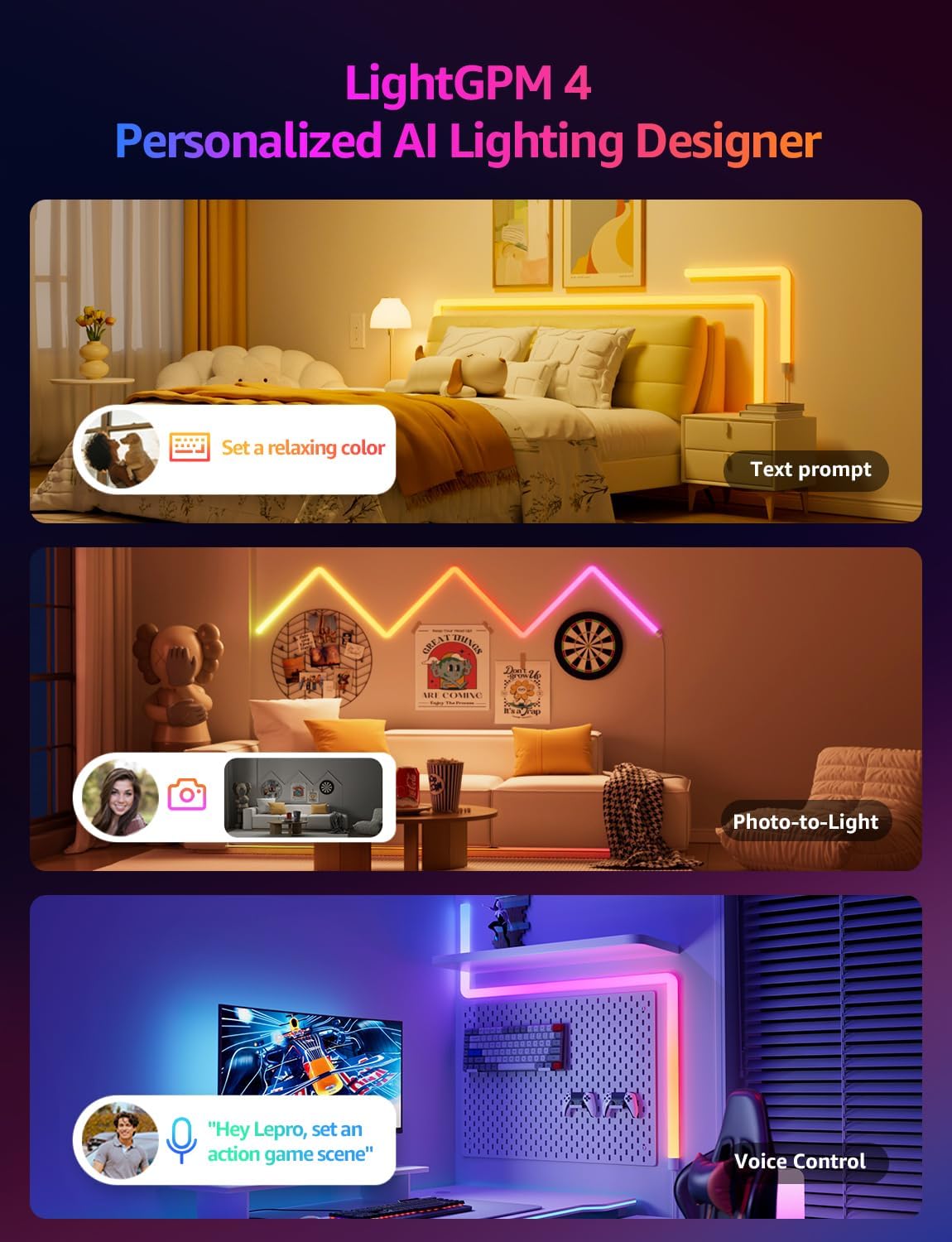
Image: The Lepro WL1 AI Smart RGB Wall Lights in a typical room setup, showcasing the product and its components.
3. Nhazi
3.1. Assembly and Mounting
Follow these steps to assemble and mount your Lepro WL1 Wall Lights:
- Hichaa mgbidi ahụ: Ensure the wall surface is clean and dry for optimal adhesive performance.
- Connect Segments: Insert the connectors into the light segments, paying attention to the direction. Ensure a secure fit.
- Tinye efere ndị e ji etinye ihe: Secure the mounting plates to the back of the light segments.
- Nhazi atụmatụ: Before sticking, plan your desired light arrangement on the wall.
- Ugwu ọkụ: Peel off the adhesive backing from the mounting plates and firmly press the light segments onto the wall. Begin with the power supply section and gradually install the full light.
- Njikọ Ike: Plug the power adapter into the controller, then into a power outlet.
Video: Detailed instructions on how to install the Lepro Glide Wall Light WL1, covering assembly and mounting steps.

Image: Visual guide showing the five key steps for installing the Lepro WL1 Wall Lights, from cleaning the wall to linking with the app.
3.2. App Connection (Lepro+ App)
To unlock the full smart features of your Lepro WL1 Wall Lights, connect them to the Lepro+ App:
- Budata ngwa: Chọọ maka "Lepro+" on the App Store (iOS) or Google Play (Android) and install it.
- Ndebanye aha akaụntụ: Open the app and sign up for a new Lepro+ account or log in if you already have one.
- Mee ka Bluetooth na Wi-Fi rụọ ọrụ: Ensure your phone's Bluetooth is enabled and it is connected to a 2.4GHz Wi-Fi network (5GHz networks are not supported).
- Tinye ngwaọrụ: In the Lepro+ App, tap the "+" icon or "Add Device" and follow the on-screen instructions to detect and connect your WL1 Wall Lights.
Video: A step-by-step guide on connecting your Lepro WL1 RGBIC Wall Lights to the Lepro+ App.

Image: Screenshot of the Lepro+ App interface, showing options for Bluetooth and Wi-Fi connection and various lighting controls.
3.3. Voice Assistant Integration (Alexa & Google Assistant)
Once connected to the Lepro+ App, you can link your lights with Amazon Alexa or Google Assistant for hands-free control:
- Open Lepro+ App: Navigate to the "Smart Integration" section in the app settings.
- Select Assistant: Họrọ Amazon Alexa ma ọ bụ Google Assistant.
- Akaụntụ njikọ: Follow the prompts to link your Lepro+ account with your chosen voice assistant. This typically involves enabling the Lepro skill/action in the Alexa or Google Home app.
- Chọpụta Ngwaọrụ: Once linked, ask your voice assistant to "discover devices" or manually add them through the assistant's app.
Example olu iwu:
- "Alexa, turn on the wall lights."
- "Hey Google, change the wall lights to blue."
- "Alexa, dim the wall lights to 50%."

Image: Demonstrates hands-free voice control with Alexa and Google Assistant, alongside in-line box control and smart app control for the Lepro WL1 lights.
4. Ntuziaka ọrụ
4.1. AI Lighting Designer (LightGPM)
The Lepro LightGPM 4 is an AI-powered lighting designer that learns your preferences and creates personalized lighting effects. Interact with it through:
- Text Prompts: Describe your desired mood or activity (e.g., "Set a relaxing color," "Ignite holiday vibes"). The AI will generate suitable lighting.
- Photo-to-Light: Upload a photo of your room, a movie poster, or a game character, and the AI will create a themed lighting design.
- Njikwa olu: Use the integrated voice assistant in the Lepro+ app to adjust brightness, change colors, or activate specific scenes.

Image: Illustrates the LightGPM 4 AI Lighting Designer, showing how text prompts, photo analysis, and voice control can generate personalized lighting scenes.

Image: Shows the simplicity of using AI voice control within the Lepro App to adjust lighting based on emotions, scenes, or direct instructions.
4.2. LightBeats Music Sync
Immerse yourself in dynamic lighting that responds to your music. The LightBeats feature analyzes audio rhythms and transforms your space into an energetic environment.
Video: Demonstrates the LightBeats Music Sync feature of the Lepro WL1 AI Generated Lighting RGBIC Wall Light, showing lights reacting to music.

Image: Shows the LightBeats Music Sync in action, with wall lights changing colors in rhythm with music, enhancing a social gathering.
4.3. Customization and Group Control
The Lepro+ App provides extensive control over your wall lights:
- Nhazi agba: Choose from 16 million colors and tunable white light. Adjust brightness from 0-100%.
- Nhọrọ Mpaghara: Select from a variety of pre-set scenes or create your own custom scenes for different occasions.
- Ọrụ ngụ oge: Set schedules for your lights to turn on/off or change modes automatically.
- Njikwa otu: Manage multiple Lepro devices simultaneously for a unified lighting experience across different areas.

Image: The Lepro+ App interface displaying options for custom color selection, including a color wheel and brightness adjustment.

Image: An illustration of the group control feature within the Lepro+ App, showing how various Lepro lighting products can be managed together.
5. Nkọwapụta
| Njirimara | Nkọwa |
|---|---|
| Ụdị | ekpenta |
| Nọmba nlereanya | WL1 |
| Agba | Multicolor |
| Ụdị | Prism akụkụ anọ |
| Ihe onwunwe | Plastic, Polycarbonate (PC) |
| Ụdị mmecha | Matte Black |
| Ụdị isi iyi ọkụ | Ikanam |
| Isi Iyi Ike | Igwe ọkụ eletrik |
| Voltage | 120 volts |
| Icha ọkụ | 3000 lumen |
| Wattage | 30 watt |
| Ụdị nkwụnye | Ugwu mgbidi |
| Bọlbụ Akụkụ | AI Music Sync, RGB, Voice Control, Wi-Fi & Bluetooth, LightBeats Music Sync |
| Ọnụọgụ nke isi mmalite ọkụ | 8 |
| Akụkụ ngwaahịa | 11.81"L x 1.38"W (per segment) |
| Ibu Ibu | 3.25 pound |
| Ndakọrịta Smart Home | Amazon Alexa, onye enyemaka Google |
6. Nlekọta
To ensure the longevity and optimal performance of your Lepro WL1 Wall Lights, follow these maintenance guidelines:
- Nhicha: Gently wipe the light segments with a soft, dry cloth. Avoid using abrasive cleaners or solvents that could damage the surface.
- Gbanyụọ tupu ihicha: Always unplug the power adapter before cleaning the lights.
- Zenarị mkpughe mmiri: These lights are designed for indoor use. Do not expose them to water or high humidity.
- Lelee njikọ: Periodically check all physical connections between segments and to the power adapter to ensure they are secure.
7. Nchọpụta nsogbu
If you encounter issues with your Lepro WL1 Wall Lights, refer to the following common solutions:
| Nsogbu | Ngwọta |
|---|---|
| Ọkụ anaghị agbanwu. |
|
| Lights are not connecting to the Lepro+ App. |
|
| Voice control (Alexa/Google Assistant) is not working. |
|
| Lights are flickering or displaying incorrect colors. |
|
7.1. How to Reset the Device
If you experience persistent issues, you may need to reset your Lepro WL1 Wall Lights:
- Locate the button on the in-line controller.
- Press and hold this button for approximately 5 seconds until the lights flash or change color, indicating a successful reset.
- After resetting, you will need to reconnect the device to the Lepro+ App.

Image: A visual representation of the reset process for the Lepro WL1 Wall Lights, showing the controller button being pressed.
8. Akwụkwọ ikike na nkwado
Lepro products are designed and manufactured to the highest quality standards. For information regarding warranty coverage, technical support, or customer service, please refer to the official Lepro websaịtị ma ọ bụ kpọtụrụ nkwado ndị ahịa ha ozugbo.
Nkwado n'ịntanetị: Gaa leta www.lepro.com maka Ajụjụ Ndị A Na-ajụkarị, ntuziaka maka nsogbu, na ozi kọntaktị.
Nkwado email: support@lepro.com
Nkwado ekwentị: +1 (800) 555-0199