Okwu mmalite
This manual provides essential information for setting up, operating, and maintaining your XIAOMI Poco X6 5G smartphone. The Poco X6 5G is designed to deliver a high-performance mobile experience, featuring a powerful Snapdragon 7s Gen 2 processor, a vibrant 6.67-inch CrystalRes 120Hz Flow AMOLED display, a versatile 64MP triple camera system with Optical Image Stabilization (OIS), and a long-lasting 5100mAh battery with 67W turbo charging capabilities.

Foto: ihu na azụ view of the XIAOMI Poco X6 5G smartphone in blue. The front displays a vibrant screen, and the rear features a triple camera module.
Kedu ihe dị na Igbe ahụ
Upon unboxing your XIAOMI Poco X6 5G, please verify that all the following items are included:
- XIAOMI Poco X6 5G Smartphone
- Ihe nkwụnye ọkụ
- eriri USB (ụdị-C)
- Akpa ekwentị
- Fast Car chaja
- Ngwaọrụ SIM Ejector
- Ntuziaka mmalite ngwa ngwa / ozi nchekwa
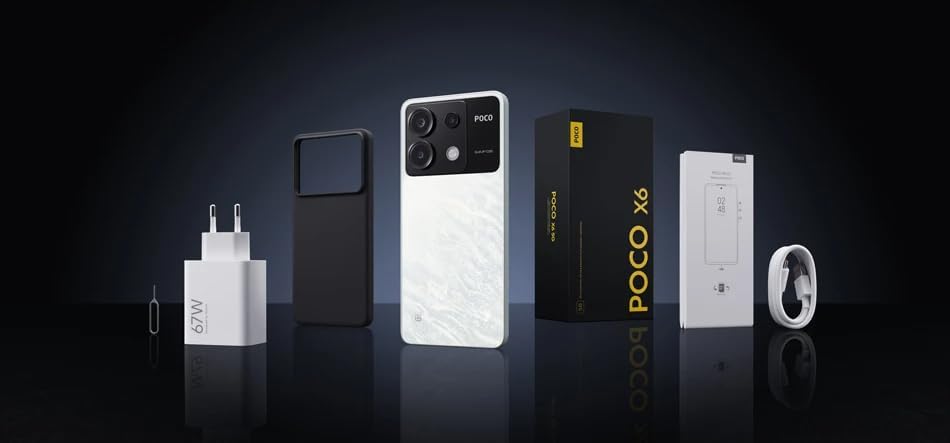
Image: Contents of the XIAOMI Poco X6 5G retail box. Visible items include the smartphone, a power adapter, a USB cable, a protective phone case, and documentation.
Melite
1. Ịtinye kaadị SIM
- Chọta tray kaadị SIM n'akụkụ ngwaọrụ gị.
- Insert the provided SIM ejector tool into the small hole on the SIM tray and press gently until the tray pops out.
- Place your Nano-SIM card(s) into the designated slots on the tray. The Poco X6 5G supports dual Nano-SIM cards. Mara: This device does not support MicroSD cards.
- Jiri nlezianya tinyegharịa traị SIM n'ime ekwentị.
2. Ike mbido na ịtọlite
- Press and hold the Power button (usually on the right side) until the XIAOMI logo appears.
- Soro ntuziaka ndị dị na ihuenyo iji mezue ntọala mbụ:
- Họrọ asụsụ na mpaghara gị.
- Jikọọ na netwọk Wi-Fi maka nhazi ngwa ngwa yana mmelite ngwanrọ.
- Review and accept the User Agreement and Privacy Policy.
- Banye na akaụntụ Google gị ma ọ bụ mepụta nke ọhụrụ. Nke a dị mkpa maka nbudata ngwa site na ụlọ ahịa Google Play.
- Set up screen lock (PIN, pattern, password, fingerprint, or face unlock).
- Choose your preferred settings for Google services and other features.
- Once setup is complete, your device is ready for use.
Na-arụ ọrụ ngwaọrụ gị
Ngosipụta
The Poco X6 5G features a 6.67-inch CrystalRes 1.5K Flow AMOLED DotDisplay with a resolution of 2712 × 1220 pixels (446 PPI). It offers a 120Hz refresh rate for smooth scrolling and gaming, and a peak brightness of 1800 nits for excellent visibility even in bright sunlight. The display is protected by Corning Gorilla Glass Victus for enhanced durability.
Sistemụ igwefoto
The device is equipped with a versatile triple camera system:
- Igwefoto isi 64MP: f/1.79 aperture, 1.4µm large pixel (4-in-1), with Optical Image Stabilization (OIS) for clear photos and stable videos.
- Igwefoto sara mbara nke 8MP: f/2.2 aperture, 118° Field of View (FOV) for capturing broader scenes.
- Igwefoto Macro 2MP: f/2.4 aperture for detailed close-up shots.
Video recording capabilities include 4K at 30fps, 1080p at 30fps/60fps, and 720p at 30fps. The camera also supports features like Short film, Slow motion, and Time-lapse.
Arụmọrụ
Kwadoro site na Qualcomm Snapdragon 7s Gen 2 processor, built on an advanced 4nm process, the Poco X6 5G delivers efficient and powerful performance for demanding applications and gaming. It features an octa-core CPU up to 2.4GHz and an Adreno GPU.
Batrị na Nchaji
Ngwaọrụ gụnyere a 5100mAh (typ) battery, providing extended usage times. It supports 67W turbo chaja, allowing for rapid recharging of the device. A compatible 67W charger is included in the box.
Njikọta
The Poco X6 5G supports 5G and 4G LTE networks globally (check compatibility with your carrier). It features Wi-Fi Protocol 802.11a/b/g/n/ac, Bluetooth 5.2, GPS (L1), GLONASS (G1), Beidou (B1), Galileo (E1), QZSS (L1), and an Infrared (IR) blaster.
Audio
Enjoy immersive audio with dual speakers, Dolby Atmos certification, Hi-Res Audio certification, and Hi-Res Wireless Audio certification. A Jack ekweisi 3.5mm dịkwanụ.
Nlekọta
Nlekọta izugbe
- Nhicha: Jiri akwa dị nro na-enweghị lint hichaa ihuenyo na ahụ. Zere ihe na-emebi emebi ma ọ bụ kemịkalụ siri ike.
- Okpomọkụ: Operate the device within recommended temperature ranges. Avoid extreme heat or cold, which can affect battery life and performance.
- Nguzogide mmiri: The Poco X6 5G is not rated for water resistance. Avoid exposing it to liquids.
- Nchedo: Use the provided phone case and consider a screen protector to prevent scratches and damage.
Mmelite ngwanrọ
Na-enyocha ma wụnye mmelite ngwanrọ mgbe niile iji hụ na ngwaọrụ gị nwere njirimara kachasị ọhụrụ, ihe mkpuchi nchekwa, na mmezi arụmọrụ. Ị nwere ike ịchọta nhọrọ a na Ntọala > Gbasara ekwentị > Ụdị MIUI.
Nchọpụta nsogbu
If you encounter issues with your Poco X6 5G, try the following common troubleshooting steps:
- Ngwaọrụ anaghị aza: Pịa ma jide bọtịnụ ike maka ihe dịka 10-15 sekọnd ịmanye ịmalitegharịa.
- Network Issues (No Signal/Data):
- Ensure SIM card is correctly inserted.
- Lelee ma ọ bụrụ na agbanyụrụ ọnọdụ ụgbọelu.
- Malitegharịa ngwaọrụ ahụ.
- Verify your carrier settings and plan.
- Na-agbapụ batrị ọsọ ọsọ:
- Belata nchapụta ihuenyo.
- Mechie ngwa ejighi ya na-agba n'azụ.
- Disable unnecessary features like GPS, Bluetooth, or Wi-Fi when not in use.
- Lelee ojiji batrị na Ntọala iji chọpụta ngwa na-agụ ike.
- Ngwa ndị na-emebi ma ọ bụ na-ajụ oyi:
- Clear the app's cache and data (Settings > Apps > Manage apps > [App Name] > Clear data).
- Update the app to the latest version from the Google Play Store.
- Wepu ma tinyegharịa ngwa ahụ.
- ekpo oke ọkụ:
- Avoid using the phone while charging, especially during heavy tasks.
- Mechie ngwa ndabere.
- Belata nchapụta ihuenyo.
- If the device becomes excessively hot, power it off and let it cool down.
- Ntọgharị ụlọ mmepụta ihe (Ebe ikpeazụ): Ọ bụrụ na nsogbu dịgidere, ị nwere ike ịtụle nrụpụta nrụpụta ụlọ ọrụ. Ịdọ aka ná ntị: Nke a ga-ehichapụ data niile dị na ekwentị gị. Kwado data dị mkpa tupu ịga n'ihu. Gaa na Ntọala > Gbasara ekwentị > Ntọgharị ụlọ ọrụ.
Nkọwapụta
Key technical specifications for the XIAOMI Poco X6 5G:
| Aha Nlereanya | POCO X6 |
| Sistemụ nrụọrụ | MIUI 13, dabere na gam akporo 11 |
| Nhazi | Qualcomm Snapdragon 7s Gen 2 (Octa-core, up to 2.4GHz) |
| Ngosipụta | 6.67-inch CrystalRes 1.5K Flow AMOLED DotDisplay, 2712 × 1220, 120Hz Refresh Rate, 1800 nits peak brightness, Corning Gorilla Glass Victus |
| RAM | 8 GB |
| Nchekwa nke ime | 256 GB |
| Igwefoto azụ | 64MP Main (OIS) + 8MP Ultra-Wide + 2MP Macro |
| Ike batrị | 5100 mAh (typ) |
| Ịchaji | Nchaji Turbo 67W |
| Njikọta | 5G, 4G LTE, Wi-Fi (802.11a/b/g/n/ac), Bluetooth 5.2, GPS, GLONASS, Beidou, Galileo, QZSS, Infrared |
| Audio | Dual speakers, 3.5mm headphone jack, Dolby Atmos, Hi-Res Audio |
| Ihe mmetụta | Proximity sensor, Ambient light sensor, Accelerometer, Electronic compass, IR blaster, Gyroscope, X-axis linear vibration motor |
| Akụkụ | 7.28 x 3.66 x 2.32 inch (akụkụ ngwugwu) |
| Ibu | 1.12 pound (ihe dị arọ) |
Akwụkwọ ikike na nkwado
Your XIAOMI Poco X6 5G is covered by a limited manufacturer's warranty. Please refer to the warranty card included in your product packaging for specific terms and conditions, including warranty period and coverage details. For technical support, service, or further inquiries, please visit the official XIAOMI support websaịtị ma ọ bụ kpọtụrụ ndị ahịa ha ọrụ. Debe ihe akaebe nke ịzụrụ ihe maka akwụkwọ ikike.
Official XIAOMI Support: www.mi.com/global/support


