1. Okwu mmalite
This manual provides essential information for the safe and effective operation, maintenance, and troubleshooting of your LDARC V64 1:64 Scale Mini RC Racing Car. Please read this manual thoroughly before using the product.
Safety Information: This product is recommended for users aged 14 years and up.
2. Ihe ngwugwu
Chọpụta na ihe niile dị na ngwugwu gị:
- LDARC V64 Mini RC Car (Grey)
- Remote Control Transmitter (CT01 8-channel or similar)
- USB Type-C Nchaji USB
- 1 Lithium Polymer Battery (pre-installed or separate)
- DIY Interchangeable Body Case

Image: Contents of the LDARC V64 Mini RC Car package, showing the car, remote control, and an additional DIY body shell.
3. Nhazi
3.1 Ịchaji batrị
The RC car and remote control both utilize a Type-C charging port. Use the provided charging cable to charge both devices before initial use.
- Connect the Type-C end of the charging cable to the charging port on the RC car (typically located on the underside).
- Connect the other end of the charging cable to a compatible USB power source (e.g., computer USB port, USB wall adapter).
- Repeat the process for the remote control transmitter.
- Charging indicators (if present) will typically show red during charging and turn off or green when fully charged.

Image: The LDARC V64 Mini RC Car being charged via its USB Type-C port.
3.2 Njikọ Remote Control
Your RC car and remote control should be pre-paired. If re-pairing is necessary, refer to the specific instructions included with your remote control model (CT01 or alternative).
4. Ntuziaka ọrụ
4.1 Remote Control Functions (CT01 Transmitter)
The CT01 8-channel remote control offers precise control over your RC car. Familiarize yourself with its layout and functions:

Image: Diagram illustrating the various controls on the LDARC CT01 8-channel remote control, including throttle, steering, trim, and light switches.
- Throttle (C Beginner mode): Controls forward and reverse speed. Settings include Low, Middle, and High.
- Direction (B Beginner mode): Controls steering sensitivity. Settings include Small, Middle, and Big.
- TH Trim: Adjusts the neutral point of the throttle.
- ST Trim: Adjusts the neutral point of the steering.
- Vehicle Light Switch: Toggles vehicle lights ON/OFF.
- High and Low Beam: Switches between high and low beam headlights.
- Njikwa ọkụ gburugburu: Cycles through 13 color options for the additional ambient lights (Led OFF, White, Orange, Yellow, YellowGreen, Green, CyanGreen, Cyan, CyanBlue, Blue, Purple, Magenta, Pink, Red).
4.2 Driving the RC Car
- Ensure both the RC car and remote control are powered on and paired.
- Place the car on a clean, flat surface.
- Use the throttle trigger to control forward and reverse movement.
- Jiri wiilụ chịkwaa ntụgharị aka ekpe na aka nri.
- Experiment with the Beginner mode settings for throttle and direction to match your skill level.

Image: Multiple LDARC V64 Mini RC Cars positioned on a miniature racing track, ready for operation.
4.3 Ọrụ ọkụ
The LDARC V64 features analog light design for enhanced realism:
- Igwe ọkụ ihu: High and low beams can be switched.
- Ntụnye akara: Activate when steering left or right.
- Brake/Reverse Lights: Illuminate during braking or reversing.
- Dual Flashing Lights: Can be activated for hazard warning.
- Ambient Lights: Four additional ambient lights offer 13 selectable colors.
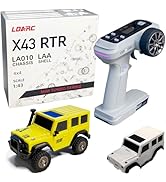
Image: The front of the LDARC V64 Mini RC Car showcasing its illuminated RGB lights.
5. Nlekọta
5.1 Nhicha
To ensure optimal performance and longevity, keep your RC car clean. Operate the car on clean surfaces free of debris, hair, and dust.
5.2 Nlekọta batrị
Always fully charge the battery before use and store the car with a partially charged battery if not used for extended periods. Avoid over-discharging the battery.
5.3 Interchangeable Body Case
The LDARC V64 comes with a DIY interchangeable body case, allowing for customization. To change the body:
- Carefully remove the existing body shell from the chassis.
- Position the new body shell onto the chassis, aligning any mounting points.
- Secure the new body shell in place.

Image: An unpainted DIY removable body shell, demonstrating the customization feature of the LDARC V64.
6. Nchọpụta nsogbu
- Vehicle not moving:
Check battery level of both the car and the remote control. The car features a safety protection system: if the battery voltage is low, the front and rear headlights will flash rapidly, and the vehicle will not move. Recharge batteries as needed. - Remote control unresponsiveness:
Ensure the remote control's battery is charged. If buttons become stuck or the remote behaves erratically, a factory reset may be required. Refer to the remote control's specific manual for reset procedures. - Arụmọrụ adịghị mma:
Ensure the driving surface is clean and free of obstructions. Check for any debris caught in the wheels or chassis.
7. Nkọwapụta
| Njirimara | Nkọwa |
|---|---|
| Nọmba nlereanya | V64 |
| Ụdị | captainrc |
| Ọnụ ọgụgụ | 1:64 |
| Akụkụ ngwaahịa | 8.66 x 4.72 x 8.66 sentimita asatọ |
| Ibu Ibu | 5.6 ounces |
| Afọ akwadoro | Afọ 14 na karịa |
| Ụdị batrị | 1 Lithium Polymer (gụnyere) |
8. Akwụkwọ ikike na nkwado
Specific warranty details for the LDARC V64 Mini RC Racing Car are not provided in the product information. For warranty claims or technical support, please refer to the contact information provided by your retailer or the manufacturer, captainrc.


