Okwu mmalite
Thank you for choosing the RAZEAK Portable 60% Mechanical Gaming Keyboard. This manual provides detailed instructions for the proper setup, operation, and maintenance of your new keyboard. Please read this manual thoroughly before use to ensure optimal performance and longevity of your device.
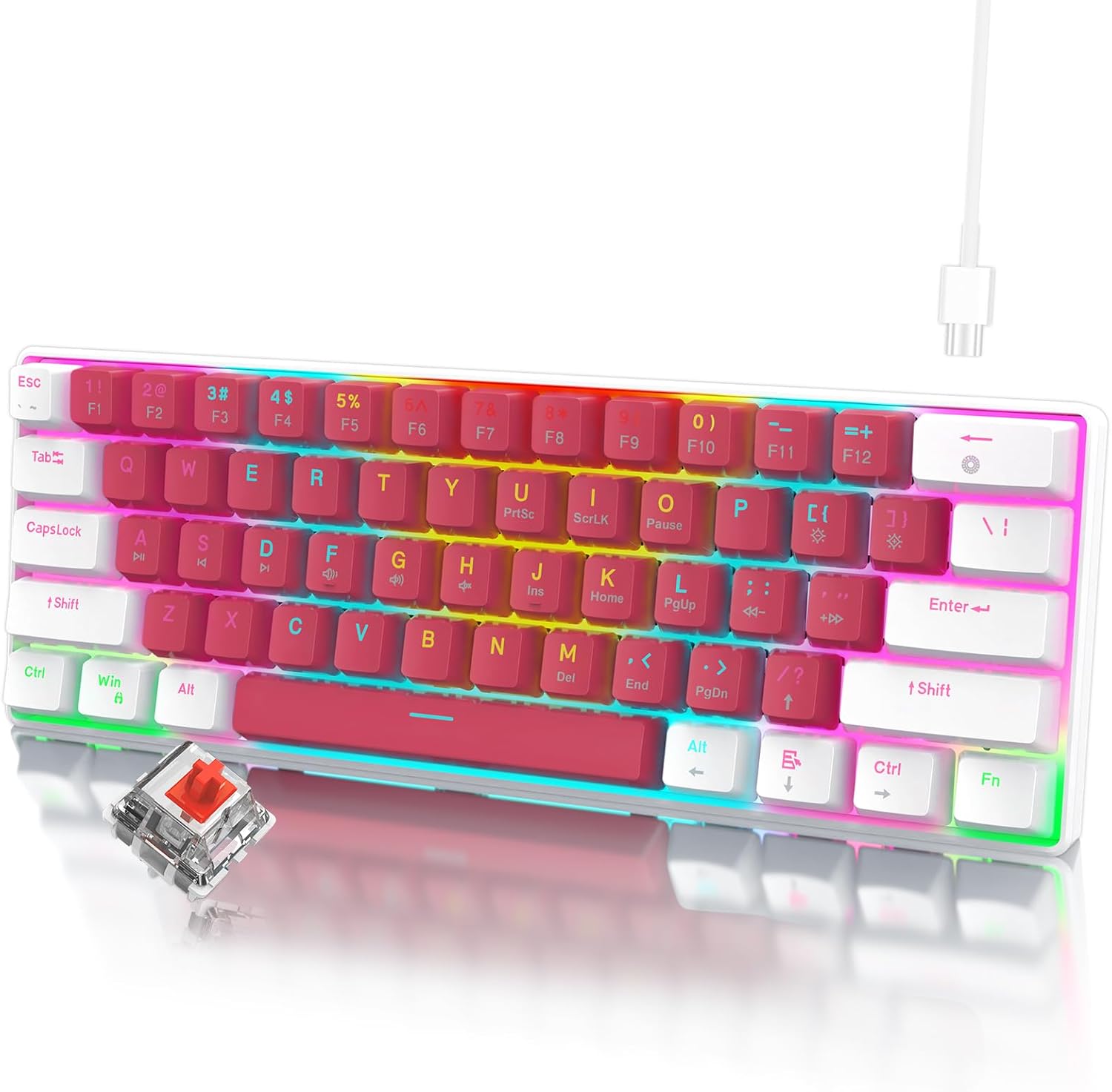
Image: The RAZEAK Portable 60% Mechanical Gaming Keyboard in Pink-White, showcasing its compact design and included USB-C cable. A single red switch is visible in the foreground.
Ntuziaka nhazi
1. Ihe ngwugwu
Gbaa mbọ hụ na ihe niile dị na ngwugwu:
- RAZEAK Portable 60% Mechanical Gaming Keyboard
- USB-C USB
2. Jikọọ ahụigodo
- Locate the USB-C port on the back or side of the keyboard.
- Jikọọ otu nsọtụ nke eriri USB-C enyere na ọdụ USB-C nke ahụigodo ahụ.
- Connect the other end of the USB-C cable to an available USB port on your computer (Windows PC or Laptop).
- Sistemụ arụmọrụ gị ga-amata ahụigodo ahụ na akpaghị aka. A naghị achọkarị draịva ọzọ maka ọrụ ndị bụ isi.
Ntuziaka ọrụ
Nhazi kọmpat 60%.
The RAZEAK keyboard features a compact 60% layout with 61 keys, designed to save desk space while retaining full functionality through key combinations. Many standard keys (e.g., F-keys, navigation keys) are accessed via the Function (Fn) key.

Image: A diagram illustrating the 60% ultra-compact 61-key layout of the keyboard, highlighting its space-saving design.
Key Combinations (Fn Key Functions)
To access secondary functions printed on the keycaps, press and hold the Fn key, then press the desired key.
- Fn + 1-0, -, =: Access F1-F12 keys.
- Fn + P, {, }, |, :, ", <, >, ?, /: Access various navigation and editing keys (e.g., Print Screen, Scroll Lock, Pause, Insert, Home, Page Up, Delete, End, Page Down).
- Fn + W, A, S, D: Swap arrow key functions with W, A, S, D for gaming.
- Consult the keycap legends for specific secondary functions.
N-Key Rollover
The keyboard features N-Key Rollover (NKRO), meaning all 61 keys can be pressed simultaneously and registered correctly. This prevents ghosting and ensures precise input, especially beneficial for fast-paced gaming.
Njikwa Ọkụ Azụ
The keyboard offers multi-colored LED backlighting with 19 different modes. Use the following key combinations to adjust the lighting:
- Fn + \ |: Cycle through 19 backlight modes.
- Fn + [ {: Belata nchapụta ọkụ azụ.
- Fn + ] }: Mụbaa nchapụta azụ azụ.
- Fn + ; :: Decrease backlight speed/animation.
- Fn +": Increase backlight speed/animation.

Foto: A nso nso view of the keyboard highlighting the backlit key legends and the Red mechanical switches visible beneath the keycaps.
Ergonomic imewe
The keyboard features ergonomic curved keycaps and two adjustable height angles to suit different user preferences and promote comfortable typing during extended use.

Foto: A side profile of the RAZEAK keyboard demonstrating its ergonomic high and low key design and adjustable feet for varied typing angles.
Nlekọta
Na-ehicha ahụigodo
ihicha mgbe niile na-enyere aka idowe ọdịdị na arụrụ ọrụ ahụigodo.
- Kwụpụ kiiboodu na kọmputa gị tupu ihicha.
- Jiri akwa dị nro na nke enweghị mmiri ọkụ dampejiri mmiri tinye ma ọ bụ ihe ngwọta dị nro iji hichaa igodo igodo na elu.
- Maka uzuzu na irighiri ihe n'etiti igodo, jiri ikuku abịakọrọ.
- Zere iji kemịkalụ siri ike, ihe nhicha ihe na-emebi emebi, ma ọ bụ fesa mmiri mmiri ozugbo na ahụigodo ahụ.
Nlekọta mkpuchi igodo
The dual-color injection molded keycaps are designed for durability and to prevent legends from fading. If you need to remove keycaps for deeper cleaning or replacement, use a keycap puller to avoid damage.
Nchọpụta nsogbu
If you encounter issues with your RAZEAK keyboard, refer to the following common solutions:
- Ahụigodo anaghị aza:
- Gbaa mbọ hụ na ejikọrọ eriri USB-C nke ọma na ma ahụigodo na kọmputa.
- Gbalịa ijikọ ahụigodo na ọdụ ụgbọ USB dị iche na kọmputa gị.
- Kwụpụ ma jikọọ eriri USB-C.
- Malitegharịa ekwentị gị na kọmputa.
- Ọkụ azụ anaghị arụ ọrụ ma ọ bụ na-ezighi ezi:
- Check if the backlight brightness is set to maximum using Fn + ] }.
- Jiri usoro ọkụ azụ mee okirikiri Fn + \ | to see if it resolves the issue.
- Igodo akọwapụtara anaghị arụ ọrụ:
- Gbaa mbọ hụ na ọnweghị ihe mkpofu etinyere n'okpuru okpu igodo.
- If using secondary functions, ensure you are pressing the Fn igodo n'out oge.
Nkọwapụta
| Nọmba nlereanya | X44-WTRD-RS_W |
| Akụkụ ngwaahịa | 11.5 x 4.02 x 1.57 sentimita asatọ |
| Ibu Ibu | 1.39 pound |
| Onye nrụpụta | WINSTAR TECHNOLOGY INDUSTRIAL LIMITED |
| Ngwa dakọtara | Ngwa Windows |
| Teknụzụ Njikọta | USB-C |
| Nkọwa ahụigodo | Gaming, Mechanical |
| Njirimara Pụrụ Iche | Portable, Backlit |
| Agba | Pink-Ọcha |
| Backlighting Color Support | RGB |
| Ihe onwunwe | Plastic |
| Ngwa gụnyere | eriri USB |
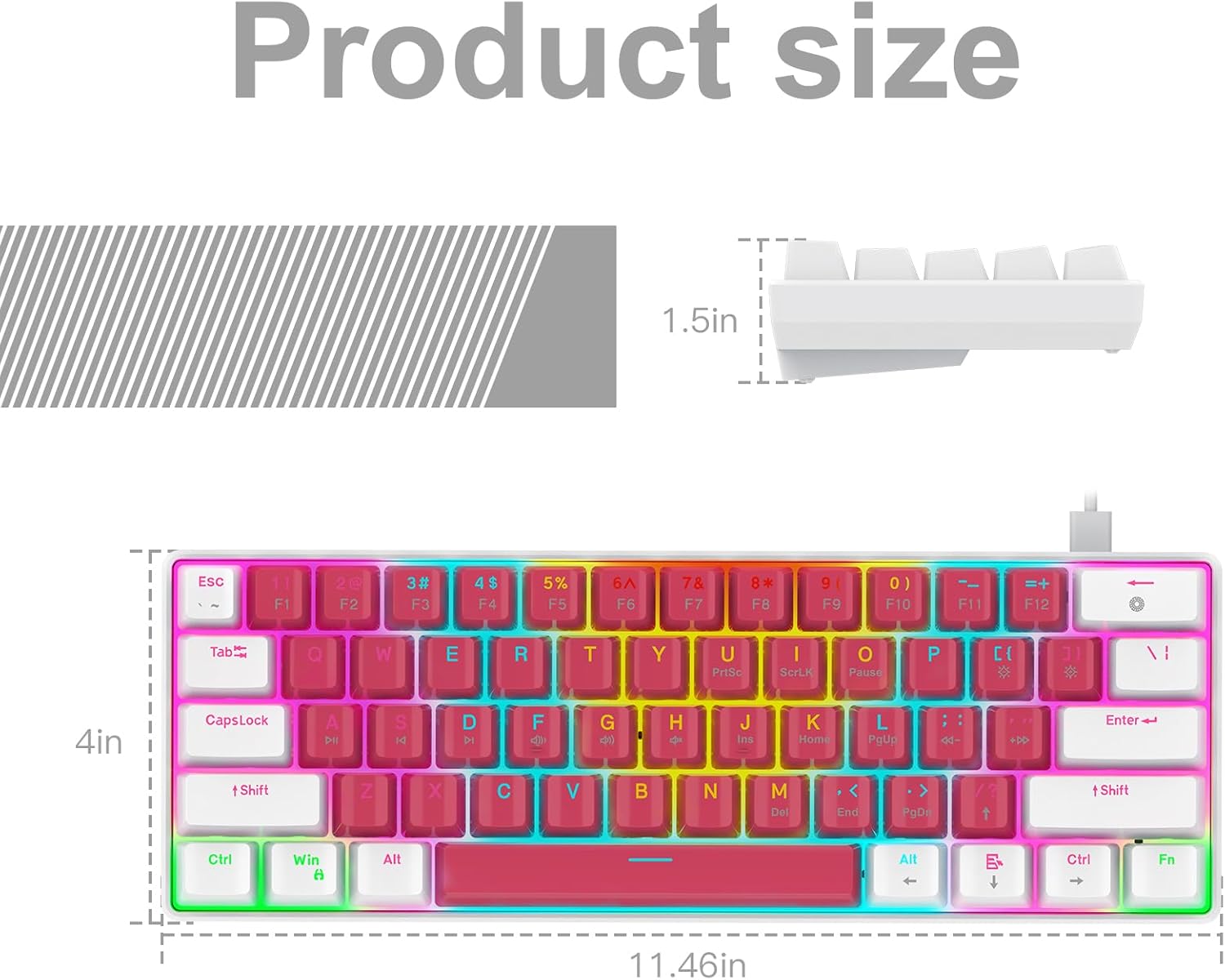
Image: A technical diagram illustrating the product dimensions (length, width, height) of the RAZEAK Portable 60% Mechanical Gaming Keyboard.
Ozi akwụkwọ ikike
Specific warranty details for the RAZEAK Portable 60% Mechanical Gaming Keyboard are typically provided with your purchase documentation or can be found on the official RAZEAK websaịtị. Biko dowe ihe akaebe nke ịzụrụ ihe maka akwụkwọ ikike.
Nkwado ndị ahịa
For further assistance, technical support, or inquiries regarding your RAZEAK keyboard, please visit the official RAZEAK store or contact their customer service through the details provided on their websaịtị.
You can visit the RAZEAK store at: RAZEAK Store on Amazon


