1. Okwu mmalite
Thank you for choosing the Philips LED Solar Portable Light. This manual provides essential information for the safe and efficient operation of your device. Please read it thoroughly before use and retain it for future reference.

Image 1.1: Philips LED Solar Portable Light and its retail packaging.
The Philips LED Solar Portable Light is designed for both indoor and outdoor use, offering versatile lighting with its 3-in-1 light settings, including bright white and color-changing modes. It features dual charging capabilities via solar power and USB, ensuring long-lasting illumination.
2. Ozi nchekwa
- Gụọ ntuziaka niile tupu i jiri ngwaahịa a.
- Do not disassemble, repair, or modify the product. This may cause electric shock, fire, or damage to the product.
- Debe ngwaahịa ahụ pụọ na oke okpomọkụ, ìhè anyanwụ kpọmkwem, na gburugburu iru mmiri.
- Ensure the USB charging port is dry before connecting the charging cable.
- This product is waterproof (IPX4 rated), meaning it is protected against splashing water from any direction. Do not immerse it in water.
- Debe ebe ụmụaka na-apụghị iru.
3. Ihe ngwugwu
Chọpụta na ihe niile dị na ngwugwu:
- 1 x Philips LED Solar Portable Light
- 1 x eriri USB
- Akwụkwọ ntuziaka onye ọrụ 1 x (akwụkwọ a)
4. Ngwaahịa gafereview
Familiarize yourself with the components of your Philips LED Solar Portable Light.

Image 4.1: Product dimensions. The light measures approximately 5.52 inches (L) x 5.16 inches (W) x 5.87 inches (H).
- Ogwe anyanwụ: Located on the top surface for solar charging.
- Light Diffuser: Emits light.
- Jikwaa: Maka ibugharị ngwa ngwa.
- USB Nchaji Port: For wired charging (located at the base).
- Ihe mmetụta njikwa: Integrated into the body for tap control.
5. Ntọala na Nchaji
Before first use, it is recommended to fully charge the light.
5.1 Nchaji anyanwụ
Place the light outdoors in direct sunlight. The integrated solar panel will automatically begin charging the internal battery. Charging time varies depending on sunlight intensity.

Image 5.1: The solar panel on top of the light for outdoor charging.
5.2 USB Nchaji
For faster charging or when sunlight is unavailable, use the provided USB cable.
- Locate the USB charging port at the base of the light.
- Connect the small end of the USB cable to the light's charging port.
- Connect the larger end of the USB cable to a standard USB power adapter (not included) or a computer USB port.
- The light will indicate charging status (specific indicator not detailed in product info, assume visual cue or refer to product for details).
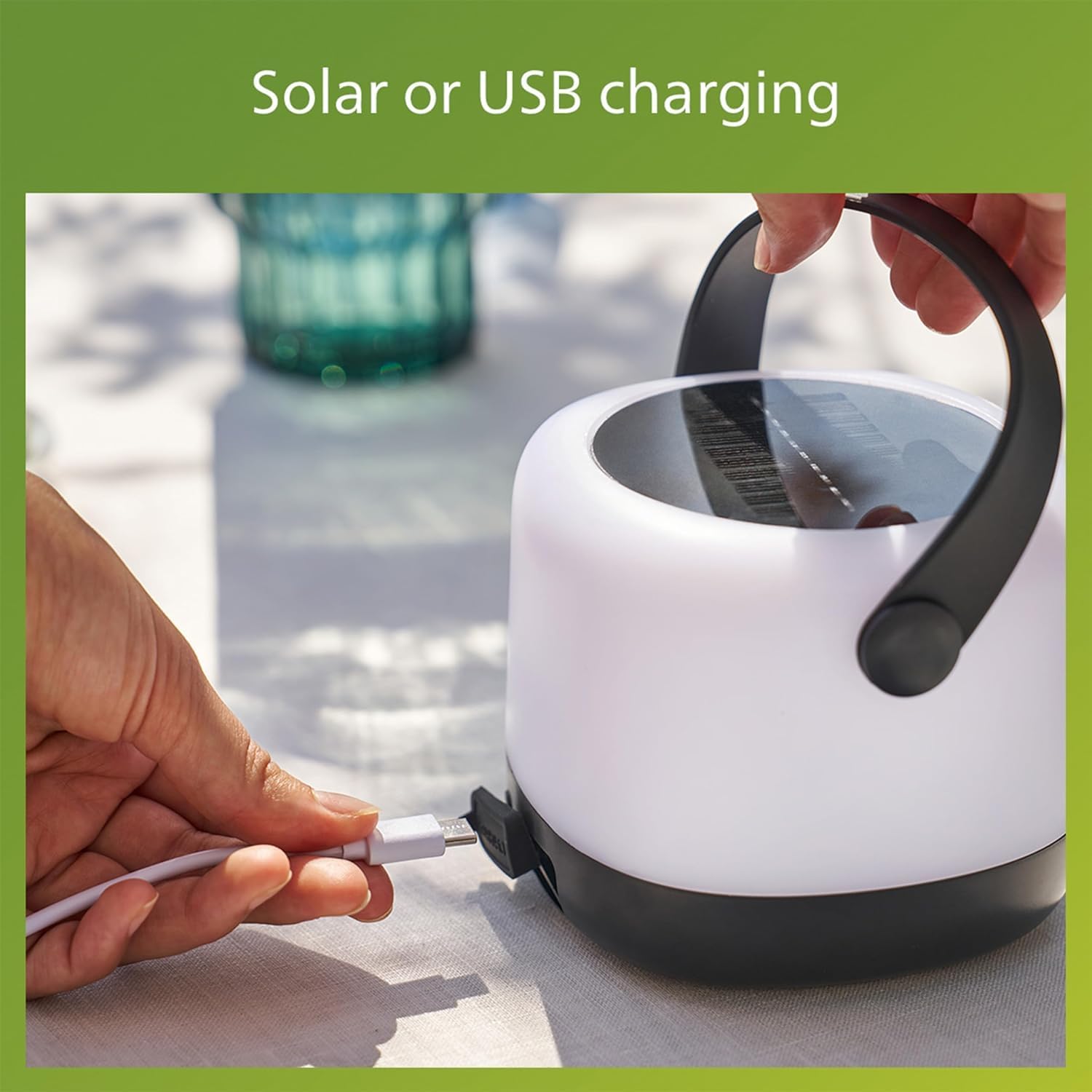
Image 5.2: Connecting the USB charging cable to the light.
A full charge provides up to 24 hours of illumination, depending on the selected light mode.
6. Ntuziaka ọrụ
The Philips LED Solar Portable Light features intuitive tap control for changing light settings.
6.1 Gbanyụọ ma ọ bụ gbanyụọ
To turn the light on or off, gently tap the body of the light once. (Note: Product description mentions "double-tap" for changing modes, implying a single tap for on/off or initial mode. Clarify with product if needed. Assuming single tap for basic on/off.)
6.2 Changing Light Modes (3-in-1 Settings)
The light offers three distinct modes: two brightness levels of bright white (3000K) and an automatic color-changing mode. To cycle through these modes:
- Ensure the light is on.
- Pịa ugboro abụọ the body of the light. Each double-tap will switch to the next mode in sequence.
- The modes typically cycle as follows:
Ọnọdụ 1: Bright White (80 Lumens)
Ọnọdụ 2: Lower Brightness White (20 Lumens)
Ọnọdụ 3: Automatic Color Changing Mode

Image 6.1: User interacting with the light to change settings.

Image 6.2: Visual representation of the 3-in-1 light modes.
6.3 Selecting a Specific Color (Color Changing Mode)
When in the automatic color changing mode, you can select and fix a specific color:
- Activate the automatic color changing mode by double-tapping until it appears.
- Once the desired color is displayed, tap the light once to pause the color cycle and keep that color.
- To resume color cycling, tap the light once again.

Image 6.3: Effortless control to select and confirm your preferred color.
7. Nlekọta
7.1 Nhicha
Iji hichaa ọkụ ahụ, jiri nwayọọ hichaa ya, damp cloth. Do not use abrasive cleaners or solvents, as these may damage the surface or internal components.
7.2 Nlekọta batrị
- For optimal battery life, avoid completely draining the battery frequently.
- If storing the light for an extended period, charge it fully and recharge every 3-6 months to prevent deep discharge.
- The light uses a Lithium-Ion battery. Do not attempt to replace the battery yourself.
7.3 Mmiri Nguzogide
The light is rated IPX4 waterproof, making it suitable for outdoor use in various weather conditions, including rain. However, it is not designed for submersion in water.

Image 7.1: The light is designed to perform in various weather conditions.
8. Nchọpụta nsogbu
| Nsogbu | Ihe nwere ike ime | Ngwọta |
|---|---|---|
| Ìhè anaghị agbanwuo. | Batrị agwụla. | Charge the light using the solar panel or USB cable. |
| Light not charging via solar. | Insufficient sunlight; solar panel is dirty or obstructed. | Place in direct sunlight; clean the solar panel; try USB charging. |
| Light not changing modes. | Incorrect tapping gesture; sensor obstruction. | Ensure a clear, firm double-tap on the body. Check for any obstructions on the sensor area. |
| Ìhè na-agbanyụ na mberede. | Batrị dị ala. | Fanye ọkụ. |
9. Nkọwapụta
| Njirimara | Nkọwa |
|---|---|
| Ụdị | Philips LED |
| Nọmba nlereanya | 585786 |
| Ụdị isi iyi ọkụ | Ikanam (Light Emitting Diode) |
| Okpomọkụ agba | 3000K (Ọcha na-egbuke egbuke) |
| Mmepụta Lumen | 80 Lumens / 20 Lumens (Adjustable) |
| Isi Iyi Ike | Akwadoro anyanwụ, Nchaji USB |
| Ụdị batrị | Lithium-ion (1 gụnyere) |
| Ndụ batrị | Ruo awa 24 |
| Ọkwa Nguzogide mmiri | IPX4 (ihe mgbochi mmiri) |
| Akụkụ ngwaahịa | 5.52"L x 5.16"W x 5.87"H |
| Ibu Ibu | 1 paụnd |
| Ihe onwunwe | Plastic |
| Voltage | 3.7 volts |
10. Akwụkwọ ikike Ozi
This Philips LED Solar Portable Light comes with a Akwụkwọ ikike onye nrụpụta afọ 2 site na ụbọchị ịzụrụ. Akwụkwọ ikike a na-ekpuchi ntụpọ dị na ngwa na arụ ọrụ n'okpuru ojiji nkịtị. Ọ naghị ekpuchi mmebi nke n'ụzọ na-ezighị ezi, ihe mberede, mgbanwe na-akwadoghị, ma ọ bụ ihe na-akpata mpụga.
Biko dowe ihe akaebe nke ịzụrụ ihe maka akwụkwọ ikike.
11. Nkwado ndị ahịa
For further assistance, technical support, or warranty inquiries, please contact Philips customer service. You can typically find contact information on the Philips Lighting websaịtị ma ọ bụ site na onye na-ere ahịa gị.
Visit the official Philips Lighting websaịtị maka ozi nkwado kachasị ọhụrụ: www.philips.com/lighting


