1. Okwu mmalite
Welcome to the user manual for your MESWAO MES-B3 15.6-inch Android 13 Tablet. This document provides essential information for setting up, operating, maintaining, and troubleshooting your device. The MES-B3 tablet features a large 15.6-inch IPS HD display, an Octa-Core processor, 6GB RAM, 128GB internal storage (expandable), and a 12000mAh battery, designed for a versatile user experience.

Figure 1: MESWAO MES-B3 Tablet Overview
2. Ozi nchekwa
Please read all safety instructions carefully before using your tablet to prevent injury or damage to the device. Keep this manual for future reference.
- Nchekwa batrị: Do not attempt to replace the battery yourself. Do not expose the tablet to extreme temperatures, direct sunlight, or fire. Do not puncture, drop, or disassemble the battery.
- Mmiri na mmiri: This tablet is not waterproof. Avoid exposing it to water, rain, or high humidity.
- Nhicha: Use a soft, dry cloth to clean the tablet. Do not use liquid cleaners or aerosols.
- Ijikwa: Avoid dropping the tablet or subjecting it to strong impacts.
- Nchedo Ntị: When using headphones, set the volume to a moderate level to avoid hearing damage.
3. Ihe ngwugwu
Chọpụta na ihe niile dị na ngwugwu:
- MESWAO MES-B3 15.6-inch Android 13 Tablet
- Ihe nkwụnye ọkụ
- USB-C USB
- Akwụkwọ ntuziaka (akwụkwọ a)
4. Ngwaọrụ gafereview
Familiarize yourself with the physical components of your MESWAO MES-B3 tablet.

Figure 2: Buttons and Connectors
- Bọtịnụ ike: Press and hold to turn the tablet on or off. Press briefly to turn the screen on or off.
- Bọtịnụ olu: Gbanwee olu ọdịyo.
- Igwefoto ihu: For video calls and selfies (5MP).
- Rear Camera with Flashlight: For taking photos and videos (13MP).
- Ụdị-C Port: Maka ịchaji mbadamba na ijikọ na kọmputa.
- Oghere TF Kaadị: Insert a MicroSD card to expand storage.
- Ndị na-ekwu okwu stereo: Nye mmepụta ọdịyo.
5. Nhazi
5.1 Ịchaji mbadamba nkume
Before first use, fully charge your tablet. Connect the USB-C cable to the tablet's Type-C port and the other end to the power adapter. Plug the adapter into a wall outlet. The battery indicator on the screen will show charging status.
5.2 Gbanyụọ/ gbanyụọ
- Iji gbanye: Press and hold the Power Button until the MESWAO logo appears.
- Iji gbanyụọ: Press and hold the Power Button until the power options appear, then select 'Power off'.
- Ka Malitegharịa ekwentị: Pịa ma jide bọtịnụ Ike ruo mgbe nhọrọ ike pụtara, wee họrọ 'Malitegharịa'.
5.3 Ọkachamara Mbido Mbido
Ozugbo agbanyere ya na mbụ, mbadamba ahụ ga-eduzi gị site na usoro ntọala mbụ:
- Họrọ asụsụ ọkacha mmasị gị.
- Jikọọ na netwọk Wi-Fi.
- Jiri akaụntụ Google gị banye ma ọ bụ mepụta nke ọhụrụ.
- Review ma nabata usoro na ọnọdụ.
- Tọọ mkpọchi ihuenyo (PIN, ụkpụrụ, paswọọdụ).
5.4 Ịtinye kaadị MicroSD
To expand the tablet's storage, you can insert a MicroSD card (up to 256GB, as per some product information, though 1TB is also mentioned in images, please verify with product packaging for exact maximum). Locate the TF card slot on the side of the tablet. Gently insert the MicroSD card with the gold contacts facing down until it clicks into place.

Figure 3: Storage Expansion with MicroSD Card
6. Na-arụ ọrụ gị mbadamba
6.1 Nsoro ụzọ
The MESWAO MES-B3 runs on Android 13, offering an intuitive touch interface.
- Kpatụ: Họrọ otu ihe ma ọ bụ mepee ngwa.
- Mịpụta: Navigate through screens, scroll lists, or dismiss notifications.
- Tụọ-gaa-mbugharị: Enlarge or reduce content on the screen.
- Ihuenyo ụlọ: Access your apps and widgets. Swipe down from the top for notifications and quick settings.
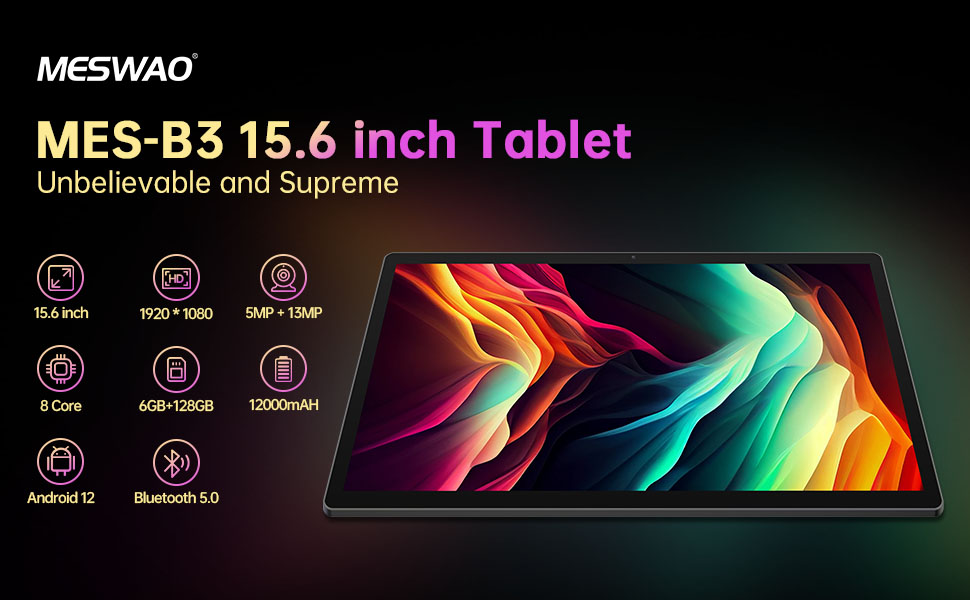
Foto nke 4: Njikọ Android 13
6.2 Njikọ Wi-Fi
- Gaa na Ntọala > Netwọk & ịntanetị > Ịntanetị.
- Gbanwuo Wi-Fi.
- Họrọ netwọk ịchọrọ site na ndepụta ahụ wee tinye paswọọdụ ma ọ bụrụ na ịchọrọ.
6.3 Njikọ Bluetooth
The tablet supports Bluetooth 5.0 for connecting wireless accessories.
- Gaa na Ntọala > Ngwa ejikọrọ > Mmasị njikọ > Bluetooth.
- Gbanwuo Bluetooth.
- Gbaa mbọ hụ na ngwaọrụ Bluetooth gị nọ na ọnọdụ njikọta.
- Select your device from the 'Available devices' list and follow on-screen prompts to pair.
6.4 Ngwa njikwa
- Wụnye ngwa: Open the Google Play Store app, search for your desired app, and tap 'Install'.
- Wepụ ngwa: Press and hold an app icon on the home screen or app drawer, then drag it to 'Uninstall' or select 'App info' and choose 'Uninstall'.
- Manage Apps: Gaa na Ntọala > Ngwa ka view, force stop, or clear data for installed applications.
6.5 Ntọala ngosi
Hazie gị viewahụmahụ nke:
- Gaa na Ntọala > Ngosipụta.
- Gbanwee Ọkwa ihie.
- Tọọ Ọnwụ ihuenyo (sleep duration).
- Gbanwee Ogo mkpụrụedemede na Ngosipụta nha.
- Kwado Isiokwu gbara ọchịchịrị for reduced eye strain.
6.6 Njikwa batrị
The MES-B3 features a 12000mAh battery for extended use.

Ọgụgụ 5: Ndụ batrị agbatịkwuru
- Gaa na Ntọala > Batrị ka view usage and optimize settings.
- Kwado Nchekwa batrị mode to extend battery life when needed.
- Mechie ngwa ejighi ya na-agba n'azụ.
- Belata nchapụta ihuenyo.
7. Nlekọta
7.1 Nhicha
- Jiri ákwà dị nro, nke na-enweghị lint hichaa ákwà ahụ na ahụ ya nke ọma.
- Maka isi ike smudges, ntakịrị dampen akwa na mmiri ma ọ bụ ihe nchacha ihuenyo ahaziri maka ngwá electronic.
- Avoid using abrasive materials, alcohol, or chemical solvents.
7.2 Nchekwa
- Debe mbadamba ahụ n'ebe dị jụụ ma kpọọ nkụ, ebe anwụ na-anaghị anwụ kpọmkwem na oke okpomọkụ dị oke njọ.
- If storing for an extended period, ensure the battery is charged to about 50% to prolong its lifespan.
7.3 Mmelite ngwanrọ
Na-enyocha mgbe niile maka mmelite ngwanrọ iji hụ na arụmọrụ na nchekwa kacha mma.
- Gaa na Ntọala > Sistemu > Mmelite sistemụ.
- The tablet will check for available updates. Follow the on-screen instructions to download and install any updates.
8. Nchọpụta nsogbu
Nke a bụ ngwọta maka nsogbu nkịtị ị nwere ike ihu:
| Nsogbu | Ngwọta |
|---|---|
| Mbadamba agaghị agbanwu | Ensure the tablet is charged. Connect it to the charger for at least 30 minutes, then try powering it on again. |
| Nsogbu njikọ Wi-Fi | Restart your Wi-Fi router and the tablet. Go to Settings > Network & internet > Internet, forget the network, and reconnect. |
| Ịrụ ọrụ nwayọ | Close unused apps. Clear cache for frequently used apps (Settings > Apps > [App Name] > Storage & cache > Clear cache). Restart the tablet. |
| Batrị na-agbapụ ngwa ngwa | Reduce screen brightness. Disable Wi-Fi/Bluetooth when not in use. Close background apps. Check battery usage in Settings > Battery to identify power-hungry apps. |
| Ngwa na-akụda ma ọ bụ na-ajụ oyi | Force stop the app (Settings > Apps > [App Name] > Force stop). Clear the app's cache. If the problem persists, uninstall and reinstall the app. |
9. Nkọwapụta
Detailed technical specifications for the MESWAO MES-B3 tablet:

Foto nke 6: Isi Atụmatụ na Nkọwapụta
| Njirimara | Nkọwapụta |
|---|---|
| Ụdị | MESWAO |
| Nọmba nlereanya | MES-B3 |
| Sistemụ nrụọrụ | Android 13 |
| Nhazi | MediaTek Octa-Core (MTK6789) |
| RAM | 6 GB |
| Nchekwa nke ime | 128 GB |
| Nchekwa enwere ike ịgbasa | Up to 256 GB (via TF/MicroSD card) |
| Nha ihuenyo | 15.6 sentimita asatọ |
| Mkpebi ihuenyo | Pikselụ 1920 x 1080 (IPS HD) |
| Igwefoto ihu | 5 MP |
| Igwefoto azụ | 13 MP |
| Ike batrị | 12000 mAh |
| Ndụ batrị | Approximately 10 hours (usage dependent) |
| Njikọta | Bluetooth 5.0, Wi-Fi (802.11ac, 2.4G/5G) |
| ọdụ ụgbọ mmiri | USB Type-C, TF Card Slot |
| Agba | Agba ntụ |
| Akụkụ (L x W x H) | 36.85 x 22.25 x 0.93 cm |
| Ibu | 1.1 kilogram |
10. Akwụkwọ ikike na nkwado
Your MESWAO MES-B3 tablet is covered by a standard manufacturer's warranty. Please refer to the warranty card included in your package for specific terms and conditions, including warranty duration and coverage details.
For technical support, troubleshooting assistance beyond this manual, or warranty claims, please contact MESWAO customer service through the retailer where you purchased the product or visit the official MESWAO websaịtị maka ozi kọntaktị.


