1. Okwu mmalite
The syitren R300 is a portable desktop retro CD player designed for home use. It features Bluetooth connectivity and fiber optic output, allowing users to connect to various external audio systems. This manual provides detailed instructions for setting up, operating, maintaining, and troubleshooting your R300 CD player.

Figure 1: syitren R300 CD Player - Front View
2. Kedu ihe dị na Igbe ahụ
Biko lelee ọdịnaya nke ngwugwu ahụ ka ị hụ na ihe niile dị:
- syitren R300 CD Player
- Ụdị-C eriri ọkụ
- 1 batrị AAA (gụnyere)
3. Nhazi
3.1 Ịgbanye na Ịchaji
The R300 CD player is powered via a Type-C cable. It includes a built-in 2000mAh battery, providing over 6 hours of playback on a full charge. Connect the provided Type-C power cable to the DC IN 5V port on the back of the unit and plug the other end into a compatible USB power adapter (not included).

Figure 2: Rear Ports (DC IN 5V and SPDIF)
3.2 Ijikọ na Ngwaọrụ Ọdịyo
The R300 CD player does not have a built-in speaker. It requires connection to external audio devices for sound output. This design helps reduce the impact of audio vibration on the CD player, allowing users to choose their preferred speakers and power ampngwa ngwa.
3.2.1 Njikọ Bluetooth
The R300 CD player can connect wirelessly to Bluetooth headphones or speakers.
- Ensure your external Bluetooth audio device is in discovery mode.
- On the R300, activate Bluetooth pairing mode by holding the designated Bluetooth button (refer to controls section for button identification).
- Once connected, a solid Bluetooth icon will appear on the R300's display.
Video 1: Demonstrates how to connect the R300 CD Player to an external stereo system using Bluetooth. The video shows activating Bluetooth on the R300 and pairing it with a separate speaker, confirming connection via the display icon.
3.2.2 Fiber Optic (SPDIF) Output
For high-quality digital audio output, connect the R300 to an audio receiver or amplifier using a fiber optic cable (not included) via the SPDIF port on the back of the unit.
3.2.3 AUX Output
The R300 also features an AUX output for analog audio connection to compatible devices using a 3.5mm audio cable (not included).
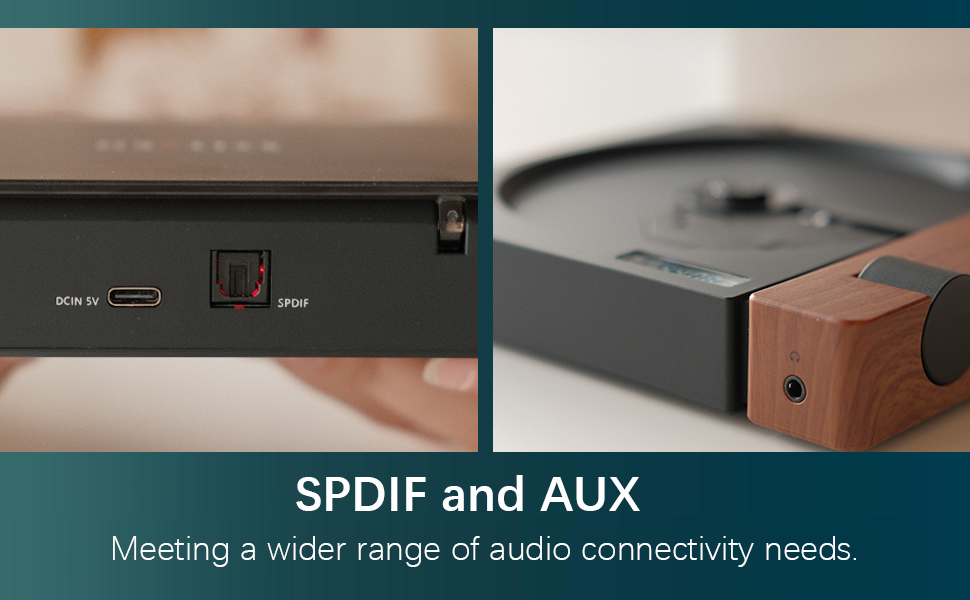
Figure 3: SPDIF and AUX Connectivity Options
4. Ntuziaka ọrụ
4.1 CD na-egwu egwu
- Meghee mkpuchi diski ahụ nwayọ.
- Place a CD onto the spindle, ensuring it is seated correctly.
- Mechie mkpuchi diski.
- Press the Play/Pause button (orange button) to begin playback.
- Use the Skip Forward and Skip Backward buttons to navigate between tracks.
- Gbanwee olu site na iji mkpịsị olu.

Figure 4: Opening the Disc Cover

Figure 5: Control Panel and Display
4.2 Na-achịkwaview
The R300 features a minimalist control panel on the right side of the unit:
- Ike mgba ọkụ: Located on the back/side of the unit (refer to Figure 2).
- Mpịakọta Mpịakọta: Rotates to adjust audio output level.
- Bọtịnụ Kwụsị/Kwụsị: Orange button to start or pause CD playback.
- Wụpụ bọtịnụ: Black buttons for skipping tracks forward or backward.
- Bluetooth Activation Button: (Likely one of the black buttons, or the top one, as shown in video) Used to initiate Bluetooth pairing.
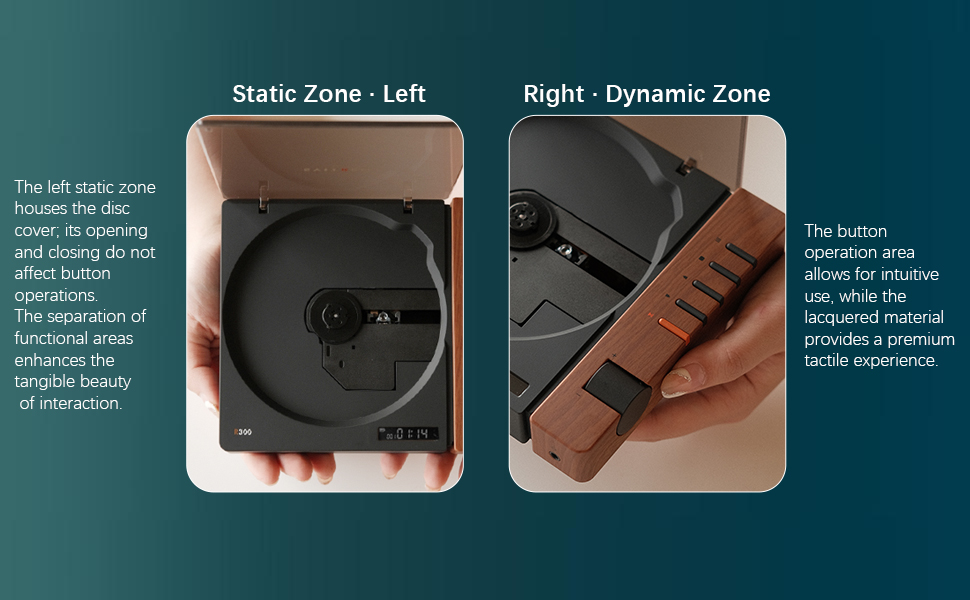
Figure 6: Functional Zones of the R300
5. Nlekọta
- Keep the unit clean by wiping it with a soft, dry cloth. Avoid abrasive cleaners or solvents.
- Ensure the disc tray is free of dust and debris to prevent playback issues.
- When not in use, store the CD player in a cool, dry place away from direct sunlight and extreme temperatures.
- Jikwaa CD n'akụkụ ha iji zere mkpịsị aka na ọkọ.
6. Nchọpụta nsogbu
| Nsogbu | Ihe nwere ike ime | Ngwọta |
|---|---|---|
| Onye ọkpụkpọ anaghị agba ọkụ. | Battery is depleted or power cable is not connected. | Charge the unit using the Type-C power cable. Ensure the power cable is securely connected. |
| "NO CD" message displayed. | No CD inserted, CD is dirty/scratched, or CD is not properly seated. | Insert a CD. Clean the CD with a soft cloth. Ensure the CD is placed correctly on the spindle. |
| Enweghị mmepụta ụda. | No external speaker connected, volume too low, or incorrect output mode selected. | Connect an external speaker via Bluetooth, SPDIF, or AUX. Increase the volume. Ensure the external device is properly configured for input. |
| Nsogbu njikọ Bluetooth. | Device not in pairing mode, out of range, or interference. | Ensure both devices are in pairing mode. Move devices closer. Reduce interference from other wireless devices. |
| Player randomly shuts off. | Batrị dị ala ma ọ bụ nsogbu dị n'ime. | Gbaa mbọ hụ na chajịrị batrị zuru oke. Ọ bụrụ na nsogbu ahụ ka dị, kpọtụrụ nkwado ndị ahịa. |
7. Nkọwapụta
- Aha nlereanya: R300
- Akara: syitren
- Akụkụ ngwaahịa: 6.38 x 5.79 x 1.28 sentimita asatọ
- Ibu ihe: 14.1 ounces
- Batrị: 1 batrị AAA achọrọ (gụnyere)
- Teknụzụ Njikọta: Bluetooth, SPDIF, AUX
- Njirimara Pụrụ Iche: Enwere ike ibugharị
- Onye nrụpụta: syitren/Guangdong Kaiping Electronics Co., Ltd
- Ike batrị: Built-in 2000mAh (more than 6 hours playback)
8. Akwụkwọ ikike na nkwado
For warranty information and customer support, please refer to the product's official Amazon listing page or visit the syitren official websaịtị. Debe nnata nzụta gị maka nkwupụta akwụkwọ ikike ọ bụla.
Onye nrụpụta: syitren/Guangdong Kaiping Electronics Co., Ltd
Ụlọ ahịa ika: Visit the syitren Store on Amazon


