1. Nhazi ntuziaka
1.1 Unboxing na akụrụngwa
Carefully unpack all items from the box. The package should contain the following:
- MagicMount Base Pro PD 3-in-1 Charging Stand
- Removable 5,000 mAh Power Bank
- Removable Apple Watch Holder (Note: Apple Watch charger sold separately)
- AC Adapter with 5 Ft. Cord
- Ihe nkwụnye MagicRing

Image: All components included in the Scosche MSQSPBWT package.
1.2 Assembling the Charging Stand
- Mepee Nkwụsi ike: Gently unfold the chrome arm of the charging stand to its upright position.
- Attach Apple Watch Holder: If you intend to charge an Apple Watch, insert your own Apple Watch charging puck into the removable Apple Watch holder. Then, slide the holder onto the designated arm of the stand. Ensure the charging cable is routed through the integrated cable management channel for a tidy setup.
- Insert Power Bank: Place the removable 5,000mAh power bank into its designated slot on the base of the charging stand. It will magnetically align.
- Njikọ Ike: Plug the provided AC adapter into a wall outlet and connect the other end to the charging station's power input port.
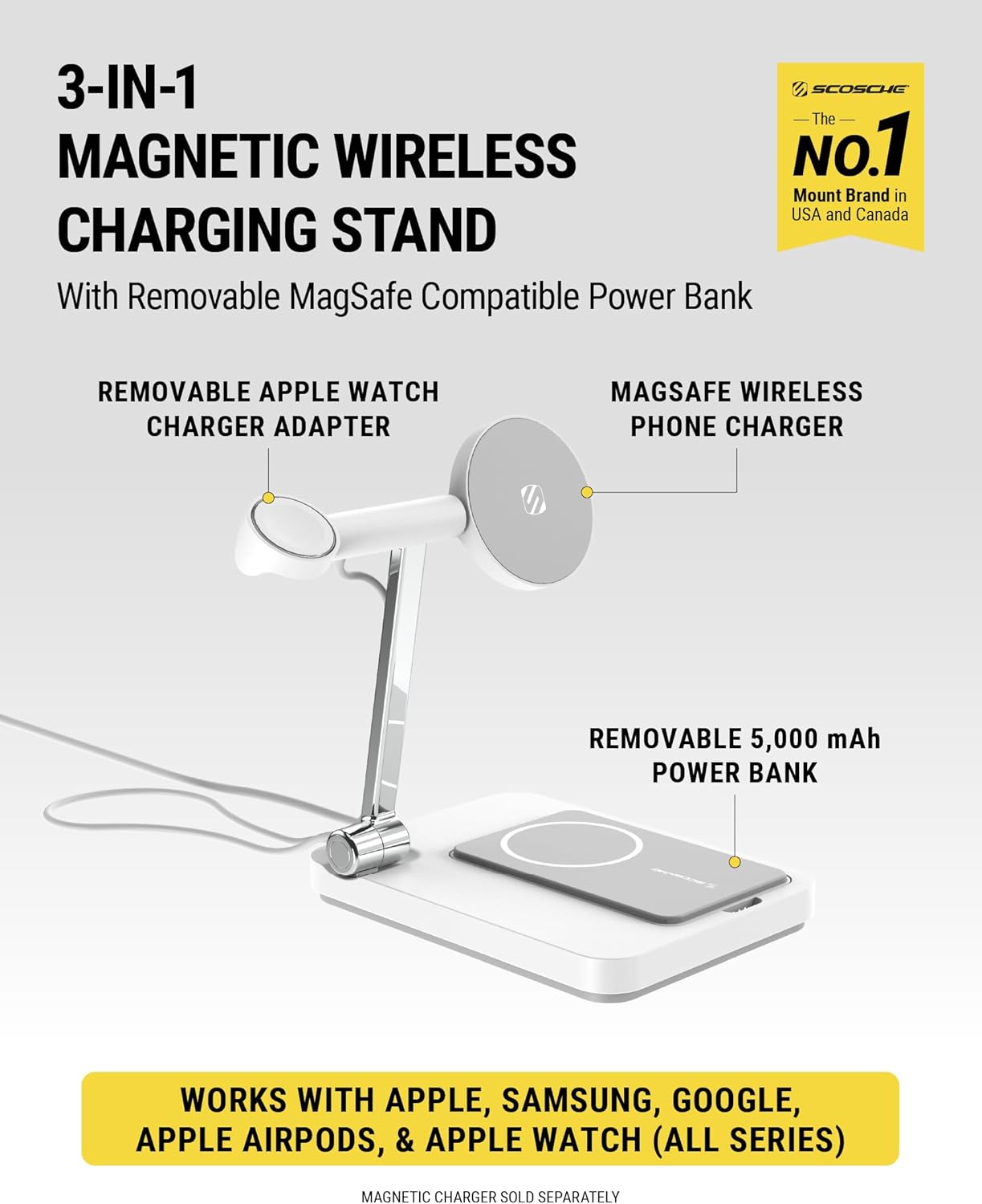
Image: Assembled charging station with an Apple Watch and iPhone in position.
1.3 Using the MagicRing Adapter (for non-MagSafe devices)
If your smartphone is not MagSafe compatible, you can use the included MagicRing Adapter to enable magnetic attachment and wireless charging.
- Elu dị ọcha: Use the provided cleaning wipe to thoroughly clean the back of your phone or phone case where the MagicRing will be applied. Ensure the surface is dry.
- Apply MagicRing: Peel off the adhesive backing from the MagicRing Adapter. Carefully center the ring on the back of your phone or case and press firmly to secure it.

Image: Illustration of applying the MagicRing Adapter to a non-MagSafe phone case.
2. Ntuziaka ọrụ
2.1 Ngwaọrụ Nchaji
- iPhone (MagSafe Compatible): Place your MagSafe-compatible iPhone (iPhone 12 series or newer, or phones with MagicRing Adapter) onto the magnetic charging pad on the stand's arm. The phone will magnetically snap into place and begin charging.
- AirPods Pro/3/2 or Second Qi-Enabled Smartphone: Place your AirPods charging case or a second Qi-enabled smartphone onto the wireless charging pad located on the base of the stand. Ensure proper alignment for charging to initiate.
- Apple Watch: Place your Apple Watch onto the charging puck inserted into the removable holder. (Your own Apple Watch charger is required and sold separately).

Image: Multiple devices charging simultaneously on the station.
2.2 Using the Removable Power Bank
The 5,000mAh power bank can be used independently for portable charging.
- Na-ekewapụ: Gently pull the power bank from its magnetic slot on the base.
- Nchaji ikuku (MagSafe): Attach your MagSafe-compatible iPhone directly to the power bank for on-the-go wireless charging.
- Nchaji USB-C: Use the USB-C port on the power bank to charge other Type-C devices like tablets or cameras.

Image: The removable power bank magnetically attached to an iPhone for portable charging.
2.3 Na-emezigharị Viewing Angles and Nightlight
- Ogwe aka nwere ike idozi: The chrome arm of the stand is foldable and adjustable, allowing you to set your iPhone at various viewing angles for optimal use in portrait or landscape mode.
- Ọkụ abalị LED: The base features an integrated LED nightlight. Touch the chrome arm to turn the nightlight on/off or to dim its brightness.

Image: The adjustable arm allows for multiple viewing angles, and the base features an LED nightlight.
3. Nlekọta
To ensure the longevity and optimal performance of your Scosche MSQSPBWT Wireless Charging Station, follow these maintenance guidelines:
- Nhicha: Use a soft, dry, lint-free cloth to clean the surface of the charging station. Avoid using abrasive cleaners, solvents, or aerosol sprays, which may damage the finish or internal components.
- Nchekwa: When not in use or for travel, fold the chrome arm flat and ensure the power bank is securely docked or removed. Store in a cool, dry place away from direct sunlight and extreme temperatures.
- Nlekọta USB: Avoid bending or crimping the power cable excessively. Always grasp the plug, not the cable, when disconnecting from the wall outlet or the charging station.
- Ọnọdụ gburugburu: Do not expose the device to water, moisture, or high humidity. Keep it away from heat sources.
4. Nchọpụta nsogbu
If you encounter issues with your charging station, refer to the following common solutions:
| Nsogbu | Ihe nwere ike ime | Ngwọta |
|---|---|---|
| Ngwaọrụ anaghị agbacha chaja na-enweghị eriri. | Improper alignment, foreign object, or non-compatible device/case. | Ensure device is centered on the charging pad. Remove any metal objects or thick cases. Verify device is Qi-enabled or using the MagicRing Adapter. |
| Nightlight is too bright or not responding. | Incorrect setting or touch sensor issue. | Double-tap and hold the chrome arm to dim the brightness. Tap once to turn on/off. Ensure the arm is clean and dry. |
| Removable power bank not charging. | Not properly seated in the base or power bank is fully charged. | Ensure the power bank is correctly docked and making contact with the charging pins. Check the indicator lights on the power bank. |
| Apple Watch anaghị akwụ ụgwọ. | Apple Watch charger not properly installed or faulty charger. | Verify your Apple Watch charging puck is correctly inserted into the holder and connected to the USB-C port. Ensure the Apple Watch is properly placed on its charger. |
5. Nkọwapụta
| Njirimara | Nkọwa |
|---|---|
| Nọmba nlereanya | MSQSPBWT-SP |
| Akụkụ ngwugwu | 13.31 x 6.97 x 2.44 sentimita asatọ |
| Ibu Ibu | 1.95 pound |
| Ụdị | Scosche |
| Ụdị njikọ | Onye nwe ya |
| Ngwa dakọtara | Smartphones (MagSafe compatible iPhone 12/13/14/15/16 series, Qi-enabled Smartphones, AirPods Pro/3/2, Apple Watch) |
| Ngwa gụnyere | MagicMount Base Pro PD 3-in-1 Charging Stand, Removable 5K mAh Power Bank, Removable Apple Watch Holder (Watch Charger Sold Separately), AC Adapter with 5 Ft. Cord, MagicRing Adapter |
| Njirimara Pụrụ Iche | Fast Charging, Magnetic, MagSafe Compatible, Wireless Charging, LED Nightlight |
| Agba | Ọcha |
| Ntinye Voltage | 12 volts |
| Mgbakọta ọdụ ụgbọ mmiri USB | 1 (USB-C) |
| Wireless Charging Wattage | 10W (MagSafe), 5W (AirPods/Qi pad) |
| Ike Bank Power | 5,000mAh |
| Power Bank USB-C Output | Ruo 15W |
6. Akwụkwọ ikike & Nkwado
6.1 Akwụkwọ ikike ngwaahịa
The Scosche MSQSPBWT Wireless Charging Station is backed by a Akwụkwọ ikike dị afọ 3 site na ụbọchị ịzụrụ. Akwụkwọ ikike a na-ekpuchi ntụpọ dị na ngwa na arụ ọrụ n'okpuru ojiji nkịtị.
6.2 Nkwado nka na ụzụ
For technical assistance, troubleshooting, or warranty claims, please contact Scosche customer support. Lifetime technical support is provided for this product.
- Websaịtị: Visit the official Scosche websaịtị maka akụrụngwa nkwado na ozi kọntaktị.
- Kpọtụrụ: Refer to the contact details provided in your product packaging or on the Scosche websaịtị.