Okwu mmalite
Thank you for choosing the Rohnson Genius 16 Dehumidifier. This appliance is designed to efficiently remove excess moisture from your indoor environment, improve air quality, and create a healthier living space. With its advanced features, including Wi-Fi control, a powerful dehumidification capacity of up to 16 liters per day, and an ultra-quiet operation, the Genius 16 is an ideal solution for rooms up to 100 square meters. Please read this manual thoroughly before operating the unit to ensure safe and optimal performance.
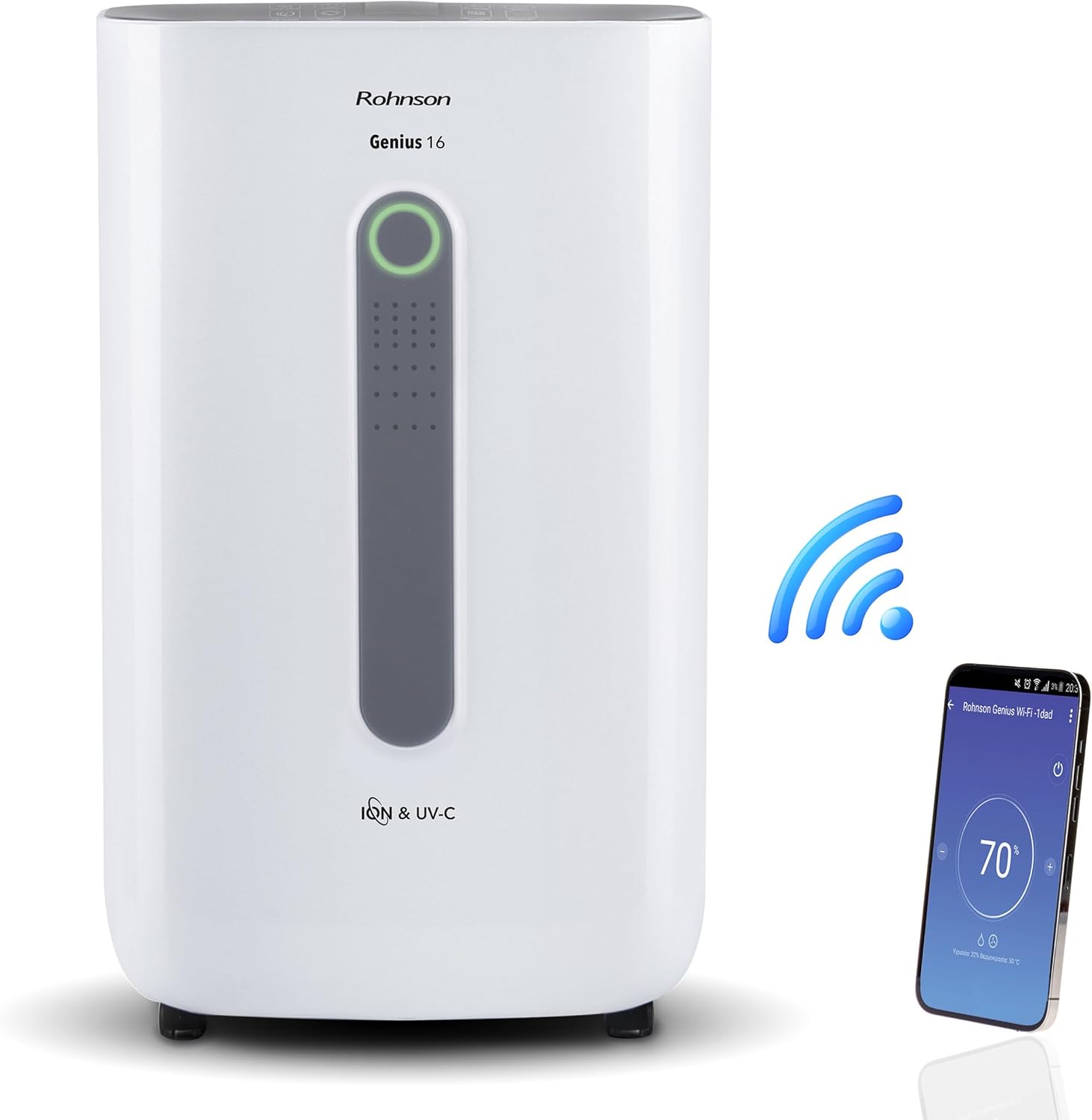
Image: The Rohnson Genius 16 Dehumidifier, a white rectangular unit with a central display, shown alongside a Wi-Fi symbol and a smartphone displaying the control app. This illustrates the unit's smart connectivity.
Ntuziaka nchekwa
Na-agbaso usoro nchekwa nchekwa mgbe niile mgbe ị na-eji ngwa eletriki iji belata ihe egwu nke ọkụ, ujo eletrik na mmerụ ahụ.
- Gbaa mbọ hụ na ọkọnọ ike dabara na voltage akọwapụtara na akara ọkwa nke otu ahụ.
- Ejila eriri ma ọ bụ plọg mebiri emebi rụọ ọrụ ahụ.
- Debe unit ahụ site na isi mmalite okpomọkụ na ìhè anyanwụ kpọmkwem.
- Akwụsịla ntinye ikuku ma ọ bụ ọnụ ụzọ.
- Kwupuo unit ahụ mgbe niile tupu ihicha ma ọ bụ rụọ ọrụ mmezi.
- Debe ebe ụmụaka na-apụghị iru.
Ngwaahịa gafereview
The Rohnson Genius 16 Dehumidifier is equipped with several features to enhance your indoor air quality and comfort.
- Mwepu ikuku nke ọma: Removes up to 16 liters of moisture per day, suitable for areas up to 100 m².
- Advanced Air Purification: Features UV-C light and a dual ionizer to eliminate bacteria and odors. An optional HEPA 13 + Activated Carbon filter can remove 99.7% of particles, smoke, chemicals, and allergens.
- Ọrụ Ultra-Quiet: Operates at a low noise level of 36 dB(A) in low fan mode, ideal for bedrooms and living areas.
- Njikwa smart: Wi-Fi enabled for remote control via the Rohnson App (Android and iOS compatible). Includes a touch control panel, 1-24 hour timer, and automatic restart after power failure.
- Nhazi Nchekwa Ike: Powerful yet energy-efficient with only 240W power consumption. Features a Turbo-Boost mode for fast clothes drying and automatic shut-off when the water tank is full.
- Digital Humidity Display: A color indicator (Blue, Green, Red) shows current humidity levels for easy monitoring.

Image: The Rohnson Genius 16 Dehumidifier positioned in a living room, illustrating its compact size. Key features are overlaid, including its 16L/day dehumidification capacity, anti-frost system, digital humidity display, smart Wi-Fi control, UV-C light and ionizer, silent 36dB operation, and 6.5L water tank.
Melite
1. Iwepu ngwongwo
Jiri nlezianya wepụ ihe mgbapụta na nkwakọ ngwaahịa ya. Lelee unit ahụ maka akara ọ bụla mebiri emebi. Jikwaa nkwakọ ngwaahịa maka nchekwa ma ọ bụ mbugharị n'ọdịnihu.
2. Ntinye
Place the dehumidifier on a firm, level surface in the area where dehumidification is desired. For optimal performance, ensure there is at least 20 cm (8 inches) of space around all sides of the unit to allow for proper airflow. The unit is effective for rooms up to 100 m². For best air circulation, consider placing it centrally within the room.

Image: A diagram illustrating the optimal placement of the dehumidifier in different household areas such as a laundry room, bedroom, living room, office, and basement, emphasizing central positioning for maximum effectiveness in rooms up to 100 m².
3. Njikọ ike
Plug the power cord into a grounded electrical outlet. Ensure the outlet meets the electrical requirements of the unit (230 Volts AC).
4. Filter Installation (Optional HEPA 13 + Activated Carbon Filter)
The Rohnson Genius 16 comes with an optional HEPA 13 + Activated Carbon filter for enhanced air purification.
- Locate the filter compartment, typically at the back or side of the unit.
- Mepee mkpuchi nzacha.
- Insert the HEPA 13 + Activated Carbon filter, ensuring it is correctly oriented.
- Mechie mkpuchi nzacha nke ọma.
5. Water Drainage Options
Ngwa ahụ na-enye usoro drainage abụọ:
- tank mmiri: The unit has a 6.5-liter water tank. When the tank is full, the unit will automatically shut off and an indicator will light up. Empty the tank and reinsert it to resume operation.
- Mgbapu mmiri na-aga n'ihu: For continuous operation without needing to empty the tank, connect a drainage hose (not included) to the continuous drainage port on the unit. Route the hose to a suitable drain or larger container.
Ntuziaka ọrụ
1. Ogwe njikwa
The Rohnson Genius 16 features an intuitive touch control panel and a digital display.
- Bọtịnụ ike: Gbanyụọ ma ọ bụ gbanyụọ unit ahụ.
- Nhọrọ ụdị: Cycle through different operating modes (e.g., Dehumidification, Turbo-Boost, Night Mode).
- Ọsọ onye ofufe: Adjust fan speed (low, medium, high).
- Ntọala iru mmiri: Set your desired humidity level. The unit will operate until this level is reached.
- Bọtịnụ ngụ oge: Set a timer for automatic shut-off (1-24 hours).
- UV-C/Ionizer Button: Activates or deactivates the UV-C light and dual ionizer.
- Ngosipụta Digital: Shows current humidity, temperature, and selected settings.

Image: A visual representation of the digital humidity control feature, showing the dehumidifier and its color-coded humidity indicators. Blue indicates humidity below 55%, Green for 55-70%, and Red for above 70%, providing an easy visual cue for air moisture levels.
2. Njikwa Ngwa Wi-Fi
Control your Rohnson Genius 16 from anywhere using the Rohnson App.
- Download the "Rohnson" app from the App Store (iOS) or Google Play Store (Android).
- Debanye aha akaụntụ wee banye.
- Follow the in-app instructions to add your Rohnson Genius 16 dehumidifier. This typically involves putting the unit into pairing mode and connecting it to your home Wi-Fi network.
- Once connected, you can remotely monitor humidity, adjust settings, set schedules (hourly, daily, weekly), and control all functions of the dehumidifier.

Image: A banner illustrating the smart connectivity of the dehumidifier, showing the unit and a smartphone displaying the Rohnson app. This highlights the ability to control the room climate remotely, schedule operations, and monitor humidity via a smartphone, compatible with both Android and iOS.
3. Ụdị Pụrụ Iche
- Turbo-Boost Mode (Laundry Drying): This mode provides a powerful airflow to quickly dry clothes indoors. Position the unit near the laundry for efficient drying.
- Ụdị abalị: Na-ebelata ọsọ fan ma na-ebelata ọkụ ngosi maka ọrụ dị jụụ n'oge ụra.

Image: The Rohnson Genius 16 Dehumidifier positioned in a room with a clothes drying rack, illustrating its effectiveness in drying laundry indoors, especially useful during rainy weather or in apartments without balconies.
Nlekọta
Regular maintenance ensures the longevity and efficient operation of your dehumidifier. Always unplug the unit before cleaning.
1. Na-ehicha Mpụga
Jiri nwayọ hichaa mpụta nke otu ahụ, damp akwa . Ejila kemịkalụ siri ike, abrasives, ma ọ bụ ihe mgbaze, n'ihi na ndị a nwere ike imebi elu.
2. Nchacha/Dochie ihe nzacha
The air filter should be cleaned regularly (e.g., every two weeks or as needed) to maintain optimal performance. If using the optional HEPA 13 + Activated Carbon filter, refer to its specific replacement schedule.
- Gbanyụọ ma kwụpụ ihe dehumidifier.
- Remove the filter cover and carefully take out the filter(s).
- For washable filters, rinse with lukewarm water and mild detergent. Allow to air dry completely before reinserting.
- For HEPA/Activated Carbon filters, these are typically not washable and should be replaced according to manufacturer recommendations or when visibly dirty.
- Reinsert the clean/new filter(s) and close the cover.
3. Na-ekpochapụ tank mmiri ahụ
When the water tank is full, the unit will stop operating.
- Gently pull out the water tank from the unit.
- Carefully empty the collected water.
- Clean the tank with mild soap and water if necessary, then rinse thoroughly.
- Reinsert the empty tank firmly into the unit until it clicks into place. The unit will resume operation.
Nchọpụta nsogbu
Tupu ị kpọtụrụ ndị ahịa, biko lee nsogbu na ngwọta ndị a na-ahụkarị.
| Nsogbu | Ihe nwere ike ime | Ngwọta |
|---|---|---|
| Unit anaghị agbanwuo. | No power, power cord loose, water tank full or not properly inserted. | Check power connection. Empty and reinsert water tank securely. |
| No water collected / Low dehumidification. | Room humidity too low, air filter clogged, temperature too low, unit size too small for room. | Check current humidity setting. Clean or replace air filter. Ensure room temperature is above 5°C (41°F). |
| Ngalaba na-eme mkpọtụ. | Otu abụghị n'elu larịị, ihe mgbochi, ihe nzacha ruru unyi. | Place unit on a flat, stable surface. Check for obstructions in fan area. Clean filter. |
| Nsogbu njikọ Wi-Fi. | Incorrect Wi-Fi password, unit too far from router, app not updated. | Ensure correct Wi-Fi password. Move unit closer to router. Update Rohnson App. Refer to app's troubleshooting guide. |
Nkọwapụta
| Njirimara | Nkọwa |
|---|---|
| Ụdị | Rohnson |
| Nọmba nlereanya | R-9916W |
| Dehumidification ikike | Up to 16 liters/day |
| Mpaghara ime ụlọ akwadoro | Ihe ruru 100 m² |
| Ike tank mmiri | 6.5 lita |
| Ọkwa mkpọtụ | 36 dB(A) (low fan mode) |
| Oriri ike | 240 W |
| Voltage | 230 volts (AC) |
| Akụkụ ngwaahịa (L x W x H) | 28 x 38 x 64 cm |
| Ibu Ibu | 16 kilogram |
| Atụmatụ pụrụ iche | Digital Display, Wi-Fi Control, UV-C Light, Dual Ionizer, Optional HEPA 13 Filter, Turbo-Boost Mode, Auto Shut-off, Auto Restart |
| Agba | Ọcha |
Akwụkwọ ikike na nkwado
For information regarding warranty coverage and customer support, please refer to the warranty card included with your product or visit the official Rohnson websaịtị. Debe nnata nzụta gị ka ihe akaebe nke ịzụrụ.
If you encounter issues not covered in this manual, please contact Rohnson customer service for assistance.


