Okwu mmalite
The Strich BT-FP2 is a wireless page turner pedal designed to enhance your musical performance or presentation by providing hands-free control over digital content. This device allows musicians, presenters, and other users to effortlessly navigate through sheet music, lyrics, chords, or presentation slides on their mobile phones, tablets, or computers via Bluetooth connectivity. By eliminating the need to use your hands for page turning, you can maintain focus on your instrument or presentation, ensuring a smooth and uninterrupted experience.
Melite
Ihe ngwugwu
Tupu ịmalite, biko hụ na ihe niile dị na ngwugwu:
- Strich BT-FP2 Wireless Page Turner Pedal
- Ịchaji eriri
Ịchaji ngwaọrụ
The BT-FP2 pedal features a built-in rechargeable Lithium-ion battery. For optimal performance, fully charge the device before its first use.
- Connect the provided charging cable to the charging port on the pedal.
- Connect the other end of the charging cable to a standard USB power adapter (not included) or a computer's USB port.
- Ọkụ ihe ngosi chaja ga-enwu. Ozugbo chajịchara ya nke ọma, ọkụ ahụ nwere ike ịgbanwe agba ma ọ bụ gbanyụọ, dabere na ụdị ya.
- A full charge provides up to 20 hours of continuous use.
Ijikọ na Ngwaọrụ gị
The Strich BT-FP2 uses Bluetooth for wireless connectivity with your mobile phone, tablet, or computer. It is compatible with both Apple iOS and Android platforms.
- Ensure the BT-FP2 pedal is charged and powered on. The power switch is typically located on the central unit.
- On your mobile device or computer, navigate to the Bluetooth settings.
- Kwado Bluetooth wee chọọ ngwaọrụ dị.
- Select "BT-FP2" from the list of discovered devices to initiate the pairing process.
- Once paired, the device's Bluetooth indicator light will confirm a successful connection. The operating range is up to 10 meters (33 feet).

Foto 1: N'ihu view of the Strich BT-FP2 pedal, showing the two foot pedals and the central control panel with various buttons and indicator lights. This view is useful for identifying the power switch and pairing buttons.
Ntuziaka ọrụ
Ọrụ ndị bụ isi
The BT-FP2 pedal features two foot pedals, allowing for intuitive control of your digital content.
- Pedal aka ekpe: Typically used for moving backward (e.g., previous page, previous slide).
- Pedal aka nri: Typically used for moving forward (e.g., next page, next slide).
- Ụdị bọtịnụ: The central control panel includes buttons to switch between different operating modes, which may emulate various keyboard commands (e.g., page up/down, left/right arrow keys). Refer to your application's settings for optimal configuration.
Ndakọrịta ngwa
The pedal is compatible with a wide range of applications that support external keyboard or Bluetooth input for navigation. Supported software includes, but is not limited to, GarageBand and CAKEWALK. For other applications, check their settings for options to assign keyboard shortcuts to page turning or navigation functions.

Foto 2: The Strich BT-FP2 pedal shown in a usage scenario, connected to a device via a red cable (likely for charging or wired connection, though primarily wireless). This image illustrates the pedal's compact design and how it might appear during use.

Foto 3: A nso-elu view of a foot pressing one of the pedals on the Strich BT-FP2. This demonstrates the hands-free operation and the ergonomic design for foot control, highlighting its practical application during a performance.
Nlekọta
Proper care and maintenance will extend the life of your Strich BT-FP2 pedal.
- Nhicha: Use a soft, dry cloth to clean the surface of the pedal. Avoid using abrasive cleaners or solvents, as they may damage the finish.
- Nchekwa: Debe pedal ahụ n'ebe dị jụụ ma kpọọ nkụ, ebe anwụ na-anaghị anwụ kpọmkwem na oke okpomọkụ dị oke njọ.
- Nlekọta batrị: To maintain battery health, avoid fully discharging the battery frequently. If storing for an extended period, charge the battery to approximately 50% every few months.
- Mkpughe mmiri: This device is not waterproof. Avoid exposure to liquids to prevent damage.
Nchọpụta nsogbu
If you encounter issues with your Strich BT-FP2 pedal, refer to the following common problems and solutions:
- Ngwaọrụ anaghị agbanye:
- Ensure the battery is charged. Connect the charging cable and allow it to charge for at least 30 minutes.
- Hụ na ihe mgba ọkụ eletrik dị n'ọnọdụ 'ON'.
- Enweghị ike ijikọ site na Bluetooth:
- Make sure the pedal is powered on and within the 10-meter range of your device.
- Turn off and on Bluetooth on your mobile device or computer.
- Forget the device from your Bluetooth settings and attempt to pair again.
- Ensure no other devices are actively connected to the pedal.
- Pedal not responding in application:
- Check if the pedal is successfully paired with your device.
- Verify the application settings to ensure it supports external input or keyboard shortcuts for navigation.
- Try switching the operating mode on the pedal using the central buttons to see if a different mode is compatible with your application.
- Restart the application and/or your mobile device.
- Ndụ batrị dị mkpụmkpụ:
- Gbaa mbọ hụ na chajịla ngwaọrụ ahụ nke ọma tupu ejiri ya.
- Battery life can vary based on usage and environmental conditions.
- If the issue persists, the battery may need replacement (contact support).
Nkọwapụta
Detailed technical specifications for the Strich BT-FP2 Wireless Page Turner Pedal:
| Njirimara | Nkọwa |
|---|---|
| Nọmba nlereanya | BT-FP2 |
| Teknụzụ Njikọta | Bluetooth |
| Ngwa dakọtara | PC, Laptọọpụ, Smartphone, Mbadamba ụrọ |
| Ngwanrọ akwadoro | GarageBand, CAKEWALK (and others supporting keyboard input) |
| Number of Keys/Pedals | 2 |
| Ụdị batrị | 1 Lithium-ion (gụnyere) |
| Ndụ batrị | Ruo awa iri abụọ |
| Ikuku iche | Ruo mita 10 |
| Ibu Ibu | 420 g |
| Akụkụ ngwugwu | 21.3 x 19.2 x 4.2 cm |
| Njirimara Pụrụ Iche | Compact, Portable |
| Onye nrụpụta | Strich |
| Mba onye si | China |
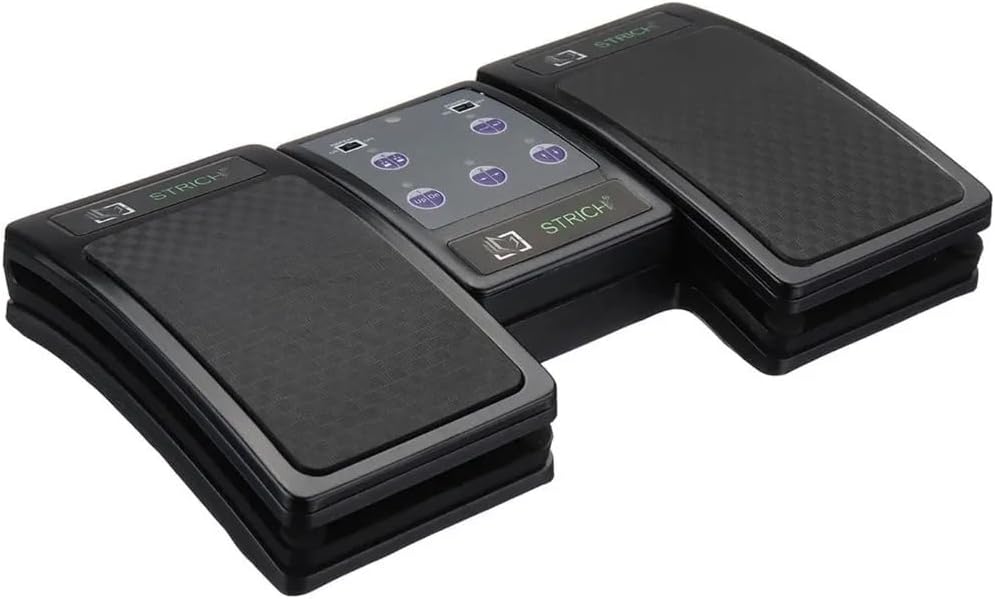
Foto 4: An angled top-down view of the Strich BT-FP2 pedal, showcasing its overall design and footprint. This image provides a comprehensive look at the product's physical characteristics.
Akwụkwọ ikike na nkwado
For warranty information or technical support, please refer to the documentation provided with your purchase or contact the retailer/manufacturer directly. Keep your proof of purchase for any warranty claims.


