Okwu mmalite
Daalụ maka ịzụrụasing the Baseus S-09 Pro Series Car FM Transmitter. This device allows you to stream audio from your smartphone or other devices to your car's FM radio, and also provides fast charging capabilities. Please read this manual carefully before use to ensure proper operation and to maximize the product's lifespan.
Ngwaahịa gafereview
The Baseus S-09 Pro Series Car FM Transmitter is designed to enhance your in-car audio experience and provide convenient charging. Key features include:
- FM Transmitter Functionality: Broadcasts audio to your car's FM radio.
- Njikọ Bluetooth 5.3: For stable wireless audio streaming from compatible devices.
- Flash Drive Playback: Supports audio playback directly from a flash drive (up to 512GB).
- Nchaji ngwa ngwa: Equipped with a USB-C port supporting PD 18W (Max) fast charging.
- Dual-Mic System: Provides premium sound quality and clear calls.
- Large LED Screen with Dual Display: Shows frequency band and battery voltage alternately.
- Triple Charging Ports: Offers multiple charging options.
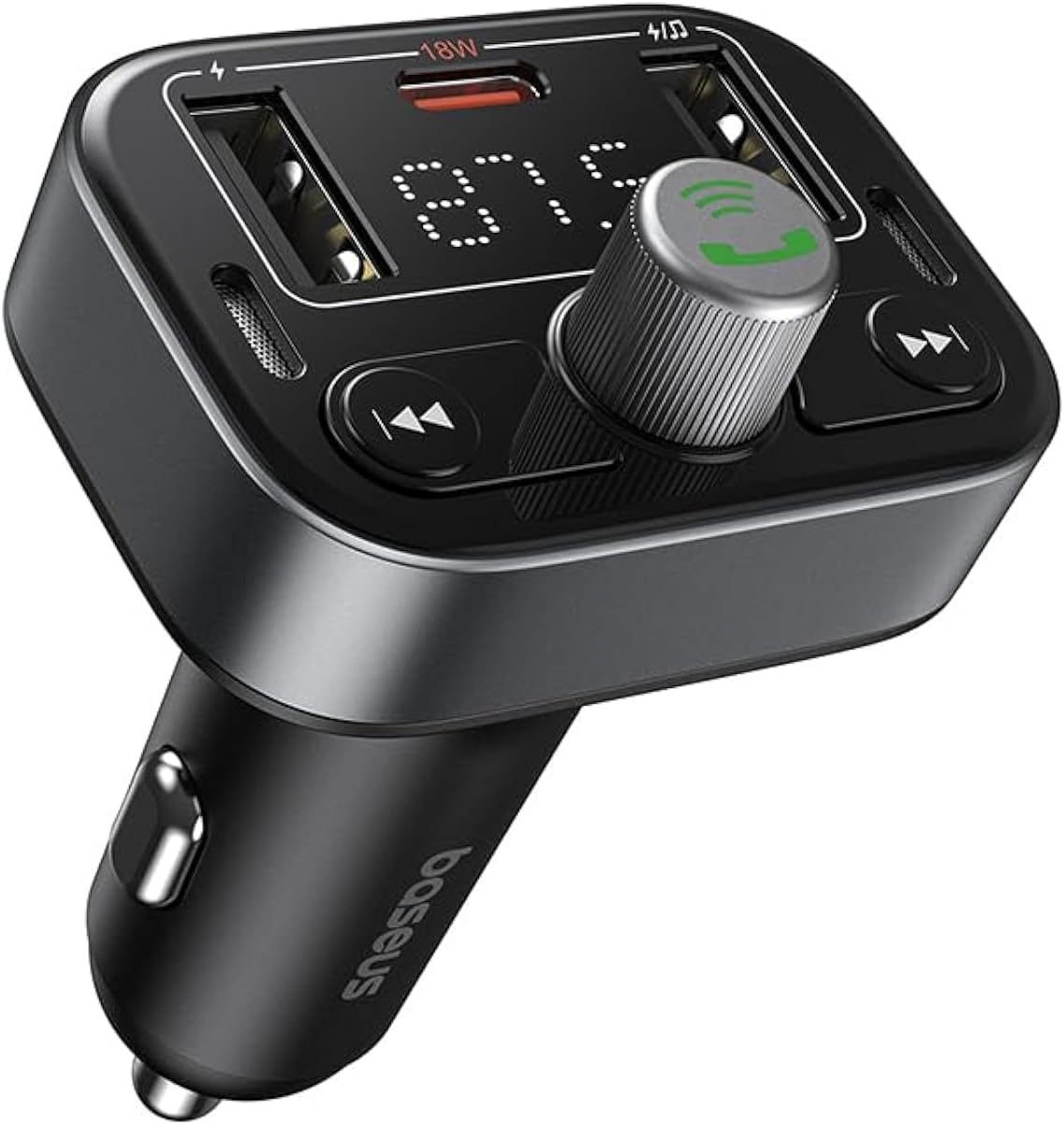
Foto 1: N'ihu view of the Baseus S-09 Pro Series Car FM Transmitter, showing the display, control knob, and USB ports.
Ihe ngwugwu
Biko lelee ngwungwu maka ihe ndị a:
- Baseus S-09 Pro Series Car FM Transmitter
- Akwụkwọ ntuziaka (akwụkwọ a)

Figure 2: The Baseus S-09 Pro Series Car FM Transmitter shown in its retail packaging.
Melite
- Insert into Car Cigarette Lighter Socket: Plug the Baseus S-09 Pro Series Car FM Transmitter firmly into your car's 12V/24V cigarette lighter socket. The device will power on automatically, and the LED display will light up.
- Tune FM Frequency:
- On the FM Transmitter, press and hold the multi-function knob (the large central knob) until the FM frequency on the LED display starts flashing.
- Rotate the multi-function knob left or right to adjust the frequency. Choose an empty FM frequency (one with no radio station broadcasting) to minimize interference.
- On your car's FM radio, tune to the exact same empty frequency you selected on the transmitter.
- Once matched, the transmitter is ready to broadcast audio to your car stereo.
- Njikọ Bluetooth:
- After the device powers on, it will automatically enter Bluetooth pairing mode. The Bluetooth icon on the display may flash.
- On your smartphone or Bluetooth-enabled device, open the Bluetooth settings and search for available devices.
- Select "Baseus S-09 Pro" (or similar name) from the list to connect. Once connected, the Bluetooth icon on the transmitter's display will stop flashing and remain solid.

Figure 3: Illustration showing connection options: via flash drive and Bluetooth 5.3 pairing with a smartphone.
Ntuziaka ọrụ
Ngwugharị ọdịyo
- Bluetooth Audio: Once paired, play music or audio from your smartphone. The audio will be transmitted to your car's FM radio.
- Flash Drive Audio: Insert a USB flash drive (up to 512GB, formatted to FAT32) containing MP3 audio files into the designated USB port on the transmitter. The device will automatically detect and play the audio files.
- bọtịnụ njikwa:
- Mkpọchi ọtụtụ ọrụ: Rotate to adjust volume. Press once to play/pause.
- Bọtịnụ Egwu Gara Aga (◀◀): Pịa ka ịga na egwu gara aga.
- Bọtịnụ Egwu Na-esote (▶▶): Pịa ka ịga na egwu na-esote.
Ịkpọ oku na-enweghị aka
- Azịza/Kwụsị Oku: Press the multi-function knob once to answer an incoming call or end an ongoing call.
- Jụ oku: Press and hold the multi-function knob for 2 seconds to reject an incoming call.
- Nọmba Ikpeazụ emegharịgharịrị: Double-press the multi-function knob to redial the last dialed number.
- Switch Call to Phone: During a call, press and hold the multi-function knob for 2 seconds to switch the call between the transmitter and your phone.

Figure 4: The device highlighting its dual-mic system for premium sound quality during calls and music playback.
Ngwa ịchaji
- The transmitter features multiple USB ports for charging your devices.
- Ọdụ USB-C: Supports Power Delivery (PD) 18W (Max) fast charging. Use a compatible USB-C to USB-C or USB-C to Lightning cable for fast charging supported devices.
- Ọdụ ụgbọ mmiri USB-A: Provide standard charging for various devices.

Figure 5: The transmitter connected via its USB-C port to an iPhone for fast charging.
Gosipụta Ozi
- The large LED screen alternately displays the current FM frequency and the car battery voltage.
- Ugboro FM: Indicates the frequency the transmitter is broadcasting on.
- Batrị Voltage: Na-egosi ezigbo oge voltage of your car's battery, allowing you to monitor its health.

Figure 6: The LED screen displaying both the FM frequency (87.5) and the car battery voltagE (12.5V).
Nlekọta
- Keep the device dry. Do not expose it to moisture or extreme temperatures.
- Jiri akwa dị nro hichaa ngwaọrụ ahụ. Ejila kemịkalụ siri ike ma ọ bụ ihe mkpocha abrasive.
- Zere idobe ma ọ bụ idobe ngwaọrụ ahụ na mmetụta siri ike.
- Chekwaa n'ebe dị jụụ, kpọrọ nkụ mgbe ọ naghị eji ya.
Nchọpụta nsogbu
| Nsogbu | Ihe nwere ike ime | Ngwọta |
|---|---|---|
| Enweghị ike/Ngosipụta | Not properly inserted into cigarette lighter; Car socket fuse blown. | Ensure firm connection. Check car's fuse box. |
| Ọdịda Static/Na-adịghị mma | FM frequency interference; Volume too low. | Change to a different, empty FM frequency. Increase volume on both transmitter and car stereo. |
| Enweghị ike ijikọ Bluetooth | Device not in pairing mode; Bluetooth disabled on phone. | Ensure transmitter is in pairing mode. Enable Bluetooth on your phone and search again. |
| Nchaji ngwa ngwa anaghị arụ ọrụ | Cable not compatible; Device does not support fast charging. | Use a certified fast-charging cable. Ensure your device supports PD 18W. |
Nkọwapụta
- Aha nlereanya: S-09 Pro Series
- Nọmba nlereanya: C10762200113-00
- Ngwa ngwa ngwa: Bluetooth
- Ngwa dakọtara: Car Stereo System, Smartphone, Tablet
- Atụmatụ pụrụ iche: Mbufe FM
- Ntinye odiyo: 3.5mm AUX
- Ụkpụrụ mmepụta ụda: Stereo
- Ụdị mmepụta ọdịyo: FM redio, Bluetooth
- Voltage: 12 volts (DC)
- Isi mmalite ike: Igwe ọkụ eletrik
- Ụdị ikuku: Bluetooth
- Ụdị Bluetooth: 5.3
- Media Type Supported: MP3 (from flash drive)
- Akụkụ ngwugwu: 17 x 11.6 x 3.9 cm
- Ibu ihe: 80 grams
- Agba: Nwa
Akwụkwọ ikike na nkwado
Baseus products typically come with a standard manufacturer's warranty. Please refer to the warranty card included in your product packaging or visit the official Baseus websaịtị maka nkọwa na usoro akwụkwọ ikike.
For technical support, troubleshooting assistance, or warranty claims, please contact Baseus customer service through their official channels or the retailer from whom you purchased the product.
Ị nwere ike ịchọta ozi na nkwado na Ụlọ Ahịa Baseus dị na Amazon.


