1. Okwu mmalite
This manual provides essential information for the safe and efficient operation of your Amazon Basics 4-Bay Ni-MH Battery Charger. Please read these instructions thoroughly before use and retain for future reference.
2. Ngwaahịa gafereview
The Amazon Basics 4-Bay Battery Charger is designed for Ni-MH rechargeable batteries, supporting both AA and AAA sizes. It includes four AA 2000mAh rechargeable batteries.
Akụkụ ndị bụ isi:
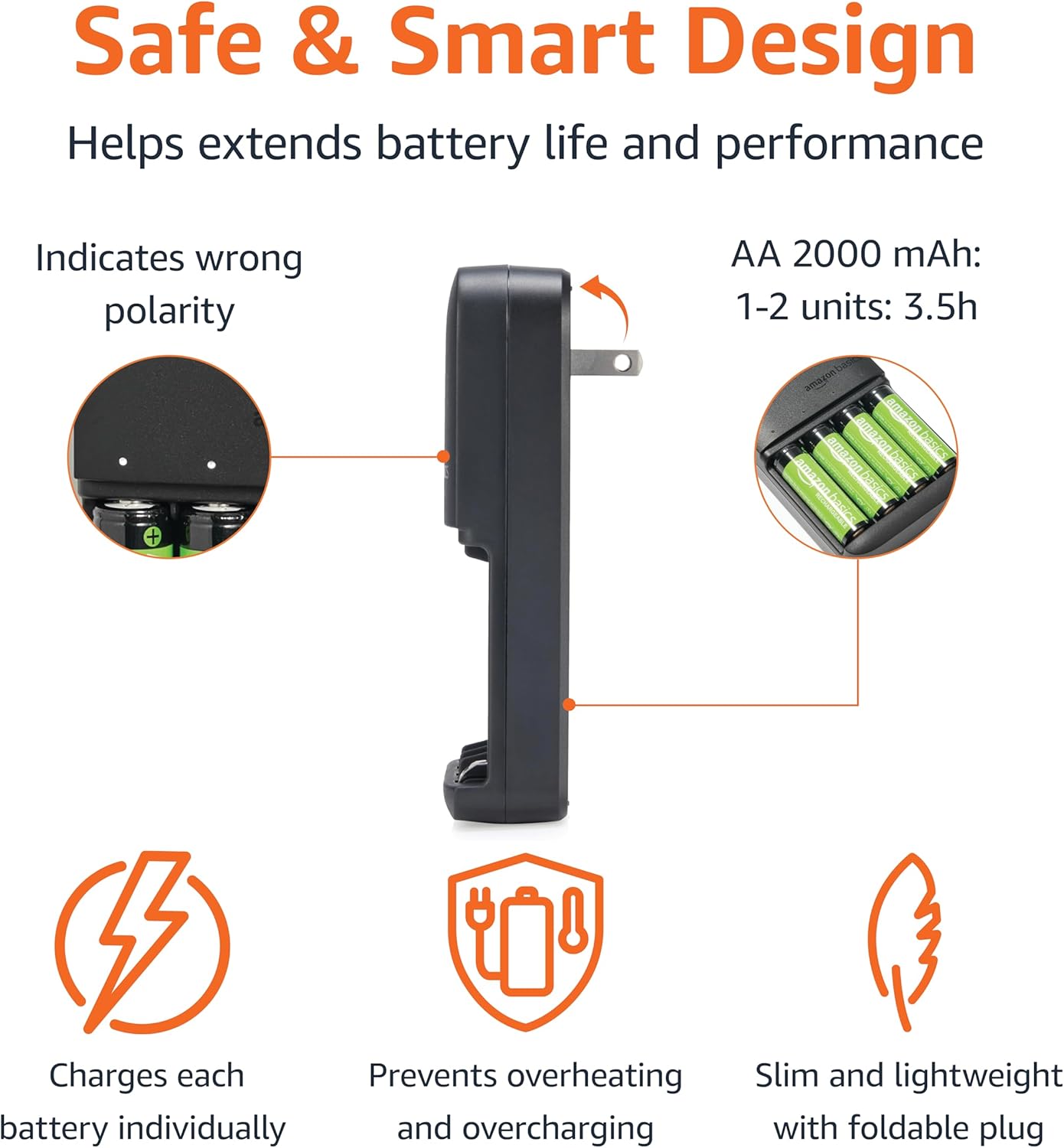
- 4-Bay Design: Charges up to four AA or AAA Ni-MH batteries simultaneously.
- Ihe ngosi ọkụ LED: Provides clear status updates for each charging bay.
- Nchaji ọgụgụ isi: Features battery detection technology to prevent wrong polarity, overheating, and overcharging. Switches to trickle charge when batteries are full.
- Fast-Charging: Capable of fully charging 2 AA batteries within 3.5 hours, 4 AA within 7 hours; 2 AAA within 2 hours, and 4 AAA within 4 hours.
- Njem enyi na enyi: Slim, lightweight design with a foldable Type A (American) plug.

3. Ozi nchekwa
- Use only Ni-MH specific chargers with independent charging channels and voltage nleba anya.
- Avoid timer-only chargers.
- Never use chargers designed for other battery types (e.g., NiZn or Li-ion), as this may cause damage or leakage.
- Verify device compatibility with 1.2V Ni-MH batteries.
- Ni-MH batteries are slightly larger than alkaline batteries; ensure proper fit.
- Replace all batteries simultaneously in a device for optimal performance.
- Consult the device manual for specific battery requirements.
- Do not expose the charger or batteries to extreme temperatures or moisture.
4. Nhazi
The Amazon Basics 4-Bay Battery Charger is designed for plug-and-play convenience. No complex setup is required.
- Ensure the charger's foldable plug is extended.
- Plug the charger directly into a standard Type A (American) wall outlet.

5. Ntuziaka ọrụ
Ịtinye batrị:
Insert 1 to 4 AA or AAA Ni-MH rechargeable batteries into the charging bays, ensuring correct polarity (+/-) as indicated on the charger and batteries.
Ntuziaka ihe ngosi LED:
The charger features individual LED indicators for each battery bay to communicate charging status.
| Ọnọdụ | Nkọwa |
|---|---|
| Power on and quick diagnosis: | When connected to the power supply, all 4 LEDs will light up sequentially, followed by a single simultaneous flash. This occurs regardless of whether a battery is inserted or not. |
| Charging (Slow blinking): | Slow blinking (one flash per second) indicates the battery in the port is charging. |
| Battery charged (Solid white): | Solid white (no blinking) indicates the battery in the port is fully charged. To prevent overcharging, the charger will automatically switch to a protection mode after a set period, during which the LED indicator stays on without any change. |
| Errors (Fast blinking): | Fast blinking (two flashes per second) indicates a damaged battery or a non-rechargeable alkaline battery is in the port. Immediately remove the battery or unplug the charger. This fast blinking can also occur with old rechargeable batteries after hundreds of charge cycles over several years, especially if the battery voltage exceeds 1.5V after charging. |

Official Product Video: How to Use
Video 1: This official video from Amazon Product Imaging demonstrates the basic operation and usage of the Amazon Basics 4-Bay Battery Charger, including inserting batteries and understanding LED indicators.
6. Oge Njikere
- 1-2 AA Ni-MH batteries (2000 mAh): Ebubo zuru ezu n'ime awa 3.5.
- 3-4 AA Ni-MH batteries (2000 mAh): Ebubo zuru ezu n'ime awa 7.
- 1-2 AAA Ni-MH batteries (800 mAh): Ebubo zuru ezu n'ime awa 2.
- 3-4 AAA Ni-MH batteries (800 mAh): Ebubo zuru ezu n'ime awa 4.

7. Battery Tips (Ni-MH)
- Verify device compatibility with 1.2V Ni-MH batteries.
- Runtime may be shorter than 1.5V alkaline batteries in some devices.
- Ni-MH batteries are slightly larger than alkaline batteries; check for proper fit to comply with IEC standards.
- Replace all batteries simultaneously in a device for consistent performance.
- Consult the device manual for specific battery requirements.
- Pre-charged and ready-to-use rechargeable batteries can be recharged up to 1000 times.
- Batteries maintain 80% capacity for up to 12 months due to low self-discharge.
8. Charger Tips
- Use only Ni-MH specific chargers.
- Ensure the charger has independent charging channels and voltage monitoring to prevent overcharging or undercharging.
- Avoid chargers that rely solely on timers.
- Never use chargers designed for other battery chemistries (e.g., NiZn or Li-ion) as this can cause damage or leakage.
9. Nlekọta
To ensure the longevity and optimal performance of your charger and batteries:
- Keep the charger and batteries clean and dry.
- Avoid exposing them to direct sunlight, high temperatures, or humid environments.
- Chekwaa batrị n'ebe dị jụụ, kpọrọ nkụ mgbe anaghị eji ya.
- Periodically inspect the charger and batteries for any signs of damage or leakage.
10. Nchọpụta nsogbu
LED is fast blinking:
This indicates an error. Possible causes include:
- A defective or damaged battery.
- A non-rechargeable alkaline battery inserted.
- An old rechargeable battery that has exceeded its useful life or has a voltage exceeding 1.5V after charging.
Omume: Immediately remove the problematic battery or unplug the charger. Replace defective batteries with new Ni-MH rechargeable ones.
11. Nkọwapụta
| Njirimara | Nkọwa |
|---|---|
| Akụkụ ngwaahịa | 1.08 x 2.71 x 4.82 sentimita asatọ |
| Ibu Ibu | 3.52 ounces (0.1 Kilogram) |
| Nọmba nlereanya | HFR-AA2000-HPTCH0033 |
| Ụdị | Amazon Basics |
| Agba | Nwa |
| Mmepụta Voltage | 1.2 volts |
| Ntinye Voltage | 120 volts |
| Ụbọchị mbụ dị | Ọgọst 6, 2024 |
12. Akwụkwọ ikike na nkwado
For warranty information and customer support, please refer to the documentation included with your product or visit the official Amazon Basics websaịtị. Debe akwụkwọ nnata ịzụrụ maka akwụkwọ ikike.


