Okwu mmalite
This manual provides essential instructions for the safe and efficient operation of your JVC 40W Portable Party Speaker, Model XS-N5223PB. Please read this manual thoroughly before using the device and retain it for future reference.
The JVC 40W Portable Party Speaker features integrated Bluetooth technology for wireless audio streaming, a built-in USB port for multimedia file playback (MP3, picture, video), TF card support, Karaoke function, and an LED light show. It delivers 40W output through two 8-inch speakers and is powered by a 4000mAh battery.
Ozi nchekwa dị mkpa
- Do not expose the speaker to water or excessive moisture.
- Zere itinye igwe okwu n'akụkụ ebe okpomọkụ ma ọ bụ n'anwụ kpọmkwem.
- Do not attempt to disassemble or modify the speaker. Refer all servicing to qualified personnel.
- Jiri naanị nkwụnye nchaji akọwapụtara.
- Debe ebe ụmụaka na-apụghị iru.
- Gbaa mbọ hụ na ikuku ikuku dị mma na gburugburu ọkà okwu mgbe ọ na-arụ ọrụ.
Ihe ngwugwu
Biko lelee ma ihe niile dị na ngwugwu ahụ:
- 1 x JVC 40W Portable Party Speaker (Model XS-N5223PB)
- 1 x eriri nchaji
- Akwụkwọ ntuziaka onye ọrụ 1 x (akwụkwọ a)
Ngwaahịa gafereview
Familiarize yourself with the main components and controls of your JVC Portable Party Speaker.
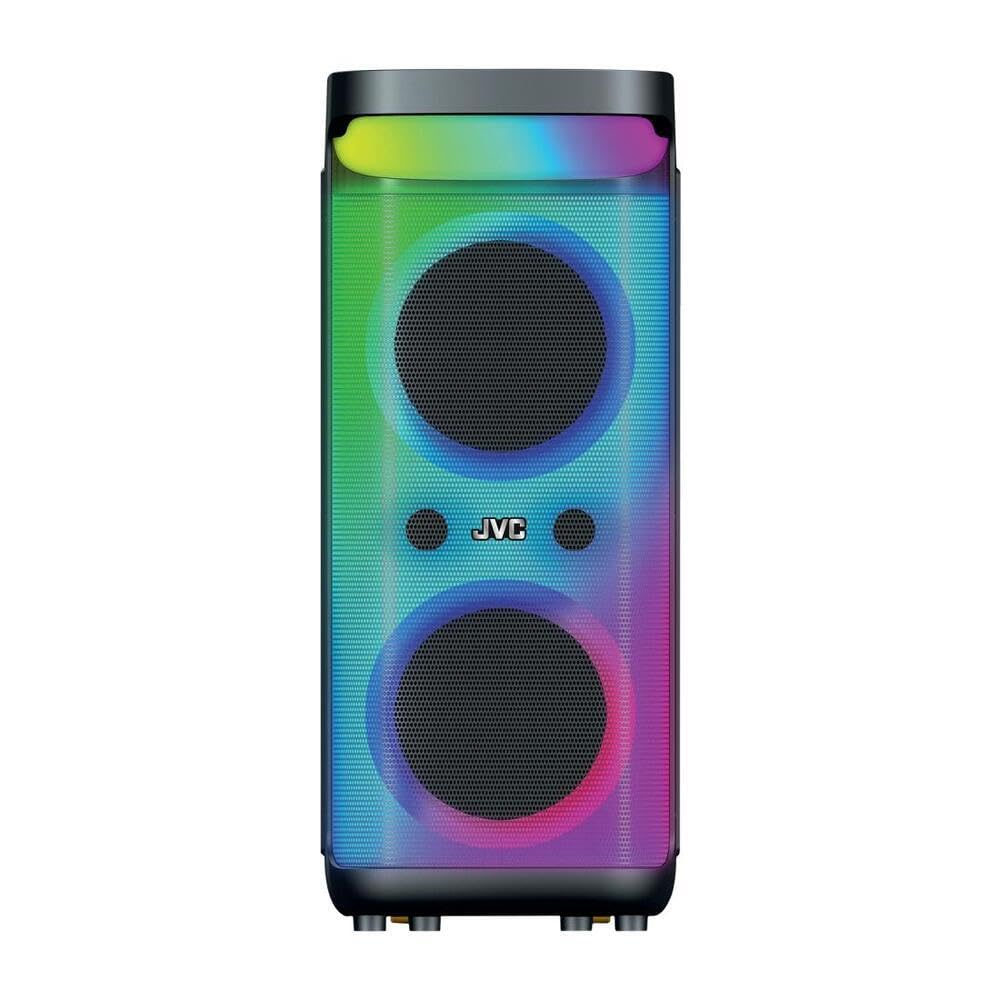
Foto nke 1: Ihu na elu view of the JVC 40W Portable Party Speaker, showing the control panel, LED lights, and speaker grille.

Foto nke 2: Zuru ezu view of the speaker's top control panel, highlighting buttons for mode selection, volume, playback, and input ports.
Ọrụ Panel Control:
- Bọtịnụ ike: Na-agbanyụ/gbanyụọ ọkà okwu.
- Bọtịnụ ụkpụrụ: Switches between Bluetooth, USB, TF Card, and AUX input modes.
- Nkpọ olu: Adjusts master volume and microphone volume (if applicable).
- Bọtịnụ Kwụsị/Kwụsị: Na -ejikwa ọkpụkpọ mgbasa ozi.
- Bọtịnụ egwu gara aga/ na-esote: Na-agagharị n'ime egwu.
- Bọtịnụ ọkụ ọkụ LED: Toggles or changes LED light show patterns.
- Ọdụ ụgbọ mmiri USB: For USB drive playback of MP3, picture, and video files.
- Oghere TF Kaadị: For TF (MicroSD) card playback of MP3, picture, and video files.
- Ntinye AUX: Maka ijikọ ngwaọrụ ọdịyo mpụga site na eriri 3.5mm.
- Ntinye igweokwu: For karaoke function.
Melite
Ịchaji Ọkà Okwu
- Connect the charging cable to the speaker's charging port.
- Plug the other end of the charging cable into a suitable power adapter (9 Volts input) and then into a wall outlet.
- The charging indicator light will illuminate, typically red, during charging. It will change color or turn off when fully charged.
- For first use, fully charge the speaker for approximately 4-6 hours.
Ntinye mbu
Place the speaker on a stable, flat surface. Ensure there is adequate space around the speaker for optimal sound dispersion and ventilation. The speaker is designed for floorstanding placement.
Ntuziaka ọrụ
Gbanyụọ/ Gbanyụọ
- To turn on: Press and hold the Power button until the display illuminates.
- To turn off: Press and hold the Power button again until the display turns off.
Njikọ Bluetooth
- Turn on the speaker. It will automatically enter Bluetooth pairing mode, indicated by a flashing "BLUE" on the display or an audible prompt.
- Na ngwaọrụ mkpanaaka gị (smartphone, tabletị, wdg), gbanye Bluetooth wee chọọ ngwaọrụ dịnụ.
- Select "JVC XS-N5223PB" (or similar name) from the list of devices.
- Once paired, the speaker will confirm the connection with an audible sound, and "BLUE" on the display will stop flashing.
- Ugbu a, ị nwere ike ịgbasa ọdịyo site na ngwaọrụ gị gaa na ọkà okwu na-enweghị eriri.
USB/TF Kaadị playback
- Insert a USB flash drive or TF (MicroSD) card into the respective port/slot on the speaker.
- The speaker will automatically switch to USB or TF card mode and begin playing supported audio, picture, or video files. If it does not switch automatically, press the Mode button to select the correct input.
- Jiri bọtịnụ Play/Pause na Previous/Next Track iji chịkwaa ọkpụkpọ egwu.
Ntinye aka AUX
- Jikọọ otu njedebe nke eriri ọdịyo 3.5mm (anaghị etinye ya) na ọdụ ụgbọ mmiri AUX dị na ọkà okwu.
- Jikọọ nsọtụ nke ọzọ nke eriri ahụ na jakị mmepụta ọdịyo nke ngwaọrụ mpụga gị (dịka ọmụmaatụ, ọkpụkpọ MP3, laptọọpụ).
- Press the Mode button on the speaker until "AUX" mode is selected.
- Jikwaa ọkpụkpọ egwu na olu site na ngwaọrụ mpụga gị.
Ọrụ Karaoke
- Connect a microphone (not included) to the Microphone Input port.
- Hazie olu igwe okwu site na iji bọtịnụ raara onwe ya nye na panel njikwa.
- Play music via Bluetooth, USB, TF card, or AUX, and sing along.
Ihe ngosi ọkụ ọkụ LED
Press the LED Light button to cycle through different light patterns or to turn the LED lights on/off.
Ezi ọrụ stereo ikuku ikuku (TWS).
The TWS function allows you to pair two JVC XS-N5223PB speakers together for a stereo sound experience.
- Gbaa mbọ hụ na agbanyere igwe okwu abụọ ahụ yana na ọnọdụ Bluetooth, mana ejikọtaghị ya na ngwaọrụ ọ bụla.
- On one speaker (this will be the primary speaker), press and hold the TWS button (refer to your speaker's specific button layout if not explicitly labeled).
- Onye isi okwu ga-achọ ọkà okwu nke abụọ. Ozugbo ejikọrọ, ọkà okwu abụọ ahụ ga-ewepụta ụda nkwenye.
- Now, connect your mobile device to the primary speaker via Bluetooth as described above. Audio will play through both speakers in stereo.
Nlekọta
- Nhicha: Jiri akwa dị nro dị nro hichaa mpụta nke ọkà okwu. Ejila ihe na-ehicha mmiri mmiri ma ọ bụ ihe abrasive.
- Nchekwa: When not in use for extended periods, store the speaker in a cool, dry place. It is recommended to charge the battery every 3-6 months to maintain its lifespan.
- Nlekọta batrị: Avoid fully discharging the battery frequently. Charge the speaker when the low battery indicator appears.
Nchọpụta nsogbu
| Nsogbu | Ihe nwere ike ime | Ngwọta |
|---|---|---|
| Ọkà okwu anaghị agba ọkụ. | Agbanyụrụ batrị. | Connect the speaker to a power source and charge it. |
| Enweghị ụda. | Volume is too low; incorrect input mode; device not connected. | Increase volume on speaker and connected device. Ensure correct input mode is selected. Reconnect Bluetooth or check cable connections. |
| Njikọ Bluetooth ada ada. | Ọkà okwu adịghị n'ụdị njikọta; ngwaọrụ dị oke anya; nnyonye anya. | Ensure speaker is in Bluetooth pairing mode. Move device closer to speaker. Avoid strong electromagnetic interference. Try restarting both devices. |
| Kaadị USB/TF adịghị egwu. | Enweghị nkwado file usoro; e tinyeghị kaadị/draịva nke ọma; mebiri emebi files. | Gbaa mbọ hụ files are in supported formats (e.g., MP3). Reinsert the USB drive/TF card. Try with a different USB drive/TF card or different files. |
| Ọkụ LED anaghị arụ ọrụ. | LED lights are turned off. | Press the LED Light button to turn them on or change patterns. |
Nkọwapụta
| Nọmba nlereanya | XS-N5223PB |
| Ike mmepụta | 40W |
| Nha Ọkà Okwu | 8-anụ ọhịa x 2 |
| Njikọta | Bluetooth, USB, TF Card, AUX |
| Ike batrị | 4000mAh |
| Ntinye Voltage | 9 volts |
| Akụkụ (D x W x H) | 33 cm x 28.5 cm x 66 cm |
| Ihe onwunwe | Plastic |
| Ụdị nkwụnye | Ikwado ala |
| Atụmatụ ndị ọzọ | TWS Function, Karaoke, LED Light Show |
Ozi akwụkwọ ikike
This JVC Portable Party Speaker (Model XS-N5223PB) comes with a Akwụkwọ ikike nke Onye nrụpụta afọ 1 site na ụbọchị ịzụrụ. Akwụkwọ ikike a na-ekpuchi ntụpọ n'ichepụta ihe na arụ ọrụ n'okpuru ojiji nkịtị.
Akwụkwọ ikike anaghị ekpuchi:
- Mmebi sitere na ihe mberede, mmetọ, ojiji, idei mmiri, ọkụ, ala ọma jijiji, ma ọ bụ ihe ndị ọzọ na-akpata mpụga.
- Damage caused by operating the product outside the permitted or intended uses described by JVC.
- Damage caused by service performed by anyone who is not an authorized service provider of JVC.
- Products or parts that have been modified to alter functionality or capability without the written permission of JVC.
Biko dowe ihe akaebe nke ịzụrụ ihe maka akwụkwọ ikike.
Ozi nkwado na kọntaktị
For technical support, warranty claims, or further assistance, please contact JVC customer service.
- Websaịtị: www.jvc.com (Please check your regional JVC website for local support details)
- Email: Refer to the JVC website for specific contact email addresses.
- Ekwentị: Refer to the JVC website for specific contact phone numbers.
When contacting support, please have your product model number (XS-N5223PB) and proof of purchase readily available.


