1. Ngwaahịa gafereview
The Electro-Harmonix Pico Triboro Bridge is a versatile multi-mode drive pedal designed to provide a wide range of tonal possibilities. It features three distinct modes: Overdrive, Distortion, and Fuzz, allowing musicians to bridge any gap in their gain requirements. With its powerful EQ capabilities, input contouring, and compact pico-sized footprint, the Triboro Bridge can serve as a foundational element for your tone or offer a fresh alternative to your existing drive pedals.
Akụkụ ndị bụ isi:
- Wide range of saturation with Overdrive, Distortion, and Fuzz modes.
- Treble control boosts or cuts high end in Overdrive and Distortion modes.
- Bass control boosts or cuts low end in Overdrive and Distortion modes.
- Fuzz mode features a dedicated Gate control and a Low Pass Filter.
- Includes a power adapter for immediate use.

Foto: Angle view of the Electro-Harmonix Pico Triboro Bridge pedal, highlighting its compact size and control knobs.
2. Ntọala na Njikọ
Follow these steps to connect your Pico Triboro Bridge pedal to your audio setup:
- Njikọ ike: Connect the included 9V DC power adapter to the power jack on the top of the pedal. Ensure the power supply meets the pedal's specifications (9V DC, center-negative).
- Njikọ ntinye: Connect your instrument (guitar, bass, etc.) to the INPUT jack on the right side of the pedal using a standard 1/4-inch instrument cable.
- Njikọ mmepụta: Jikọọ jakị OUTPUT n'akụkụ aka ekpe nke pedal na nke gị amplifia ma ọ bụ pedal ọzọ dị na agbụ mgbaàmà gị site na iji eriri ngwa egwu nke 1/4-inch ọkọlọtọ.
- Ike Na: Once all connections are secure, plug the power adapter into a wall outlet. The pedal's LED will illuminate when active.
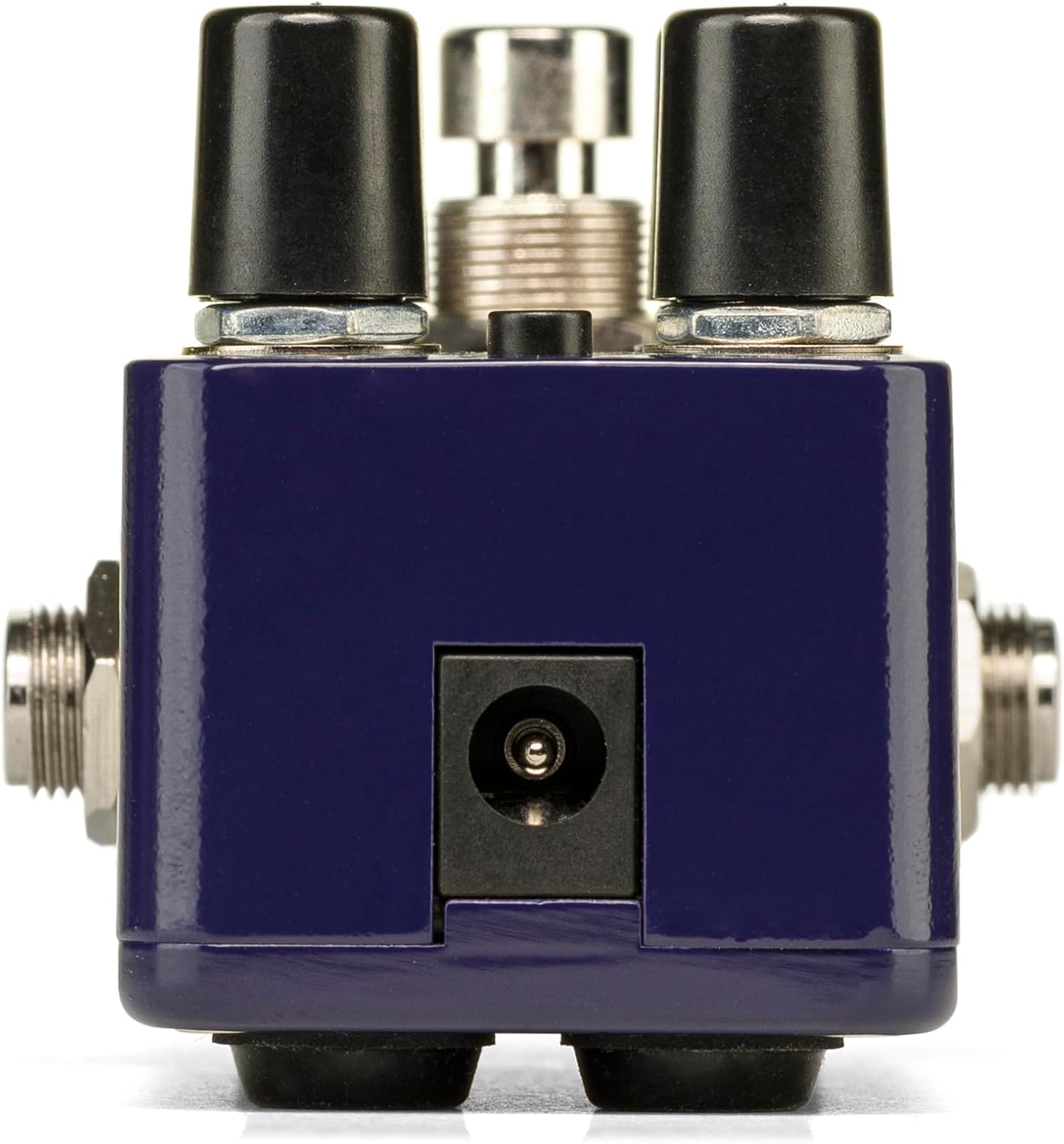
Foto: N'azụ view of the Pico Triboro Bridge pedal, showing the power input jack for connecting the power adapter.
3. Njikwa na Ọrụ
The Pico Triboro Bridge features intuitive controls for shaping your desired drive tone. Understanding each knob and button is key to unlocking its full potential.
Igwe njikwa:
- VOL (Mpịakọta): Controls the overall output level of the pedal. Adjust this to balance the effect's volume with your bypassed signal or other effects.
- Nweta: Controls the intensity of the drive, distortion, or fuzz effect. Higher settings result in more saturation and sustain.
- BASS / GATE:
- In Overdrive and Distortion modes, this knob functions as a Bass control, allowing you to boost or cut low frequencies.
- In Fuzz mode, this knob functions as a ỌNỤ ỤZỌ control, adjusting the noise gate threshold to eliminate unwanted noise and feedback.
- TREBLE / TONE:
- In Overdrive and Distortion modes, this knob functions as a IKU control, allowing you to boost or cut high frequencies.
- In Fuzz mode, this knob functions as a ỤWA control, specifically a Low Pass Filter, for extreme tonal variations and shaping the fuzz character.
TYPE Button:
The small button labeled "TYPE" at the top of the pedal is used to select between the three primary drive modes and to engage the Input Contour Mode.
- Nhọrọ ụdị: Pressing the TYPE button cycles through the Overdrive (green LED), Distortion (orange LED), and Fuzz (red LED) modes.
- Input Contour Mode: Press and hold the TYPE button to enable or disable the Input Contouring EQ. When active, this mode applies a specific EQ to the input signal for a tighter, more modern character across all drive modes.

Foto: Top view of the Pico Triboro Bridge pedal, illustrating the layout of the VOL, GAIN, BASS/GATE, TREBLE/TONE knobs, and the TYPE button.
4. Drive Modes Explained
The Pico Triboro Bridge offers three distinct drive modes, each with its unique sonic characteristics:
- Overdrive Mode (Green LED): This mode provides a gain spectrum ranging from low to mid-level saturation with an open voicing. It is ideal for use as a subtle "always-on" drive, adding warmth and grit, or as a solo boost to push your ampna -emegharị ihe.
- Distortion Mode (Orange LED): Engaging this mode provides additional gain-staging, delivering tones from crunchy rhythms to fully saturated leads. It offers a more aggressive and compressed sound compared to the Overdrive mode.
- Fuzz Mode (Red LED): This mode transforms the pedal into a high-gain fuzz effect with over-the-top saturation. The BASS knob becomes a GATE control, and the TREBLE knob becomes a Low Pass Filter, allowing for unique and extreme tonal variations specific to fuzz.
Video: Official demonstration of the Electro-Harmonix Pico Triboro Bridge pedal, showcasing its Overdrive, Distortion, and Fuzz modes, along with an overview of its controls and input contouring feature. This video highlights the tonal versatility of the pedal for both guitar and bass.
5. Nkọwapụta
| Njirimara | Nkọwapụta |
|---|---|
| Ibu Ibu | 1.21 pound (0.55 Kilogram) |
| Akụkụ ngwaahịa | 3.65"L x 2"W x 2"H (3.65 x 2 x 2 inch) |
| Nọmba Nlereanya ihe | PICO TRIBORO |
| Akụrụngwa ahụ | Plastic, metal |
| Agba | Acha anụnụ anụnụ |
| Ụdị njikọ | Power Adapter (1/4-inch Audio Hardware Interface) |
| Ụdị mgbaàmà | Analọg |
| Isi Iyi Ike | Igwe ọkụ eletrik |
| Voltage | 9 volts |
6. Nlekọta
To ensure the longevity and optimal performance of your Pico Triboro Bridge pedal, follow these maintenance guidelines:
- Nhicha: Use a soft, dry cloth to clean the pedal's exterior. Avoid abrasive cleaners, solvents, or excessive moisture, as these can damage the finish or internal components.
- Nchekwa: Store the pedal in a cool, dry place away from direct sunlight, extreme temperatures, and high humidity when not in use.
- Njikọ: Na-elele njikọ eriri niile mgbe niile maka mmebi na mmebi. Hụ na jakị ndị ahụ enweghị uzuzu na ihe mkpofu.
- Ịnye ọkụ: Always use the recommended 9V DC center-negative power adapter. Using an incorrect power supply can damage the unit and void the warranty.
7. Nchọpụta nsogbu
If you encounter issues with your Pico Triboro Bridge pedal, refer to the following common troubleshooting steps:
- Enweghị ụda:
- Check all cable connections (instrument to input, output to amp).
- Ensure the power adapter is correctly connected and functioning.
- Gbaa mbọ hụ na ngwaọrụ gị na amplifier na-arụ ọrụ nke ọma.
- Check the pedal's bypass status; if it's true bypass, sound should pass even if the pedal is off.
- Weak or Distorted Sound (unexpectedly):
- Check the GAIN and VOL knob settings.
- Ensure the correct drive mode (Overdrive, Distortion, Fuzz) is selected for your desired sound.
- If in Fuzz mode, adjust the GATE and TONE (Low Pass Filter) knobs, as extreme settings can significantly alter the sound.
- Test with different cables and power supplies to rule out faulty accessories.
- Mkpọtụ/Mkpu Oke:
- Hụ na ị na-eji ọkụ eletrik a na-achịkwa nke dị iche.
- If in Fuzz mode, adjust the GATE knob to reduce unwanted noise.
- Lelee maka mgbada ala na ntọala gị.
- Bugharịa pedal ahụ pụọ na transformers ike ma ọ bụ ihe ndị ọzọ na-akpata nnyonye anya electromagnetic.
8. Akwụkwọ ikike na nkwado
Electro-Harmonix products are designed for reliability and performance. For warranty information, product registration, or technical support, please refer to the official Electro-Harmonix websaịtị ma ọ bụ kpọtụrụ ngalaba ọrụ ndị ahịa ha. Debe nnata nzụta gị dị ka ihe akaebe nke ịzụrụ maka nkwupụta ikike.
Maka enyemaka ọzọ, biko gaa na: www.ehx.com


