Okwu mmalite
The Aiwa Smart Band ASB-40 is a versatile fitness tracker designed to help you monitor your health and fitness activities. It features a comfortable silicone strap and a 1.1-inch color AMOLED display for clear visibility. This smart band tracks various health metrics including heart rate, blood pressure, and SpO2 levels, alongside fitness activities such as steps taken, calories burned, and distance traveled. It also offers sleep quality tracking and smart features like notification alerts, music and camera remote control, 'find my phone' function, alarm clock, timer, and stopwatch.
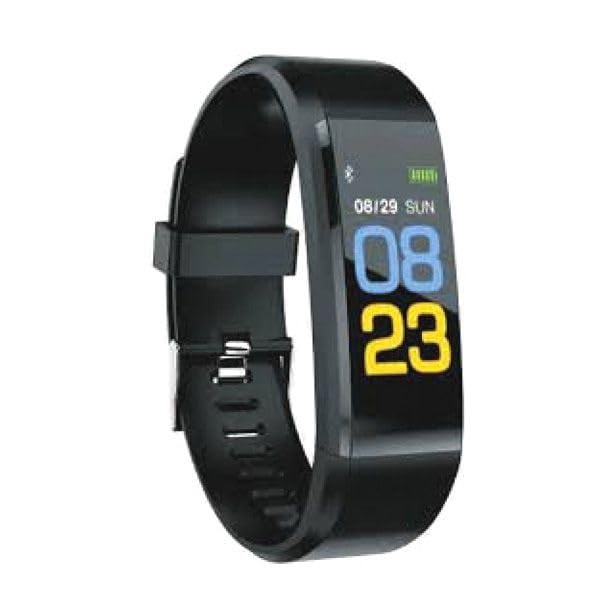
Image: Aiwa Smart Band ASB-40, a sleek black fitness tracker with a clear display.
Melite
1. Igbe mkpuchi
Carefully remove the Aiwa Smart Band ASB-40 and its accessories from the packaging. The box should contain the smart band and a charging cable.
2. Ịchaji ngwaọrụ
- Connect the charging cable to the charging port on the back of your smart band.
- Tinye nsọtụ nke ọzọ nke eriri chaja ahụ n'ime ihe nkwụnye ike USB (anaghị etinye ya) ma ọ bụ ọdụ USB nke kọmputa.
- The band's display will show a charging indicator. Allow approximately 2 hours for a full charge before first use.
3. Ijikọ na ekwentị mkpanaaka gị
- Download the official Aiwa Smart Band application from your smartphone's app store (iOS or Android).
- Gbaa mbọ hụ na agbanyere Bluetooth na ekwentị gị.
- Open the Aiwa Smart Band application and follow the on-screen instructions to create an account or log in.
- In the app, navigate to the device pairing section and select 'Add Device'.
- The app will search for available devices. Select 'ASB-40' from the list to initiate pairing.
- Confirm the pairing request on both your smartphone and the smart band if prompted.
4. Wearing the Smart Band
Wear the smart band snugly on your wrist, about one finger's width above your wrist bone. Ensure the sensor on the back of the band is in contact with your skin for accurate heart rate and other health measurements.
Ntuziaka ọrụ
Nsoro ụzọ
The Aiwa Smart Band ASB-40 features a touch-sensitive 1.1-inch color AMOLED display. Swipe left/right or up/down to navigate through different menus and functions. Tap the screen to select an option or confirm an action.
Isi atụmatụ na ọrụ
- Ndepụta mmemme: Na-enyocha nzọụkwụ ndị e mere, anya njem, na kalori e tinyere n'ụbọchị ahụ dum. View your daily progress directly on the band or in the companion app.
- Nyochaa Ọnụọgụgụ Obi: Continuously tracks your heart rate. Access real-time readings on the band and historical data in the app.
- Blood Pressure & SpO2 Monitoring: Provides estimates of your blood pressure and blood oxygen saturation (SpO2) levels. These measurements are for reference only and should not be used for medical diagnosis.
- Nchicha ụra: Automatically monitors your sleep patterns, including deep sleep, light sleep, and awake times. Review your sleep quality analysis in the app.
- Amamọkwa Smart: Receive alerts for incoming calls, messages, and app notifications directly on your wrist when connected to your smartphone.
- Ncheta ịnọdụ ala: The band can remind you to move if you have been inactive for an extended period.
- Njikwa anya: Control music playback and trigger your smartphone camera remotely from the smart band.
- Chọta ekwentị m: Use this function on the band to make your paired smartphone ring, helping you locate it.
- Alarm Clock, Timer, Stopwatch: Access these utility functions directly from the band's menu.
Mgbochi mmiri (IP67)
The Aiwa Smart Band ASB-40 is IP67 rated, meaning it is protected against dust ingress and can withstand immersion in water up to 1 meter for up to 30 minutes. It is suitable for daily use, such as washing hands or light rain. However, it is not recommended for swimming, showering with hot water, or diving, as steam and prolonged water exposure can damage the device.
Nlekọta na nlekọta
- Nhicha: Regularly clean the smart band, especially the sensor area and the strap, with a soft, damp akwa . Zere iji kemịkalụ siri ike ma ọ bụ ihe na-emebi emebi.
- Ịchaji: Use only the provided charging cable. Avoid overcharging the device. Disconnect the charger once the battery is full.
- Nchekwa: Store the smart band in a cool, dry place when not in use. Avoid extreme temperatures.
- Zere Mmetụta: Protect the device from strong impacts or drops, which can damage the screen or internal components.
Nchọpụta nsogbu
Ngwaọrụ anaghị agbanwu
- Gbaa mbọ hụ na chajịrị ngwaọrụ ahụ nke ọma. Jikọọ ya na chaja opekata mpe nkeji iri atọ.
- If the issue persists, try performing a soft reset (refer to the app for specific instructions, or hold the touch button/area for 10-15 seconds if available).
Unable to Pair with Smartphone
- Make sure Bluetooth is enabled on your smartphone and the smart band is within range.
- Ensure the Aiwa Smart Band app is installed and updated to the latest version.
- Restart both your smartphone and the smart band.
- If previously paired, try unpairing the device from your phone's Bluetooth settings and then re-pairing through the app.
Inaccurate Readings (Heart Rate, Steps)
- Ensure the band is worn snugly on your wrist, with the sensor in full contact with your skin.
- Clean the sensor on the back of the band to remove any dirt or sweat.
- Ensure your personal information (height, weight, age) is accurately entered in the companion app.
Ndụ obere batrị
- Reduce screen brightness or screen-on time settings in the app.
- Disable continuous heart rate monitoring if not needed constantly.
- Limit the number of notifications received on the band.
Nkọwapụta
| Nọmba nlereanya | ASB-40 |
| Ụdị | Aịwa |
| Ngosipụta | 1.1-inch Color AMOLED |
| Njikọta | Bluetooth V4.0 |
| Ihe eriri eriri | TPU |
| Ngosi nke enweghị mmiri | IP67 |
| Nlekọta ahụike | Heart Rate, Blood Pressure, SpO2 |
| Ndepụta ihe omume | Steps, Calories, Distance, Sleep |
| Atụmatụ Smart | Notifications, Sedentary Reminder, Music/Camera Control, Find Phone, Alarm, Timer, Stopwatch |
| Akụkụ ngwugwu | 15 x 8.2 x 3.2 cm |
| Ibu Ibu | 60 g |
| Mba onye si | China |
| Ụbọchị mbụ dị | Ọktoba 19, 2023 |
Akwụkwọ ikike na nkwado
For detailed warranty information, please refer to the warranty card included with your purchase or visit the official Aiwa website. If you encounter any issues not covered in this manual or require further assistance, please contact Aiwa customer support through their official channels.


