1. Okwu mmalite
This manual provides detailed instructions for the safe and efficient operation of your Telefunken THP-2535 Solar Powered Portable Bluetooth FM Radio. Please read this manual thoroughly before using the device and retain it for future reference.
The Telefunken THP-2535 is a versatile portable radio featuring Bluetooth connectivity, FM radio tuning, USB and TF card playback, and an AUX input. It is designed for portability with a built-in speaker, headphone jack, carrying handle, and a solar panel for convenient battery charging.
2. Ozi nchekwa
- Do not expose the device to extreme temperatures, direct sunlight for prolonged periods (beyond charging), or high humidity.
- Zere idobe ma ọ bụ idobe ngwaọrụ ahụ na mmetụta siri ike.
- Ewepụla, rụkwaa ma ọ bụ gbanwee ngwaọrụ n'onwe gị. Kpọtụrụ ndị ọrụ ruru eru ọrụ niile.
- Debe ngwaọrụ ahụ na mmiri na mmiri mmiri ndị ọzọ.
- Ensure proper ventilation when charging to prevent overheating.
- Use only the specified charging cable and power sources.
- Tụfuo batrị na akụrụngwa eletrọnịkị nke ọma dịka iwu obodo siri dị.
- Do not operate the radio at excessively high volumes for extended periods to prevent hearing damage.
3. Ihe ngwugwu
Biko lelee ma ihe niile dị na ngwugwu ahụ:
- 1 x Telefunken Solar Powered Portable Bluetooth FM Radio (THP-2535)
- 1 x eriri chaja (USB)
- Akwụkwọ ntuziaka onye ọrụ 1 x (akwụkwọ a)
4. Ngwaahịa gafereview
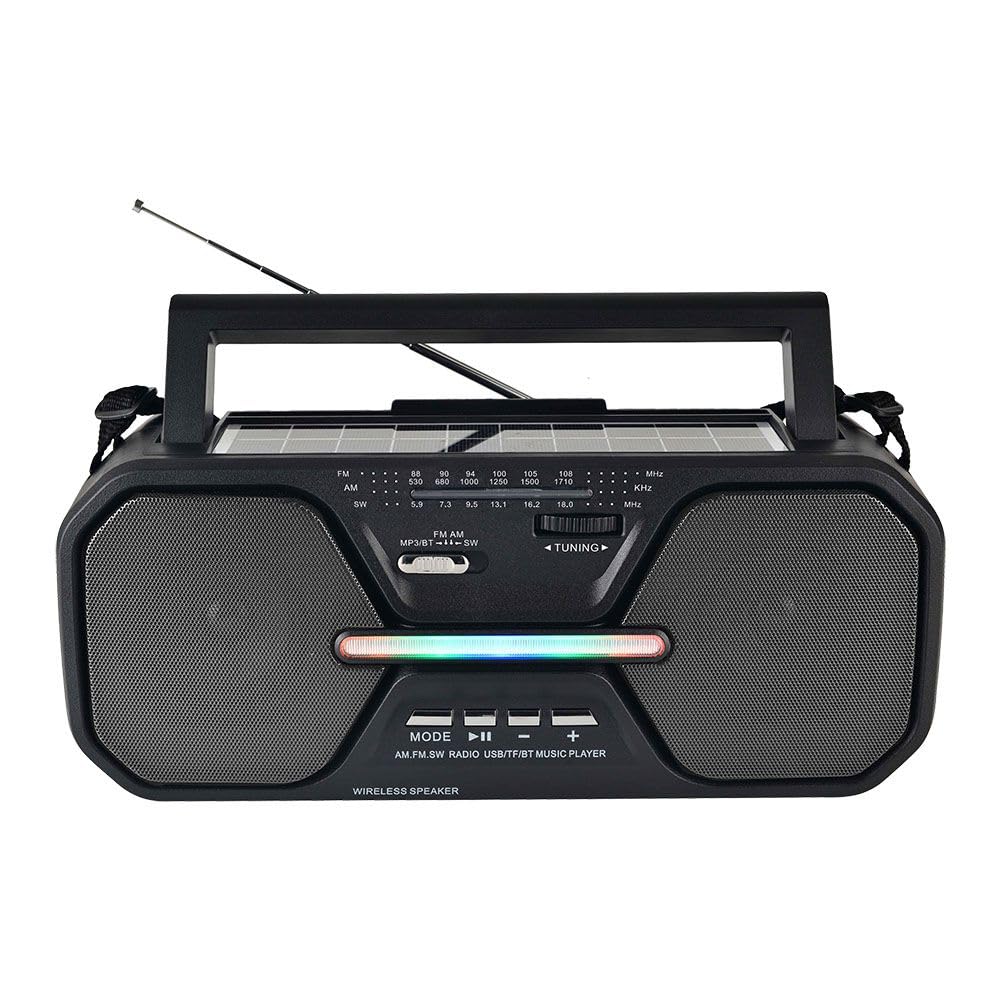
Foto 4.1: N'ihu view of the Telefunken THP-2535 radio, showing speakers, control panel, antenna, and carrying handle.

Foto 4.2: Top view highlighting the solar panel and control buttons.
Njikwa na ọdụ ụgbọ mmiri:
- Ike mgba ọkụ: Gbanyụọ ma ọ bụ gbanyụọ redio.
- Bọtịnụ ụkpụrụ: Switches between Bluetooth, FM, USB, TF, and AUX modes.
- Bọtịnụ Kwụsị/Kwụsị: Controls playback in Bluetooth, USB, and TF modes.
- Previous/Volume Down Button: Skips to the previous track or decreases volume.
- Next/Volume Up Button: Skips to the next track or increases volume.
- Ịkpọ oku: For manual FM station selection.
- Ọdụ ụgbọ mmiri USB: For playing music from USB flash drives.
- Oghere TF Kaadị: For playing music from TF (MicroSD) cards.
- Ntinye AUX: Maka ijikọ ngwaọrụ ọdịyo mpụga site na eriri 3.5mm.
- Jack ekweisi: Maka ige ntị nkeonwe.
- Ogwe anyanwụ: Charges the internal battery when exposed to sunlight.
- Nchaji ọdụ ụgbọ mmiri: For charging the internal battery using the provided USB cable.
- Antenna: Extend for improved FM radio reception.
5. Nhazi
5.1 Nchaji izizi
- Tupu i jiri ya nke mbụ, chajie batrị dị n'ime redio ahụ nke ọma.
- Connect the provided USB charging cable to the radio's charging port.
- Jikọọ nsọtụ nke ọzọ nke eriri USB na ihe nkwụnye ọkụ USB ọkọlọtọ (anaghị etinye ya) ma ọ bụ ọdụ ụgbọ USB nke kọmputa.
- The charging indicator light will illuminate. Once fully charged, the light may change color or turn off (refer to specific indicator behavior if detailed in product).
- Charging via the solar panel: Place the radio with the solar panel facing direct sunlight. Ensure the panel is clean and unobstructed. Solar charging is slower than USB charging and is best for maintaining charge or extending playtime.
5.2 Gbanyụọ/ gbanyụọ
- To power on the radio, slide the Power Switch to the "ON" position.
- To power off the radio, slide the Power Switch to the "OFF" position.
6. Ntuziaka ọrụ
6.1 Nhọrọ ọnọdụ
Pịa Ụdị button repeatedly to cycle through the available modes: Bluetooth, FM Radio, USB, TF Card, and AUX Input.
6.2 Ọnọdụ Bluetooth
- Switch the radio to Bluetooth mode. The radio will indicate it is ready for pairing (e.g., a voice prompt or flashing indicator light).
- Na ngwaọrụ Bluetooth gị (smartphone, tabletị, wdg), gbanye Bluetooth wee chọọ ngwaọrụ dịnụ.
- Select "THP-2535" (or similar name) from the list of devices.
- Once paired, the radio will confirm the connection. You can now stream audio from your device to the radio.
- Use the Play/Pause, Previous/Volume Down, and Next/Volume Up buttons on the radio to control playback and volume.
Ọnọdụ redio FM 6.3
- Switch the radio to FM mode.
- Extend the telescopic antenna fully for optimal reception.
- Tugharia ihe Ịkpọ oku n'iji ya gee ntị to scan for FM radio stations (frequency range: 87.5-108 MHz).
- Adjust the volume using the Volume Up/Down buttons.
6.4 USB / TF Kaadị ịkpọghachi
- Tinye draịvụ flash USB n'ime ọdụ ụgbọ USB ma ọ bụ kaadị TF (MicroSD) n'ime oghere kaadị TF.
- Switch the radio to USB or TF mode. The radio will automatically detect and begin playing audio files (e.g., MP3 format).
- Use the Play/Pause, Previous/Volume Down, and Next/Volume Up buttons to control playback and volume.
6.5 Ụdị ntinye AUX
- Connect one end of a 3.5mm audio cable (not included) to the AUX input port on the radio.
- Connect the other end of the audio cable to the headphone jack or audio output of your external device (e.g., MP3 player, laptop).
- Switch the radio to AUX mode.
- Control playback and volume primarily from your external device. The radio's volume controls will also adjust the output.
6.6 Ojiji Ekweisi
Insert 3.5mm headphones (not included) into the headphone jack for private listening. The internal speakers will automatically mute.
7. Nlekọta
- Nhicha: Wipe the radio with a soft, dry cloth. Do not use abrasive cleaners, waxes, or solvents.
- Nchekwa: Mgbe a naghị eji redio ahụ ruo ogologo oge, debe ya n'ebe dị jụụ ma kpọọ nkụ.
- Nlekọta batrị: To prolong battery life, avoid fully discharging the battery frequently. Recharge the battery regularly, even if the radio is not in active use.
- Ogwe anyanwụ: Keep the solar panel clean and free of dust or debris to ensure efficient charging.
8. Nchọpụta nsogbu
| Nsogbu | Ihe nwere ike ime | Ngwọta |
|---|---|---|
| Redio anaghị agbanye ọkụ. | Batrị agwụla. Agbanyụrụ ọkụ. | Charge the battery using the USB cable or solar panel. Ensure the power switch is in the "ON" position. |
| Enweghị ụda. | Volume is too low. Mute function active. Incorrect mode selected. Headphones connected. | Increase the volume. Check if headphones are plugged in. Ensure the correct mode (Bluetooth, FM, USB, TF, AUX) is selected. |
| Nnabata FM adịghị mma. | Antenna not extended. Weak signal. Interference. | Fully extend the telescopic antenna. Reposition the radio for better signal. Avoid sources of electronic interference. |
| Bluetooth not pairing. | Radio not in Bluetooth mode. Device's Bluetooth is off. Radio is already paired with another device. | Ensure the radio is in Bluetooth mode. Turn on Bluetooth on your device. Disconnect from other devices or restart the radio and your device. |
| Kaadị USB/TF adịghị egwu. | Incorrect mode. Unsupported file format. Corrupted files. Card/drive not inserted correctly. | Ensure the correct mode is selected. Check if audio files are in a supported format (e.g., MP3). Reinsert the USB drive/TF card. Try another drive/card. |
9. Nkọwapụta
| Nọmba nlereanya | THP-2535 |
| Ụdị | TELEFUNKEN |
| Isi Iyi Ike | Solar Powered, USB Rechargeable (Lithium Ion Battery) |
| Njikọta | Bluetooth, USB, TF Card, AUX Input |
| Nkà na ụzụ Tuner | FM |
| Ndị otu redio akwadoro | FM (87.5-108 MHz) |
| Akụkụ ngwaahịa | 38.7L x 13.3W x 16.5H centimita |
| Atụmatụ pụrụ iche | Portable, Built-in Speaker, Headphone Jack, Carrying Handle |
10. Akwụkwọ ikike na nkwado
10.1 Akwụkwọ ikike nke onye nrụpụta
This Telefunken THP-2535 radio comes with a Akwụkwọ ikike nke Onye nrụpụta afọ 1 site na ụbọchị azụrụ ya. Akwụkwọ ikike a na-ekpuchi ntụpọ nrụpụta na ọrụ aka n'oge ojiji nkịtị. Ọ naghị ekpuchi mmebi sitere na ojiji na-ezighị ezi, ihe mberede, mgbanwe na-akwadoghị, ma ọ bụ mmebi nkịtị.
Biko dowe ihe akaebe nke ịzụrụ ihe maka akwụkwọ ikike.
10.2 Nkwado ndị ahịa
For technical assistance, warranty claims, or further inquiries, please contact your retailer or the Telefunken customer support service. Refer to the product packaging or the official Telefunken websaịtị maka nkọwa kọntaktị.


