1. Okwu mmalite
This manual provides essential instructions for the safe operation, setup, maintenance, and troubleshooting of your CREATE THERA MATIC TOUCH automatic coffee machine. Please read this manual thoroughly before first use and retain it for future reference.
Ozi nchekwa
Always observe basic safety precautions when using electrical appliances to reduce the risk of fire, electric shock, and injury. Ensure the appliance is placed on a stable, level surface. Do not immerse the appliance, power cord, or plug in water or other liquids. Keep out of reach of children. Unplug the machine before cleaning or when not in use for extended periods.
2. Ngwaahịa gafereview
The CREATE THERA MATIC TOUCH is a fully automatic coffee machine designed to deliver fresh coffee from whole beans. It features a 20-bar pressure system, an integrated grinder, a 1.5-liter water tank, and a steam wand for milk frothing and hot water dispensing. The touch control panel allows for easy operation and customization of coffee intensity and volume.
Isi ihe
- Coffee Bean Hopper with integrated grinder
- Water Tank (1.5 L capacity)
- Aka Control Panel
- Kọfị Spout
- Steam Wand / Hot Water Dispenser
- Ebe a na-adọba mmiri na ebe kọfị kọfị

Foto 2.1: N'ihu view of the coffee machine, showing the coffee spout, drip tray, and touch control panel.

Ọgụgụ 2.2: N'akuku view of the coffee machine, illustrating the removable water tank.

Nyocha 2.3: N'eluview of the machine's removable parts for cleaning and maintenance.
3. Nhazi
3.1 Mwepu na mkpochapụ mbụ
- Carefully remove all packaging materials from the coffee machine.
- Wash the water tank, drip tray, and coffee grounds container with warm soapy water, then rinse thoroughly and dry.
- Jiri mgbasa ozi hichaa mpụta igweamp akwa .
3.2 Na-ejuputa tank mmiri
- Wepu tank mmiri ahụ n'akụkụ igwe.
- Jupụta tankị ahụ na mmiri ọṅụṅụ dị ọhụrụ, nke dị jụụ ruo na ihe ngosi ọkwa kachasị elu.
- Debe tank mmiri ahụ n'ọnọdụ ya, hụ na ọ nọdụrụ nke ọma.
3.3 Ịtinye Agwa Kọfị
- Open the lid of the coffee bean hopper located on top of the machine.
- Pour whole coffee beans into the hopper. The hopper has a capacity of 180g.
- Mechie mkpuchi ahụ nke ọma ka ọ dị ọhụrụ nke agwa.

Figure 3.1: Adding coffee beans to the integrated hopper.
3.4 Ojiji Mbụ / Nhazi
- Tinye igwe ahụ n'ime ebe a na-etinye ọkụ eletrik n'ala.
- Press the power button on the touch control panel. The machine will perform an initial rinse cycle.
- Place a container under the coffee spout and steam wand to collect the water.
- Once the rinse cycle is complete, the machine is ready for use.
4. Ntuziaka ọrụ
4.1 Ogwe njikwa aka
The touch control panel provides access to all machine functions. Indicators will illuminate to show status or warnings such as 'no beans', 'no water', 'cleaning required', or 'drip tray full'.
4.2 Ime Kọfị
- Ensure the water tank is filled and the bean hopper contains enough coffee beans.
- Tinye otu iko n'okpuru kọfị kọfị.
- Select your desired coffee type (e.g., Espresso, Lungo) from the touch panel.
- You can adjust the coffee intensity and volume via the touch panel before brewing.
- Press the start button. The machine will grind the beans, brew, and dispense the coffee.
4.3 Iji Osisi Steam
The steam wand can be adjusted between 0° and 42° for optimal milk frothing or hot water dispensing.
4.3.1 Mmiri ara ehi
- Jupụta otu ite mmiri ara ehi na mmiri ara ehi oyi.
- Debe mkpanaka uzuoku ahụ n'ime mmiri ara ehi, n'okpuru elu.
- Select the steam function on the touch panel.
- Bugharịa ite ahụ elu na ala ka ịmepụta ụfụfụ.
- Ozugbo e nwetara ụfụfụ achọrọ, gbanyụọ ọrụ steam ahụ.
- Immediately clean the steam wand after use.
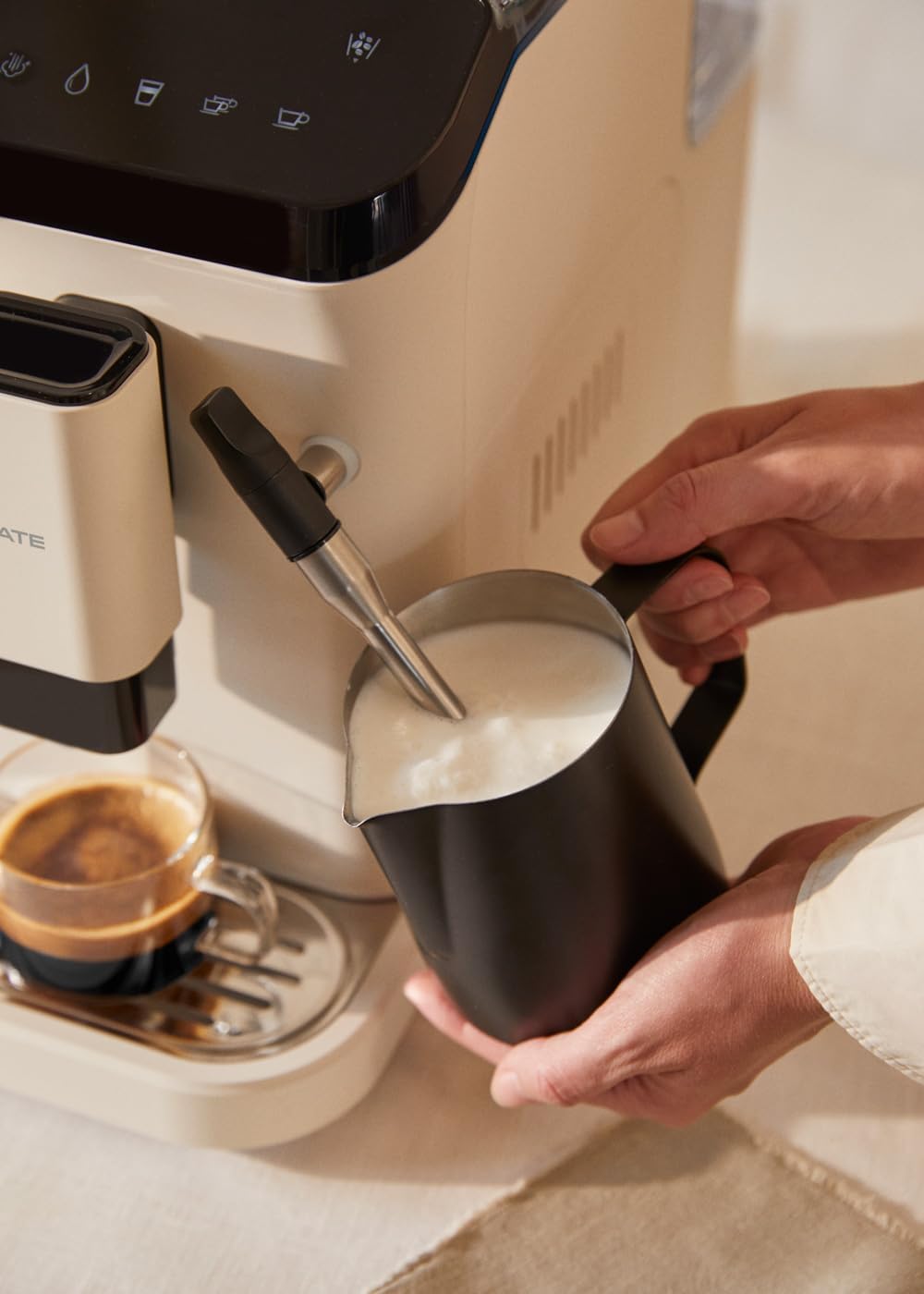
Figure 4.1: Frothing milk using the adjustable steam wand.
4.3.2 Na-ekesa mmiri ọkụ
- Tinye otu iko n'okpuru uzuoku wand.
- Select the hot water function on the touch panel.
- The machine will dispense hot water for teas or other infusions.

Figure 4.2: Dispensing hot water for beverages.
5. Nlekọta na nhicha
Ịsacha na idozi ya mgbe niile na-eme ka igwe kọfị gị rụọ ọrụ nke ọma ma na-adịte aka.
5.1 Ọrụ nhicha onwe
The machine is equipped with a self-cleaning function. Follow the prompts on the touch control panel when the cleaning indicator illuminates. This cycle helps maintain internal hygiene.
5.2 Drip Tray and Coffee Grounds Container
- When the 'drip tray full' indicator appears, carefully remove the drip tray.
- Empty the liquid from the drip tray and the used coffee grounds from the container.
- Wash both components with warm soapy water, rinse, and dry before reinserting.
5.3 Nhicha Osisi Steam
Mgbe ejichara nke ọ bụla, jiri mgbasa ozi hichaa wand uzuokuamp cloth to remove any milk residue. Periodically, remove the outer nozzle and rinse it under running water to prevent blockages.
5.4 calhapụ ịda
Over time, mineral deposits can build up in the machine. The machine will indicate when descaling is required. Use a suitable descaling solution designed for coffee machines and follow the instructions provided with the descaling product and the machine's display prompts.
6. Nchọpụta nsogbu
Lee ngalaba a maka nsogbu ndị a na-enwekarị na ngwọta ha. Ọ bụrụ na nsogbu ahụ anọgide, kpọtụrụ ndị ọrụ nkwado ndị ahịa.
| Nsogbu | Ihe nwere ike ime | Ngwọta |
|---|---|---|
| Ọnweghị kọfị ekesara | Water tank empty / No coffee beans / Clogged coffee spout | Refill water tank / Add coffee beans / Clean coffee spout |
| Kọfị na-adịghị ike | Insufficient coffee quantity / Coarse grind setting | Adjust coffee intensity setting / Adjust grinder to a finer setting |
| Igwe anaghị agbanwu | Akpọchighị ya / power outage | Check power connection / Check circuit breaker |
| 'No water' indicator | Water tank empty or not properly inserted | Refill water tank and ensure it is correctly seated |
| 'No beans' indicator | Agwa hopper efu | Refill coffee bean hopper |
| 'Cleaning' indicator | Self-cleaning cycle required | Initiate the self-cleaning program as per display instructions |
| 'Drip tray full' indicator | Drip tray or coffee grounds container is full | Empty and clean the drip tray and coffee grounds container |
7. Nkọwapụta
| Njirimara | Nkọwapụta |
|---|---|
| Ụdị | Mepụta |
| Aha Nlereanya | THERA MATIC emetụ |
| Nọmba nlereanya | 161966_361774 |
| Agba | Cream-white |
| Akụkụ ngwaahịa (L x W x H) | 32.5 x 19 x 44 cm |
| Ibu | 9.05 n'arọ |
| Ike tank mmiri | 1.5 lita |
| Ikike Kọfị Bean Hopper | 180 grams |
| Nrụgide | 20 mmanya |
| Ike/Wattage | 1350 watt |
| Voltage | 240 volts |
| Ihe onwunwe | AS + ABS |
| Atụmatụ pụrụ iche | Removable tank, Milk frother, Integrated grinder, Self-cleaning function, Touch control panel |
8. Akwụkwọ ikike na nkwado
8.1 Ozi akwụkwọ ikike
Your CREATE THERA MATIC TOUCH coffee machine is covered by a manufacturer's warranty. Please refer to the warranty card included with your purchase for specific terms, conditions, and duration. Retain your proof of purchase for warranty claims.
8.2 Nkwado ndị ahịa
For technical assistance, spare parts, or any questions regarding your product, please contact CREATE customer support. Contact details can typically be found on the manufacturer's websaịtị ma ọ bụ na nkwakọ ngwaahịa.
Note: Specific contact information is not provided in this manual. Please refer to your product packaging or the official CREATE websaịtị maka nkọwa nkwado.