1. Ngwaahịa gafereview
The Cooler Master GX III Gold 850W ATX3.0 Full Modular Power Supply features an innovative material and structural design, including striking hexagonal details for enhanced airflow and a sleek aesthetic. It holds an 80 Plus Gold certification and can achieve Titanium-level efficiency under light loads. This unit supports ATX 3.0, includes a robust 12VHPWR cable, and incorporates a half-bridge APFC, LLC, and DC-DC design. Anodic-coated heat sinks reduce component temperatures, and a state-of-the-art STCM zero-RPM fan ensures quiet operation.

Image: Cooler Master GX III Gold 850W Power Supply, showcasing ya kọmpat imewe.
2. Atụmatụ igodo
- Innovative, Streamlined Design: Enhances aesthetic appeal and optimizes airflow.
- ATX 3.0 & 90-Degree 12VHPWR: Features ATX 3.0 support and a 90-degree 12+4pin (12VHPWR) PCIe 5.0 connector for enhanced electrical durability, increased safety, and up to 450W delivery to your GPU.
- Optimized Thermal Performance: Anodic-coated heat sinks maintain average temperatures 5°C lower than conventional heat sinks, improving durability and lifespan.
- Certified Efficiency: 80 Plus Gold & Cybenetics Platinum certifications ensure over 90% efficiency at standard loads, with Titanium-level efficiency possible during typical light load usage (115V test).
- Silent Performance Zero-RPM Mode: Cybenetics A- noise level certification and a smart thermal control mode enable a zero-spin setting for silent operation under low loads.

Image: Innovative design for enhanced airflow.

Image: 90-Degree 12VHPWR PCIe 5.0 Connector.

Image: Anodic-coated heat sink for improved cooling.

Image: Efficiency chart showing 80 Plus Gold and Cybenetics Platinum performance.
3. Ntọala & nwụnye
The Cooler Master GX III Gold 850W is a fully modular power supply, allowing you to connect only the cables necessary for your system. This reduces cable clutter and improves airflow within your PC case.
3.1 Unboxing na akụrụngwa
Upon unboxing, you will find the power supply unit, a set of modular cables, mounting screws, and documentation. Ensure all components are present before proceeding with installation.
Vidiyo: Ofeview of the Cooler Master GX III Gold 850W Power Supply contents, including the unit and modular cables.
3.2 Connecting Modular Cables
Connect the necessary modular cables to the power supply unit first. The unit features clearly labeled ports for 12VHPWR, 8-pin PCIe/CPU, 8-pin M/B, 18-pin M/B, and 5-pin SATA/HDD connections. Ensure each cable is securely seated.
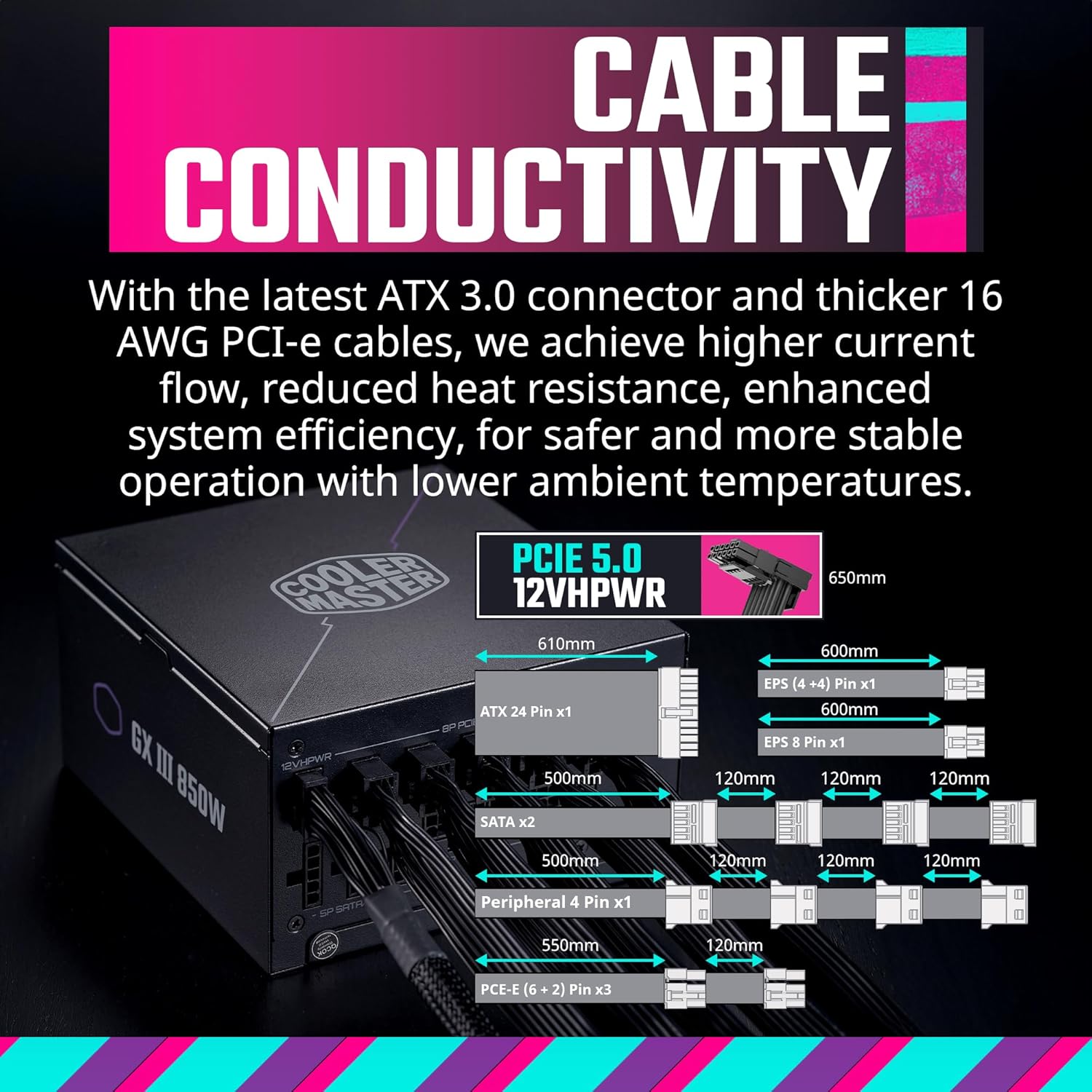
Image: Rear panel of the Cooler Master GX III Gold 850W showing all modular cable connection ports.
3.3 PSU Installation in PC Case
Mount the power supply unit into the designated PSU bay of your PC case using the provided screws. Route the connected cables through the case's cable management channels to their respective components (motherboard, GPU, storage drives). Ensure cables are not obstructing airflow or fan operation.
Video: Demonstrates the installation process of the Cooler Master GX III Gold 850W PSU into a PC case, including cable routing.
3.4 12VHPWR PCIe 5.0 Connector
The 90-degree 12VHPWR PCIe 5.0 connector is designed for improved cable management and reduced stress on the connector. When connecting to your GPU, ensure the connector is oriented correctly to avoid strain or damage. Refer to your GPU's manual for specific port orientation if unsure.

Image: Close-up of the 90-degree 12VHPWR connector, highlighting its design for preventing cable wear.
4. Ntuziaka ọrụ
Once installed and all connections are secure, connect the power cord to the PSU and a wall outlet. Flip the power switch on the back of the PSU to the 'On' position. Your system should now be ready to power on.
4.1 Zero-RPM Fan Mode
The GX III Gold 850W features a smart thermal control mode with a Zero-RPM fan setting. This means the fan will not spin until a specific core temperature is reached, ensuring silent operation under low to moderate loads. The fan will automatically activate when the system demands more power and generates more heat.

Image: Fan curve illustrating the Zero-RPM mode and noise levels at various loads.
Vidiyo: Mkpebi dị mkpirikpiview of the Cooler Master GX III Gold 850W PSU, highlighting its quiet operation and features.
5. Nlekọta
To ensure optimal performance and longevity of your power supply, regular maintenance is recommended:
- Mwepụ uzuzu: Periodically clean the PSU's fan and ventilation grilles to prevent dust buildup, which can impede airflow and lead to overheating. Use compressed air for best results.
- Njikwa USB: Ensure cables are neatly routed and do not obstruct internal airflow within the PC case.
- Ọnọdụ gburugburu: Operate the PSU in a well-ventilated area with stable temperatures to prevent excessive heat stress.
6. Nchọpụta nsogbu
6.1 Fan Not Spinning
If the PSU fan does not spin immediately upon system startup, this is normal behavior due to the Zero-RPM mode. The fan will only activate once a specific internal core temperature is reached, indicating a higher load on the power supply. If the fan never spins even under heavy load, ensure the PSU is receiving power and is correctly installed.
6.2 90-Degree 12VHPWR Connector Orientation
Some users may encounter issues with the orientation of the 90-degree 12VHPWR PCIe 5.0 connector, particularly with certain GPU or CPU cooler configurations. If the connector appears to be upside down or does not fit correctly, consult the Cooler Master support resources or product documentation for potential solutions, which may include instructions on reorienting the connector shroud if applicable.
7. Nkọwapụta
| Njirimara | Uru |
|---|---|
| Aha Nlereanya | GX III Gold 850W ATX3.0 |
| Nọmba Nlereanya ihe | MPX-8503-AFAG-BUS |
| Ụdị | Nna-ukwu oyi |
| Mpụta Wattage | 850 watt |
| Ụdị Ihe | ATX |
| Asambodo arụmọrụ | 80 Plus Gold & Cybenetics Platinum |
| Usoro jụrụ oyi | Air (Zero-RPM fan) |
| Ụdị njikọ | 12VHPWR, ATX, EPS, PCI Express, SATA |
| Akụkụ ihe (LxWxH) | 6.3 x 5.91 x 3.39 sentimita asatọ |
| Ibu Ibu | 5.8 pound |
8. Akwụkwọ ikike & Nkwado
The Cooler Master GX III Gold 850W ATX3.0 Full Modular Power Supply is backed by a 10-afọ akwụkwọ ikike, ensuring long-term reliability and peace of mind. For technical support, warranty claims, or further assistance, please visit the official Cooler Master website or contact their customer service department. Keep your purchase receipt and product serial number handy for any inquiries.


