1. Ozi nchekwa dị mkpa
Biko gụọ ntuziaka nchekwa na ọrụ niile nke ọma tupu i jiri telivishọn gị. Debe ntuziaka ndị a maka ntụaka n'ọdịnihu.
- Isi mmalite ike: Connect the TV only to the type of power source indicated on the marking label.
- Igwe ikuku: Gbaa mbọ hụ na ikuku ikuku dị mma. Akwụsịla oghere ikuku ikuku ọ bụla.
- Mmiri na mmiri: Do not expose the TV to rain or moisture. Do not use near water.
- Nhicha: Unplug the TV from the wall outlet before cleaning. Use a soft, dry cloth. Do not use liquid or aerosol cleaners.
- Nkwanye: Tinye TV n'elu elu kwụsiri ike, dịkwa larịị. Zere itinye ya na ìhè anyanwụ kpọmkwem ma ọ bụ nso ebe okpomọkụ.
- Àmụmà: Kwụpụ TV n'oge oké ifufe ọkụ ma ọ bụ mgbe ejighi ya ogologo oge.
2. Ihe ngwugwu
Verify that all items listed below are included in your TV package:
- coocaa ROKU 50R5G 50-inch UHD Smart LED TV
- Eji batrị dị anya njikwa
- Ihe nkwụnye TV (2 iberibe)
- Kwuo skru
- Igwe ọkụ ọkụ
- Ntuziaka mmalite ngwa ngwa (akwụkwọ ntuziaka a)
3. Nhazi
3.1 Mwepu na nkwụnye nrụnye
Carefully remove the TV from its packaging. It is recommended to have two people for this process. Place the TV face down on a soft, clean surface to prevent screen damage.
Iji tinye ihe nkwụnye TV:
- Kwado ibe nkwụnye ọ bụla na oghere kwekọrọ na ala TV.
- Chekwaa ihe nkwụnye ahụ site na iji skru ndị enyere. Gbaa mbọ hụ na agbachiela ha nke ọma.
Alternatively, for wall mounting, consult a professional installer and use a VESA-compatible wall mount (not included).

This image illustrates the coocaa Roku TV seamlessly integrated into a modern living room environment, mounted on a light blue wall. The TV is positioned above a minimalist wooden TV cabinet, demonstrating a typical installation scenario.
3.2 Ike Njikọta na Ntọala Mmalite
- Jikọọ eriri ọkụ na ntinye ike TV wee banye na mgbidi.
- Pịa bọtịnụ ike na njikwa anya ma ọ bụ TV.
- Follow the on-screen instructions to complete the initial Roku OS setup, including language selection, country, and channel scanning for the triple tuner (satellite, cable, or antenna).
3.3 Njikọ netwọkụ
To access Smart TV features and streaming services, connect your TV to the internet:
- Wi-Fi: During initial setup or via the Settings menu, select 'Network' and then 'Wireless'. Choose your Wi-Fi network from the list and enter the password.
- LAN (Ethernet): Connect an Ethernet cable from your router to the LAN port on the back of the TV. The TV will automatically detect the wired connection.
4. Na-arụ ọrụ TV gị
4.1 Roku OS Home Screen
The Roku OS home screen provides quick access to all your entertainment. It combines linear TV and streaming services into one intuitive interface.

This image shows the coocaa Roku TV from the front, powered on and displaying its intuitive home screen. The screen features icons for popular streaming services like Netflix, Disney+, Apple TV, and live TV options, alongside inputs for cable box and game console. A '2023 Heimkino Innovation Award' badge is visible on the bottom left bezel.
- Ọwa Na-agagharị: Access popular apps like Netflix, Disney+, and Apple TV.
- TV dị ndụ: Watch broadcast television via the integrated triple tuner.
- Ntinye: Easily switch between connected devices (e.g., game console, cable box).
- Chọọ: Use the cross-channel search to find content by title, actor, or genre.
4.2 Iji njikwa anya
The user-friendly remote control provides all necessary functions:
- Mpempe igodo ụzọ: Use the arrow buttons to navigate menus and select items.
- OK bọtịnụ: Kwenye nhọpụta.
- Bọtịnụ ụlọ: Return to the Roku OS home screen.
- Bọtịnụ azụ: Laghachi na ihuenyo gara aga.
- Mkpọgharị ngwa ngwa: Replay the last few seconds of video.
- Bọtịnụ nweta ngwa ngwa: Bọtịnụ ndị raara onwe ha nye maka ọrụ mgbasa ozi ama ama.
- Ọchụchọ olu: Use the voice search feature for hands-free control (if supported by remote model).
4.3 Input Sources
Connect external devices to your TV using the available ports:
- HDMI: The TV features three HDMI inputs for connecting devices like Blu-ray players, game consoles, or set-top boxes.
- USB: One USB port is available for media playback or Timeshift functions.
- Ọdịnihu Dijitalụ: Maka ijikọ na sistemụ ọdịyo mpụga.
4.4 Smart TV atụmatụ
Your coocaa Roku TV offers a wide range of smart features:
- Ọrụ gụgharia: Access pre-installed apps like Netflix, Disney+, Apple TV, and more.
- Nkwado onye enyemaka olu: Compatible with Apple AirPlay, Apple Home, Alexa, and Google Home for integrated smart home control.
- Ngwa mkpanaaka Roku: Control your TV, use voice search, and listen to audio via headphones using the free Roku app for iOS and Android devices.
4.5 Ntọala Ọdịyo na Vidiyo
Bulite gị viewahụmahụ nke:
- Ụdị foto: Select from various picture modes (e.g., Standard, Movie, Sport) or customize brightness, contrast, and color settings.
- Nkwado HDR: Enjoy enhanced contrast and color with HDR10 and HLG content.
- Ụdị ụda: Choose sound modes (e.g., Standard, Music, Speech) or adjust equalizer settings for optimal audio.
5. Nlekọta
5.1 Na-ehicha TV gị
Iji mee ka ọdịdị na arụmọrụ TV dị mma:
- Kwupuo TV tupu ihicha.
- Jiri akwa dị nro, kpọrọ nkụ, akwa enweghị lint iji hichaa ihuenyo na kabinet.
- Maka akara ndị isi ike, dị obere dampJiri mmiri kpuchie ákwà ahụ. Efesala ihe nhicha ahụ ozugbo na TV.
- Zere iji ihe nchacha, waxes, ma ọ bụ ihe mgbaze.
5.2 Mmelite ngwanrọ
Your Roku TV automatically checks for and installs software updates when connected to the internet. These updates provide new features, performance improvements, and bug fixes. Ensure your TV remains connected to the internet for timely updates.
6. Nchọpụta nsogbu
Ọ bụrụ na ị na-enwe nsogbu na TV gị, rụtụ aka na azịza ndị a na-ahụkarị:
| Nsogbu | Ngwọta enwere ike |
|---|---|
| Enweghị ike | Lelee ma ọ bụrụ na ejikọrọ eriri ọkụ na TV na oghere mgbidi. Gbalịa ụzọ ọpụpụ dị iche. |
| Enweghị foto, mana ụda dị ugbu a | Gbaa mbọ hụ na ahọpụtara isi mmalite ntinye ziri ezi. Lelee njikọ eriri na ngwaọrụ mpụga. |
| Enweghị ụda, mana Foto dị ugbu a | Check the volume level and mute status. Ensure external audio systems are correctly connected and powered on. |
| Enweghị ike ijikọ na Wi-Fi | Verify your Wi-Fi password. Restart your router and modem. Move the TV closer to the router or use a wired connection. |
| Njikwa Remote anaghị arụ ọrụ | Replace the batteries. Ensure there are no obstructions between the remote and the TV. |
7. Nkọwapụta
Detailed technical specifications for the coocaa ROKU 50R5G TV:

This image displays the official product data sheet (Produktdatenblatt) for the coocaa 50R5G television. It provides comprehensive technical specifications, including energy efficiency class, power consumption, screen resolution, panel technology, and guaranteed software/spare parts availability, as per EU regulations.
| Oke | Uru |
|---|---|
| Ụdị | koko |
| Model Name / Item Model Number | 50R5G |
| Sistemụ nrụọrụ | Roku OS |
| Nha ihuenyo | 50 sentimita (126 cm) |
| Ngosipụta teknụzụ | LCD LED |
| Mkpebi | 3840 x 2160 pikselụ (4K UHD) |
| Akụkụ akụkụ | 16:9 |
| Refresh Rate (Standard) | 50 Hz |
| Njikọta | Wi-Fi, LAN (Ethernet), 3x HDMI, 1x USB |
| Atụmatụ pụrụ iche | Integrated Speaker, HDR10, HLG, Triple Tuner |
| Ọrụ ịntanetị akwadoro | Netflix, Disney+, Apple TV, Prime Video, RTL+ |
| Ngwaahịa (W x H x D) | 110 cm x 65 cm x 9 cm (ihe dị ka) |
| Klas arụmọrụ ike (SDR) | G |
| Oriri Ike (SDR) | 70.0 W / 70 kWh/1000h |
| Klas arụmọrụ ike (HDR) | G |
| Oriri Ike (HDR) | 103 W / 103 kWh/1000h |
| Guaranteed Software/Firmware Updates | 8 years (from end of market placement) |
| Guaranteed Spare Parts Availability | 7 years (from end of market placement) |
| Guaranteed Product Support | afọ 7 |
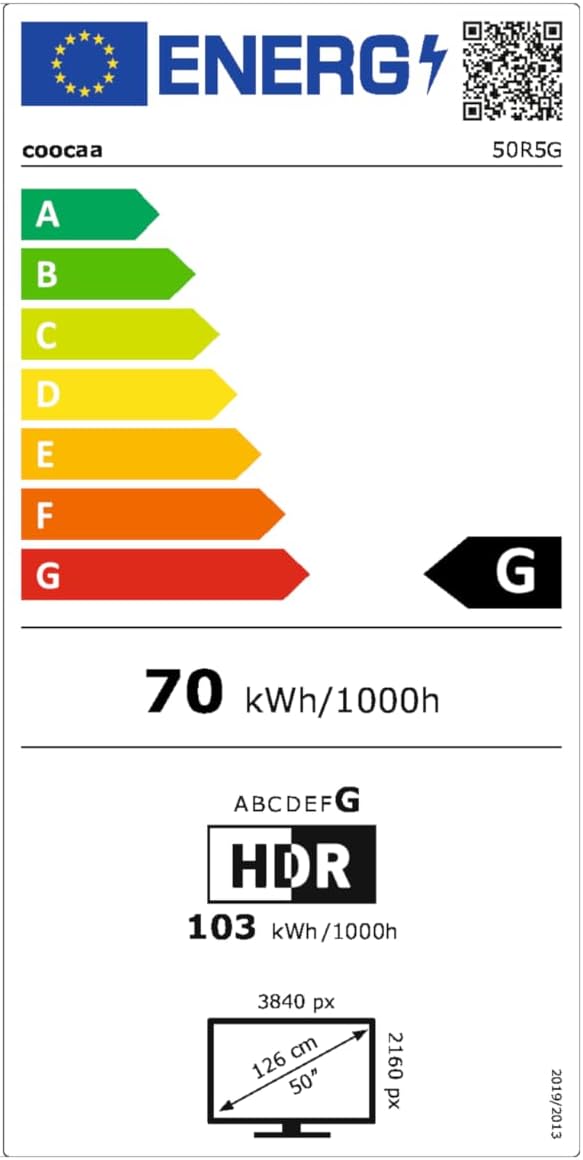
This image presents the EU Energy Label for the coocaa 50R5G TV. It indicates an energy efficiency class of 'G' for both Standard Dynamic Range (SDR) and High Dynamic Range (HDR) content, with power consumption values of 70 kWh/1000h for SDR and 103 kWh/1000h for HDR. The label also shows the screen size of 50 inches (126 cm) and resolution of 3840x2160 pixels. A QR code is included for accessing the EPREL database: EPREL Database njikọ
8. Akwụkwọ ikike na nkwado
Your coocaa ROKU 50R5G TV comes with a manufacturer's warranty. Please refer to the official product documentation for specific terms and conditions.
- General Warranty Period: Afọ 2 site na ụbọchị ịzụrụ.
- Nkwado ngwaahịa: Guaranteed for 7 years.
- Akụkụ mapụtara: Guaranteed availability for 7 years after the product is no longer placed on the market.
- Mmelite ngwanrọ: Guaranteed for 8 years after the product is no longer placed on the market.
For technical assistance or warranty claims, please contact coocaa customer support through their official websaịtị ma ọ bụ onye na-ere ahịa ebe a zụrụ ngwaahịa ahụ.


