Okwu mmalite
This manual provides comprehensive instructions for the proper setup, operation, and maintenance of your Arrowmax AHDH0032-BK-AX Noise Cancelling Headset. Please read this manual thoroughly before using the headset to ensure optimal performance and safety. This headset is designed for use with various Motorola radio models, offering clear communication in noisy environments.
Ozi nchekwa
- Do not expose the headset to extreme temperatures, moisture, or corrosive substances.
- Avoid dropping or subjecting the headset to severe impact.
- Do not attempt to disassemble or modify the headset. Repairs should only be performed by authorized personnel.
- Ensure the headset is securely connected to your radio before operation.
- Clean the headset with a soft, dry cloth. Do not use harsh chemicals.
Ihe ngwugwu
Chọpụta na ihe niile dị na ngwugwu gị:
- Arrowmax AHDH0032-BK-AX Noise Cancelling Headset
- Ihe mkpuchi isi
- Earpiece (pre-attached)
Product Features and Overview
The Arrowmax AHDH0032-BK-AX headset is engineered for reliable communication and comfort in demanding environments.
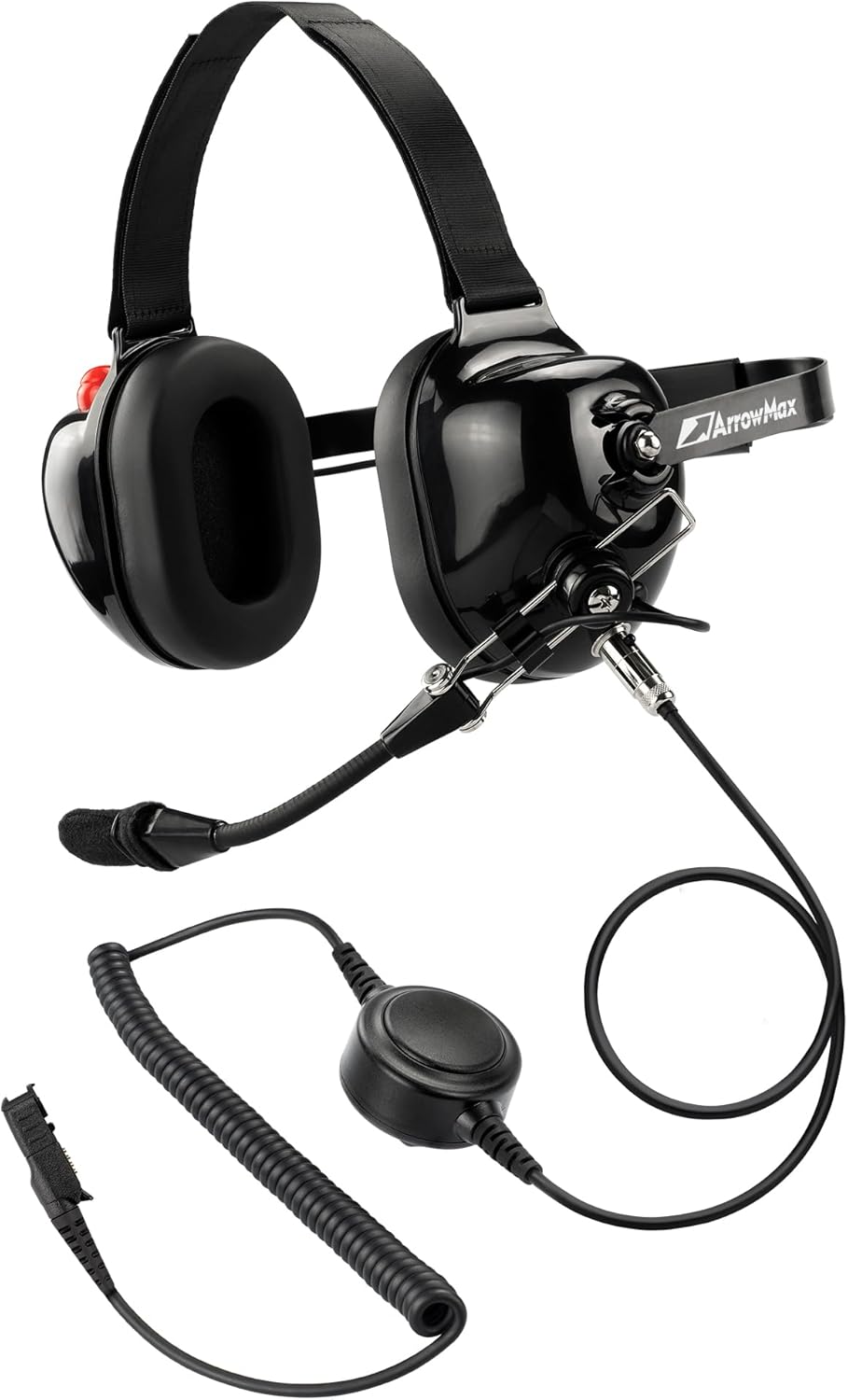
Figure 1: Arrowmax AHDH0032-BK-AX Noise Cancelling Headset, showcasing its robust design and integrated microphone.
Nkasi obi na Nhazi
The headset features an ergonomic design for maximum and lasting comfort, even during extended use. The ear pads are high-quality and exchangeable, providing long-lasting comfort and effective noise isolation.

Figure 2: Headset emphasizing its ergonomic design for comfort and noise isolation.
Quick PTT Button
A quick access Push-To-Talk (PTT) button is conveniently located on the right ear-cup for immediate communication.
Multi-Axis Wire Boom Microphone
The skeletal style boom with multi-axis construction is made of durable metal, ensuring longevity and optimal microphone sound. The microphone is exchangeable to meet various sound demands.

Figure 3: Headset illustrating the exchangeable microphone feature.
5-Pin Modular Design
The headset features a universal 5-pin industry standard cable connector port, allowing for interchangeability with various 5-pin cables, with or without PTT, to support different types of two-way radios.
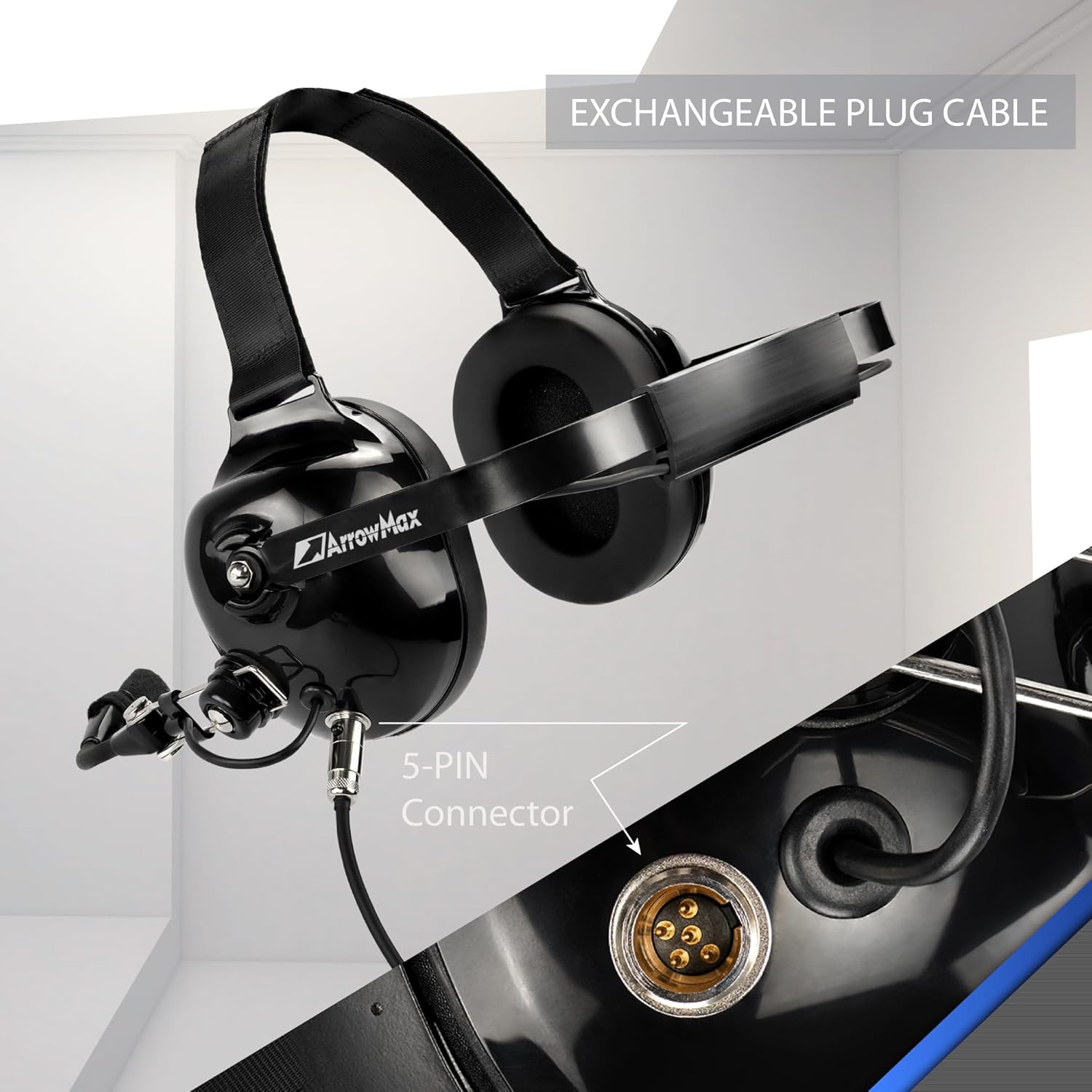
Ọgụgụ 4: Zuru ezu view of the 5-pin modular connector on the headset.

Figure 5: The AX Plug, compatible with various Motorola radio models.
HD ndị na-ekwu okwu
Equipped with high-definition audio speakers for clear sound transmission and reception.
Mbelata mkpọtụ
The headset provides 24dB noise attenuation and active noise cancellation, along with sound isolation, to ensure clear communication in loud environments.
Ndakọrịta
Compatible with Motorola Radio R5, XPR3300, XPR3500, XPR3300E, XPR3500E, DEP550, DEP570, DEP550E, DEP570E, DP2000, DP2400, DP3441, DP2000E, DP2400E, DP2600E, DP3441E, DP3661E. Also compatible with XiRP6600, XiRP6620, XiRP6600i, XiRP6620i, XiRE8600, XiRE8608, XiRE8600i, XiRE8608i, DGP8050E, DGP8550E, TETRA: MTP3100, MTP3150, MTP3200, MTP3250, MTP3500, MTP3550.
Melite
- Hazie eriri isi: The headset features a behind-the-head metal band with an overhead strap. Adjust the straps for a secure and comfortable fit. The Velcro straps allow for easy adjustment.
- Jikọọ eriri: Insert the 5-pin modular cable into the corresponding port on the headset. Ensure a firm connection.
- Jikọọ na Redio: Connect the other end of the cable to your compatible Motorola two-way radio.
- Adjust Microphone: Position the multi-axis wire boom microphone appropriately for clear voice transmission. The boom length is adjustable and rotatable.
Vidiyo 1: Agafeeview of the ArrowMax AHDH0032 Heavy Duty Noise Cancelling Headset, demonstrating its features and adjustability.
Video 2: Demonstration of the ArrowMax AHDH0032 Series Noise Cancelling Headset, highlighting its various components and ease of use.
Ntuziaka ọrụ
- Gbanyụọ/ Gbanyụọ: The headset draws power from the connected radio. Ensure your radio is powered on.
- Gbanwee olu: Use the volume control on your radio or the wired volume control on the cable (if applicable) to adjust the listening volume.
- Nyefee (PTT): Press and hold the Push-To-Talk (PTT) button on the right ear-cup or the in-line PTT button on the cable to transmit. Release the button to listen.
- Ojiji igweokwu: Speak clearly into the boom microphone. Ensure it is positioned close to your mouth for optimal voice pickup.
Nlekọta
- Nhicha: Wipe the headset exterior with a soft, slightly damp cloth. Do not use abrasive cleaners or immerse the headset in water.
- Ndochi Ntị: The ear pads are exchangeable. If they become worn or damaged, they can be replaced to maintain comfort and hygiene.
- Nlekọta USB: Avoid sharp bends or excessive pulling on the cable to prevent damage. The cable features a retractable design for convenience.
- Nchekwa: Store the headset in a clean, dry place away from direct sunlight and extreme temperatures when not in use.
Nchọpụta nsogbu
| Nsogbu | Ihe nwere ike ime | Ngwọta |
|---|---|---|
| Enweghị ọdịyo sitere na ekweisi | Loose cable connection; Radio not powered on; Volume too low. | Ensure cable is securely connected; Power on radio; Increase volume. |
| Igwe okwu anaghị agbasa ozi | Microphone not positioned correctly; PTT button not pressed; Microphone damaged. | Adjust microphone position; Press PTT button firmly; Check for damage, consider replacing microphone. |
| Poor audio quality / Excessive noise | Loose connection; Environmental noise exceeding headset capability; Damaged components. | Check all connections; Ensure proper fit for noise isolation; If problem persists, contact support. |
Nkọwapụta
| Njirimara | Nkọwa |
|---|---|
| Aha Nlereanya | AHDH0032-BK-AX |
| Ụdị | Arrowmax |
| Teknụzụ Njikọta | Ekwenyere |
| Jack ekweisi | Njikọ 5-pin |
| Atụmatụ Njikwa Mkpọtụ | Mkpọchi Mkpọtụ Na-arụ Ọrụ, Mwepụ Ụda |
| Noise Mbelata Rating | 24dB |
| Igwe okwu | Noise isolation boom microphone, Multi-Axis Wire Boom, Exchangeable |
| Ndị na-ekwu okwu | High Definition Audio Speakers |
| Ụdị njikwa | Volume Control, Quick PTT Button |
| Ntinye ntị | N'elu Ntị |
| Ụdị Ihe | N'elu Ntị |
| Ihe onwunwe | Leather, Metal |
| Ibu Ibu | 2.43 pound |
| Akụkụ ngwugwu | 10.5 x 8 x 4.5 sentimita asatọ |
| Ngwa dakọtara | Motorola XPR, DEP, XiRP, DGP, and MTP Series radios |
Akwụkwọ ikike na nkwado
For warranty information and technical support, please refer to the contact details provided with your purchase or visit the official Arrowmax websaịtị. Debe ihe akaebe nke ịzụrụ maka akwụkwọ ikike.


