Okwu mmalite
Daalụ maka ịzụrụasing the HEANTTV Mini Stereo USB Computer Speakers, Model C1. This manual provides essential information for the safe and efficient use of your new speakers. Please read it thoroughly before use and retain it for future reference.
Ozi nchekwa
- Ekwela ka igwe okwu ahụ banye n'ime mmiri ma ọ bụ oke mmiri.
- Zere itinye igwe okwu n'akụkụ ebe okpomọkụ ma ọ bụ n'anwụ kpọmkwem.
- Do not attempt to disassemble or repair the speakers yourself. Contact qualified service personnel.
- Debe ebe ụmụaka na-apụghị iru.
- Jiri naanị ngwaọrụ na isi mmalite ike dakọtara dịka akọwapụtara.
Ihe ngwugwu
Biko lelee ngwungwu maka ihe ndị a:
- HEANTTV Mini Stereo USB Computer Speakers (2 units)
- Integrated USB power cable and 3.5mm audio cable with in-line control
- Ntuziaka mmalite ngwa ngwa
Ngwaahịa gafereview
The HEANTTV C1 speakers feature a compact design with integrated LED lighting and convenient in-line controls for volume and LED light management.
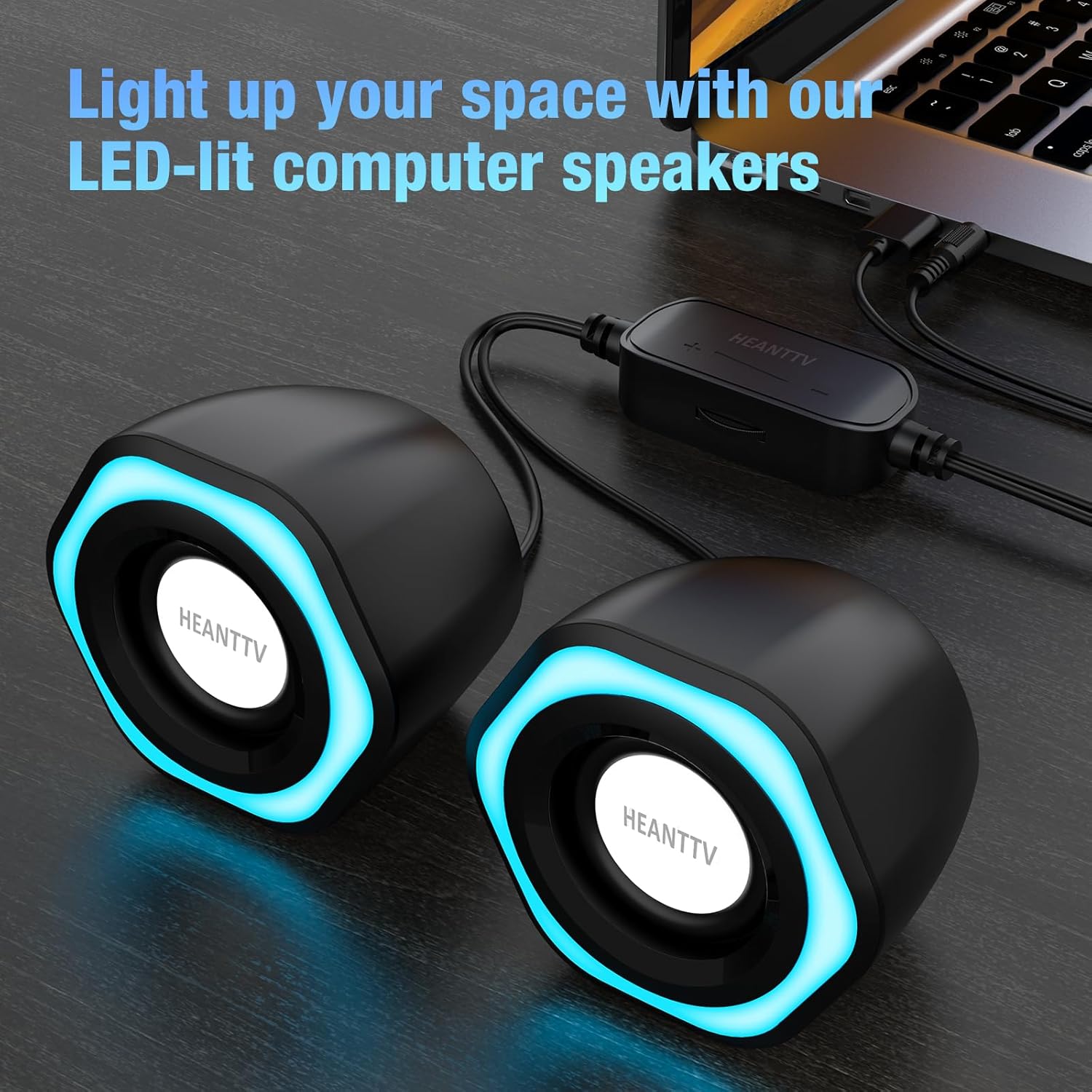
Foto 1: HEANTTV C1 speakers with their distinctive blue LED lighting, connected to a laptop. The speakers are designed to illuminate your workspace.

Foto 2: Zuru ezu view of the HEANTTV C1 speaker dimensions, highlighting its compact and portable size. The measurements are approximately 79mm (3.11in) height, 65mm (2.55in) width, and 84mm (3.30in) depth.

Foto 3: A HEANTTV C1 speaker held in a hand, illustrating its mini size and portability.
Ntuziaka nhazi
Follow these steps to set up your HEANTTV C1 speakers:
- Nkwanye: Position the two speakers on your desk or desired surface, ensuring they are equidistant from your listening position for optimal stereo sound.
- Jikọọ ọdịyo: Plug the 3.5mm audio jack into the audio output port of your computer, laptop, or other compatible device.
- Njikọ Ike: Insert the USB-A connector into an available USB port on your computer, laptop, or a USB power adapter (5V/1A recommended). The speakers are USB powered.
- Ike Na: Once both cables are connected, the speakers will power on, and the LED lights will illuminate.

Foto 4: Illustration of the easy connection process. The USB cable provides power, and the 3.5mm audio cable transmits sound. The in-line control unit is visible for convenient adjustments.

Foto 5: A nso-elu view of the USB plug for power and the 3.5mm audio plug for sound input, demonstrating the simple plug-and-play connectivity.
Ntuziaka ọrụ
The HEANTTV C1 speakers are designed for straightforward operation.
- Njikwa olu: Use the in-line control wheel located on the cable to adjust the volume. Rotate the wheel upwards to increase volume and downwards to decrease it.
- Ikanam Light Control: The in-line control unit also features a button to turn the LED lights on or off. Press the button to toggle the lighting feature.
- Nkpọghachi ọdịyo: Once connected and powered, play audio from your connected device. The speakers will output stereo sound.

Foto 6: Detail of the in-line control unit, showing the volume adjustment wheel and the button for controlling the LED lights. This allows for easy access to common functions.
Nlekọta
To ensure the longevity and optimal performance of your speakers, follow these maintenance guidelines:
- Nhicha: Jiri ákwà dị nro ma kpọọ nkụ hichaa mpụta nke igwe okwu. Ejila ihe nhicha mmiri ma ọ bụ ihe ndị na-eme ka ọ dị nro.
- Nchekwa: When not in use for extended periods, store the speakers in a cool, dry place away from direct sunlight and dust.
- Nlekọta USB: Avoid bending or twisting the cables excessively to prevent damage.
Nchọpụta nsogbu
If you encounter issues with your HEANTTV C1 speakers, refer to the following common problems and solutions:
| Nsogbu | Ihe nwere ike ime | Ngwọta |
|---|---|---|
| Enweghị ụda |
|
|
| Igwe ọkụ LED anaghị arụ ọrụ |
|
|
| Ụda agbagọ |
|
|
Nkọwapụta
| Njirimara | Nkọwa |
|---|---|
| Aha Nlereanya | C1 |
| Ụdị | HEANTTV |
| Ngwa dakọtara | Personal computer, laptop, desktop |
| Teknụzụ Njikọta | USB (for power), 3.5mm AUX (for audio) |
| Ọnọdụ mmepụta ọdịyo | Stereo (2.0 channel configuration) |
| Ike mmepụta okwu | 6 Watt (Ngụkọta) |
| Atụmatụ pụrụ iche | LED Light (with on/off control) |
| Usoro njikwa | In-line volume control wheel, LED light button |
| Isi Iyi Ike | USB Powered (Electric cable) |
| Ihe onwunwe | Plastic |
| Akụkụ ngwaahịa (L x W x H) | 3.11 x 6.5 x 7.9 cm (per speaker) |
| Ibu | 400 grams (mkpokọta) |
| Waterproof | Mba |
Akwụkwọ ikike na nkwado
A na-enyekarị ozi gbasara mkpuchi akwụkwọ ikike na nkwado ndị ahịa yana akwụkwọ ịzụrụ ihe gị ma ọ bụ na gọọmentị nke onye nrụpụta. website. Please refer to the included "Quick Start Guide" or visit the HEANTTV websaịtị maka nkọwa akwụkwọ ikike na ozi kọntaktị maka nkwado.
For any issues not covered in this manual, please contact HEANTTV customer service.


