1. Okwu mmalite
Thank you for choosing the ARROWMAX SES PRO Electric Precision Screwdriver. This cordless tool is designed for precision tasks, featuring smart motion control and a comprehensive set of 34 magnetic bits. It is ideal for electronics, laptops, glasses, and other delicate applications. This manual provides essential information for safe operation, setup, maintenance, and troubleshooting to ensure optimal performance and longevity of your device.
2. Ozi nchekwa
Please read all safety warnings and instructions carefully before using this product. Failure to follow these instructions may result in electric shock, fire, and/or serious injury.
- Debe ebe a na-arụ ọrụ ọcha na ọkụ nke ọma. Ebe mgbagwoju anya ma ọ bụ ọchịchịrị na-akpọ ihe mberede.
- Ejila ngwaọrụ ike rụọ ọrụ n'ime ikuku mgbawa, dị ka n'ihu mmiri ọkụ, gas, ma ọ bụ uzuzu. Ngwá ọrụ ike na-emepụta ọkụ ọkụ nke nwere ike ịgbanye uzuzu ma ọ bụ uzuoku.
- Chebe ụmụaka na ndị na-ekiri ebe ha na-arụ ọrụ ike. Ihe ndọpụ uche nwere ike ime ka ị kwụsị ịchịkwa.
- Zere ịmalite na mberede. Gbaa mbọ hụ na ngbanwe ahụ nọ n'ọnọdụ agbanyụrụ tupu ị jikọọ na ngwugwu batrị, iburu ma ọ bụ buru ngwá ọrụ.
- Emechala oke. Debe ụkwụ kwesịrị ekwesị na nguzozi mgbe niile. Nke a na-enyere aka ịchịkwa ngwá ọrụ ike ka mma na ọnọdụ ndị a na-atụghị anya ya.
- Yi uwe nke ọma. Ejila uwe na-adịghị mma ma ọ bụ ọla. Debe ntutu gị na uwe gị ka ọ ghara imegharị akụkụ ahụ. Enwere ike ijide uwe ndị rụrụ arụ, ọla ma ọ bụ ogologo ntutu n'akụkụ ndị na-akpụ akpụ.
- Jiri akụrụngwa nchedo onwe onye. Yiri nchebe anya mgbe niile. Akụrụngwa nchekwa dị ka ihe mkpuchi uzuzu, akpụkpọ ụkwụ nchekwa na-abụghị skid, okpu siri ike, ma ọ bụ nchebe anụ nke ejiri maka ọnọdụ kwesịrị ekwesị ga-ebelata mmerụ ahụ onwe onye.
- Chekwaa ngwaọrụ ike na-adịghị arụ ọrụ ebe ụmụaka ga-eru ma ekwela ka ndị na-amachaghị ngwa ike ma ọ bụ ntuziaka ndị a ka ha rụọ ọrụ ike.
- Jikwaa ngwaọrụ ike. Lelee maka ndakọrịta ma ọ bụ njikọ nke akụkụ ndị na-akpụ akpụ, nbibi nke akụkụ na ọnọdụ ọ bụla ọzọ nwere ike imetụta ọrụ ngwá ọrụ ike. Ọ bụrụ na mebiri emebi, rụzie ngwa ike tupu eji ya.
- Jiri ngwá ọrụ ike, ngwa na ngwa ngwa ngwa ngwa wdg dị ka ntụziaka ndị a si dị, na-eburu n'uche ọnọdụ ọrụ na ọrụ a ga-arụ. Iji ngwa ike rụọ ọrụ dị iche na nke ezubere nwere ike ibute ọnọdụ dị egwu.
- Fanye naanị na chaja nke onye nrụpụta kwuru. Chaja dabara maka otu ụdị ngwugwu batrị nwere ike ịmepụta ihe egwu ọkụ mgbe ejiri ya na ngwugwu batrị ọzọ.
- Ejila ngwá ọrụ ma ọ bụrụ na mgba ọkụ anaghị agbanye ma gbanyụọ ya. Ngwá ọrụ ike ọ bụla nke enweghị ike ijikwa mgba ọkụ dị ize ndụ ma a ghaghị ịrụzi ya.
- Kwụpụ ngwugwu batrị na ngwa ike tupu ime mgbanwe ọ bụla, ịgbanwe ngwa ma ọ bụ ichekwa ngwa ike. Usoro nchekwa mgbochi dị otú ahụ na-ebelata ohere nke ịmalite ngwá ọrụ ike na mberede.
3. Ihe ngwugwu
The ARROWMAX SES PRO Electric Precision Screwdriver package typically includes the following items:
- 1 x ARROWMAX SES PRO Electric Precision Screwdriver
- 1 x Magnetic Storage Case
- 34 x Magnetic Precision Bits (S2 Steel, 4mm)
- 1 x USB-A na eriri USB-C

Image: The ARROWMAX SES PRO Electric Precision Screwdriver, its magnetic bit case, and the included 34 precision bits.
4. Ngwaahịa gafereview na akụrụngwa
Familiarize yourself with the main components of your ARROWMAX SES PRO screwdriver:

Image: Labeled diagram of the ARROWMAX SES PRO screwdriver's key components.
- Ụdị-C ọdụ ụgbọ mmiri: Located at the top for recharging the internal battery.
- Ngosipụta ọnọdụ LED: An OLED screen showing battery level, torque setting, and operational status.
- Bọtịnụ ike: Used to turn the device on/off and adjust torque settings.
- Ahụ Aluminom Alloy: Owuwu siri ike ma dị fechaa.
- Ọkụ LED: Na-amụba ebe ọrụ ka mma visibiliti.
- Bit Installation Port: Where precision bits are inserted.
5. Nhazi
5.1 Charging the Screwdriver
- Locate the USB-C charging port at the top of the screwdriver.
- Connect the provided USB-A to USB-C charging cable to the screwdriver and a compatible USB-A power adapter (not included).
- The LED Status Display will indicate the charging progress. A full charge allows for tightening approximately 900 screws.
- Ihe ndetu dị mkpa: This electric screwdriver only supports USB-A to USB-C charging and is not compatible with USB-C PD (Power Delivery) chargers.

Foto: Ofeview of charging port, battery, torque adjustment, and OLED display.
5.2 Installing Precision Bits
- Select the appropriate precision bit from the magnetic storage case. The case features a pop-up design for easy access.
- Insert the bit firmly into the Bit Installation Port at the tip of the screwdriver. The magnetic holder will secure the bit in place.
- To remove a bit, simply pull it out.
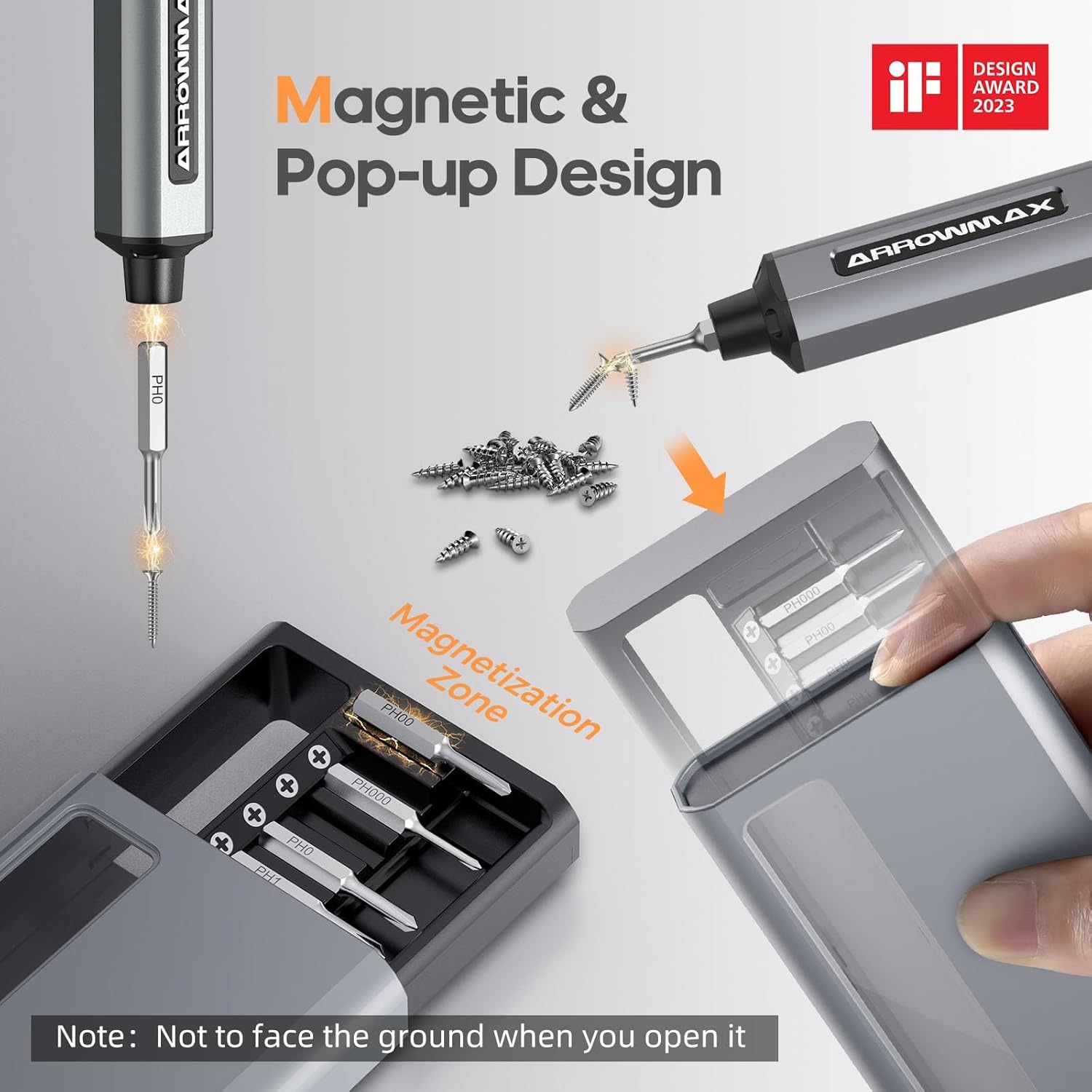
Image: Magnetic pop-up bit case design and bit magnetization zone.
6. Ntuziaka ọrụ
6.1 Gbanyụọ/ gbanyụọ
Press and hold the Power Button for a few seconds to turn the screwdriver on or off. The OLED screen will illuminate upon activation.
6.2 Adjusting Torque Settings
The SES PRO offers 5 adjustable torque levels, including an auto-sensing mode, to suit various tasks. The electric torque ranges from 0.049 N.m to 0.30-0.35 N.m, with a manual torque of 3 N.m.
- With the screwdriver powered on, press the Power Button three times continuously to cycle through the torque settings.
- The OLED screen will display the current torque level (e.g., 1, 2, 3, 4, A for Auto-Sensing).
- Select a lower torque for delicate items like glasses or small electronics, and higher torque for more robust applications.
- For screws that are too tight for the electric motor, the screwdriver can be used in manual mode by applying direct force.
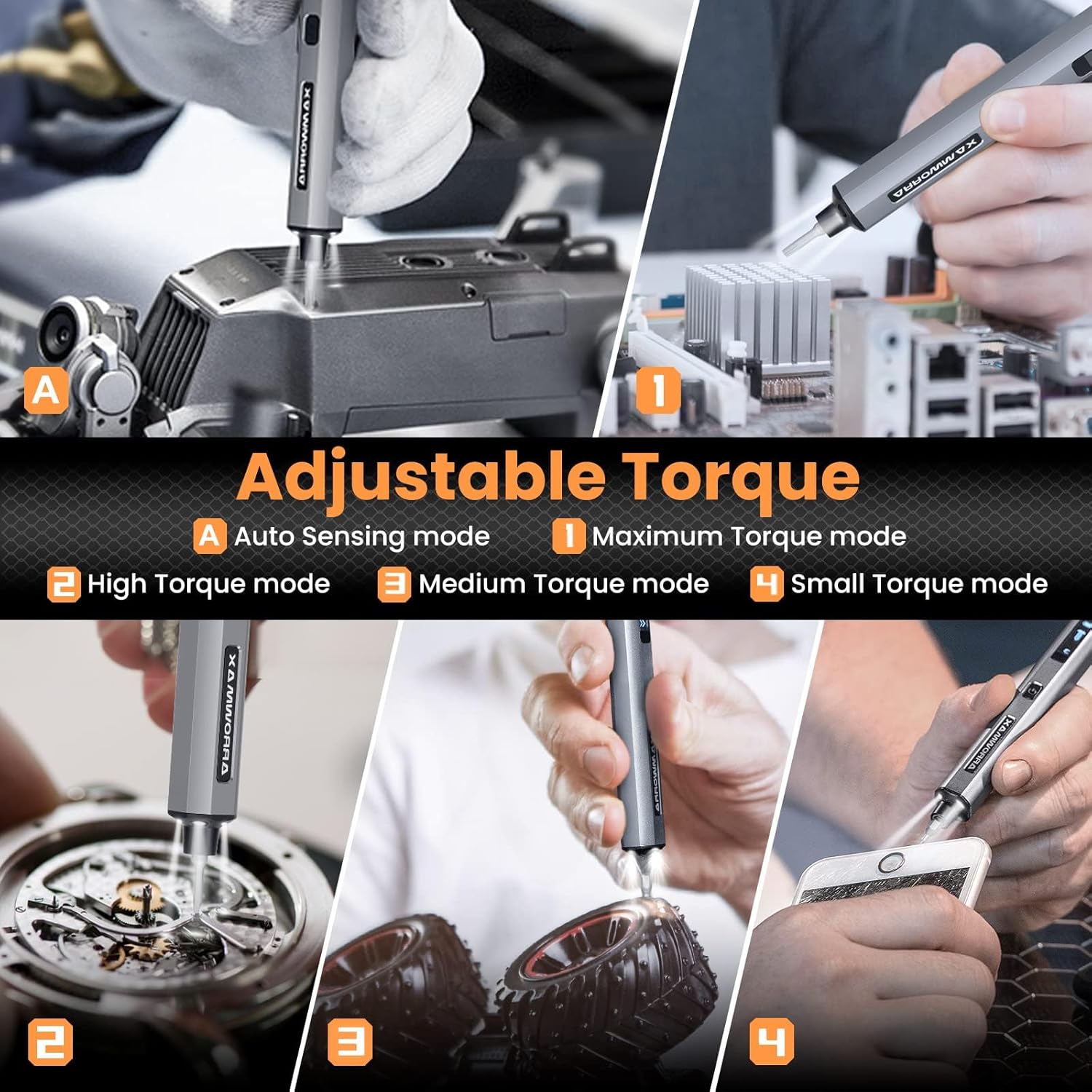
Image: Adjustable torque settings for various applications.
6.3 Body Sensory Dual-Mode (Forward/Reverse)
The SES PRO features a body sensory dual-mode for intuitive control of rotation direction.
- To drive a screw in (tighten), gently rotate your wrist in a clockwise direction while holding the screwdriver.
- To remove a screw (loosen), gently rotate your wrist in a counter-clockwise direction.
- The screwdriver's internal gyroscope detects your wrist movement and activates the motor accordingly.
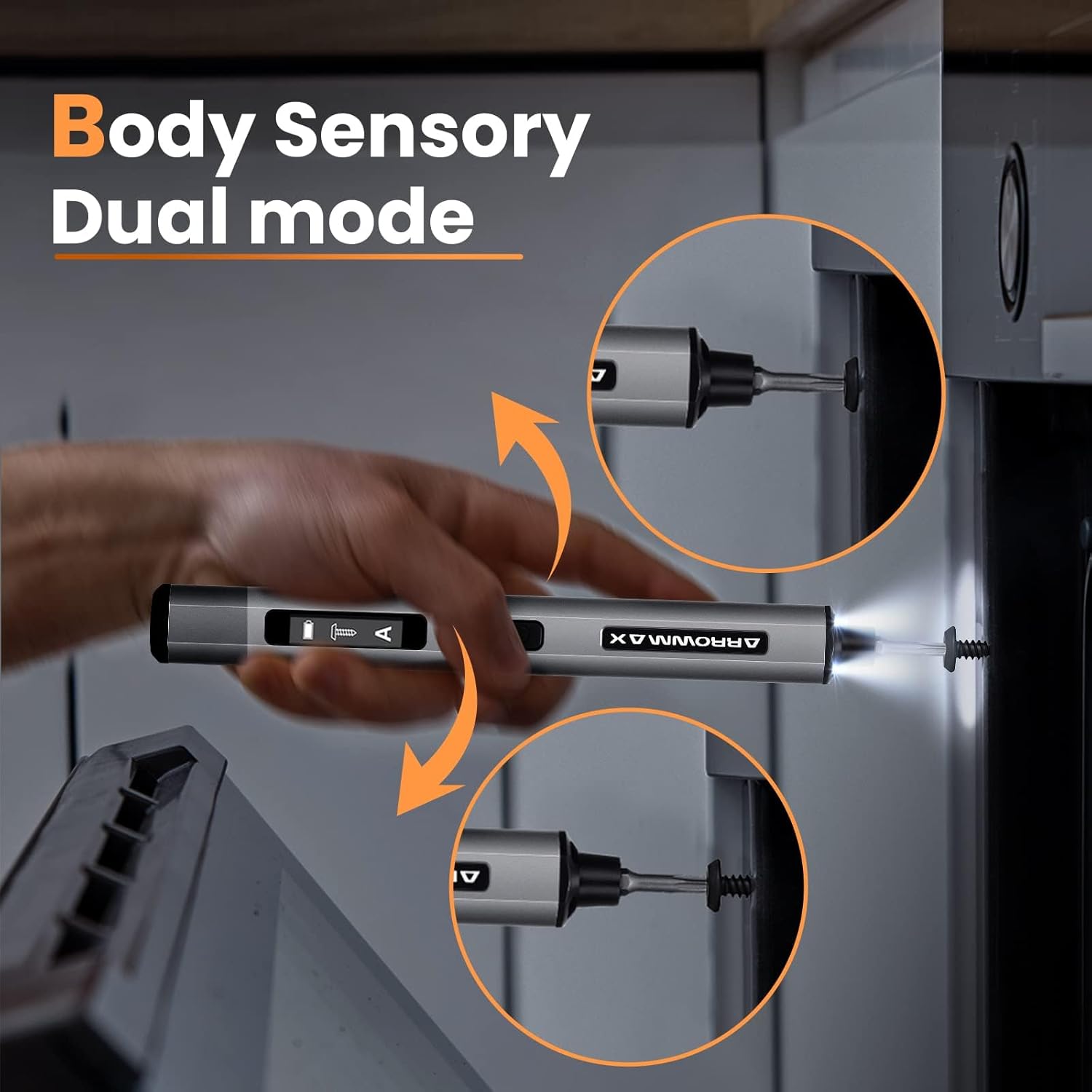
Image: Body sensory dual-mode in action for forward and reverse operation.
6.4 LED Work Lights
The integrated LED lights at the tip of the screwdriver automatically illuminate when the motor is active, providing clear visibility of your work area.
7. Nlekọta
7.1 Nhicha
- Wipe the screwdriver body with a soft, dry cloth. Do not use abrasive cleaners or solvents.
- Ensure the bit installation port is free of debris.
7.2 Nlekọta batrị
- Ka ịgbatị ndụ batrị ogologo, zere ịchaji batrị ugboro ugboro.
- Store the screwdriver in a cool, dry place when not in use.
- Recharge the battery periodically if stored for extended periods to prevent deep discharge.

Image: The SES PRO's long-lasting battery capacity.
7.3 Bit Care
- Keep the precision bits clean and free of rust.
- Store bits securely in the magnetic case to prevent loss and damage.
8. Nchọpụta nsogbu
If you encounter issues with your ARROWMAX SES PRO screwdriver, refer to the following common problems and solutions:
| Nsogbu | Ihe nwere ike ime | Ngwọta |
|---|---|---|
| Screwdriver does not turn on or respond. | Low battery; device is off. | Charge the screwdriver using the provided USB-A to USB-C cable. Ensure the power button is pressed to turn it on. |
| Screwdriver anaghị akwụ ụgwọ. | Incorrect charger type; faulty cable/adapter. | Ensure you are using a USB-A to USB-C cable and a standard USB-A power adapter. USB-C PD chargers are not supported. Try a different cable or adapter. |
| Motor lacks power or cannot loosen/tighten screws. | Low battery; incorrect torque setting; screw is too tight for electric mode. | Charge the screwdriver. Increase the torque setting. For very tight screws, manually loosen or tighten them first, then use the electric mode. |
| Directional control (forward/reverse) is inconsistent. | Improper wrist movement; gyroscope calibration issue. | Ensure clear and deliberate wrist movements. If issues persist, try restarting the device. |
| Bits fall out or are not held securely. | Bit installation port is dirty; bit is not fully inserted. | Clean the bit installation port. Ensure the bit is pushed in firmly until it clicks or feels secure. |
9. Nkọwapụta
Key technical specifications for the ARROWMAX SES PRO Electric Precision Screwdriver:
| Njirimara | Nkọwapụta |
|---|---|
| Ụdị | ARROWMAX |
| Nlereanya | SES PRO (AM-199913-G) |
| Ọsọ | 200 RPM |
| Isi Iyi Ike | Akwanyere batrị |
| Voltage | 3.7 volts (DC) |
| Igwe ọkụ eletrik | 0.049 N.m - 0.30-0.35 N.m (Adjustable) |
| Torque akwụkwọ ntuziaka | 3 Nm |
| Ụdị batrị | Lithium ion (500mAh) |
| Nchaji ọdụ ụgbọ mmiri | USB-C (USB-A to USB-C charging only) |
| Ibu Ibu | 13.7 ounces |
| Akụkụ ngwugwu | 7.48 x 3.43 x 1.73 sentimita asatọ |
| Atụmatụ pụrụ iche | OLED Screen, Smart Motion Control, Ergonomic Design, LED Lights |
10. Akwụkwọ ikike na nkwado
The manufacturer's warranty information for this product is not explicitly provided in the available data. For details regarding warranty coverage, duration, and terms, please refer to the documentation included with your purchase or contact the retailer where the product was acquired.
For technical support, product inquiries, or assistance with troubleshooting that is not covered in this manual, please visit the official ARROWMAX website or contact their customer service department. Contact information can typically be found on the product packaging or the manufacturer's official online channels.


