1. Okwu mmalite
The Texet KLS-2 Microcurrent Facial Device is a versatile 6-in-1 home-use skincare tool designed to enhance your facial care routine. This device combines microcurrent technology with light therapy and various massage functions to promote skin tightening, lifting, and rejuvenation for the face, eyes, and neck. Please read this manual thoroughly before use to ensure safe and effective operation.
2. Ozi nchekwa
Maka nchekwa gị na iji gbochie mmebi na ngwaọrụ ahụ, biko lezie anya na ihe ndị a:
- This device is for cosmetic use only and is not intended for medical purposes. Consult a physician before use if you have any medical conditions, especially if you are pregnant, have a pacemaker, or suffer from epilepsy.
- Do not use on broken, irritated, or infected skin, or on areas with sunburn, open wounds, or recent surgical scars.
- Debe ngwaọrụ ahụ ka ụmụaka ghara iru ya.
- Do not immerse the device in water or use it in excessively humid environments.
- Zere kọntaktị na anya ozugbo.
- Kwụsị iji ya ozugbo ma ọ bụrụ na ahụ erughị ala ma ọ bụ mmeghachi omume ọjọọ ọ bụla.
- Jiri naanị eriri nchaji enyere.
3. Ihe ngwugwu
Biko lelee ma ihe niile dị na ngwugwu ahụ:
- Texet KLS-2 Microcurrent Facial Device
- Igwe nchaji USB
- Akwụkwọ ntuziaka onye ọrụ
4. Njirimara ngwaahịa na uru
The Texet KLS-2 device offers a comprehensive skincare experience with its multiple functions:
4.1. 6-in-1 Skincare Modes
- Nhicha: Deep pore cleansing to remove impurities.
- Ntinye: Promotes the absorption of skincare essences.
- Na-ebuli: Helps shape and firm the face.
- Mma: Brightens skin tone and reduces the appearance of wrinkles.
- Pụrụ iche: Targets smooth wrinkles around the eyes.
- dị jụụ: Calms the skin and helps shrink pores.

Nyocha 1: N'eluview of the 6-in-1 Skincare Modes.
4.2. 7 Core Benefits
- Ịkwụchi akpụkpọ ahụ: To smooth wrinkles and fine lines.
- Skin Lifting: To firm sagging skin and enhance contours.
- Skin Toning: To improve skin radiance.
- Mmeghari akpụkpọ ahụ: To reshape facial features.
- Nlekọta anya: To remove wrinkles, fine lines, dark circles, eye bags, and puffiness around eyes.
- Ọgwụgwọ oyi: To remove facial swelling, puffiness, shrink pores, and soothe redness.
- High Frequency Massage: To promote blood circulation and relax muscles.

Figure 2: The 7 Core Benefits of the Texet KLS-2 Device.
4.3. Face LED Light Therapy
The device incorporates various LED light modes to target specific skin concerns:
- Ìhè oroma: For clean export and purifying pores.
- Amber Light: To brighten skin tone and lighten skin lines.
- Crimson Light: For tight lifting and full face plasticity.
- Ìhè na-acha anụnụ anụnụ: To calm skin, control oil, and fight acne.
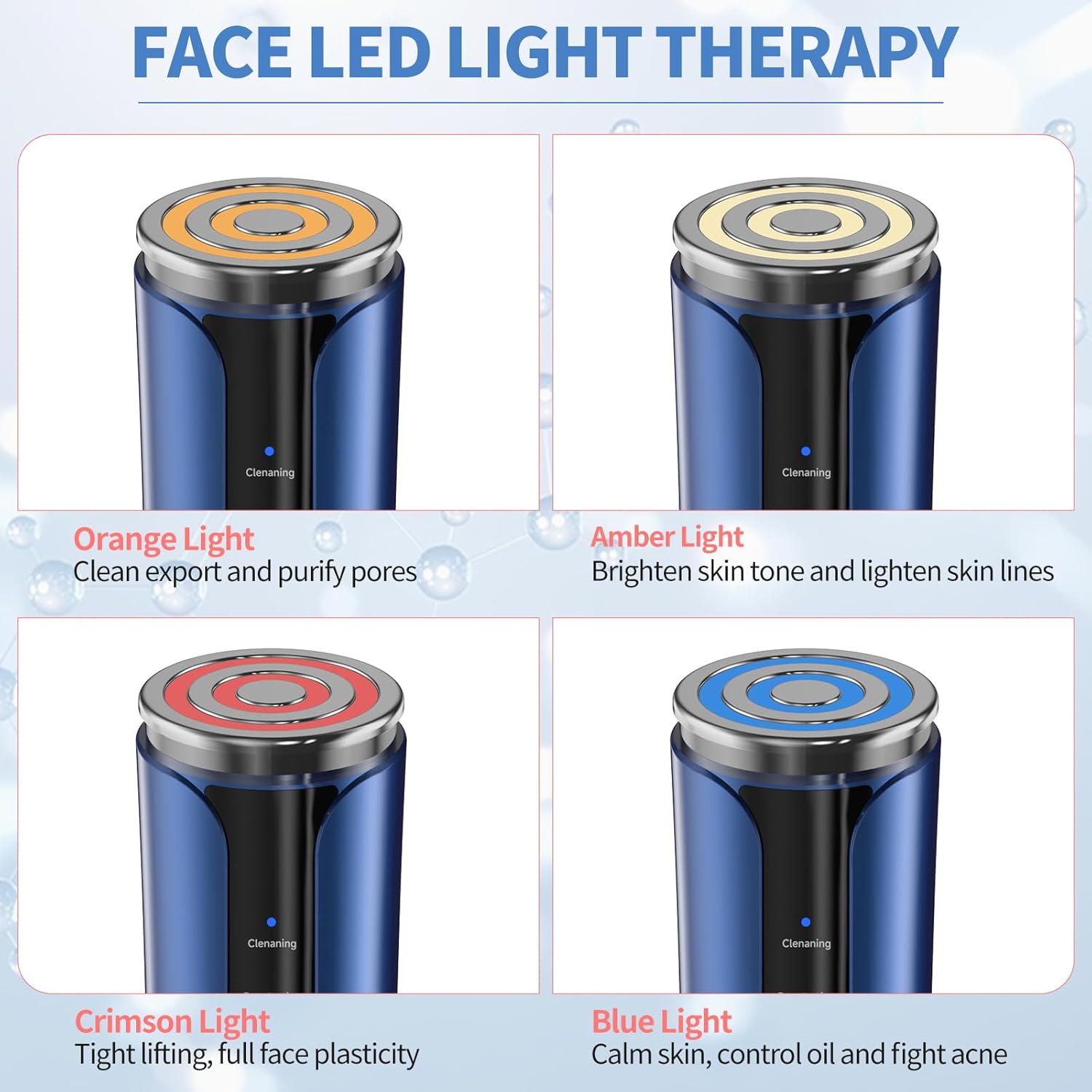
Figure 3: Face LED Light Therapy Modes.
4.4. Nhazi na Portability
The Texet KLS-2 is designed to be lightweight and portable, making it a convenient companion for your skincare journey. It features a modern style and is USB rechargeable for ease of use.

Figure 4: Lightweight, Portable, and USB Rechargeable Design.
5. Nhazi
5.1. Ịchaji ngwaọrụ
- Connect the provided USB charging cable to the charging port at the bottom of the device.
- Tinye nsọtụ nke ọzọ nke eriri USB n'ime ihe nkwụnye ọkụ USB dakọtara (anaghị etinye ya) ma ọ bụ ọdụ ụgbọ USB kọmputa.
- The charging indicator light will illuminate, typically blinking while charging and solid when fully charged.
- Ụgwọ zuru ezu na-ewekarị ihe dị ka awa 2-3.
5.2. Nkwadebe mbụ
- Tupu ojiji nke mbụ, chajịa ngwaọrụ ahụ kpamkpam.
- Clean the device head with a soft, damp akwa . Ejila ihe nhicha abrasive ma ọ bụ imikpu ngwaọrụ n'ime mmiri.
6. Ntuziaka ọrụ
Follow these steps for optimal use of your Texet KLS-2 Microcurrent Facial Device:
- Sachaa ihu gị: Thoroughly clean your face and neck before using the device. Ensure your skin is free of makeup and impurities.
- Apply Skincare Product: For best results, apply a conductive gel, serum, or moisturizer to the treatment area. This helps the device glide smoothly and enhances the effectiveness of the microcurrent.
- Ike Na: Press and hold the power button (usually the lower button) for a few seconds to turn on the device.
- Họrọ Ụdị: Press the mode selection button (usually the upper button) to cycle through the available modes (Cleaning, Penetration, Lifting, Beauty, Special, Cool) and LED light therapies (Orange, Amber, Crimson, Blue). Refer to Section 4.3 for light therapy benefits.
- Gbanwee ntọala (ọ bụrụ na ọdabara): Some modes may allow for intensity or temperature adjustments. Follow the device's indicators to select your preferred level.
- Apply Device: Gently place the device head onto your skin. Move it slowly and smoothly across your face, eyes, or neck in upward and outward motions. Avoid staying in one spot for too long.
- Focus on Areas: For eye care, use the 'Special' mode and gently glide around the eye area, avoiding direct contact with the eyeball. For lifting and tightening, focus on jawline, cheekbones, and forehead.
- Ụdị oyi: After other treatments, you may use the 'Cool' mode to help soothe skin, reduce puffiness, and close pores.
- Gbanyụọ: After your treatment, press and hold the power button to turn off the device.
- Ngwaọrụ dị ọcha: Wipe the device head clean with a soft, damp ákwà ozugbo ọ bụla ojiji.

Figure 5: Device Controls and Mode Indicators.
6.1. Recommended Usage Frequency
For visible improvements, consistent use is recommended. Many users observe noticeable changes within one month of regular use. Consult the device's specific mode guidelines for daily or weekly recommendations.

Figure 6: Visible Skin Improvement with Consistent Use.
7. Nlekọta
7.1. Nhicha
- Gbanyụọ ngwaọrụ mgbe niile tupu ihicha.
- Wipe the device head and body with a soft, slightly damp ákwà mgbe ọ bụla ojiji.
- Do not use alcohol, abrasive cleaners, or harsh chemicals, as these can damage the device.
- Hụ na mmiri ọ bụla adịghị abanye n'ọdụ chaja ma ọ bụ oghere ndị ọzọ.
7.2. Nchekwa
- Chekwaa ngwaọrụ ahụ n'ebe dị jụụ, kpọrọ nkụ, pụọ na ìhè anyanwụ kpọmkwem na oke okpomọkụ.
- Keep it away from moisture and dust.
- Ensure the device is fully charged before storing for extended periods to maintain battery health.
8. Nchọpụta nsogbu
If you encounter any issues with your Texet KLS-2 device, please refer to the following common problems and solutions:
| Nsogbu | Ihe nwere ike ime | Ngwọta |
|---|---|---|
| Ngwaọrụ anaghị agbanwu. | Batrị dị ala ma ọ bụ mebie ya. | Jiri eriri USB chajie ngwaọrụ ahụ nke ọma. |
| Ngwaọrụ anaghị akwụ ụgwọ. | Eriri ma ọ bụ ihe nkwụnye ọkụ adịghị mma; ọdụ chaja ruru unyi. | Nwaa eriri USB ma ọ bụ ihe nkwụnye ọkụ dị iche. Hụ na ọdụ chaja ahụ dị ọcha ma ghara inwe ihe mkpofu. |
| Enweghị mmetụta ma ọ bụ mmetụta adịghị ike n'oge ojiji. | Insufficient conductive gel/serum; low intensity setting. | Apply more conductive gel or serum to the skin. Increase the intensity setting if available for the selected mode. |
| Mmekpa ahụ akpụkpọ ahụ mgbe ejiri ya. | Device used on sensitive or broken skin; allergic reaction to skincare product. | Discontinue use immediately. Ensure skin is healthy before use. Change skincare products if irritation persists. Consult a dermatologist if necessary. |
Ọ bụrụ na nsogbu ahụ dịgidere mgbe ịnwale azịza ndị a, biko kpọtụrụ nkwado ndị ahịa.
9. Nkọwapụta
| Ụdị | Ederede |
| Aha Nlereanya | KLS-2 |
| Nọmba Nlereanya ihe | s3 |
| Onye nrụpụta | Shenzhen Keri Technology Co., LTD |
| Isi Iyi Ike | Corded Electric (USB Rechargeable) |
| Ihe onwunwe | Plastic |
| Agba | Ọcha-acha anụnụ anụnụ |
| Ibu Ibu | 0.32 kilogram |
| Akụkụ ngwugwu | 17.5 x 10.7 x 7 cm |
| Uru ngwaahịa | Na-eme ka Ọkpụkpọ Akpụkpọ ahụ dịkwuo mma |
| Eji ngwaahịa akwadoro | Improving skin elasticity and firmness |
10. Akwụkwọ ikike Ozi
The Texet KLS-2 Microcurrent Facial Device comes with a standard manufacturer's warranty. Please refer to the warranty card included in your package or contact Texet customer support for detailed information regarding warranty terms and conditions.
11. Nkwado ndị ahịa
For any questions, technical assistance, or support regarding your Texet KLS-2 Microcurrent Facial Device, please contact our customer service team. Contact details can typically be found on our official websaịtị ma ọ bụ na nkwakọ ngwaahịa.


