1. Okwu mmalite
This manual provides comprehensive instructions for the installation, operation, and maintenance of your Syble XB-8602 2D Desktop Barcode Scanner. Please read this manual thoroughly before using the device to ensure optimal performance and longevity.
2. Ngwaahịa gafereview
The Syble XB-8602 is a high-performance 2D desktop barcode scanner designed for efficient and accurate barcode reading in various commercial and industrial environments. It is capable of scanning both 1D and 2D barcodes from printed labels, paper, and digital screens such as mobile phones. Its automatic sensing feature and high scan rate make it ideal for point-of-sale (POS) systems, libraries, warehouses, and other applications requiring rapid data capture.

Foto 1: N'ihu view of the Syble XB-8602 2D Desktop Barcode Scanner, showing the scanning window and the Syble logo.
3. Atụmatụ
- Ịrụ ọrụ dị elu: Equipped with an automatic sensor for quick and hands-free scanning.
- Fast Scan Rate: Achieves up to 1500 scans per second for rapid data processing.
- Ndakọrịta nke ukwuu: Reads both 1D and 2D barcodes (e.g., QR Code, Data Matrix, PDF417).
- Multi-Surface Scanning: Capable of scanning barcodes from printed materials, labels, and digital screens (smartphones, tablets).
- Njikọta nkwụnye na-egwu: Simple USB connection requires no additional software or driver installation.
- Ngwa sara mbara: Suitable for retail stores, libraries, warehouses, parking systems, and various commercial settings.
- Nhazi na-adịgide adịgide: Built for reliable performance in demanding environments.
4. Nhazi
The Syble XB-8602 barcode scanner is designed for easy setup and immediate use. Follow these steps to get started:
- Mepee ihe nyocha: Carefully remove the scanner and its USB cable from the packaging.
- Jikọọ na ngwaọrụ nnabata: Locate an available USB port on your computer (desktop, laptop) or POS system.
- Tinye: Insert the USB cable from the scanner into the USB port of your host device.
- Nchọpụta akpaaka: The operating system (Windows, macOS, Linux) will automatically detect and install the necessary drivers. No manual driver installation is required.
- Dị njikere maka ojiji: Once the installation is complete (usually indicated by a system notification), the scanner is ready to begin scanning barcodes.

Ọgụgụ 2: Azụ view of the scanner, highlighting the USB connection port.
5. Ntuziaka ọrụ
The XB-8602 scanner operates with an intuitive automatic sensing mechanism.
- Ndokwa: Place the item with the barcode in front of the scanner's reading window.
- Nyocha akpaka: The scanner will automatically detect the barcode and illuminate to read it.
- Successful Read: Upon a successful scan, the scanner will typically emit an audible beep and/or a visual indicator (e.g., a green light flash). The barcode data will then be transmitted to your connected computer or POS system, appearing as if typed via a keyboard.
- Ọkwa ndozi: If a barcode is not read immediately, slightly adjust the distance or angle of the item relative to the scanner window. Ensure the barcode is flat and not excessively creased or damaged.
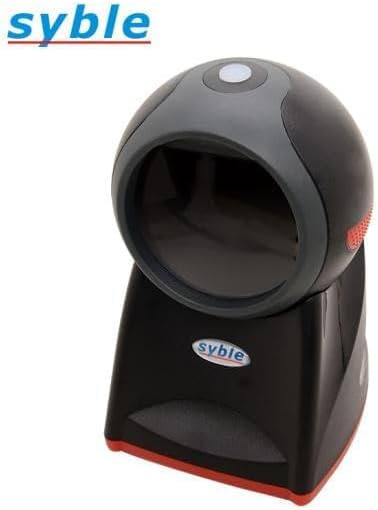
Foto 3: Top view of the scanner, illustrating the optimal area for barcode presentation.
6. Nlekọta
Ndozi kwesịrị ekwesị na-eme ka nyocha barcode gị dị ogologo ma rụọ ọrụ nke ọma.
- Nhicha windo nyocha: Regularly clean the scanning window with a soft, lint-free cloth. For stubborn smudges, slightly dampen the cloth with water or a mild, non-abrasive glass cleaner. Avoid harsh chemicals or abrasive materials that could scratch the window.
- Nchacha izugbe: Wipe the exterior of the scanner with a dry or slightly damp akwa iji wepu uzuzu na unyi.
- Zere Mmiri mmiri: Do not immerse the scanner in water or expose it to excessive moisture.
- Nchekwa: When not in use for extended periods, store the scanner in a clean, dry environment away from direct sunlight and extreme temperatures.
- Nlekọta USB: Zere ịgbagọ ma ọ bụ ịgbagọ eriri USB gabiga ókè, n'ihi na nke a nwere ike imebi waya dị n'ime.
7. Nchọpụta nsogbu
Ọ bụrụ na ị hụ nsogbu na nyocha gị, lee nsogbu na ngwọta ndị a na-ahụkarị:
| Nsogbu | Ihe nwere ike ime | Ngwọta |
|---|---|---|
| Scanner not powering on/no light. | Ejikọghị eriri USB nke ọma ma ọ bụ ọdụ ụgbọ USB na-adịghị mma. | Ensure the USB cable is securely plugged into both the scanner and the computer. Try a different USB port on your computer. |
| Nyocha anaghị agụ koodu barcode. | Barcode damaged, poor print quality, or scanner window is dirty. Incorrect barcode type. | Clean the scanning window. Ensure the barcode is clear and undamaged. Verify the barcode type is supported (1D/2D). Adjust distance and angle. |
| Barcode data not appearing on screen. | Application not in focus, or scanner not recognized by the system. | Ensure the cursor is in the desired text field of your application (e.g., Notepad, Word, POS software). Reconnect the USB cable. Restart the computer if necessary. |
| Scanner beeps but no data output. | Output mode misconfiguration (less likely for plug-and-play). | This model is typically plug-and-play. If this occurs, try reconnecting the USB cable. Ensure your application is ready to receive input. |
8. Nkọwapụta
| Njirimara | Nkọwa |
|---|---|
| Nlereanya | XB-8602 |
| Ụdị ọkụ | Red LED, 630 nm wavelength |
| Reading Accuracy (1D Barcode) | 3 nde |
| Reading Accuracy (2D Data Matrix) | 7.5 nde |
| Reading Accuracy (2D PDF 417) | 4 nde |
| Ubi nke View (Horizontal) | ogo 46.1 |
| Ubi nke View (Votịkal) | ogo 30.4 |
| Ọnụ ụzọ | USB HID / USB-COM / RS-232 |
| Okpomọkụ na-arụ ọrụ | 0°C ruo 50°C (32°F ruo 122°F) |
| Ngwa dakọtara | Smartphone, Laptop, Desktop Computer |
| Isi Iyi Ike | Eriri eletriki (site na USB) |
| Ọnụego nyocha | okpokolo agba 1500 kwa nkeji (fps) |
| Akụkụ (L x W x H) | 18.8 x 13.9 x 11.2 cm (7.4 x 5.5 x 4.4 inch) |
| Ibu | 500 grams (1.1 lbs) |
| Onye nrụpụta | Syble-e |
| Mba onye si | China |
9. Akwụkwọ ikike na nkwado
For warranty information and technical support, please refer to the documentation provided at the time of purchase or contact your vendor. Keep your proof of purchase for any warranty claims.
For general inquiries or further assistance, please visit the manufacturer's official websaịtị ma ọ bụ kpọtụrụ ngalaba ọrụ ndị ahịa ha.


