1. Okwu mmalite
This manual provides detailed instructions for the setup, operation, and maintenance of your boAt Aavante Bar 490 Bluetooth Soundbar. Please read this manual thoroughly before using the product to ensure proper functionality and to maximize your audio experience.

Image 1.1: The boAt Aavante Bar 490 Bluetooth Soundbar in Classic Black.
2. Ihe ngwugwu
Nyochaa na etinyere ihe niile edepụtara n'okpuru na ngwugwu gị:
- BoAt Aavante Bar 490 Soundbar
- Ịchaji eriri
- Akwụkwọ ntuziaka (akwụkwọ a)
- Akwụkwọ ikike kaadị
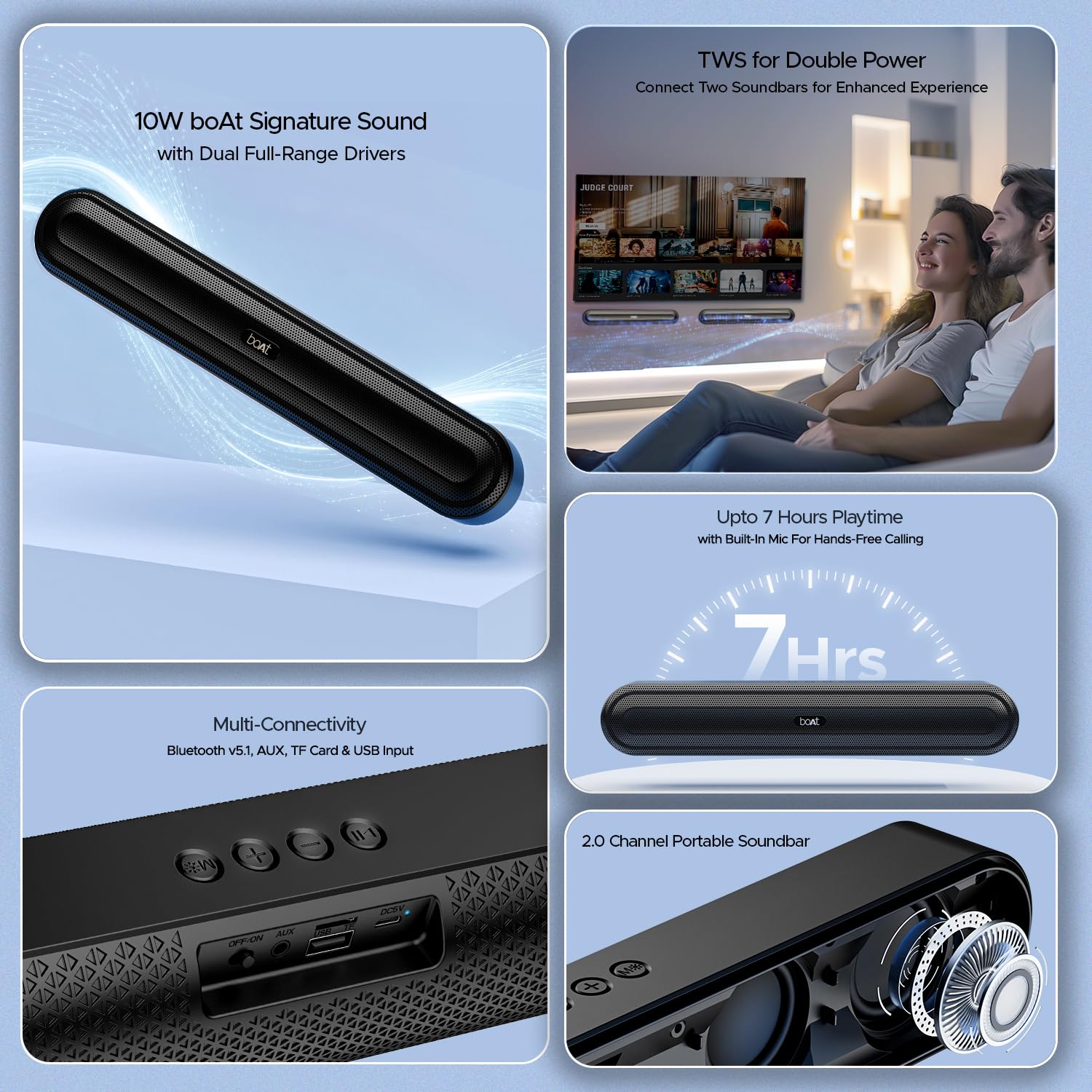
Foto 2.1: Ofeview of the boAt Aavante Bar 490 and its key features, including package contents.
3. Ngwaahịa gafereview
3.1. Njikwa na Ọdụ Ụgbọ Mmiri
Familiarize yourself with the control buttons and connectivity ports on your Aavante Bar 490.

Foto 3.1: nso nso view of the control buttons and multi-connectivity ports (Bluetooth v5.1, AUX, TF Card, USB Input) on the soundbar.
- Bọtịnụ ike: Press and hold to power on/off. Short press to switch modes.
- Mpịakọta ọnụ (-): Belata olu.
- Elu elu (+): Welie olu.
- Bọtịnụ Kwụsị/Kwụsị: Play or pause music. Answer/end calls.
- Bọtịnụ Ụdị (M): Switch between input modes (Bluetooth, AUX, USB, TF Card).
- Gbanyụọ/gbanwuo: Isi ngbanwe ike.
- Ọdụ ụgbọ mmiri AUX: Maka njikọ ọdịyo wired.
- Ọdụ ụgbọ mmiri USB: Maka ịkpọghachi draịva USB.
- Oghere TF Kaadị: For TF card playback.
- DC5V ọdụ ụgbọ mmiri: Maka ịchaji ngwaọrụ.
4. Nhazi
4.1. Charging the Soundbar
Before first use, fully charge the soundbar. Connect the provided charging cable to the DC5V port on the soundbar and the other end to a compatible USB power adapter (not included). The LED indicator will show charging status and turn off when fully charged. A full charge provides up to 7 hours of playback.

Image 4.1: The boAt Aavante Bar 490 highlighting its up to 7 hours of playtime on a single charge.
4.2. Gbanyụọ / gbanyụọ
- Ensure the OFF/ON switch at the back is in the "ON" position.
- Press and hold the Power button on the top panel for 3 seconds to power on the soundbar.
- To power off, press and hold the Power button again for 3 seconds.
4.3. Njikọ Bluetooth
- Power on the soundbar. It will automatically enter Bluetooth pairing mode (indicated by a flashing LED).
- Na ngwaọrụ gị (smartphone, tabletị, wdg), gbanye Bluetooth wee chọọ ngwaọrụ dịnụ.
- Select "Aavante Bar 490" from the list.
- Once paired, the LED indicator will turn solid blue, and you will hear a confirmation tone.
The soundbar supports Bluetooth v5.1 for stable and efficient wireless connection up to 10 meters.
4.4. TWS (Ezigbo Stereo ikuku ikuku) ijikọ
For an enhanced stereo experience, you can pair two Aavante Bar 490 soundbars together.
- Ensure both Aavante Bar 490 units are powered on and in Bluetooth pairing mode (not yet connected to any device).
- On one of the soundbars, double-press the Mode button (M). It will search for the other unit.
- Once successfully paired, you will hear a confirmation tone, and the LED indicators on both units will synchronize.
- Now, connect your device to one of the paired soundbars via Bluetooth as described in Section 4.3. Both soundbars will play audio in stereo.

Image 4.2: Illustration of two boAt Aavante Bar 490 soundbars connected via TWS for an enhanced audio experience.
4.5. Other Connectivity Modes
Press the Mode button (M) to cycle through the following input options:
- Ọnọdụ AUX: Connect an audio device using a 3.5mm AUX cable to the AUX port.
- Ọnọdụ USB: Insert a USB flash drive into the USB port. The soundbar will automatically play audio files.
- Ụdị kaadị TF: Insert a TF (microSD) card into the TF card slot. The soundbar will automatically play audio files.
5. Ntuziaka ọrụ
5.1. Nghaghachi egwu
- Gwuo/kwụsịtụ: Obere pịa bọtịnụ Play/kwụsịtụ.
- Ndozi olu: Pịa obere bọtịnụ Mpịakọta Elu (+) ma ọ bụ Mpịakọta Elu (-).
- Track na-esote: Pịa bọtịnụ olu elu (+) ogologo.
- Gara aga Track: Ogologo oge pịa bọtịnụ ụda ala (-).
5.2. Oku na-enweghị aka
When connected via Bluetooth, the built-in microphone allows for hands-free calls.
- Oku azaa: Obere pịa bọtịnụ Play/kwụsịtụ.
- Oku ngwụcha: Mkpirisi pịa bọtịnụ Play/kwụsịtụ mgbe oku na-aga.
- Jụ oku: Pịa ogologo bọtịnụ Play/kwụsịtụ.
6. Nlekọta
- Keep the soundbar away from water, moisture, and extreme temperatures.
- Jiri akwa dị nro hichaa ngwaọrụ ahụ. Ejila ihe nchacha abrasive ma ọ bụ ihe mgbaze.
- Avoid dropping or subjecting the soundbar to strong impacts.
- Chekwaa n'ebe dị jụụ, kpọrọ nkụ mgbe ọ naghị eji ya ogologo oge.
7. Nchọpụta nsogbu
| Nsogbu | Ihe nwere ike ime | Ngwọta |
|---|---|---|
| Ụda ụda anaghị agba ọkụ. | Low battery; OFF/ON switch is off. | Charge the soundbar; ensure OFF/ON switch is in the "ON" position. |
| Enweghị ike ijikọ site na Bluetooth. | Soundbar not in pairing mode; device Bluetooth is off; too far from device. | Ensure soundbar is in pairing mode; enable Bluetooth on your device; move closer to the soundbar (within 10m). |
| Enweghị ụda. | Olu dị oke ala; ọnọdụ ntinye ezighi ezi; eriri ejikọtaghị nke ọma. | Increase volume; switch to correct input mode (Bluetooth, AUX, USB, TF); check cable connections. |
| Njikota TWS ada ada. | One or both units already connected to a device; units too far apart. | Disconnect both units from any Bluetooth devices; ensure they are close to each other during TWS pairing. |
8. Nkọwapụta
- Aha nlereanya: Avante Bar 490
- Ụdị ọkà okwu: Igwe ụda ụda
- Mmepụta ọdịyo: 2.0 Ọwa
- Ike mmepụta: 10W RMS
- Ndị ọkwọ ụgbọ ala: Dual Full-Range Drivers
- Ụdị Bluetooth: v5.1
- Ogologo Bluetooth: Ruo mita 10
- Njikọta: Bluetooth, AUX, USB, TF Kaadị
- Ndụ batrị: Ruo awa iri abụọ
- Ụdị batrị: Lithium polymer (1 x 12V gụnyere)
- Igwe okwu arụnyere n'ime ya: Yes (for hands-free calling)
- Usoro njikwa: Pịa bọtịnụ
- Akụkụ ngwaahịa: 38.7D x 6.5W x 5.5H centimita
- Ibu ihe: 650 grams

Image 8.1: Dimensions of the boAt Aavante Bar 490 soundbar.
9. Akwụkwọ ikike na nkwado
The boAt Aavante Bar 490 comes with a standard Akwụkwọ ikike dị afọ 1 site na ụbọchị ịzụrụ. Biko rụtụ aka na kaadị ikike agụnyere maka usoro na ọnọdụ zuru ezu.
For technical support, service, or warranty claims, please contact boAt customer service:
- Email: info@imaginemarketingindia.com
- Onye nrụpụta: Imagine Marketing Limited
- adreesị: Nkeji mba. 204 & 205, ala nke abụọ, D-wing & E-wing, Corporate Avenue, Andheri Ghatkopar Link Road, Mumbai, Maharashtra-400093, India
You can also download the boAt Hearables App for additional features and user guides. Scan the QR code below:

Image 9.1: QR code to download the boAt Hearables App for additional features and support.
10. Videos ngwaahịa
Vidiyo nke 10.1: obere oge tupuview ihe ngosiasing the boAt Aavante Bar 490 Bluetooth Soundbar's features, including 10W RMS sound, dual full-range drivers, 7 hours playback, multi-connectivity, and hands-free calling. This video is provided by the seller.
Vidiyo 10.2: Mkpebi dị mkpirikpiview of the boAt Aavante Bar 490, highlighting its 10W RMS Signature Sound, dual drivers, and Bluetooth 5.1 connectivity. This video is provided by the seller.