1. Ngwaahịa gafereview
The CATLINK W03 Wireless Cat Water Fountain is designed to provide fresh, filtered water for your cat, promoting hydration and health. Featuring a wireless design with a long-lasting battery, app control for remote monitoring, and a multi-stage filtration system, this fountain offers convenience and peace of mind.

Image 1.1: The CATLINK W03 Wireless Cat Water Fountain, showing its sleek design and a mobile app interface displaying water status and filter information.
2. Atụmatụ igodo
- Ịrụ ọrụ ikuku: Equipped with a built-in 5000mAh battery, offering up to 150 days of operation on a single charge, allowing flexible placement without power cords.
- Njikọ ngwa: Connect to the CATLINK app for remote control, monitoring of water intake, detailed health reports, and timely notifications.
- Nnukwu ike: A 2.3-liter water reservoir ensures up to 8 days of water supply for a single cat.
- Nzacha dị elu: A fine filter cartridge removes impurities, providing clean and healthy drinking water.
- Ọrụ dị jụụ: Engineered to operate at less than 30dB, ensuring minimal disturbance.

Image 2.1: Multiple cats drinking from CATLINK W03 fountains placed in different areas of a home, highlighting the wireless functionality.

Image 2.2: A cat drinking from the fountain, with a clear indication of the 2.3-liter water capacity on the reservoir.
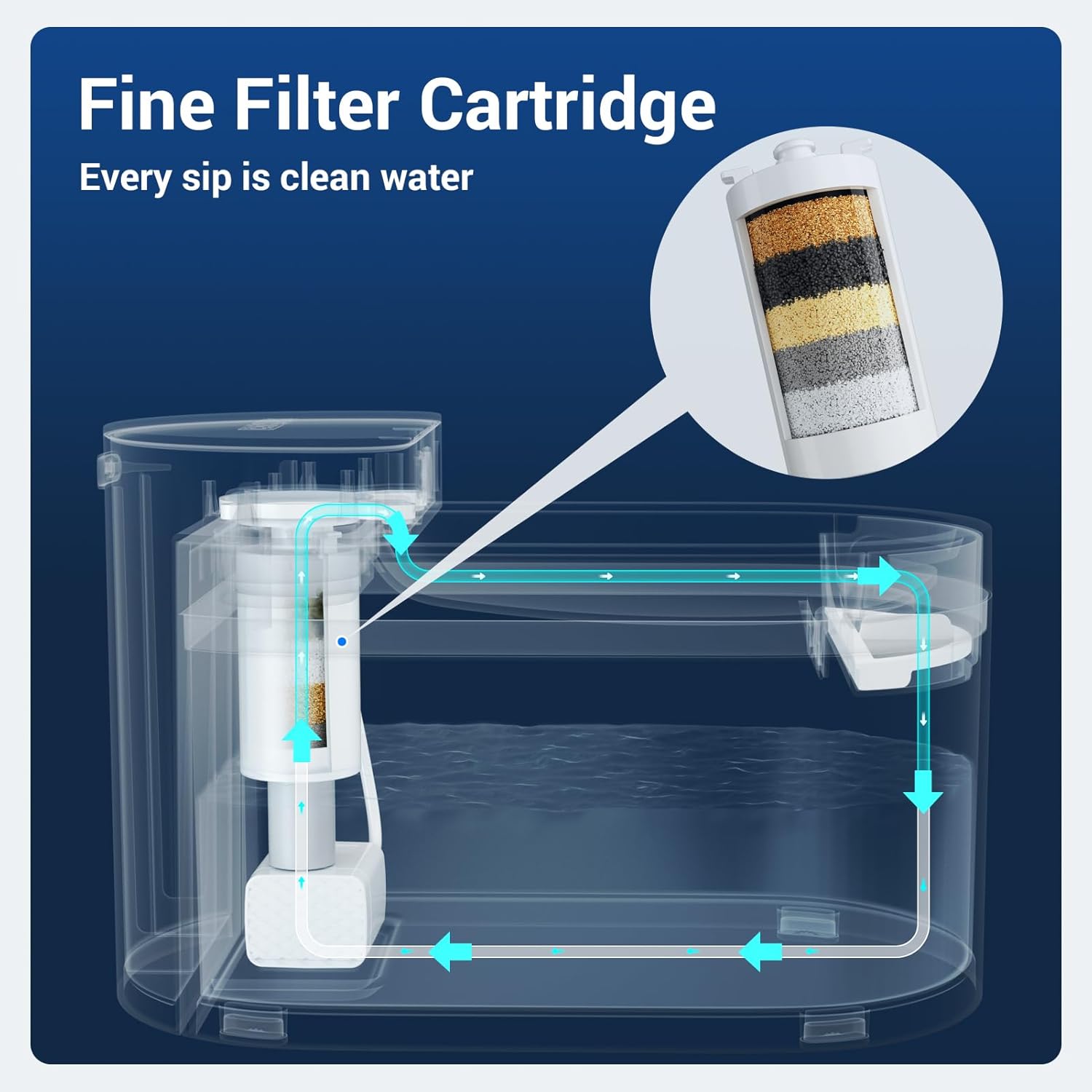
Image 2.3: A diagram illustrating the internal water flow and the multi-layer fine filter cartridge within the CATLINK W03 fountain.

Image 2.4: A cat drinking from the fountain, accompanied by a graphic indicating a sound level below 30 decibels, emphasizing quiet operation.
3. Nhazi ntuziaka
- Wepu akụrụngwa: Carefully remove all parts from the packaging. Ensure you have the main unit, water reservoir, drinking tray, filter, and charging cable.
- Gbanyụọ batrị: Before first use, fully charge the built-in 5000mAh battery using the provided charging cable. The indicator light will show charging status.
- Wụnye nzacha: Rinse the new filter under running water for a few minutes. Insert the filter into its designated slot in the pump assembly.
- Mgbakọta Isi iyi: Place the pump assembly with the filter into the water reservoir. Ensure it is securely seated.
- Jupụta ebe nchekwa mmiri: Fill the reservoir with clean water up to the 'MAX' line. Avoid overfilling.
- Place Drinking Tray: Position the drinking tray on top of the reservoir, ensuring it aligns correctly with the water outlet.
- Ike Na: Press the power button to turn on the fountain. The indicator light will illuminate.
- Njikọ Ngwa (Nhọrọ): Download the CATLINK app from your device's app store. Follow the in-app instructions to connect your fountain to your Wi-Fi network for remote monitoring and control.
4. Ntuziaka ọrụ
- Ọrụ akpaaka: The fountain is designed to operate automatically, dispensing water when your pet approaches (if motion sensor mode is enabled via the app) or on a scheduled basis.
- Manual Water Dispense: You can manually dispense water by pressing a button on the unit or through the CATLINK app.
- Njikwa ngwa: Use the CATLINK app to:
- Monitor your cat's daily water intake.
- Receive notifications for low water levels or filter replacement.
- Adjust fountain modes (e.g., continuous flow, intermittent, motion-activated).
- View health reports based on drinking patterns.
- Low Water Reminder: The fountain will notify you via the app and/or an indicator light when the water level is low. Refill promptly to ensure continuous operation.

Image 4.1: The CATLINK W03 fountain alongside a smartphone displaying app notifications for low water levels and a filter replacement reminder.
5. Nlekọta
Regular cleaning and filter replacement are crucial for maintaining water quality and the longevity of your fountain.
5.1. Cleaning the Fountain
- Kwụsa: Turn off the fountain and unplug it if connected to power. Disassemble all removable parts: drinking tray, water reservoir, and pump assembly.
- Ihe na-asachapụ: Wash the drinking tray and water reservoir with mild soap and water. Rinse thoroughly to remove all soap residue.
- Pump dị ọcha: Carefully open the pump to clean any debris or hair that may have accumulated. Use a small brush if necessary.
- Kpọọ ma chịkọtaghachi: Gbaa mbọ hụ na akụkụ niile akpọnwụwo kpamkpam tupu ị chịkọtakwa isi iyi ahụ.

Image 5.1: All components of the CATLINK W03 fountain laid out, demonstrating its easy disassembly for thorough cleaning.
5.2. Ndochi nzacha
The filter should be replaced approximately every 1-2 months, or as indicated by the CATLINK app, depending on usage and water quality.
- Wepu ihe nzacha ochie: Disassemble the fountain as described above and remove the used filter from the pump assembly.
- Kwadebe ihe nzacha ọhụrụ: Rinse the new filter under running water for several minutes to remove any loose carbon particles.
- Wụnye nzacha ọhụrụ: Insert the new filter into the pump assembly, ensuring a snug fit.
- Gbakọtaghachi: Reassemble the fountain, refill with water, and power it on. Reset the filter life counter in the CATLINK app if applicable.
6. Nchọpụta nsogbu
| Nsogbu | Ihe nwere ike ime | Ngwọta |
|---|---|---|
| Fountain not dispensing water | Low water level, clogged pump, dead battery, power off. | Refill water, clean pump and filter, charge battery, ensure power is on. |
| App not connecting to fountain | Incorrect Wi-Fi password, fountain too far from router, app issues. | Verify Wi-Fi credentials, move fountain closer to router, restart app/fountain, ensure 2.4GHz Wi-Fi. |
| Ọsọ mmiri adịghị ike | Clogged filter, dirty pump impeller. | Replace filter, clean pump thoroughly. |
| Fountain is noisy | Low water level, pump not properly seated, debris in pump. | Refill water, ensure pump is correctly installed, clean pump. |
7. Nkọwapụta
| Njirimara | Nkọwa |
|---|---|
| Nọmba nlereanya | W03 |
| Ụdị | CATLINK |
| Ike | Lita 2.3 (Mililita 2300) |
| Isi Iyi Ike | Battery Powered (5000mAh built-in battery) |
| Ndụ batrị | Ruo ụbọchị 150 |
| Ọkwa mkpọtụ | Ihe na-erughị 30dB |
| Ihe onwunwe | Plastic |
| Ibu Ibu | 3.76 pound |
| Akụkụ (L x W x H) | 12.48 x 9.72 x 7.64 inch (Ngwugwu) |
| Ngwa gụnyere | Cat water fountain unit, filter, charging cable |
| Ojiji akọwapụtara | Ime ụlọ |
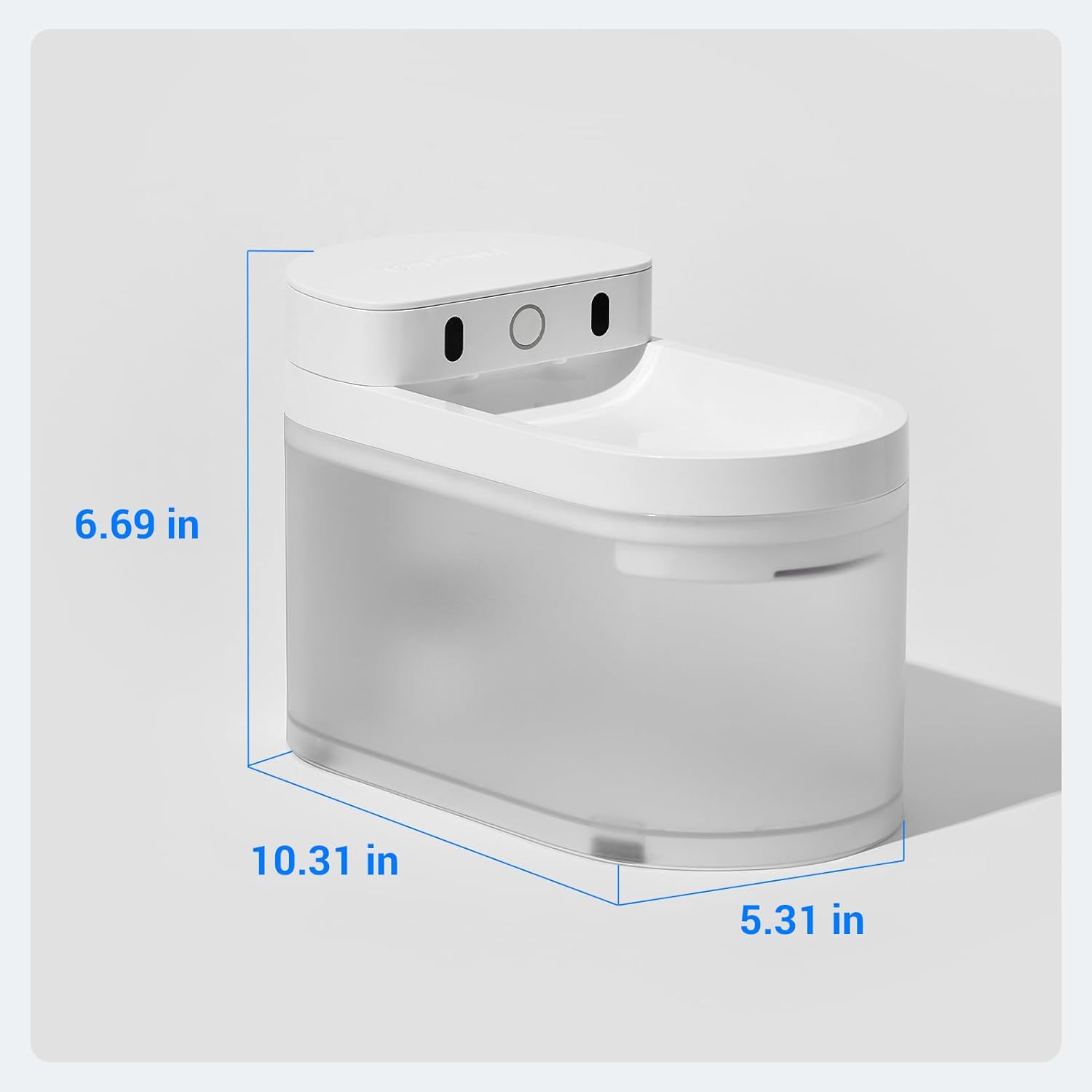
Image 7.1: A diagram illustrating the physical dimensions (length, width, height) of the CATLINK W03 Wireless Cat Water Fountain.
8. Akwụkwọ ikike na nkwado
The CATLINK W03 Wireless Cat Water Fountain comes with a Akwụkwọ ikike nke afọ 1 site na ụbọchị ịzụrụ. Akwụkwọ ikike a na-ekpuchi ntụpọ nrụpụta na adịghị arụ ọrụ n'okpuru ojiji nkịtị.
For warranty claims, technical support, or any inquiries, please contact CATLINK customer service through the following channels:
- CATLINK Official Websaịtị: Visit the official CATLINK websaịtị maka akụrụngwa nkwado, FAQs, na ozi kọntaktị.
- CATLINK App: Access support directly through the help section of the CATLINK mobile application.
- Nkwado email: Refer to your product packaging or the CATLINK website for the dedicated customer support email address.
Biko dowe ihe akaebe nke ịzụrụ ihe maka nkwado akwụkwọ ikike.


