1. Ozi nchekwa dị mkpa
Read this entire manual before operating the HYPER GOGO Cruiser 12 Plus electric motorbike. Failure to follow instructions can result in serious injury or property damage. Always prioritize safety.
- Afọ akwadoro: This product is designed for riders 6 years and older.
- Oke ibu: Agafela ikike ibu kacha nke 145 lbs (65 n'arọ).
- Ngwa nchekwa: Always wear a helmet, knee pads, elbow pads, and appropriate footwear when riding.
- Nlekọta ndị okenye: Constant adult supervision is required for all riders, especially young children.
- Gburugburu ebe a na-agba ịnyịnya: Ride in safe, open areas away from traffic, pedestrians, and obstacles. Avoid riding on uneven terrain, steep inclines, or wet surfaces.
- breeki: Familiarize yourself with the rear hub brake system before riding. Test brakes at low speed.
- Nchekwa batrị: Only use the provided charger. Do not modify the battery or charging system. Keep away from water and extreme temperatures.

Image 1.1: Always wear a helmet and protective gear when operating the motorbike.
2. Ihe ngwugwu
Carefully unpack all items and check against the list below. If any parts are missing or damaged, contact customer support immediately.

Image 2.1: Components included in the HYPER GOGO Cruiser 12 Plus package.
- Semi-assembled Mini Bike (x1)
- chaja (x1)
- Pedals (x2)
- Cover (x1)
- Wheel (x1)
- Fender (x1)
- Handlebar Clamp (x4)
- Kickstand (x1)
- Akụrụngwa Wheel
- Fender Hardware (Bolts x2)
- Handlebar Hardware (Medium Bolts x4)
- Axle & Nuts
- Bolt (x2)
- Tools (4mm, 6mm, 8mm Allen wrenches, 16mm wrench)
3. Ntọala na Mgbakọ
Follow these steps to assemble your HYPER GOGO Cruiser 12 Plus. It is recommended to have an adult perform the assembly.
3.1 Nchaji izizi
- Before first use, fully charge the motorbike's battery.
- Locate the charging port on the motorbike.
- Connect the charger to the port, then plug the charger into a standard wall outlet.
- Allow approximately 4-6 hours for a full charge. The indicator light on the charger will change when charging is complete.
3.2 Nzọụkwụ Mgbakọ
- Install Front Wheel and Fender: Attach the front wheel and fender using the provided hardware. Ensure all bolts are securely tightened.
- Tinye ogwe aka: Secure the handlebars to the bike frame using the handlebar clamps and medium bolts. Ihe dị mkpa: When routing the electrical harness wires, ensure they are fed n'okpuru the handlebars, not over the top, to prevent damage and ensure proper function.
- Wụnye pedals: Screw the pedals into their respective cranks. Note that pedals are typically marked 'L' for left and 'R' for right.
- Attach Kickstand: Mount the kickstand to the designated area on the frame.
- Place Cover: Position the decorative cover over the battery compartment.
- Nyocha ikpeazụ: Before riding, double-check all connections, bolts, and moving parts to ensure they are secure.
Video 3.1: General assembly guide for the HYPER GOGO Cruiser 12 Plus electric motorbike. (Duration: 1:58)
4. Ntuziaka ọrụ
Learn how to safely operate your HYPER GOGO Cruiser 12 Plus and utilize its features.
4.1 Power On/Off and Speed Modes
- Ike Na: Press and hold the power button on the handlebar display until the screen illuminates.
- Nhọrọ ọsọ ọsọ: The motorbike features 3 adjustable speed levels:
- L Mode (Low): Max Speed 5 MPH
- N Mode (Normal): Max Speed 8 MPH
- S Mode (Sport): Max Speed 10 MPH
- Ọsọ ọsọ: Gently twist the throttle on the right handlebar to accelerate.
- breeki: Squeeze the brake lever on the left handlebar to engage the rear hub brake.
- Gbanyụọ: Pịa ma jide bọtịnụ ike ruo mgbe ngosi ahụ kwụsịrị.
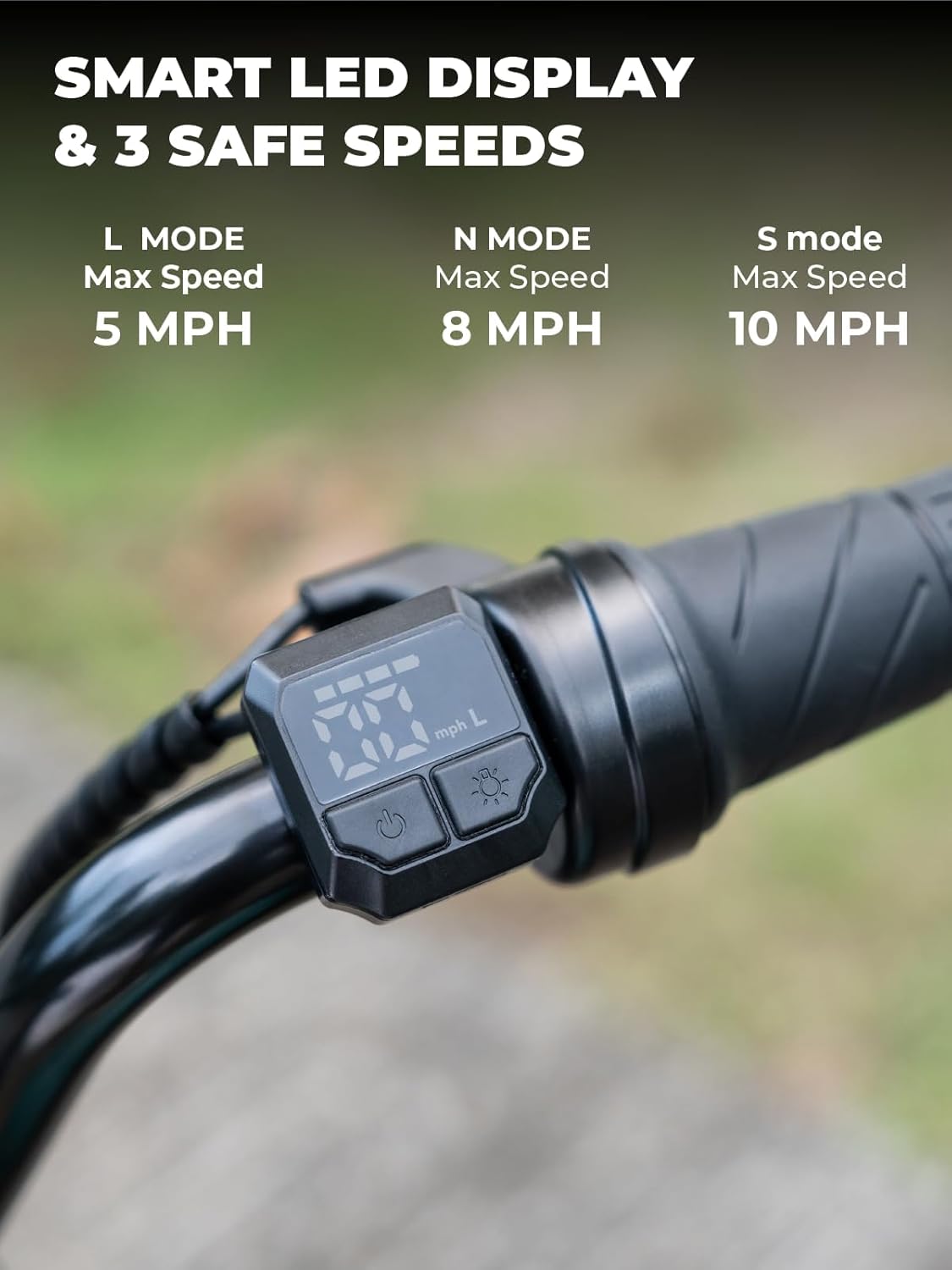
Image 4.1: Smart LED display and speed selection controls.
Atụmatụ 4.2 Pụrụ Iche
- Fog Effect: Activate the simulated fog feature for an enhanced riding experience. Refer to the display controls for activation.
- Dynamic Ambient Light: The motorbike includes dynamic lighting for visibility and style.
- Ọkà okwu Bluetooth arụnyere n'ime ya: Connect your mobile device via Bluetooth to play music through the integrated speaker.
- Ensure the motorbike is powered on.
- Enable Bluetooth on your mobile device and search for 'HYPER GOGO' or similar.
- Pair the devices. You can now play audio through the motorbike's speaker.
- Igwe ọkụ ọkụ LED: For enhanced visibility, especially in low-light conditions.

Foto 4.2: Ofeview of special features including fog effect, ambient light, and Bluetooth speaker.
5. Nlekọta
Regular maintenance ensures the longevity and safe operation of your HYPER GOGO Cruiser 12 Plus.
- Nlekọta batrị:
- Chajie batrị nke ọma ka ejirichara ya.
- If storing for extended periods, charge the battery at least once every 30 days to maintain battery health.
- Ewepụla batrị ahụ na oke okpomọkụ ma ọ bụ ìhè anyanwụ kpọmkwem.
- Nhicha: The motorbike has an IP4 water resistance rating, protecting against heavy splashing. Clean with a damp cloth. Do not use high-pressure washers or submerge the unit.
- Nrụgide taya: Regularly check tire pressure. Maintain recommended pressure for optimal performance and safety. (Specific pressure not provided, refer to tire sidewall if available).
- Nyocha izugbe: Periodically check all bolts, nuts, and connections for tightness. Inspect tires for wear and tear. Ensure brake system is functioning correctly.
6. Nchọpụta nsogbu
Rụtụ aka na ngalaba a maka okwu nkịtị na azịza ha.
| Nsogbu | Ihe nwere ike ime | Ngwọta |
|---|---|---|
| Motorbike does not power on or move. | Battery is not charged. Electrical harness wires are improperly routed. | Ensure battery is fully charged. Check that electrical harness wires are fed underneath the handlebars, not over the top, during assembly. |
| Tire loses air or cannot be inflated. | Punctured tire. Tire air valve is blocked or damaged. | Inspect tire for punctures and repair or replace as needed. If the air valve is blocked by internal components, contact customer support for assistance. |
| Obere ala ma ọ bụ ike. | Battery not fully charged. Battery degradation. | Ensure battery is fully charged before each ride. If battery life significantly decreases over time, consider battery replacement. |
| Igwe okwu Bluetooth anaghị ejikọta. | Bluetooth on device is off. Motorbike is not in pairing mode. | Ensure Bluetooth is enabled on your mobile device. Power cycle the motorbike. Try re-pairing. |
7. Nkọwapụta
Detailed technical specifications for the HYPER GOGO Cruiser 12 Plus.
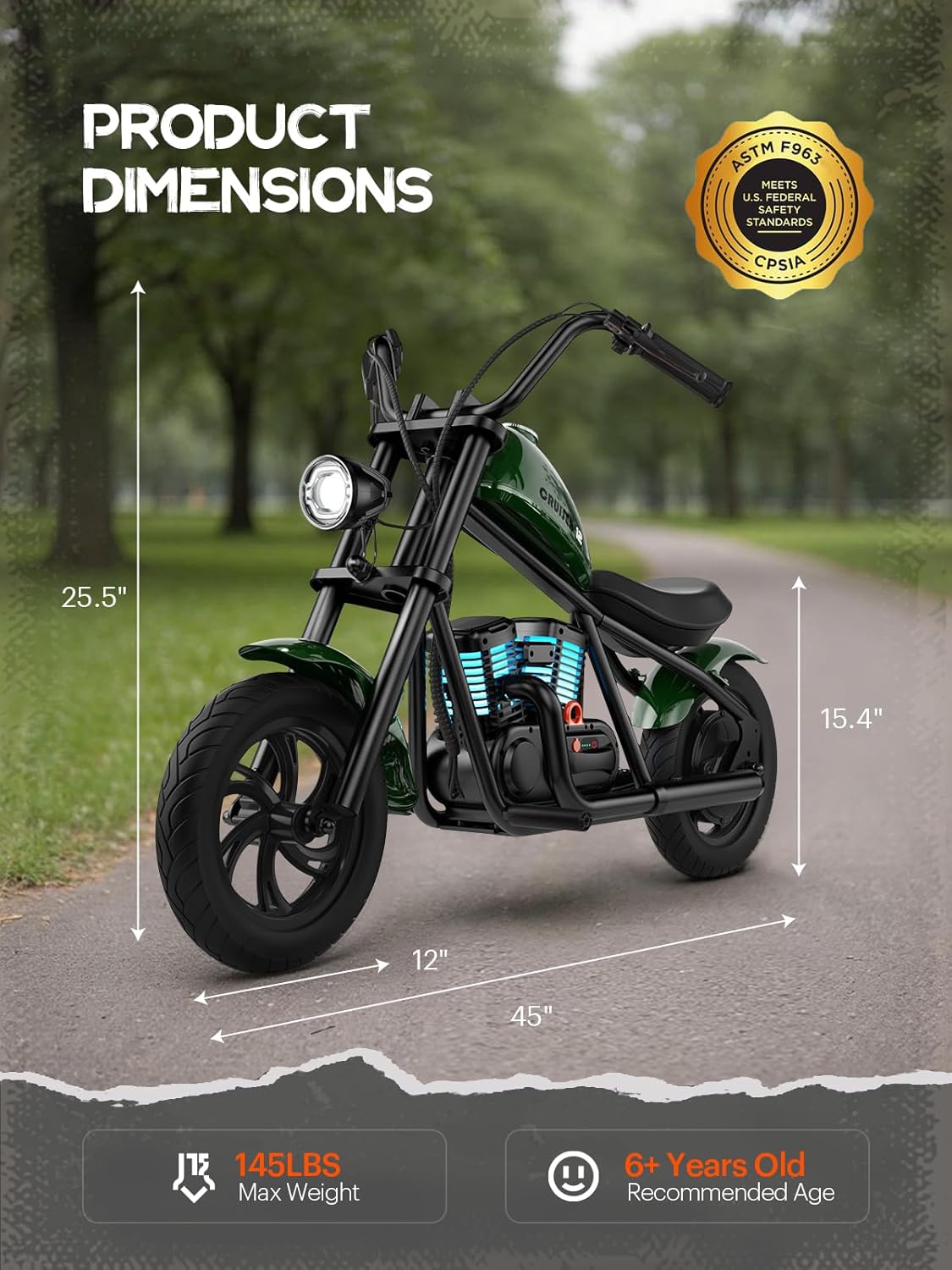
Image 7.1: Product dimensions of the HYPER GOGO Cruiser 12 Plus.
- Ụdị: Cruiser 12 Plus
- Akụkụ ngwaahịa: 45.3 x 19.6 x 28.5 sentimita (115 x 50 x 72.5 cm)
- Ibu ihe: 33 lbs (15 n'arọ)
- moto: 24V 160W
- Batrị: Li-ion 21.9V 5.2A (1 Lithium Ion battery included)
- chaja: DC24V 1.5A
- Ọsọ kacha: Up to 10 MPH (3 adjustable speed levels: 5 MPH, 8 MPH, 10 MPH)
- Oke: Approximately 7.5 miles (12 km) on a single charge
- Sistemu breeki: Rear Hub Brake
- Max Uphill Capability: 10°
- Ike ibu: Ruo 145 lbs (65 n'arọ)
- Taya: 12x3 inches, all-terrain
- Oke Nguzogide mmiri: IP4 (protection against heavy splashing)
- Afọ akwadoro: 6+ Years Old
- Onye nrụpụta: E-LINK TECHNOLOGY CO LTD Dongguan Asiwo Technology Co., Ltd
8. Akwụkwọ ikike na nkwado
For warranty information, technical support, or to inquire about replacement parts, please contact HYPER GOGO customer service directly. Refer to your purchase documentation or the official HYPER GOGO websaịtị maka nkọwa kọntaktị.
Onye nrụpụta: E-LINK TECHNOLOGY CO LTD Dongguan Asiwo Technology Co., Ltd


