1. Okwu mmalite
The Lutron YK-37UVSD is a professional-grade light meter designed for accurate measurement of both UVA and UVC light. This device features a microprocessor circuit for high reliability and durability, making it suitable for various applications including monitoring blue light radiation hazards, UV sterilization, graphic arts, photochemical matching, UV EPROM erasure, photoresist exposure, and curing of inks, adhesives, and coatings. It includes an SD card real-time data logger and supports Type K temperature measurements.
This manual provides detailed instructions for the setup, operation, maintenance, and troubleshooting of your YK-37UVSD light meter.
2. Ozi nchekwa
- Gụọ ntuziaka niile nke ọma tupu ị rụọ ọrụ ngwaọrụ.
- Do not expose the device to extreme temperatures, humidity, or direct sunlight for prolonged periods.
- Zere idobe ngwaọrụ ma ọ bụ tinye ya na mmetụta siri ike.
- Do not attempt to open or modify the device; this will void the warranty.
- Hụ na etinyere batrị n'ebe kwesịrị ekwesị. Wepụ batrị ma ọ bụrụ na a gaghị eji ngwaọrụ ahụ ruo ogologo oge.
- Keep the probes clean and free from dust or debris to ensure accurate readings.
3. Ngwaahịa gafereview
3.1 Isi ngalaba
The main unit features an LCD display, control buttons for power, function, data hold, recording, zero adjustment, and data logging. It also includes slots for the SD card and probe connections.
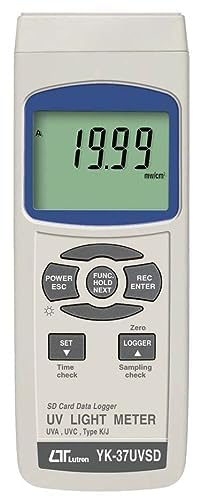
Foto 1: N'ihu view of the Lutron YK-37UVSD main unit, showing the LCD display and control buttons.
3.2 UVA and UVC Probes
The meter comes with two specialized probes: one for UVA measurement and another for UVC measurement. Both probes feature a cosine correction filter for accurate light detection.
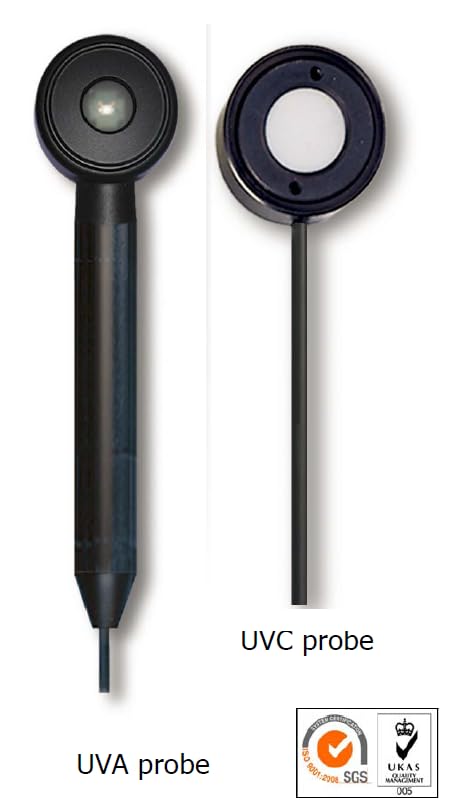
Foto 2: Separate UVA and UVC probes. The UVA probe has a cylindrical body, while the UVC probe has a flat, circular sensor head.
4. Nhazi
4.1 Ntinye batrị
- Chọta mkpuchi nke ebe batrị dị n'azụ nke isi ngwaọrụ ahụ.
- Mepee mkpuchi ahụ oghe.
- Insert six (6) 1.5V AA (UM-3) batteries, ensuring correct polarity as indicated inside the compartment.
- Dochie mkpuchi oghere batrị.
4.2 Nyocha njikọ
- Identify the desired probe (UVA or UVC) for your measurement.
- Connect the probe's cable connector to the corresponding input jack on the top or side of the main unit. Ensure a secure connection.
Ntinye kaadị SD 4.3
- Locate the SD card slot on the side of the main unit.
- Insert a formatted SD card (up to 16 GB) into the slot until it clicks into place.
- To remove, gently push the card inward until it springs out.
5. Ntuziaka ọrụ
5.1 Gbanyụọ/ gbanyụọ
Pịa POWER/ESC button to turn the meter on. Press and hold the POWER/ESC bọtịnụ maka sekọnd ole na ole iji gbanyụọ ya.
5.2 Nhọrọ Ụdị Nha
After powering on, the meter will display the current measurement mode. To switch between UVA and UVC modes, press the dedicated UVA/UVC button (if available) or cycle through modes using the FUNC/HOLD/NEXT button as per the on-screen prompts.
5.3 Nhọrọ oke
The YK-37UVSD offers two measurement ranges: 2 mW/cm² and 20 mW/cm². The meter typically auto-ranges, but you may be able to manually select a range using the SET button or a combination of buttons as described in the on-screen menu.
5.4 Data Jide Ọrụ
Pịa Jide button (often combined with FUNC/NEXT) to freeze the current reading on the display. Press it again to release the hold function.
5.5 Ndozi efu
For accurate measurements, especially in low light conditions, a zero adjustment may be necessary. With the probe covered or in a dark environment, press the ZERO button to calibrate the meter to zero.
5.6 Data Logging (SD Card)
To initiate real-time data logging to the SD card:
- Ensure an SD card is inserted.
- Pịa NKWUKWU button. The display will indicate that logging has started.
- To stop logging, press the NKWUKWU bọtịnụ ọzọ.
- Data is saved in a format compatible with spreadsheet software for easy analysis.
5.7 Type K Temperature Measurement
The YK-37UVSD also supports Type K thermocouple temperature measurements. Connect a Type K thermocouple probe (sold separately) to the designated input. Use the FUNC/NEXT button to switch to temperature measurement mode.
6. Nlekọta
6.1 Nhicha
Wipe the device and probes with a soft, dry cloth. For stubborn dirt, a slightly damp A pụrụ iji ákwà nwere ncha dị nro mee ihe, na-eme ka mmiri ghara ịbanye na ngwaọrụ ahụ. Ejila ihe nhicha ma ọ bụ ihe mgbaze.
6.2 nnọchi batrị
When the low battery indicator appears on the display, replace all six AA batteries promptly to ensure continued accurate operation. Refer to section 4.1 for battery installation instructions.
6.3 Nchekwa
Store the meter and probes in a cool, dry place, away from direct sunlight and extreme temperatures. If storing for an extended period, remove the batteries to prevent leakage.
7. Nchọpụta nsogbu
- No Display / Device Not Turning On: Check battery installation and ensure batteries are fresh. If using an AC adapter, verify the connection and power source.
- Ọgụgụ na-ezighi ezi: Ensure probes are clean and properly connected. Perform a zero adjustment. Verify that the correct measurement mode (UVA/UVC) is selected.
- Mperi kaadị SD: Ensure the SD card is properly inserted and formatted. Try a different SD card if the issue persists.
- Data Logging Not Working: Check if the SD card has sufficient free space. Ensure the logging function is activated correctly.
Ọ bụrụ na nsogbu na-adịgide mgbe ị nwara azịza ndị a, biko kpọtụrụ nkwado ndị ahịa.
8. Nkọwapụta
The following table outlines the key specifications of the Lutron YK-37UVSD UVA and UVC Light Meter:
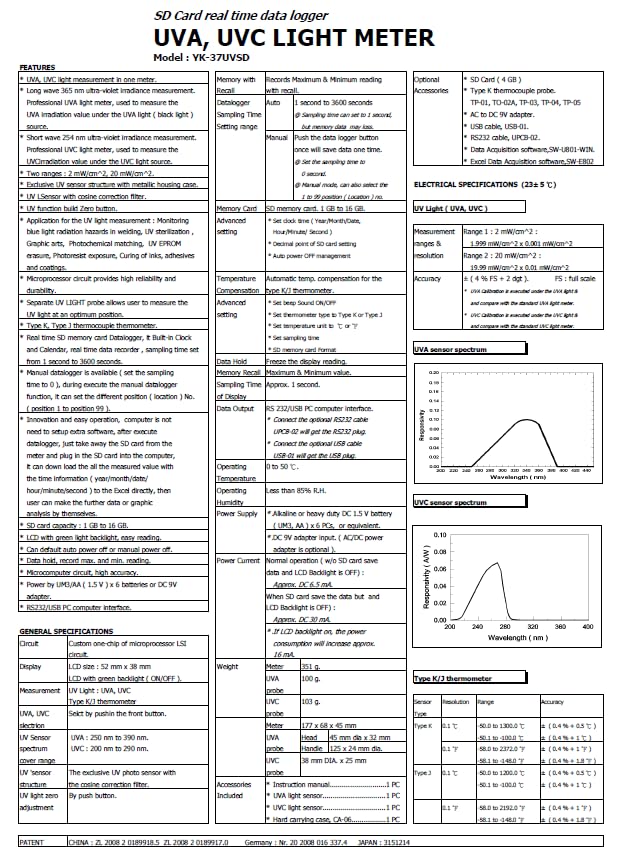
Foto 3: Detailed specification sheet for the Lutron YK-37UVSD, providing comprehensive technical data.
| Njirimara | Nkọwapụta |
|---|---|
| Nlereanya | YK-37UVSD |
| Ogo nha | UVA: 2 mW/cm², 20 mW/cm² UVC: 2 mW/cm², 20 mW/cm² |
| Ụdị ihe mmetụta | UVA probe, UVC probe with cosine correction filter |
| Ngosipụta | LCD |
| Data Logger | SD Card (1 GB to 16 GB), Real-time data logging |
| Nleba okpomọkụ | Type K Thermocouple (optional probe) |
| Ịnye ọkụ | 6 x 1.5V AA (UM-3) batteries or DC 9V adapter |
| Iru mmiri na-arụ ọrụ | Ihe na-erughị 85% RH |
| Akụkụ (Isi ngalaba) | Ihe dị ka 203 x 76 x 38 mm (8 x 3 x 1.5 sentimita asatọ) |
| Ibu (Isi) | Ihe ruru. 300 g (0.66 lbs) |
| Mba onye si | Taiwan |
| Ibu Ibu | 426 g |
| Akụkụ ngwaahịa | 30.48 x 15.24 x 10.16 cm |
9. Akwụkwọ ikike na nkwado
9.1 Ozi akwụkwọ ikike
This product is manufactured by Lutron. For specific warranty terms and conditions, please refer to the warranty card included with your product or contact the manufacturer directly. Warranty coverage typically includes defects in materials and workmanship under normal use.
9.2 Nkwado ndị ahịa
For technical assistance, troubleshooting not covered in this manual, or service inquiries, please contact the seller or the authorized Lutron service center in your region. Please have your model number (YK-37UVSD) and purchase information ready when contacting support.