Okwu mmalite
This manual provides detailed instructions for the safe and efficient operation, installation, and maintenance of your Silonn Commercial Ice Maker, model SLIM12T. Please read this manual thoroughly before using the appliance and retain it for future reference.
The Silonn SLIM12T is designed to produce up to 150 lbs of ice per day with a 33 lbs storage capacity, suitable for various commercial and home settings.

Image: Silonn Commercial Ice Maker SLIM12T, showcasing its stainless steel exterior and the included accessories: an ice scoop, drain hose, water quick connector, and water hose.

Image: A visual representation of the Silonn ice maker's versatility, showing its application in diverse environments such as coffee shops, food trucks, bars, and outdoor entertaining areas.
Atụmatụ igodo
The Silonn SLIM12T Commercial Ice Maker incorporates advanced design and technology for efficient and reliable ice production:
- Ike dị elu: Produces up to 150 lbs of ice in 24 hours with a 33 lbs storage bin.
- Mmepụta Ice Ngwa Ngwa: Ice ready in 8-15 minutes per cycle.
- Ọkpụrụkpụ Ice A Na-agbanwe agbanwe: Customize ice cubes to thin, medium, or thick.
- Na-ehicha onwe ya na-akpaghị aka: Na-eme ka mmezi dị mfe ma na-ahụ na ịdị ọcha dị.
- Dual Water Supply Options: Manual fill or direct connection to a water source.
- Intuitive LCD Control Panel: Easy operation with timer and light functions.
- Ihe owuwu na-adịgide adịgide: Made with stainless steel for longevity.

Image: An illustration detailing the four key system upgrades that contribute to the ice maker's efficient ice production and fast cooling, including air cooling, a high-efficiency compressor, multi-fan cooling, and a thickened insulation layer.
Ozi nchekwa dị mkpa
Iji belata ihe ize ndụ nke ọkụ, ujo eletrik, ma ọ bụ mmerụ ahụ mgbe ị na-eji onye na-emepụta ice gị, soro usoro nlezianya ndị a:
- Gụọ ntuziaka niile tupu ojiji.
- Jikọọ na naanị ụzọ mgbakwasị ụkwụ.
- Do not immerse the power cord, plug, or the appliance in water or other liquids.
- Na-elekọta ụmụaka mgbe ngwa a na-eji.
- Ejila eriri ma ọ bụ plọg mebiri emebi rụọ ọrụ.
- Ejila n'èzí.
- Gbaa mbọ hụ na ikuku ikuku dị na gburugburu unit ahụ.
- Jiri naanị mmiri ọṅụṅụ.
- Kpupu tupu ihicha ma ọ bụ rụọ ọrụ.
Ihe ngwugwu
Chọpụta na ihe niile dị na nkwakọ ngwaahịa:
- Silonn Commercial Ice Maker (SLIM12T)
- Akara Ice
- Drain Hose (6.6 ft)
- Water Quick Connector
- Water Hose (9.1 ft)
- Akwụkwọ ntuziaka (akwụkwọ a)
Ntọala na nwụnye
1. Ntinye
- Tinye onye na-eme ice n'elu larịị ma kwụsie ike.
- Ensure adequate clearance (at least 5 inches) around the unit for proper ventilation.
- Zere ìhè anyanwụ kpọmkwem ma ọ bụ ebe okpomọkụ.
- The ambient temperature should be between 10°C (50°F) and 32°C (90°F).
2. Njikọ Mmiri mmiri
The SLIM12T offers two water supply options:
- Manual Water Addition: Open the top lid and pour potable water directly into the water reservoir. The unit will alert you when water runs low.
- Njikọ mmiri ozugbo: For continuous operation, connect the ice maker to a potable water source.
- Locate the water inlet port at the back of the unit.
- Attach the provided water hose to the water quick connector, then connect it to your water supply.
- Gbaa mbọ hụ na njikọ niile echekwabara iji gbochie ntapu.
3. Mgbapu Hose Njikọ
Connect the provided drain hose to the drain outlet at the back of the unit. Route the drain hose to a suitable drain point, ensuring it has a continuous downward slope for proper water drainage.

Foto: Zuru ezu view of the rear panel connections, illustrating the tap water inlet hose, power cord, and water drain hose. An installation guide for hose connections is also shown.
4. Nhicha mbụ
Before first use, it is recommended to clean the ice maker. Refer to the "Maintenance" section for detailed cleaning instructions, including how to use the self-cleaning function.
Ntuziaka ọrụ
Ogwe njikwa gafereview
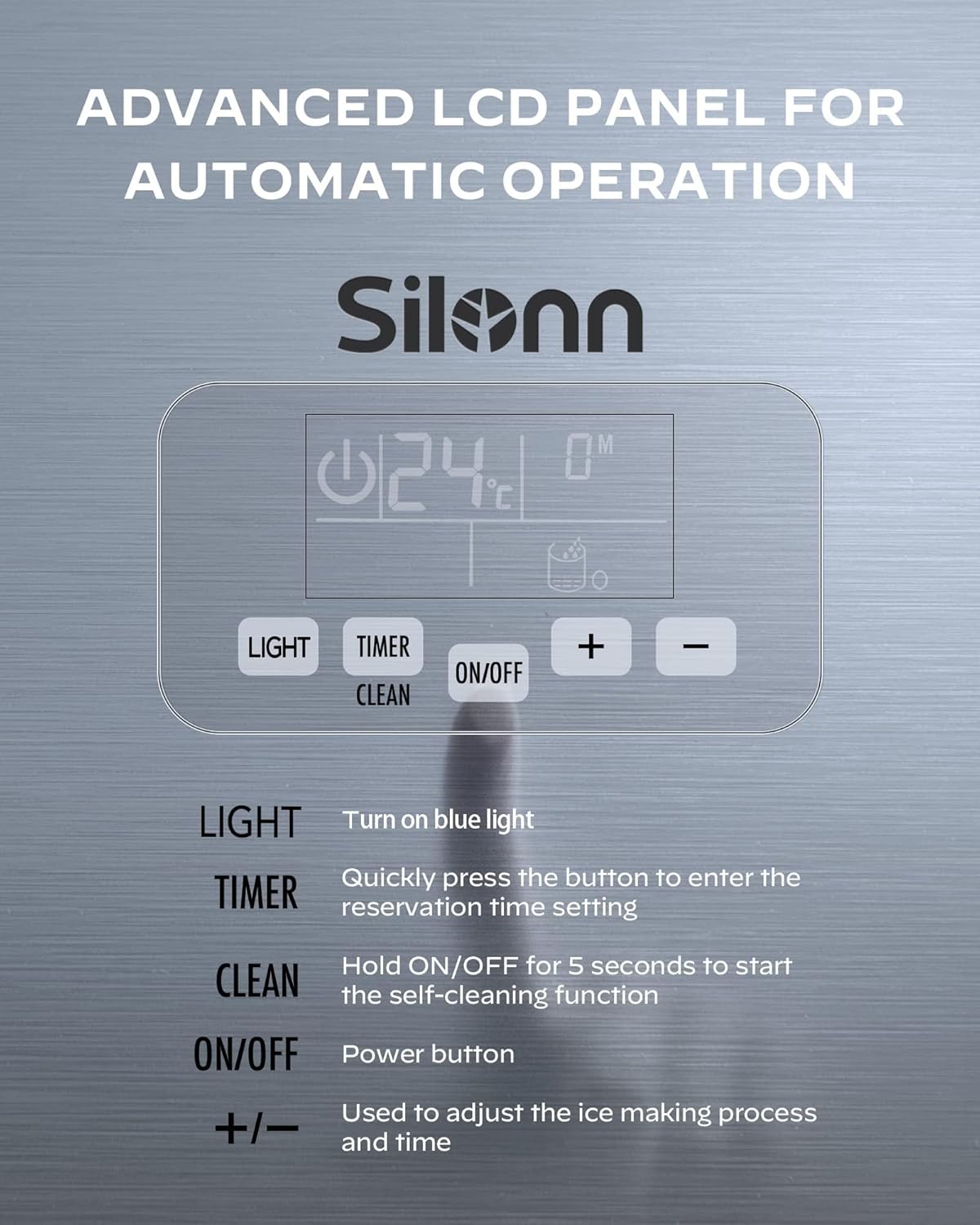
Image: Close-up of the Silonn ice maker's advanced LCD control panel, detailing the functions of the LIGHT, TIMER, ON/OFF (with CLEAN function), and +/- buttons for adjusting settings.
- Ìhè: Press to turn the internal blue light on or off.
- Oge: Quickly press to enter the reservation time setting mode.
- Gbanyụọ/gbanyụọ: Pịa ka ịgbanwuo ma ọ bụ gbanyụọ unit ahụ.
- Ọcha: Hold the ON/OFF button for 5 seconds to activate the self-cleaning function.
- +/-: Use these buttons to adjust the ice making process duration and time settings (e.g., ice thickness, timer).
Usoro Ime ice
- Ensure the water supply is connected or the reservoir is filled.
- Pịa Gbanye/ Gbanyụọ bọtịnụ iji malite okirikiri ime ice.
- Adjust ice thickness (thin, medium, or thick) using the +/- buttons if desired. The ice making cycle typically takes 8-15 minutes.
- The unit will automatically produce ice until the ice bin is full or the water level is low.
- An alarm will sound if the water runs out, prompting a refill.

Image: Illustration demonstrating the adjustable ice thickness settings (Thin, Medium, Thick) and their corresponding production times, allowing customization for various beverage types.

Image: Infographic highlighting the Silonn ice maker's daily production capacity, indicating it can produce over 7000 ice cubes, sufficient for more than 800 drinks per day.
Ọrụ ngụ oge
The timer function allows you to set a reservation time for the ice maker to start or stop.
- Pịa TIMER bọtịnụ.
- Jiri ihe +/- buttons to set the desired delay time (e.g., 8 hours, 10 hours).
- The unit will automatically begin or end operation after the set time.

Image: Visual representation of the 24-hour time reservation feature, demonstrating how users can schedule ice production for specific times during the day or night.
Nlekọta
Ọrụ nhicha onwe
The ice maker is equipped with an automatic self-cleaning function to simplify maintenance.
- Ensure the unit is connected to a water supply or the reservoir is filled.
- Jide ya Gbanye/ Gbanyụọ button for 5 seconds. The unit will enter self-cleaning mode.
- The cleaning cycle will run automatically. Once complete, drain any remaining water.
Na-asachapụ mgbe niile
- Mputa: Jiri nwayọ hichaa mpụta, damp akwa . Ejila ihe nchacha abrasive ma ọ bụ ihe mgbaze.
- Iberibe ice: Periodically remove the ice bin and wash it with mild soap and water. Rinse thoroughly and dry before replacing.
- Mmiri mmiri: If using manual fill, regularly clean the water reservoir to prevent mineral buildup.
- igbapu: Ensure the drain hose is clear and free of obstructions.
For optimal performance and hygiene, perform regular cleaning and utilize the self-cleaning function as needed.
Nchọpụta nsogbu
Tupu ịkpọtụrụ nkwado ndị ahịa, biko rụtụ aka na nsogbu na azịza ndị a na-ahụkarị:
| Nsogbu | Ihe nwere ike ime | Ngwọta |
|---|---|---|
| Onye na-eme ice anaghị emepụta ice. | No water supply; unit not powered on; ambient temperature too high. | Check water connection/reservoir; ensure unit is plugged in and turned on; move to a cooler location. |
| Aịsị ice dị oke obere ma ọ bụ dị nro. | Water temperature too high; ice making cycle too short. | Use colder water; adjust ice thickness setting to "Thick" using the +/- buttons. |
| Ihe ngosi "Tinye mmiri" agbanyere. | Ebe nchekwa mmiri tọgbọ chakoo ma ọ bụ na mmiri akwụsịla. | Refill water reservoir or check direct water connection. |
| Ngalaba na-eme mkpọtụ. | Unit abụghị ọkwa; nkịtị compressor ọrụ. | Ensure unit is on a level surface; some noise during operation is normal. |
Nkọwapụta

Image: Diagram illustrating the physical dimensions (Width, Depth, Height) and weight of the Silonn ice maker, along with a visual list of included accessories.
| Njirimara | Nkọwa |
|---|---|
| Nọmba nlereanya | SLIM12T |
| Ike mmepụta ice | 150 lbs / awa 24 |
| Ikike Nchekwa ice | 33 n'arọ |
| Akụkụ ngwaahịa (W x D x H) | 40 cm x 44.8 cm x 79.8 cm (15.7 x 17.6 x 31.4 sentimita) |
| Ibu ngwaahịa | 31 n'arọ (68.3 lbs) |
| Wattage | 320 watt |
| Voltage | 115 volts |
| Igwe nju oyi | R290 |
| Ihe onwunwe | Igwe anaghị agba nchara |
| UPC | 850054443991 |
Akwụkwọ ikike na nkwado ndị ahịa
Silonn provides excellent customer care. For warranty information, product support, or assistance with setup and operation, please contact our U.S.-based customer care team. Refer to your purchase documentation or the Silonn websaịtị maka nkọwa kọntaktị akọwapụtara.
Please have your model number (SLIM12T) and purchase date available when contacting support.


