1. Okwu mmalite
The CALEX Smart Home Indoor Ambiance Aroma Diffuser 590100500 is designed to enhance your indoor environment by improving air quality, diffusing pleasant aromas, and providing ambient lighting. This smart device integrates seamlessly into your smart home ecosystem, offering control through the Calex app, voice commands, and programmable features.
Atụmatụ gụnyere:
- Aroma diffusion with essential oils.
- Realistic flame effect for ambiance.
- Adjustable ambient lighting with 16 million color options.
- Smart control via Calex app (timers, programmable scenarios).
- Voice control compatibility with Google Assistant, Siri, and Amazon Alexa.
- 300ml water tank capacity with automatic shut-off.
2. Ozi nchekwa
Please read all safety instructions before using the device to prevent injury or damage.
- Always place the diffuser on a stable, flat surface away from direct sunlight, heat sources, and electronic devices.
- Do not exceed the maximum water fill line (300ml) to prevent overflow.
- Jiri naanị mmiri dị ọcha ma ọ bụ mmiri e siri esi. Ejila mmiri ọkụ.
- Only use 100% pure, water-soluble essential oils. Other oils or corrosive liquids may damage the device.
- Debe ngwaọrụ ahụ ka ụmụaka na anụ ụlọ ghara iru.
- Do not cover the mist outlet during operation.
- Unplug the device from the power outlet before cleaning or refilling.
- The device features an automatic shut-off function when the water tank is empty, and sends a notification to your phone.
- A built-in safety configuration will cause the diffuser to flash if the remaining water in the tank needs to cool down after a maximum of 72 hours of continuous operation.
- Anwala ịrụzi ma ọ bụ gbanwee ngwaọrụ ahụ n'onwe gị. Kpọtụrụ ndị ọrụ nkwado maka enyemaka.
3. Ihe ngwugwu
Chọpụta na ihe niile dị na ngwugwu:
- CALEX Smart Home Indoor Ambiance Aroma Diffuser (Model 5901000500)
- Ihe nkwụnye ọkụ
- Akwụkwọ ntuziaka onye ọrụ
4. Ngwaahịa gafereview
Familiarize yourself with the components of your aroma diffuser.
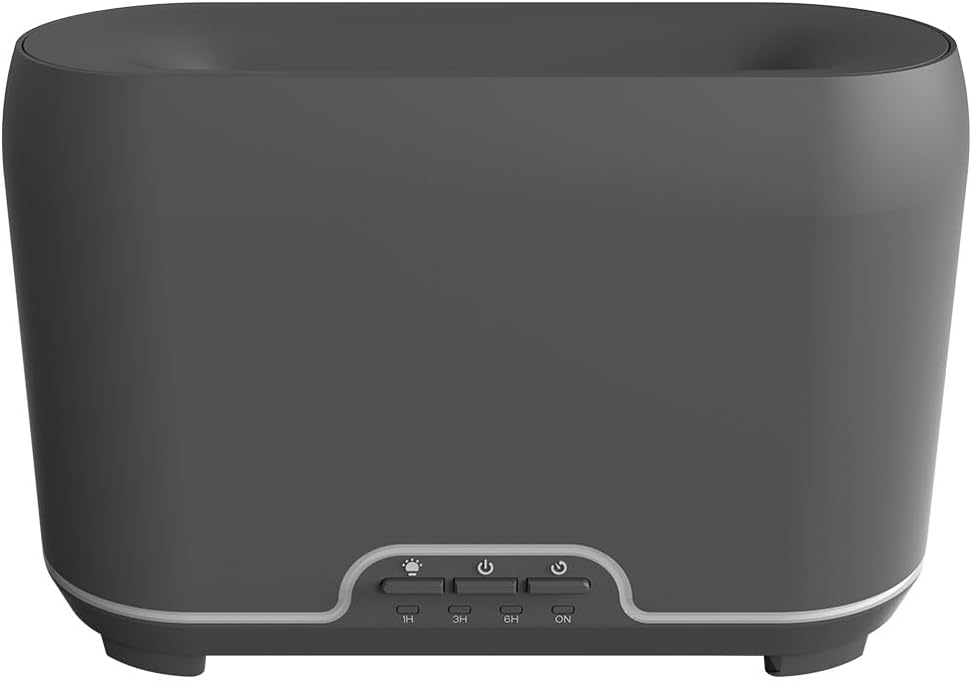
Foto: N'ihu view of the CALEX Smart Home Aroma Diffuser, showing the control panel with buttons for light, power, and timer settings (1H, 3H, 6H, ON).

Image: The CALEX Smart Home Aroma Diffuser operating on a wooden table, displaying its ambient flame effect and mist output.
The diffuser typically consists of a water tank, an ultrasonic plate, a mist outlet, and a control panel with buttons for power, light, and timer functions. The power input port is usually located at the back or bottom of the device.
5. Nhazi
Soro usoro ndị a maka nhazi mbụ:
- Nkwanye: Debe ihe mgbasa ozi n'elu larịị ma kwụsie ike.
- Mepee mkpuchi: Gently remove the top cover of the diffuser.
- Jupụta tank mmiri: Fill the water tank with clean water up to the 300ml maximum fill line. Do not overfill.
- Tinye mmanụ dị mkpa: Add a few drops of your preferred essential oil directly into the water tank.
- Mechie mkpuchi: Dochie mkpuchi elu nke ọma.
- Njikọ Ike: Plug the power adapter into the diffuser's power input port, then plug the adapter into a wall outlet.
- Budata ngwa Calex: Download the free Calex Smart app from your smartphone's app store (available for iOS and Android).
- Jikọọ na WiFi: Follow the in-app instructions to connect your diffuser to your home WiFi network. Ensure your WiFi is 2.4GHz.
6. Ntuziaka ọrụ
The CALEX Smart Home Aroma Diffuser can be operated via the Calex app or its integrated control buttons.
6.1 Using the Calex Smart App
The Calex app provides full control over your diffuser's functions:
- Gbanyụọ/ Gbanyụọ: Turn the diffuser on or off remotely.
- Njikwa alụlụ: Adjust the mist output level.
- Njikwa ọkụ: Change the ambient light color from over 16 million options, adjust brightness, and select lighting modes.
- Mmetụta ire ọkụ: Activate or deactivate the flame effect.
- Ndị na-agụ oge: Set schedules for the diffuser to turn on or off automatically.
- Programmable Scenarios: Create custom scenarios based on time, weather, or other smart home triggers.
- Amamọkwa: Receive alerts when the water tank is empty.
6.2 Njikwa olu
Integrate your diffuser with voice assistants for hands-free control:
- Onye enyemaka Google: Link your Calex account in the Google Home app. Use commands like "Hey Google, turn on the diffuser."
- Siri: Create custom shortcuts in the Apple Home app or through the Calex app for Siri commands.
- Amazon Alexa: Enable the Calex skill in the Alexa app. Use commands like "Alexa, set diffuser light to blue."
6.3 Manual Control Buttons
The control panel on the diffuser allows for basic operation:
- Bọtịnụ ike: Press once to turn on/off the mist and flame effect.
- Bọtịnụ ọkụ: Press to cycle through light colors or turn the light on/off.
- Timer Buttons (1H, 3H, 6H, ON): Select a desired operating duration. The diffuser will automatically shut off after the selected time. 'ON' typically means continuous operation until water runs out or manually turned off.
7. Nlekọta
Ịsacha mgbe niile na-eme ka arụmọrụ kacha mma ma na-agbatị ndụ nke ihe mgbasa ozi gị.
- Nhicha kwa ụbọchị: Mgbe ejiri ya mee ihe ọ bụla, wụsa mmiri ọ bụla fọdụrụ n'ime tankị ahụ. Jiri ákwà dị ọcha ma dị nro hichaa ime tankị ahụ.
- Nhicha kwa izu: For a more thorough clean, unplug the device. Add a small amount of white vinegar (about 10ml) to the water tank and let it sit for 10-15 minutes to dissolve mineral buildup. Gently wipe the ultrasonic plate with a cotton swab or soft brush. Rinse the tank thoroughly with clean water, avoiding the air outlet.
- Nhicha mpụga: Jiri ihe dị nro, d hichaa mpụta nke ihe mgbasa ozi ahụ.amp akwa . Ejila ihe nchacha abrasive ma ọ bụ ihe mgbaze.
- Ensure the device is completely dry before refilling or storing.
8. Nchọpụta nsogbu
Ọ bụrụ na ị na-enwe nsogbu, rụtụ aka na nsogbu ndị a na-ahụkarị na ngwọta ndị a:
| Nsogbu | Ihe nwere ike ime | Ngwọta |
|---|---|---|
| Enweghị alụlụ ma ọ bụ alụlụ na-adịghị ike | Ala mmiri dị ala Efere Ultrasonic ruru unyi Akpọchiela alụlụ | Refill water to the appropriate level. Clean the ultrasonic plate as per maintenance instructions. Ensure the mist outlet is clear. |
| Ngwaọrụ anaghị agbanwu | Enweghị ike Tankị mmiri tọgbọ chakoo Ngwaọrụ adịghị arụ ọrụ | Lelee njikọ ọkụ na ntinye mgbidi. Mejupụta tank mmiri ahụ. Kpọtụrụ onye na-akwado ndị ahịa ma ọ bụrụ na nsogbu ahụ ka dị. |
| Nsogbu njikọ ngwa | Okwuntughe WiFi na-ezighi ezi Router too far 2.4GHz vs 5GHz WiFi | Verify WiFi password. Move diffuser closer to the router. Ensure your router is broadcasting a 2.4GHz network and connect to it. |
| Mmetụta ire ọkụ anaghị arụ ọrụ | Feature deactivated in app Ngwaọrụ adịghị arụ ọrụ | Check app settings to ensure flame effect is enabled. Kpọtụrụ nkwado ndị ahịa. |
9. Nkọwapụta
| Njirimara | Nkọwapụta |
|---|---|
| Nọmba nlereanya | 5901000500 |
| Ụdị | CALEX |
| Ike | 300 milliliters |
| Ihe onwunwe | Plastic |
| Gbanyụọ akpaaka | Ee |
| Njikọta | WiFi (2.4GHz) |
| Ụzọ njikwa | Calex Smart App, Voice Control (Google Assistant, Siri, Amazon Alexa), Manual Buttons |
| Nhọrọ ọkụ | Agba nde 16 |
| Recommended Use Area | Medium space |
| International Article Code (EAN/UPC) | 08712879157090 |
10. Akwụkwọ ikike na nkwado
For warranty information or technical support, please refer to the documentation provided with your purchase or contact the retailer/manufacturer directly. Keep your proof of purchase for warranty claims.


