Akwụkwọ ntuziaka onye ọrụ Amazon Echo Show 21
Model: Echo Show 21
1. Okwu mmalite
Welcome to your new Amazon Echo Show 21. This smart display is designed to be the central hub for your home, offering a large Full HD screen for entertainment, organization, and communication. With built-in Fire TV and Alexa, you can stream content, manage your smart home, make video calls, and keep your family organized with customizable widgets.

Figure 1.1: Amazon Echo Show 21 Overview
The Echo Show 21 integrates seamlessly into your daily life, providing a visual and interactive experience for all your Alexa commands.
2. Mmalite: Ntọala
2.1 Kedu ihe dị na igbe ahụ
- Ngwaọrụ Echo Gosi 21
- Alexa Voice Remote with batteries (2 AAA included)
- Power adapter (30W) and 5 ft. cord (white)
- Wall mount, anchors, screws, mounting template
- Ntuziaka mmalite ngwa ngwa
2.2 Ntọala mbụ
The Echo Show 21 is designed for simple setup. You will need a Wi-Fi connection.
- Ike Na: Connect the power adapter to your Echo Show 21 and plug it into a wall outlet. The device will automatically power on.
- Njikọ Wi-Fi: Follow the on-screen instructions to connect your device to your Wi-Fi network. Amazon Wi-Fi simple setup can automatically connect your device if you are a Prime member and have previously saved your Wi-Fi credentials.
- Nbanye Akaụntụ Amazon: Log in with your Amazon account credentials.
- Nhazi onwe: Customize your home screen, set up profiles, and configure your preferred settings.
- Njikọ dịpụrụ adịpụ: The included Alexa Voice Remote should pair automatically. If not, follow the on-screen instructions or refer to the quick start guide for manual pairing.
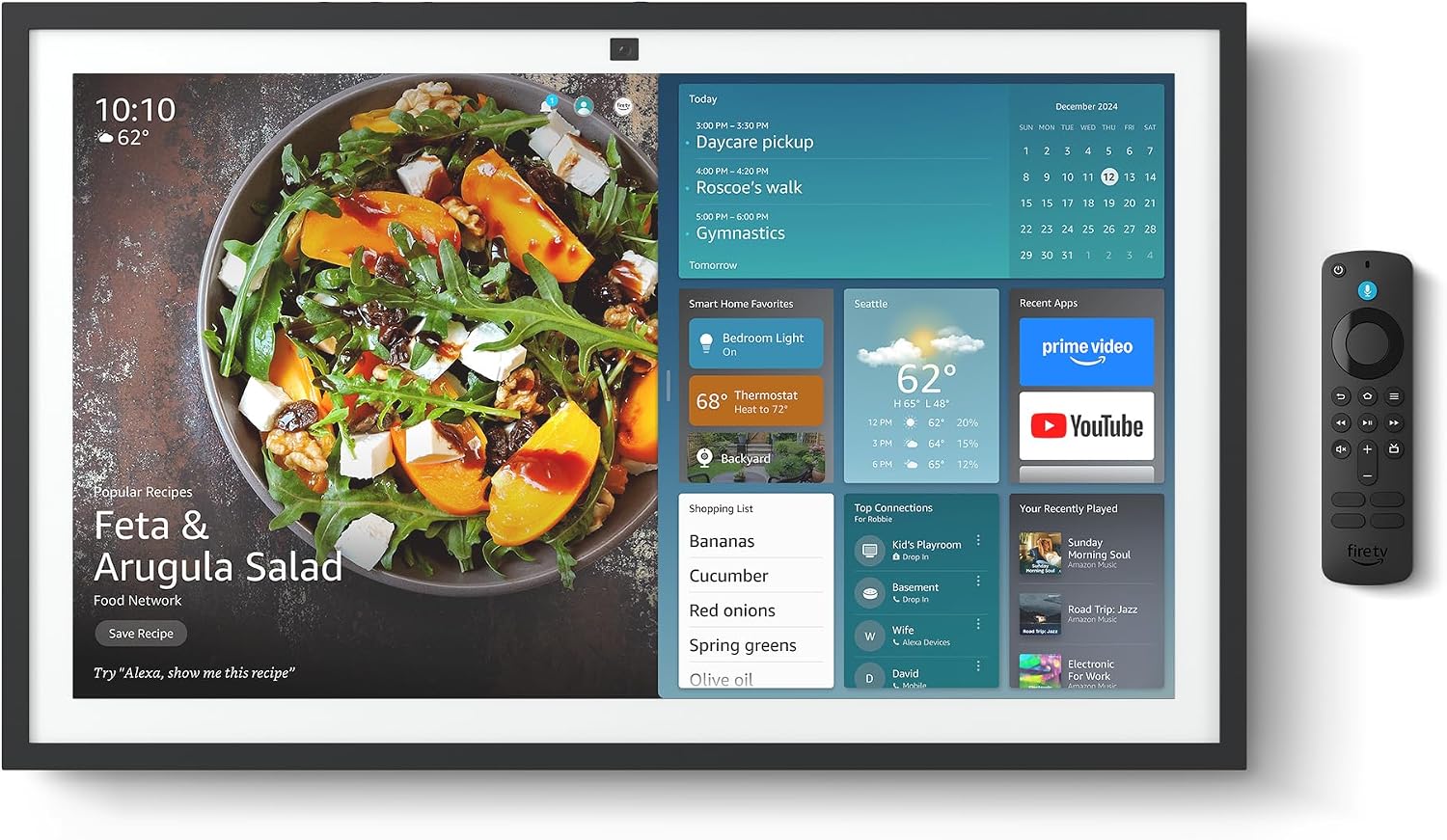
Figure 2.1: Echo Show 21 with Alexa Voice Remote
2.3 Nhọrọ nrịgo
The Echo Show 21 can be wall-mounted using the included hardware or placed on a stand (sold separately). Wall mounting requires an electric drill.
3. Ịrụ ọrụ Echo Show gị nke 21
Njikwa olu 3.1 na Alexa
Your Echo Show 21 is primarily controlled by voice using Alexa. Simply say the wake word "Alexa" followed by your command or question.
- Iwu izugbe: "Alexa, what's the weather?", "Alexa, set a timer for 10 minutes."
- Egwu & ọdịyo: "Alexa, play pop music," "Alexa, play my morning playlist."
- Video & Entertainment: "Alexa, open Prime Video," "Alexa, play The Boys on Netflix."
3.2 Fire TV Integration
Enjoy endless entertainment with built-in Fire TV. Use the included Alexa Voice Remote or voice commands to navigate.

Figure 3.1: Fire TV Interface
- Access thousands of apps like Prime Video, Netflix, YouTube, Apple TV.
- Stream movies, TV shows, and live content.
- The Fire TV remote allows for traditional navigation and playback control.
3.3 Home Screen & Widgets
The 21-inch display is ideal for organizing your day with customizable widgets.

Figure 3.2: Customizable Home Screen Widgets
- Keep important information like calendars, shopping lists, and weather in view.
- Personalize your home screen with family photos.
3.4 Njikwa Ụlọ Amamihe
Control compatible smart devices using your voice or the smart home dashboard.

Figure 3.3: Smart Home Dashboard
- Turn lights on/off, adjust thermostats, or view live camera feeds.
- Supports Zigbee, Matter, and Thread Border Router for broad compatibility.
3.5 Oku vidiyo
Connect with family and friends using the 13 MP camera with auto-framing, wide field of vision, 3.3x zoom, and noise reduction.

Figure 3.4: Echo Show 21 as a Digital Photo Frame
The camera can also be used to display your favorite memories as a digital photo frame.
4. Nlekọta
Iji hụ na Echo Show 21 gị dị ogologo ma rụọ ọrụ nke ọma, soro ntuziaka mmezi ndị a:
- Na-ehicha ihuenyo: Jiri akwa dị nro na-enweghị lint iji hichaa ihuenyo ahụ nwayọ. Maka isi ike smudges, ntakịrị dampen the cloth with water. Avoid abrasive cleaners or sprays directly on the screen.
- Na-ehicha ahụ Ngwaọrụ: Wipe the exterior surfaces with a dry, soft cloth. Do not use harsh chemicals or solvents.
- Igwe ikuku: Ensure the device's ventilation openings are not blocked to prevent overheating.
- Mmelite ngwanrọ: Your Echo Show 21 receives automatic software security updates. Ensure your device is connected to Wi-Fi to receive these updates.
5. Nchọpụta nsogbu
If you encounter issues with your Echo Show 21, try the following common solutions:
- Ngwaọrụ anaghị aza: Try saying "Alexa" again clearly. If unresponsive, unplug the power adapter for a few seconds and then plug it back in to restart the device.
- Enweghị njikọ Wi-Fi: Check your router and modem to ensure they are working correctly. Restart your router. On the Echo Show 21, go to Settings > Network to re-select your Wi-Fi network and re-enter the password.
- Okwu ọdịyo: Ensure the volume is not muted or too low. Say "Alexa, turn up the volume." Check audio settings in the device menu.
- Igwefoto anaghị arụ ọrụ: Ensure the physical camera shutter is open and the mic/camera-off button is not activated (red light indicates off).
- Remote anaghị aza: Check the batteries in the Alexa Voice Remote. If necessary, replace them. Re-pair the remote if it becomes disconnected.
6. Nka na ụzụ nkọwa
| Njirimara | Nkọwapụta |
|---|---|
| Nha | 21.4"W x 13.2"H x 1.5"D |
| Ibu | 10.7 lb |
| Ngosipụta | 21” with 1920 x 1080 resolution (landscape or portrait) |
| Igwefoto | 13 MP + Shutter |
| Audio | Two 2” woofers + two 0.6” tweeters |
| Njikọ Wi-Fi | Wi-Fi 6E (802.1ax), Tri-band, dual-antenna (MIMO). Supports 802.11a/b/g/n/ac. |
| Homelọ Smartlọ Smart | Zigbee + Matter + Eriri Okirikiri rawụta |
| Nhazi | Octa-core SoC with Amazon AZ2 neural network engine |
| Ihe mmetụta | ALS RGB + Accelerometer |
| Asụsụ | Bekee na Spanish |

Figure 6.1: Echo Show 15 vs. Echo Show 21 Dimensions
7. Atụmatụ Nzuzo
Emebere Echo Show 21 site na iji ọtụtụ njikwa nzuzo:
- Mic/Camera-Off Button: A physical button to electronically disconnect the microphones and camera.
- Mkpuchi igwefoto: A built-in physical shutter to cover the camera lens.
- Teknụzụ Okwu Wake: Alexa devices only begin recording and sending audio to the cloud after detecting the wake word.
- Ihe ngosi nkwanye ugwu: Ihe ngosi anya na-egosi mgbe a na-agbasa ọdịyo ma ọ bụ vidiyo na ígwé ojii.
- Voice Recording Control: Ikike iji view ma hichapụ ndekọ olu gị.

Figure 7.1: Mic/Camera-Off Button and Camera Shutter
For more details, visit the Alexa Privacy Hub.
8. Atụmatụ nnweta
Echo Show 21 nwere ọtụtụ atụmatụ nnweta iji hazie Alexa ka ikike gị si dị:
- Pịa na Alexa: Nweta Alexa site na imetụ aka site na taịlị ihuenyo ma ọ bụ keyboard.
- Ntị Na-agbanwe Agbanwe: Na-enye oge ka ukwuu iji kwuchaa okwu tupu Alexa azaa.
- Ọnụego okwu a kacha amasị: Jikwaa otú Alexa si ekwu okwu ngwa ngwa ma ọ bụ nwayọ.
- Captioning: Alexa Captioning, Call Captioning, and Closed Captioning provide text for supported content.
- Gosi ma Kwuo: Helps users who are blind or visually impaired identify products.
- OluView Onye na-agụ ihuenyo: Na-enye ohere maka ndị ahịa kpuru ìsì ma ọ bụ ndị nwere nsogbu anya.
- Ihe na-eme ka ihuenyo dịkwuo mma: Zoom in/out and pan around the screen.
- Gụọ Kindle n'olu dara ụda: Have Alexa read your Kindle books aloud.
- Ederede Oge A: Type live text in a video call.
These features can be enabled via Settings > Accessibility on your device.
9. Akwụkwọ ikike na nkwado
9.1 Akwụkwọ ikike ngwaahịa
Your Echo Show 21 comes with a Akwụkwọ ikike na ọrụ nwere oke afọ 1. Optional 1-year, 2-year, and 3-year extended warranties are available for U.S. customers, sold separately.
Use of Echo Show 21 and Fire TV on Echo Show 21 is subject to their respective terms of service.
9.2 Nkwado ndị ahịa
For further assistance, troubleshooting, or to learn more about your device, please visit the Amazon support websaịtị ma ọ bụ kpọtụrụ ọrụ ndị ahịa Amazon.


