1. Okwu mmalite
The Wouxun KG-826B is a dual-band UHF/VHF business two-way radio designed for reliable communication in various professional environments. This radio offers both UHF and VHF capabilities, making it a versatile solution for businesses and organizations. It comes pre-programmed with 16 channels and supports up to 199 custom programmable channels, along with 155 CTCSS/DCS codes.
Key features include a lighted dual-channel LCD display, English voice prompts, VOX functionality, low battery alert, a programmable side key, a configurable front key, a built-in flashlight, and a stopwatch timer. The KG-826B is built with a superheterodyne receiver for enhanced communication performance and is rated IP55 for dust and water resistance.
Ngwaahịa gafereview
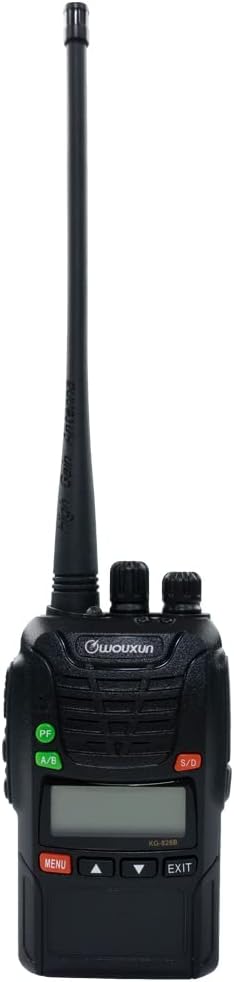
Foto 1: N'ihu view of the Wouxun KG-826B Two-Way Radio, showing the display, buttons, and non-removable antenna.
2. Kedu ihe dị na Igbe ahụ
Upon unboxing your Wouxun KG-826B, please verify that all the following components are included:
- Wouxun KG-826B Two-Way Radio (with non-removable antenna)
- Lithium-ion Battery Pack (1700mAh)
- Mpempe eriri eriri
- Desktọpụ chaja
- Ihe nkwụnye AC
- Eriri aka
- Akwụkwọ ntuziaka onye nwe (akwụkwọ a)

Figure 2: The Wouxun KG-826B radio with its standard accessories, including the desktop charger, AC adapter, belt clip, and wrist strap.
3. Ntuziaka Nhazi
3.1. Ịchaji batrị
Before initial use, fully charge the lithium-ion battery pack. The radio comes with a 1700mAh lithium-ion rechargeable battery.
- Connect the AC adapter to the desktop charger.
- Tinye ihe nkwụnye AC n'ime oghere eletrik ọkọlọtọ.
- Place the Wouxun KG-826B radio into the desktop charger. Ensure the charging contacts on the radio align with those on the charger.
- The charger's indicator light will typically show red during charging and turn green when the battery is fully charged.
- Charging time may vary, but a full charge usually takes several hours.
3.2. achinggbakwunye Clip Belt
To attach the belt clip, align the clip with the designated screw holes on the back of the radio and secure it with the provided screws. Ensure it is firmly attached before use.
3.3. Ịtinye eriri nkwojiaka
Thread the wrist strap through the loop on the top or side of the radio to prevent accidental drops.
4. Ntuziaka ọrụ
4.1. Gbanyụọ / gbanyụọ na njikwa olu
- Ike Na: Rotate the top-left knob (Power/Volume knob) clockwise until you hear a click. The radio will power on and emit a voice prompt.
- Gbanyụọ: Rotate the top-left knob counter-clockwise until you hear a click.
- Ndozi olu: Continue rotating the Power/Volume knob clockwise to increase volume and counter-clockwise to decrease volume.
4.2. Nhọrọ ọwa
The Wouxun KG-826B supports 16 pre-programmed channels and up to 199 custom programmable channels. Use the channel selector knob (top-right knob) to select your desired channel. The LCD display will show the current channel number.
4.3. Na-ebufe na ịnata
- Ịnata: When a signal is received on the selected channel, the radio will automatically output the audio.
- Mgbasa Press and hold the Push-to-Talk (PTT) button on the side of the radio. Speak clearly into the microphone, holding the radio approximately 2-3 inches from your mouth. Release the PTT button to stop transmitting and return to receive mode.
4.4. VOX Function (Voice Operated Transmit)
The VOX function allows for hands-free transmission. When activated, the radio will automatically transmit when it detects your voice, without needing to press the PTT button. Refer to the radio's menu system for VOX activation and sensitivity adjustment.
4.5. Ọkụ ọkụ arụnyere
The KG-826B features a built-in flashlight. This function can typically be activated via a short press of a programmable side key or through the menu. Consult your radio's specific key assignments for activation.
4.6. Igodo ndị a na-ahazi
The radio includes a programmable side key and a configurable front key. These keys can be assigned various functions (e.g., flashlight, monitor, scan) through programming software. Default functions may vary.
5. Nlekọta na nlekọta
5.1. Nlekọta n'ozuzu
- Keep the radio dry. If it gets wet, wipe it dry immediately.
- Do not expose the radio to extreme temperatures (hot or cold).
- Avoid strong shocks or vibrations.
- Clean the radio's surface with a soft, damp akwa . Ejila kemịkalụ siri ike ma ọ bụ ihe mkpocha abrasive.
- The radio is IP55 dust and water resistant, meaning it is protected against dust ingress and low-pressure water jets from any direction. However, it is not designed for submersion.
5.2. Nlekọta batrị
- Always use the original Wouxun charger and battery pack.
- Emegharịala ọdụ batrị dị mkpụmkpụ.
- Atụpụla batrị na ọkụ.
- If the radio will not be used for an extended period, remove the battery pack and store it in a cool, dry place.
- Recharge the battery regularly, even if not in use, to maintain its lifespan.
6. Nchọpụta nsogbu
If you experience issues with your Wouxun KG-826B radio, please consult the following common troubleshooting steps before seeking professional assistance.
| Nsogbu | Ihe nwere ike ime | Ngwọta |
|---|---|---|
| Redio anaghị agbanye ọkụ. | Akwụsịla batrị ma ọ bụ etinyeghị ya nke ọma. | Ensure battery is fully charged and correctly seated. |
| Enweghị ike ịnyefe ma ọ bụ nata. | ahọpụtara ọwa na-ezighi ezi; na-anọghị nso; batrị dị ala. | Verify channel selection; move closer to other radios; charge battery. |
| Ogo ọdịyo adịghị mma ma ọ bụ kwụ ọtọ. | Weak signal; interference; volume too low/high. | Adjust volume; move to an open area; check for obstructions. |
| Ndụ batrị dị mkpụmkpụ. | Battery not fully charged; aging battery; frequent high-power transmission. | Ensure full charge; consider battery replacement; use lower power if possible. |
7. Nka na ụzụ nkọwa
| Ụdị | Wouxun |
| Nọmba nlereanya | KG-826B |
| Ibu Ibu | 1.45 pound |
| Akụkụ ngwugwu | 8.1 x 7.8 x 4 sentimita asatọ |
| Batrị | 1 batrị lithium ion achọrọ (gụnyere) |
| Ụdị ngosi | LCD |
| Agba | Nwa |
| Ọnụọgụ nke ọwa | 16 (pre-programmed), supports up to 199 custom |
| Njirimara Pụrụ Iche | Enwere ike ibugharị |
| Oke ugboro ugboro | 136-174 MHz (VHF), 400-470 MHz (UHF) |
| Nkà na ụzụ Tuner | VHF |
| Voltage | 3.6 volts |
| Ogo nchekwa mba ụwa | IP55 (Uzuzu na mmiri na-eguzogide) |
| Onye nrụpụta | Quanzhou Wouxun Electronics Co., Ltd |
| Ụbọchị mbụ dị | Ọgọst 4, 2023 |
8. Akwụkwọ ikike na nkwado
8.1. Akwụkwọ ikike nke onye nrụpụta
The Wouxun KG-826B radio typically comes with a one-year manufacturer warranty for products purchased through authorized distributors. Please retain your proof of purchase for warranty claims. The warranty covers defects in materials and workmanship under normal use.
Note: Warranty terms may vary based on region and point of purchase. For specific details, refer to the warranty card included with your product or contact your retailer.
8.2. Nkwado nka na ụzụ
For technical assistance, troubleshooting beyond this manual, or warranty inquiries, please contact the retailer from whom you purchased the product or visit the official Wouxun websaịtị maka akụrụngwa nkwado.
Akụrụngwa dị n'ịntanetị: For the latest information, FAQs, and software updates, please visit the official Wouxun websaịtị ma ọ bụ website of your authorized dealer.


