Ozi nchekwa dị mkpa
Read all instructions before operating the TV. Keep this manual for future reference. Follow all warnings and instructions marked on the product.
- Akwụsịla oghere ikuku.
- Adịnyela nso ebe ọkụ dị.
- Chebe eriri ọkụ ka ị ghara ịgagharị ma ọ bụ tuo ya.
- Jiri naanị mgbakwunye / ngwa ndị nrụpụta akọwapụtara.
- Kwụpụ n'oge oké ifufe ọkụ ma ọ bụ mgbe ejighi ya ogologo oge.
- Tụtụ aka n'aka ndị ọrụ ruru eru.
Ngwaahịa gafereview
The THOMSON 24HA2S13C is a 24-inch HD Smart Android TV designed for versatile use, including camping with its 12V power supply. It features Google Assistant, Wi-Fi, Bluetooth, Dolby Digital audio, and a triple-tuner for various signal reception.

Foto: N'ihu view of the THOMSON 24HA2S13C 24-inch Smart Android TV, showing the screen displaying streaming service logos and a family enjoying the TV in a campntọala ntọala.
Ihe ngwugwu
Chọpụta na etinyere ihe niile na ngwugwu:
- THOMSON 24HA2S13C Smart Android TV
- Njikwa anya
- Power Adapter (12V compatible)
- Ihe nkiri TV (2)
- Ihe mkpuchi maka ihe nkwụnye TV
- Akwụkwọ ntuziaka (akwụkwọ a)
- Ntuziaka mmalite ngwa ngwa
Melite
1. Ịgbakwụnye ihe nkwụnye TV
- Jiri nlezianya dobe TV ihu n'elu ala dị nro ma dịkwa larịị iji gbochie mmebi ihuenyo.
- Align the TV stands with the mounting holes on the bottom of the TV.
- Chekwaa ihe nkwụnye ahụ site na iji skru ndị enyere. Gbaa mbọ hụ na agbachiela ha nke ọma.

Image: The THOMSON 24HA2S13C TV showing two possible stand positions for different furniture widths. The image highlights the flexibility in stand placement.
2. Ijikọ Ike
Connect the 12V power adapter to the TV's power input and then to a suitable power source. For camping or mobile use, connect to a 12V DC power outlet.

Image: The THOMSON 24HA2S13C TV mounted in a caravan, with a 12V power adapter shown, illustrating its suitability for mobile use.
3. Ijikọ Mpụga Devices
TV na-enye ọdụ ụgbọ mmiri dị iche iche maka ijikọ ngwaọrụ mpụga:
- HDMI: For high-definition audio and video devices (e.g., game consoles, Blu-ray players).
- USB: Maka ijikọ ngwaọrụ nchekwa USB iji kpọọ mgbasa ozi.
- LAN: Maka njikọ ịntanetị ejikọrọ.
- Antenna/Satellite: For receiving broadcast signals.
- AV n'ime: Maka ngwaọrụ analog ochie.
- Ọkụnụ (Optical): Maka ijikọ na sistemụ ụda mpụga.
- CI+: Maka modulu ohere ọnọdụ.

Foto: N'azụ view of the THOMSON 24HA2S13C TV, detailing the various input and output ports available for connectivity.
Na-arụ ọrụ TV
1. Ọkachamara Mbido Mbido
Mgbe agbanyere ọkụ mbụ, TV ga-eduzi gị site na usoro nhazi mbụ. Nke a gụnyere:
- Nhọrọ asụsụ.
- Njikọ netwọkụ (Wi-Fi ma ọ bụ Ethernet).
- Google account sign-in (optional, but recommended for full Smart TV features).
- Channel scanning (for DVB-T2/C/S2).
2. Ọrụ njikwa anya
The included remote control provides access to all TV functions. It features backlit buttons for use in low light and a dedicated "Favorite" button for quick access to your preferred app.

Image: The remote control for the THOMSON 24HA2S13C TV, highlighting its ergonomic design, backlit buttons, and voice control capabilities.
3. Atụmatụ TV Smart (Android TV)
This TV runs on Android TV, providing access to a wide range of applications and services:
- Ọrụ gụgharia: Access Netflix, Prime Video, YouTube, Disney+, and more.
- Onye enyemaka Google: Use voice commands to search for content, control playback, and get information. Activate by pressing the Google Assistant button on the remote.
- Chromecast arụnyere: Cast content from compatible smartphones, tablets, or computers directly to your TV.
- Ụlọ ahịa Google Play: Download additional apps and games.

Image: The THOMSON 24HA2S13C TV screen showing the Android TV home interface with popular streaming applications and content recommendations.
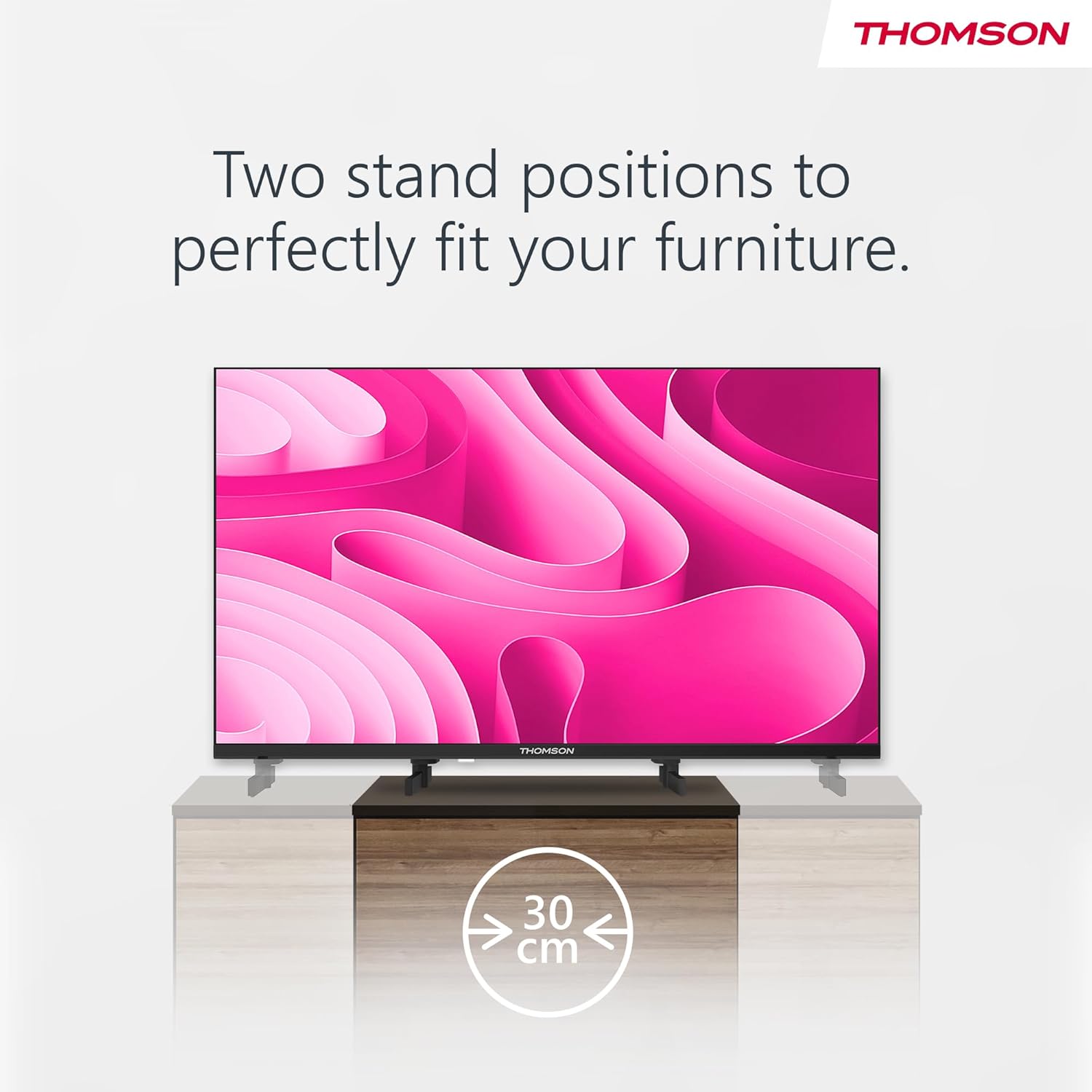
Image: A person using the voice control feature of the THOMSON TV remote, demonstrating interaction with Google Assistant.
Nlekọta
Na-ehicha TV
- Kwupuo TV mgbe niile tupu ihicha ya.
- Use a soft, dry cloth to wipe the screen and cabinet. Do not use liquid cleaners or aerosol sprays.
- Maka akara ndị isi ike, dị obere dampen a microfiber cloth with water and gently wipe. Avoid excessive moisture.
Mmelite ngwanrọ
The TV may receive software updates to improve performance and add new features. Ensure your TV is connected to the internet to receive these updates. You can usually check for updates in the TV's settings menu.
Nchọpụta nsogbu
| Nsogbu | Ihe nwere ike ime | Ngwọta |
|---|---|---|
| Enweghị ike | Ejikọghị eriri ọkụ eletrik; ebe a na-esi ike anaghị arụ ọrụ. | Lelee njikọ eriri ọkụ eletrik. Nwalee oghere ọkụ eletrik site na iji ngwaọrụ ọzọ. |
| Enweghị foto, mana ụda dị | ahọpụtara isi mmalite ntinye ezighi ezi; okwu ọkụ azụ. | Press the "Input" button on the remote to select the correct source. Contact support if issue persists. |
| Enweghị ụda, mana foto dị | Volume too low or muted; audio cables loose. | Increase volume. Check mute status. Ensure audio cables are securely connected. |
| Njikwa anya anaghị arụ ọrụ | Batrị agwụla; ihe mgbochi n'etiti remote na TV. | Dochie batrị. Wepụ ihe mgbochi ọ bụla. Hụ na ebe nchekwa ahụ dị na sensọ IR nke TV. |
| Enweghị ike ijikọ na Wi-Fi | Okwuntughe na-ezighi ezi; nsogbu nke rawụta; TV dị anya na rawụta. | Lelee paswọọdụ Wi-Fi. Malitegharịa rawụta ahụ. Bugharịa TV nso na rawụta ma ọ bụ jiri njikọ waya. |
Nkọwapụta
| Njirimara | Nkọwa |
|---|---|
| Ụdị | Thomson |
| Nlereanya | 24HA2S13C |
| Nha ihuenyo | 24 sentimita (60 cm) |
| Ngosipụta teknụzụ | Ikanam |
| Mkpebi | 1366 x 768 (HD) |
| Sistemụ nrụọrụ | Android TV |
| Atụmatụ pụrụ iche | Google Assistant, Chromecast Built-in, 12V Power Supply, Dolby Audio, Triple Tuner (DVB-T2/C/S2) |
| Njikọta | Wi-Fi, Bluetooth, HDMI (x3), USB (x2), LAN, Optical Audio Out, AV In, CI+ |
| Voltage | 12 volts (DC) |
| Akụkụ ngwaahịa (W x D x H) | 53.5 x 15.1 x 35.3 cm (ya na nkwụnye) |
| Ibu | 3.5 n'arọ |
For detailed energy efficiency information, please refer to the EU EPREL database: https://eprel.ec.europa.eu/qr/1456673

Image: The EU Energy Label for the THOMSON 24HA2S13C TV, showing an energy efficiency rating of E and power consumption of 18 kWh/1000h.
Akwụkwọ ikike na nkwado
This Thomson TV comes with a 3-year guarantee. For technical support, warranty claims, or service inquiries, please contact your local Thomson service provider or refer to the manufacturer's websaịtị.
Manufacturer: STREAMVIEW GMBH
Websaịtị: www.streamview.com
Email: kọntaktị @ iyiview.com
Vidiyo ngwaahịa ngwaahịa
Lelee vidio a ka ị hụ ihe na-eme n'ọdịnihuview of the Thomson 24-inch Easy TV.
Vidiyo: Mkpebi dị mkpirikpiview of the Thomson 24-inch Easy TV, showcasing its design and features. This video is provided by the vendor Streamview GmbH.


