1. Okwu mmalite
This manual provides instructions for the installation, operation, and maintenance of your STRONG SW8000M 8-Port Gigabit Desktop Switch. This device is designed to expand your network connectivity with high-speed Gigabit Ethernet ports, suitable for home and office environments.
2. Akụrụngwa Ngwaahịa
- Ọsọ Gigabit: Provides 10/100/1000 Mbps for fast network connections.
- 8-Port Connectivity: Expands network with 8 Gigabit Ethernet ports.
- Nkwụnye ma kpọọ: No software or configuration required for basic operation.
- Robust Metal Design: Durable metal housing for longevity.
- Nkwalite mgbanwe: Supports desktop placement or wall mounting.
- Ọrụ enweghị ofufe: Ensures quiet performance, ideal for noise-sensitive areas.
- Optimized Data Traffic: Supports QoS, IGMP, and VLAN functions.
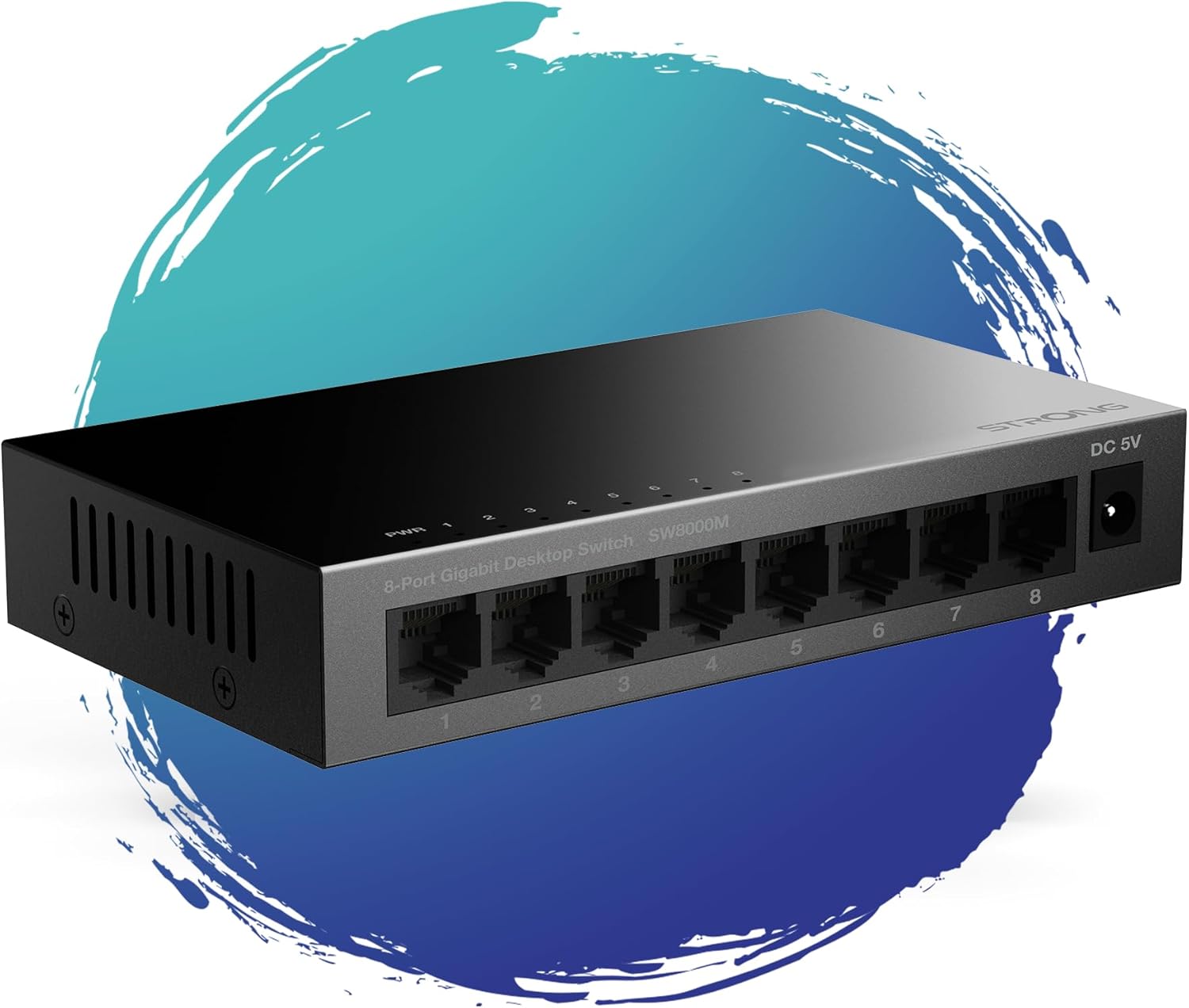
Foto 1: N'ihu view of the STRONG SW8000M 8-Port Gigabit Desktop Switch, highlighting its compact design and 8 RJ45 ports.
3. Ihe ngwugwu
Chọpụta na ihe niile dị na ngwugwu:
- STRONG SW8000M 8-Port Gigabit Desktop Switch
- Power Adapter (Mains plug)
- Ntuziaka ntinye (akwụkwọ ntuziaka a)
- Akwụkwọ ikike kaadị
4. Ntọala na nwụnye
4.1 Ntinye anụ ahụ
The SW8000M switch can be placed on a desktop or mounted on a wall. Ensure the location is well-ventilated and away from direct heat sources or moisture.
- Ndokwa Desktọpụ: Tinye mgba ọkụ n'elu larịị ma kwụsie ike.
- Ịkwanye mgbidi: Use the provided mounting options (if applicable) to secure the switch to a wall.

Figure 2: Illustrates the switch's advanced features like QoS, traffic optimization, and IEEE 802.3x flow control.
4.2 Ijikọ mgba ọkụ
- Connect the power adapter to the DC 5V port on the switch and then plug it into a power outlet. The Power LED (PWR) on the switch will illuminate.
- Connect your network devices (e.g., computers, printers, network-attached storage, routers) to any of the 8 Gigabit RJ45 ports using standard Ethernet cables.
- The corresponding LED indicator for each connected port will light up, indicating an active connection. A blinking LED indicates data activity.

Ọgụgụ 3: N'azụ view of the switch, detailing the 8 Gigabit RJ45 ports and the DC 5V power input.
5. Na-arụ ọrụ mgba ọkụ
The STRONG SW8000M is a plug-and-play device. Once connected, it automatically detects the speed and duplex mode of connected devices, providing optimal performance without manual configuration.
- Ihe ngosi LED: Each port has an LED indicator. A solid light indicates a link, and a blinking light indicates data transmission. The PWR LED indicates the device is powered on.
- Data Flow: The switch intelligently manages data traffic to ensure smooth and efficient communication between all connected devices.
6. Nlekọta
- Nhicha: Jiri akwa dị nro dị nro hichaa mpụta nke mgba ọkụ. Ejila ihe nhicha mmiri ma ọ bụ ikuku ikuku.
- Igwe ikuku: Ensure that the ventilation openings on the sides of the switch are not blocked to prevent overheating.
- Nhazi enweghị ofufe: The fanless design reduces dust accumulation and eliminates operational noise, requiring minimal internal maintenance.
7. Nchọpụta nsogbu
- Enweghị ike: Ensure the power adapter is securely connected to the switch and a working power outlet. Check if the PWR LED is illuminated.
- Enweghị ọkụ njikọ: Verify that the Ethernet cables are properly connected to both the switch and the network device. Try a different port or cable. Ensure the connected device is powered on.
- Slow Connection: Ensure all connected devices and cables support Gigabit Ethernet for optimal speed. Check for excessive network traffic or faulty cables.
- Njikọ na-adịte aka: Check cable connections. Ensure the switch is placed in a stable environment, free from strong electromagnetic interference.
8. Nkọwapụta
| Njirimara | Nkọwa |
|---|---|
| Nlereanya | SW8000M |
| Ọnụọgụ nke ọdụ ụgbọ mmiri | 8 x RJ45 Gigabit Ethernet |
| Ọnụego mbufe data | 10/100/1000Mbps |
| Ụdị interface | RJ45 |
| Ntinye ike | 5 volts, 1 Amp |
| Ihe gbasara ikpe | Ọla |
| Akụkụ ngwaahịa (L x W x H) | 3.07" x 0.98" x 5.43" |
| Ibu Ibu | 240 grams (8.5 ounces) |
| Okpomọkụ na-arụ ọrụ | N'ihe dị ka 50 Celsius |
| Ngwa gụnyere | Switch, Power Adapter, Manual, Warranty Card |
9. Akwụkwọ ikike na nkwado
The STRONG SW8000M switch comes with a manufacturer's warranty. Please refer to the included Warranty Card for specific terms and conditions. For technical support or further assistance, please visit the official Strong websaịtị ma ọ bụ kpọtụrụ ndị ahịa ha ọrụ.
Ogologo oge nnweta nke EU mapụtara: Afọ 2


