1. Okwu mmalite
Thank you for choosing the ACEFAST PD65W 3-Port USB Charger, Model A47. This device is designed to provide efficient and fast charging for a wide range of electronic devices, including laptops, tablets, and smartphones. Featuring advanced GaN (Gallium Nitride) technology and multiple protection mechanisms, it ensures safe and reliable power delivery. This manual provides essential information for the proper setup, operation, and maintenance of your charger.
2. Ozi nchekwa dị mkpa
Please read and follow all safety instructions carefully to prevent fire, electric shock, damage to the product, or property damage.
- Ekwela ka chaja ahụ pụta ìhè n'ebe mmiri dị, mmiri dị, ma ọ bụ okpomọkụ dị oke njọ.
- Do not disassemble, modify, or attempt to repair the charger. This will void the warranty and may cause damage.
- Debe chaja n'ebe ụmụaka nọ na anụ ụlọ.
- Ensure the charger is plugged into a compatible power outlet with the correct voltage.
- Avoid using damaged cables or adapters with the charger.
- Kwụpụ chaja n'oge oke mmiri ozuzo ma ọ bụ mgbe ejighi ya ogologo oge.
- Ejila chaja rụọ ọrụ ma ọ bụrụ na emebiela n'ụzọ ọ bụla.
3. Ihe ngwugwu
Chọpụta na ihe niile dị na ngwugwu gị:
- 1 x ACEFAST PD65W 3-Port USB Charger (Model A47)
- 1 x USB-C to USB-C Charging Cable
- 1 x Akwụkwọ ntuziaka onye ọrụ
4. Ngwaahịa gafereview
The ACEFAST PD65W charger is a compact and powerful charging solution. It features a foldable AC plug for portability and multiple ports to charge various devices simultaneously.
Akụkụ ndị bụ isi:
- Nnyefe ike 65W: Delivers strong power for fast charging of phones, tablets, and laptops.
- GaN Chipset: Utilizes advanced Gallium Nitride technology for faster and more efficient charging.
- 3-in-1 Multiport Design: Equipped with two USB-C ports and one USB-A port for simultaneous charging of up to three devices.
- Ndakọrịta sara mbara: Supports a broad range of devices including MacBook Pro/Air, iPad Pro/Air/Mini, XPS, ThinkPad, MateBook, iPhone series (11/12/13/14/15/16/17/X), Samsung Galaxy series (S22/S23/S24/S25/Note 20), Pixel phones, AirPods, Nintendo Switch, and more.
- Intelligent Output & Multiple Protection: Features Over Temperature, Overcurrent, Overvoltage, Over Power, and Short-Circuit Protection for safe charging. FCC certified.
- Enwere ike ibugharị: Foldable AC plug and compact size make it ideal for travel.

Figure 1: The ACEFAST PD65W 3-Port USB Charger, Model A47, in green. This image shows the compact design and the three charging ports (two USB-C and one USB-A) on the front face of the charger.
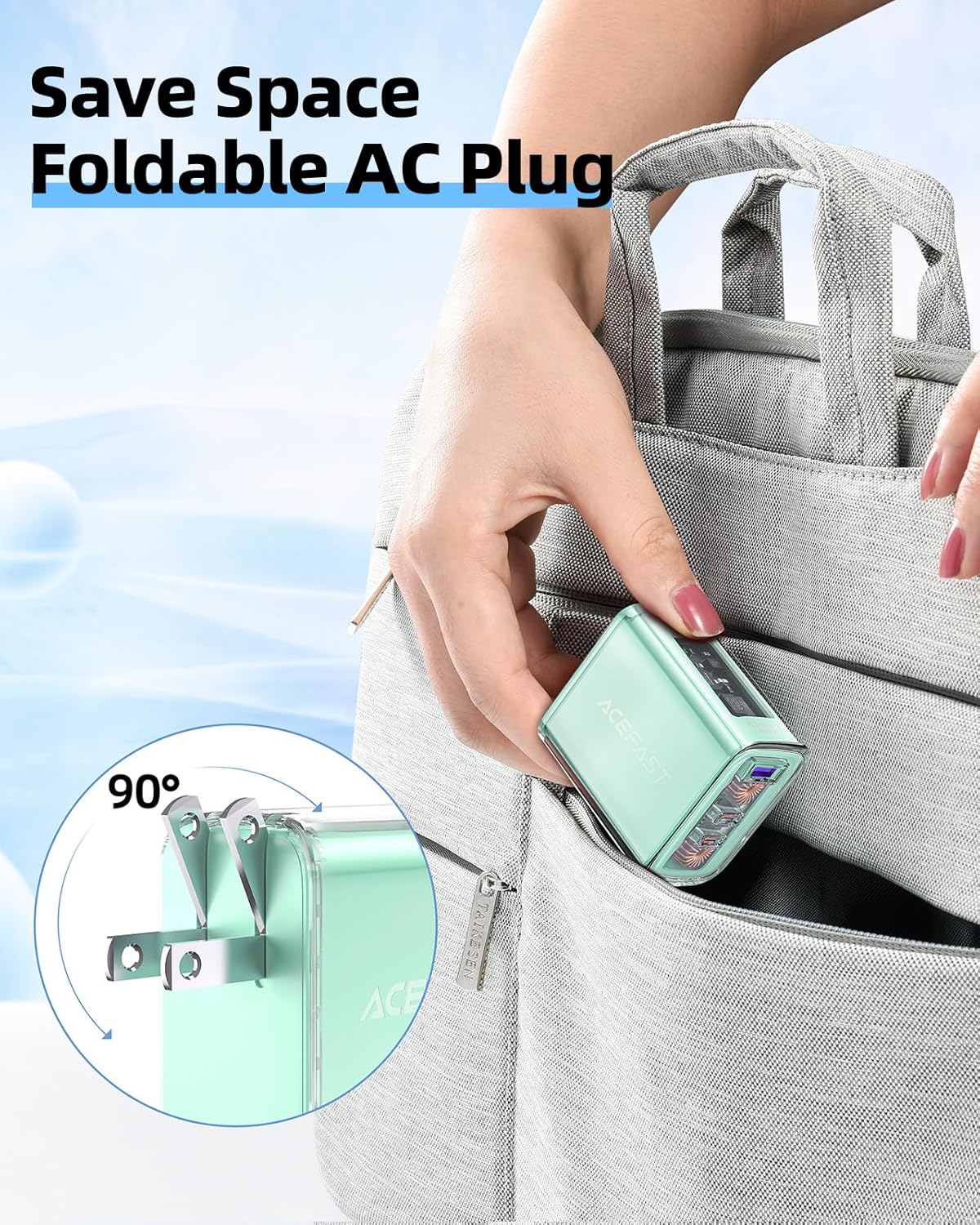
Figure 2: The ACEFAST PD65W charger demonstrating its foldable AC plug. The plug can be folded into the charger body for easy storage and portability, as shown being placed into a bag.
5. Nhazi ntuziaka
- Unfold the AC Plug: Gently pull out the foldable AC prongs from the charger body until they lock into place.
- Jikọọ na nkwụnye ọkụ: Insert the charger's AC plug into a standard wall outlet.
- Jikọọ eriri nchaji: Use a compatible USB-C to USB-C cable (included) or another appropriate charging cable for your device.
- Plug into Device: Connect the other end of the charging cable to your electronic device (laptop, tablet, smartphone, etc.).

Figure 3: The ACEFAST PD65W charger plugged into a wall outlet, simultaneously charging a laptop, a smartphone, and wireless earbuds. This illustrates its multi-device charging capability.
6. Ntuziaka ọrụ
The ACEFAST PD65W charger intelligently distributes power based on the connected devices. Understanding the power distribution modes is crucial for optimal charging.
Ụdị chaja:
- Single Port Mode:
- USB-C1: Up to 65W
- USB-C2: Up to 65W
- USB-A: Up to 20W
For fastest charging of a single device, connect it to either USB-C1 or USB-C2 port.
- Two-Port Mode:
- USB-C1 + USB-C2: 45W + 20W
- USB-C1 + USB-A: 45W + 18W
- USB-C2 + USB-A: 5V === 3.6A (shared)
When two devices are connected, the charger intelligently allocates power. For example, a laptop connected to USB-C1 will receive 45W, while a phone on USB-C2 receives 20W.
- Three-Port Mode:
- USB-C1 + USB-C2 + USB-A: 45W + 5V === 3.6A (shared between C2 and A)
When all three ports are in use, the power is distributed to ensure all devices receive a charge, though individual port output may be reduced compared to single-device charging.

Figure 4: A detailed diagram illustrating the power output for the ACEFAST PD65W charger in single-port, two-port, and three-port charging configurations. This helps users understand optimal power distribution.
7. Nlekọta na nlekọta
- Jiri akwa dị nro hichaa chaja. Ejila ihe nhicha mmiri ma ọ bụ ikuku ikuku.
- Chekwaa chaja n'ebe dị jụụ, kpọrọ nkụ mgbe anaghị eji ya.
- Zere idobe ma ọ bụ idobe chaja na mmetụta siri ike.
- Regularly inspect cables for any signs of wear or damage. Replace damaged cables immediately.
8. Nchọpụta nsogbu
| Nsogbu | Ihe nwere ike ime | Ngwọta |
|---|---|---|
| Ngwaọrụ anaghị akwụ ụgwọ. | Loose connection, incompatible cable, power outlet issue, device fault. | Ensure all connections are secure. Try a different cable or power outlet. Test the charger with another device. |
| Ọsọ nchaji dị nwayọ. | Multiple devices connected, cable not supporting fast charging, device not supporting fast charging. | Refer to the "Operating Instructions" for power distribution. Use a high-quality, fast-charging compatible cable. Ensure your device supports fast charging. |
| Chaja na-adị ọkụ. | Normal operation, heavy load. | A slight warmth during operation is normal. If it becomes excessively hot, disconnect immediately and contact support. |
9. Nkọwapụta
| Njirimara | Nkọwa |
|---|---|
| Ụdị | ACEFAST |
| Nọmba nlereanya | A47 |
| Wattage | 65 watt |
| Mgbakọta ọdụ ụgbọ mmiri USB | 3 (2 x USB-C, 1 x USB-A) |
| Ụdị njikọ | USB Ụdị C |
| Agba | Akwụkwọ ndụ akwụkwọ ndụ |
| Ihe onwunwe | Thermoplastic Elastomer (TPE) |
| Ibu Ibu | 8.1 ounces |
| Akụkụ ngwugwu | 6.73 x 4.29 x 1.65 sentimita asatọ |
| Onye nrụpụta | Acefast |
| Ụbọchị mbụ dị | Julaị 25, 2023 |
10. Akwụkwọ ikike na nkwado
The ACEFAST PD65W 3-Port USB Charger comes with a Akwụkwọ ikike nke ọnwa 12. For any product inquiries, technical support, or warranty claims, please contact ACEFAST customer service. You can find contact information on the official ACEFAST websaịtị ma ọ bụ site na onye na-ere ahịa gị.
Maka ozi ndị ọzọ, gaa na onye ọrụ gọọmentị ACEFAST Store.


