1. Ngwaahịa gafereview
The TECLAST T40Air is a high-performance tablet designed for various tasks, from entertainment to productivity. It features a 10.4-inch display, 16GB RAM, 256GB ROM, and runs on Android 13, powered by an octa-core processor. Its lightweight design and robust battery ensure portability and extended usage.

Foto 1.1: Ihu na azụ view of the TECLAST T40Air Tablet, showcasing its sleek design and dual rear cameras.
Vidiyo 1.1: Onye ọrụ gọọmentị gafereview of the TECLAST T40Air Android Tablet, highlighting its key features and design.
2. Mbido Mbido
2.1 Ịkpọghe igbe na ojiji mbụ
Carefully remove the tablet and all accessories from the packaging. Inspect the device for any physical damage. Before first use, it is recommended to fully charge the tablet.
2.2 Ịchaji mbadamba nkume
Connect the provided USB-C cable to the tablet's charging port and the other end to the 18W PD fast charging adapter. Plug the adapter into a power outlet. The battery indicator on the screen will show the charging status. A full charge typically takes approximately 2-3 hours.
2.3 Gbanyụọ/ gbanyụọ
- Iji gbanye: Press and hold the Power button located on the side of the tablet until the TECLAST logo appears on the screen.
- Iji gbanyụọ: Pịa ma jide bọtịnụ Ike ruo mgbe menu ike pụtara. Họrọ 'Gbanyụọ' wee gosi.
- Ka Malitegharịa ekwentị: From the power menu, select 'Restart'.
2.4 Nhazi izizi
Upon first power-on, the tablet will guide you through the initial setup process:
- Nhọrọ asụsụ: Họrọ asụsụ nke masịrị gị.
- Njikọ Wi-Fi: Họrọ netwọk Wi-Fi gị wee tinye paswọọdụ iji jikọọ na ịntanetị.
- Akaụntụ Google: Banye na akaụntụ Google gị ma ọ bụ mepụta nke ọhụrụ. Nke a dị mkpa maka nbudata ngwa site na Google Play Store na ijikọ data.
- Ụbọchị & Oge: Tọọ ụbọchị na oge ziri ezi, ma ọ bụ kwe ka netwọk ahụ tọọ ya na akpaghị aka.
- Nchekwa: Set up a screen lock (PIN, pattern, password, or Face Unlock).
2.5 SIM Card Installation (Optional)
The T40Air supports 4G LTE connectivity. To install a SIM card:
- Chọta tray kaadị SIM n'akụkụ mbadamba.
- Jiri ngwaọrụ ejector SIM enyere ka imepe traị.
- Place the Nano-SIM card(s) into the designated slots, ensuring correct orientation.
- Jiri nwayọọ pịa tray ahụ n'ime mbadamba ahụ ruo mgbe ọ pịrị aka n'ebe ọ nọ.

Image 2.1: The TECLAST T40Air Tablet highlighting its 4G LTE support and SIM card tray location.
3. Ntuziaka ọrụ
3.1 Ịnyagharịa na gam akporo 13
The TECLAST T40Air runs on Android 13, offering an intuitive user experience. Use touch gestures to navigate:
- Kpatụ: Họrọ otu ihe.
- Mịpụta: Pịgharịa gaa na ihuenyo ma ọ bụ ndepụta.
- Tuo-na-mbugharị: Bugharịa ma ọ bụ pụta na onyonyo na web ibe.
- Pịa ogologo: Nweta menu onodu okirikiri ma ọ bụ bugharịa akara ngosi.
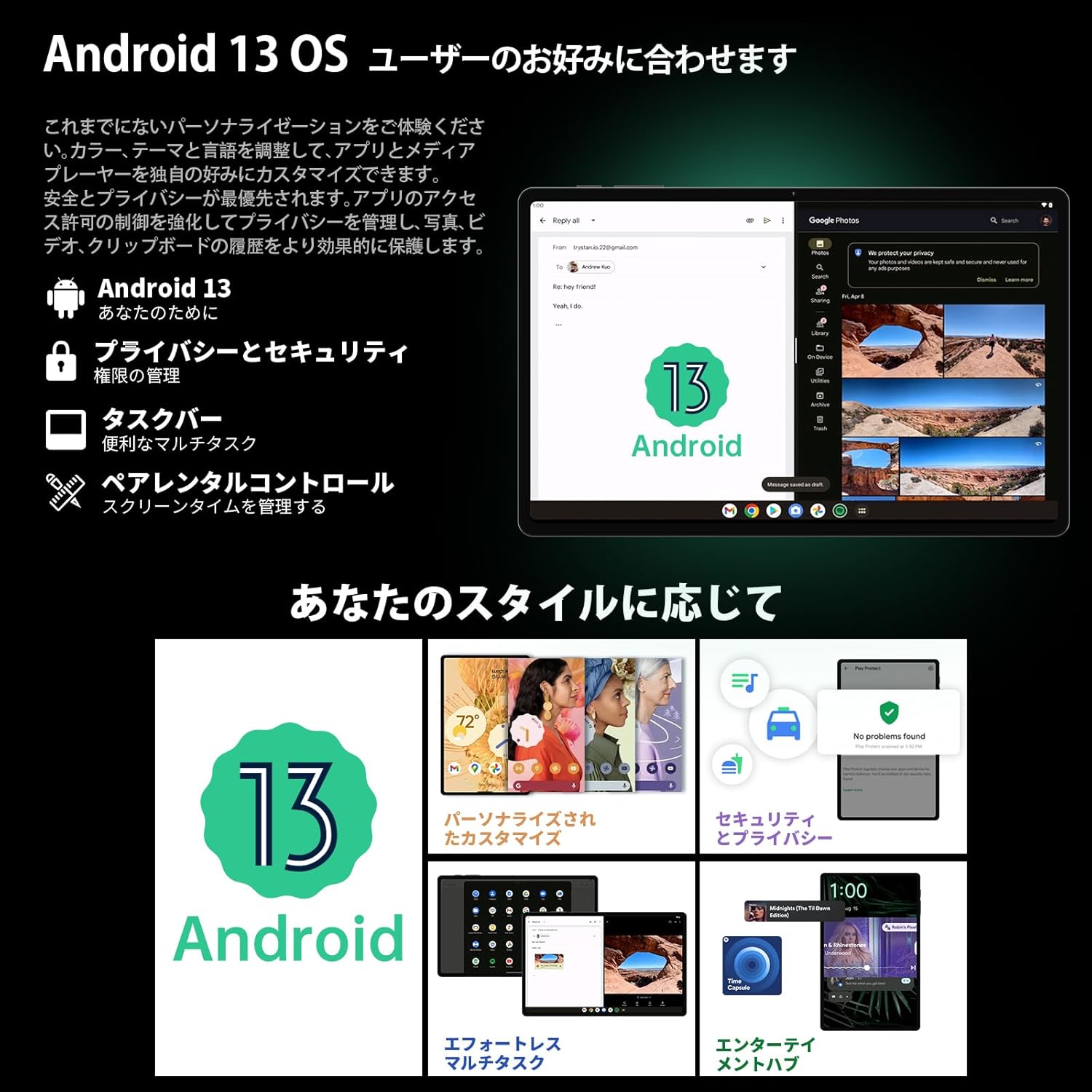
Image 3.1: The Android 13 interface on the TECLAST T40Air Tablet, showing personalization and security features.
3.2 Ngosipụta atụmatụ
The 10.4-inch 2K FHD IPS display provides vibrant colors and sharp details. It features:
- TDDI Fully Laminated: Enhances touch responsiveness and visual clarity.
- Ụdị Nchekwa Anya: Reduces blue light to prevent eye strain.
- Ụdị ọgụgụ: Optimizes the screen for comfortable reading.
- Dark Mode & Dim Mode: Adjusts screen brightness and color for different lighting conditions.

Image 3.2: Visual representation of the TECLAST T40Air Tablet's display features, including eye protection and reading modes.
3.3 Ojiji igwefoto
The tablet is equipped with a 13MP rear dual camera and an 8MP front camera.
- Na-ewere Foto: Mepee ngwa igwefoto ahụ, tinye foto gị n'ime ihe osise ahụ, wee pịa bọtịnụ mkpuchi ahụ.
- Ndekọ vidiyo: Gbanwee gaa na ọnọdụ vidiyo na ngwa igwefoto wee pịa bọtịnụ ndekọ.
- Igwefoto ihu: Use for video calls and selfies.

Image 3.3: The TECLAST T40Air Tablet showcasing its camera capabilities and 3.5mm headphone jack.
3.4 Audio na Njikọta
- SWEET 4 Speakers: Enjoy immersive audio with the tablet's quad-speaker system and Smart K Digital Ampna -emegharị ihe.
- Jack ekweisi 3.5mm: Connect your wired headphones for private listening.
- Wi-Fi: Supports 2.4GHz and 5GHz dual-band Wi-Fi (802.11ac) for stable and fast internet.
- Bluetooth Bluetooth: Connect wireless accessories like headphones, keyboards, and mice.
- VoLTE: Enables high-quality voice calls over 4G LTE networks.
3.5 Mkpọghe ihu
The tablet supports Face Unlock for convenient and secure access. Set it up in the Security settings. Ensure good lighting conditions for optimal performance.
4. Nlekọta
4.1 Na-ehicha mbadamba nkume
Iji hichaa mbadamba ụrọ gị, jiri akwa dị nro na-enweghị ntụpọ. Maka isi ike smudges, ntakịrị dampJiri mmiri ma ọ bụ ihe nhicha ákwà kpuchie ákwà ahụ. Zere iji kemịkalụ siri ike, ihe ndị na-emebi emebi, ma ọ bụ oke mmiri mmiri.
4.2 Nlekọta batrị
- Zere ikpughe mbadamba nkume na oke okpomọkụ.
- Ekwela ka batrị kpochapu kpamkpam ugboro ugboro.
- Use the original charger or a certified 18W PD charger for optimal charging.
4.3 Mmelite ngwanrọ
Lelee ma wụnye mmelite ngwanrọ mgbe niile ka ị hụ na mbadamba ụrọ gị nwere njirimara kachasị ọhụrụ, patches nche na nkwalite arụmọrụ. Gaa na Ntọala> Sistemu> Mmelite sistemụ.
4.4 Njikwa nchekwa
The tablet comes with 256GB of internal storage, expandable via microSD card up to 1TB. Regularly manage your storage by:
- Ihichapụ adịghị mkpa files na ngwa.
- Na-aga nnukwu files na kaadị microSD.
- Utilizing cloud storage services.

Image 4.1: The TECLAST T40Air Tablet highlighting its 16GB RAM, 256GB ROM, and support for microSD card expansion.
5. Nchọpụta nsogbu
This section addresses common issues you might encounter with your TECLAST T40Air Tablet.
5.1 Ngwaọrụ anaghị agba ọkụ
- Ensure the battery is sufficiently charged. Connect the charger and wait a few minutes before attempting to power on.
- Pịa ma jide bọtịnụ Ike maka opekata mpe sekọnd 10-15 iji mee ka ọ malitegharịa.
5.2 Okwu Njikọ Wi-Fi
- Check if Wi-Fi is enabled in Ntọala> Netwọk & ịntanetị> Wi-Fi.
- Gbaa mbọ hụ na itinyela paswọọdụ Wi-Fi ziri ezi.
- Malitegharịa ekwentị Wi-Fi gị na mbadamba.
- Try connecting to a different Wi-Fi network to isolate the issue.
5.3 Ịrụ ọrụ nwayọ
- Mechie ngwa ndabere ndị a na-ejighị.
- Clear cache data for apps that are running slowly (Ntọala> Ngwa> [Aha ngwa]> Nchekwa & cache> Kpochapụ cache).
- Gbaa mbọ hụ na ị nwere oghere nchekwa efu zuru oke.
- Malitegharịa ekwentị ahụ.
5.4 Ihuenyo Anaghị azaghachi
- Malitegharịa mbadamba ahụ site n'iji bọtịnụ Ike.
- Ensure the screen is clean and free from moisture or debris.
5.5 Tọgharịa Ụlọ Ọrụ Mmepụta (Ebe Njem Ikpeazụ)
If issues persist, you may consider performing a factory reset. Ịdọ Aka Na Ntị: Nke a ga-ehichapụ data niile dị na mbadamba gị. Kwadobe data dị mkpa tupu ị gaa n'ihu.
Gaa na Ntọala> Sistemu> Nhọrọ Tọgharia> Hichapụ data niile (ntọgharị ụlọ ọrụ) ma soro ntuziaka na ihuenyo.
6. Nkọwapụta
Below are the technical specifications for the TECLAST T40Air Tablet:
| Njirimara | Nkọwapụta |
|---|---|
| Nọmba nlereanya | T40Air |
| Ngosipụta nha | 10.4 sentimita asatọ |
| Mkpebi ihuenyo | 1920 x 1080 pixels (2K FHD IPS) |
| RAM | 16 GB |
| Flash Memory Size (ROM) | 256 GB |
| Akara nhazi | Rockchip or Unisoc (Octa-core) |
| Sistemụ nrụọrụ | Android 13 |
| Ụdị ikuku | 5 GHz Radio Frequency, 802.11a/b/g/n/ac |
| Bluetooth | Bluetooth 5.0 |
| Nkezi Ndụ batrị | Awa 5 (7200mAh) |
| Ibu Ibu | 1.01 pound (ihe dị ka 460 g) |
| Akụkụ ngwaahịa | 9.6 x 6.1 x 0.3 sentimita asatọ |
| Njirimara Pụrụ Iche | Dị fechaa |
7. Akwụkwọ ikike na nkwado
7.1 Akwụkwọ ikike ngwaahịa
The TECLAST T40Air Tablet comes with a standard manufacturer's warranty. Please refer to the warranty card included in your product packaging for specific terms, conditions, and duration. Keep your proof of purchase for warranty claims.
7.2 Nkwado ndị ahịa
If you encounter any issues not covered in this manual or require further assistance, please contact TECLAST customer support. You can typically find contact information on the official TECLAST websaịtị ma ọ bụ site na ọwa nkwado nke onye na-ere ahịa gị.
- Visit the official TECLAST websaịtị maka FAQ na akụrụngwa nkwado.
- Contact the seller or retailer for product-specific support and return policies.


