1. Okwu mmalite
This user manual provides comprehensive instructions for the Symcode Wireless Bluetooth Barcode Scanner, Model USA-6709DA-Green. This device is designed for accurate and efficient data capture, supporting various 1D and 2D barcode types. It offers versatile connectivity options including Bluetooth, 2.4G wireless, and USB wired connections, making it suitable for a wide range of business applications.

Image 1: Symcode Wireless Bluetooth Barcode Scanner and accessories.
2. Ihe ngwugwu
Biko chọpụta na ihe niile dị na ngwugwu gị:
- Symcode Barcode Scanner (Model: USA-6706DA-Green)
- Igwe nchaji USB
- 2.4G USB Dongle
- Akwụkwọ ntuziaka onye ọrụ

Image 2: Components included with the Symcode Barcode Scanner.
3. Akụrụngwa Ngwaahịa
- Teknụzụ nyocha dị elu: CMOS optical imaging for quick and precise scanning of 1D and 2D barcodes (QR, DataMatrix, PDF417, Aztec, Hanxin, etc.) even on damaged or poorly printed labels.
- Ụdị Njikọta Atọ: Supports Bluetooth, 2.4G wireless, and USB wired connections for maximum flexibility.
- Oke ikuku agbatịkwuru: Up to 200m in open environments and 30m indoors with the 2.4G USB dongle.
- Ogologo ndụ batrị: 2000mAh battery provides up to 30 hours of continuous scanning, with a full recharge in approximately 2 hours.
- Nhazi ọtụtụ: Features include hands-free intelligent sensor mode, trigger scan mode, vibration/buzzer settings, data storage/instant upload modes, multiple keyboard languages, and customizable prefix/suffix options.
- Ogologo Ogologo Kasị Elu: Constructed with strong ABS material, designed to withstand drops of up to 2.4 meters (8 ft) and features an integrated dustproof housing (IP67 rated).
4. Ntọala na Njikọ
The scanner offers three primary connection methods:
4.1. 2.4G Njikọ ikuku
- Tinye eriri USB 2.4G n'ime ọdụ ụgbọ USB dị na kọmputa gị.
- Turn on the scanner. It will automatically pair with the dongle.
- A successful connection is indicated by a specific beep sound and LED indicator.
4.2. Njikọ Bluetooth
- Ensure your device (smartphone, tablet, computer) has Bluetooth enabled.
- Scan the Bluetooth pairing barcode (usually found in the user manual or on a setup card).
- On your device, search for Bluetooth devices and select "Symcode Scanner" (or similar name).
- Kwenye njikọ.
4.3. USB Wired Connection
- Jikọọ nyocha na kọmputa gị site na iji eriri USB enyere.
- The scanner will function as a wired device and also charge simultaneously.

Image 3: Connectivity options for the Symcode Barcode Scanner.

Foto 4: ndakọrịta sistemụ arụmọrụ.
5. Ntuziaka ọrụ
5.1. Basic Scanning Operation
To scan a barcode, point the scanner's window at the barcode and press the trigger button. A successful scan will be indicated by a beep and/or vibration, and the data will be transmitted to your connected device.
5.2. Ụdị Ibugo Data
The scanner supports two data upload modes:
- Ụdị nbudata ngwa ngwa: Data is transmitted to the connected device immediately after each scan. This is the default mode.
- Offline Storage Mode: Scanned data is stored in the scanner's internal memory (up to 10,000 codes). To upload stored data, scan the specific setup code for 'Upload Data' found in your detailed user manual.

Image 5: Instant Upload Mode vs. Offline Storage Mode.
5.3. Decoding Capabilities
The scanner can decode a wide array of barcode types, including:
- Koodu 1D: UPC/EAN, Code 39, Code 128, Codabar, Interleaved 2 of 5, Code 93, MSI, Code 11, RSS variants, etc.
- Koodu 2D: QR Code, Data Matrix, PDF417, Aztec, Hanxin.
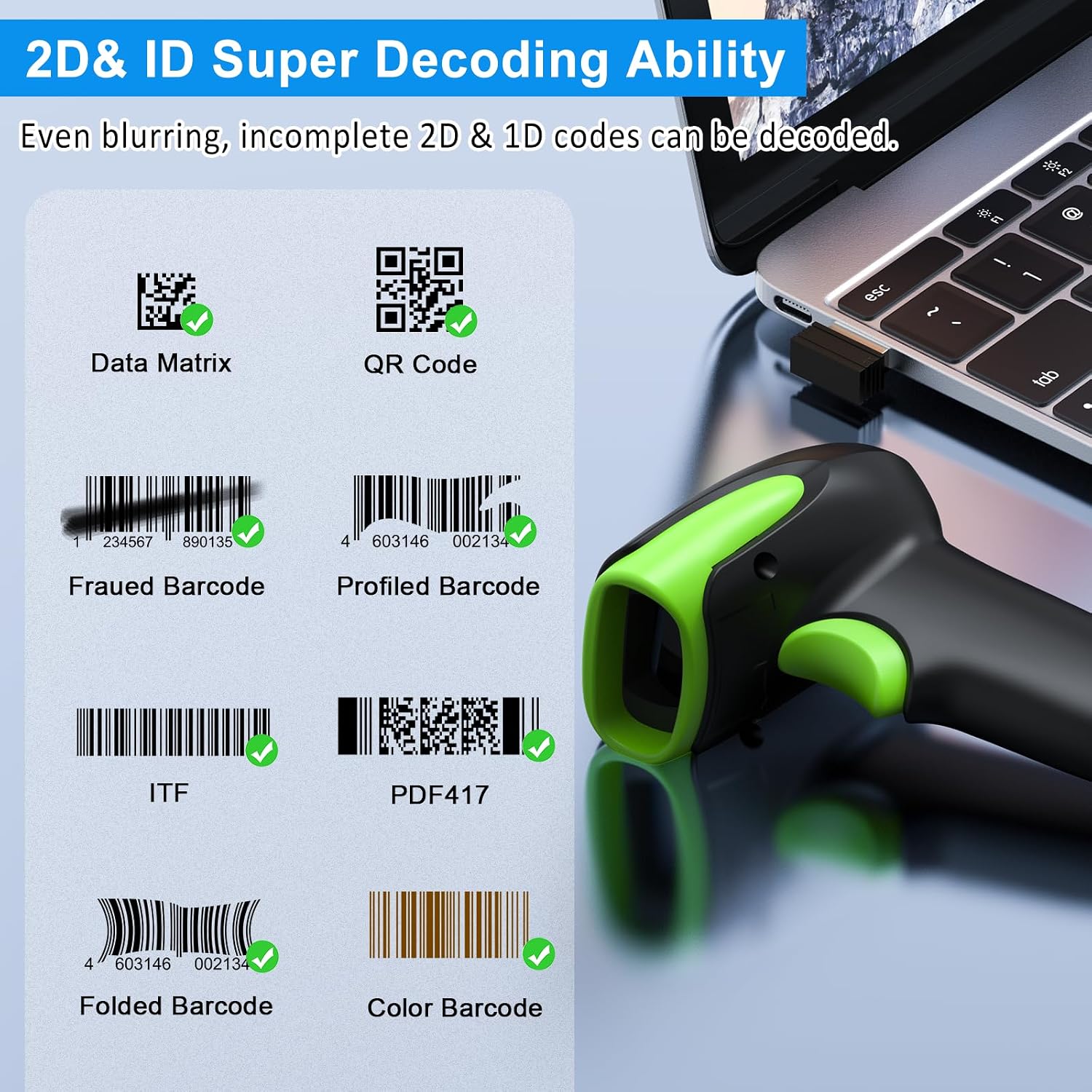
Foto 6: Ọpụamples of decodable 1D and 2D barcodes.
6. Nlekọta
To ensure optimal performance and longevity of your scanner:
- Nhicha: Use a soft, dry cloth to clean the scanner's exterior. For the scanning window, use a lens cleaning cloth to avoid scratches. Do not use abrasive cleaners or solvents.
- Ịchaji: Recharge the battery using the provided USB cable. Avoid overcharging or completely draining the battery for extended periods.
- Nchekwa: Debe ihe nyocha ahụ n'ebe dị jụụ ma kpọọ nkụ, ebe anwụ na-anaghị apụta kpọmkwem na oke okpomọkụ.
- Ogologo oge: While rugged, avoid intentional drops or impacts. The scanner is designed to withstand accidental drops up to 2.4 meters.

Image 7: The scanner's rugged design and drop resistance.
7. Nchọpụta nsogbu
If you encounter issues with your scanner, please refer to the following common problems and solutions:
- Scanner not connecting:
- Ensure the scanner is charged.
- Verify the correct connection mode (Bluetooth, 2.4G, USB) is selected and properly set up.
- For 2.4G, ensure the dongle is securely plugged in. For Bluetooth, ensure your device's Bluetooth is on and the scanner is paired.
- Try restarting both the scanner and the host device.
- Scanner not reading barcodes:
- Ensure the barcode is not excessively damaged, smudged, or poorly printed.
- Check the distance and angle of the scanner to the barcode.
- Verify that the barcode type is supported by the scanner.
- Clean the scanning window if it is dirty.
- Data not transmitting:
- Confirm the scanner is successfully connected to your device.
- Check if the scanner is in 'Offline Storage Mode' and needs to be manually uploaded.
- Ensure the application on your device is ready to receive input.
For further assistance, please refer to the comprehensive troubleshooting section in the full user manual or contact Symcode customer support.
8. Nkọwapụta
| Njirimara | Nkọwapụta |
|---|---|
| Nọmba nlereanya | USA-6709DA-Green |
| Ntinye Voltage | DC5V±0.25v |
| Current (Work/Instantaneous) | 25mA / 95mA |
| Decoding Speed | 100 ugboro / sk |
| Wireless Range (2.4G) | Up to 200m (open air), 30m (indoors) |
| Oge Nchaji | Ihe ruru. Awa 2.5 |
| Ndụ batrị | Up to 30 Hours (continuous scanning) |
| Ụdị batrị | 1 batrị lithium polymer (gụnyere) |
| Njikọta | Bluetooth 6.1, Wireless 2.4G, USB Cable |
| Ngwa dakọtara | Desktop, Laptop, Smartphone, POS systems |
| Sistemu eji arụ ọrụ | Windows 11/10/8/7/XP, Mac OS, iOS, Android, Linux |
| Ibu Ibu | 10.2 ounces |
| Akụkụ ngwugwu | 6.89 x 4.49 x 3.31 sentimita asatọ |

Image 8: Wireless transmission range.
9. Akwụkwọ ikike na nkwado
This Symcode product is manufactured by USA Scanner. For any product inquiries, technical support, or warranty claims, please contact USA Scanner directly. Refer to the contact information provided in your product packaging or visit the official Symcode brand store on Amazon for support resources.
Gaa leta Symcode Store maka ozi ndị ọzọ.


