1. Okwu mmalite
Thank you for choosing BUGANI Open Ear Headphones, Model MH22109. These headphones are designed to provide a comfortable, open-ear listening experience with advanced Bluetooth 5.3 technology, immersive stereo sound, and clear call functionality. This manual will guide you through the setup, operation, and maintenance of your new headphones.
2. Ozi nchekwa
- Ekwela ka ekweisi ma ọ bụ ihe mkpuchi chaja kpuchie ya n'ebe okpomọkụ dị oke elu, anwụ kpọmkwem, ma ọ bụ ọkụ na-apụta.
- Avoid using the headphones at excessively high volumes for prolonged periods to prevent hearing damage.
- Keep the device away from water and liquids, although it is IPX5 rated for sweat and light splashes, it is not designed for submersion.
- Anwala ịkwasa ma ọ bụ gbanwee ngwaọrụ ahụ. Nke a ga-emebi akwụkwọ ikike.
- Jiri naanị eriri chaja enyere maọbụ eriri Type-C nke akwadoro maka chaja.
- Mara ihe gbasara gburugburu gị mgbe ị na-eji ekweisi mepere emepe, ọkachasị n'ebe okporo ụzọ ma ọ bụ ebe dị ize ndụ.
3. Ihe ngwugwu
The BUGANI Open Ear Headphones package includes the following items:
- BUGANI Open Ear Headphones (Left and Right)
- Nchaji case
- USB Type-C Charging Cable (not explicitly listed but standard)
- Akwụkwọ ntuziaka (akwụkwọ a)

Image: The BUGANI Open Ear Headphones and their transparent charging case.
4. Ngwaahịa gafereview
The BUGANI Open Ear Headphones feature a unique design that rests gently on your ears without entering the ear canal, providing comfort and situational awareness. The charging case protects the earbuds and provides extended battery life.

Image: A woman wearing the BUGANI Open Ear Headphones, illustrating the open-ear design and comfortable fit.

Image: A man relaxing and listening to music with the headphones, highlighting the immersive stereo sound.
5. Nhazi
5.1 Ịchaji ekweisi na akpa
Tupu ejie ya nke mbụ, chajie nke ọma ekweisi na akpa nchaji.
- Tinye ntị ntị n'ime akpa nchaji. Gbaa mbọ hụ na ha nọ ọdụ nke ọma.
- Connect the Type-C charging cable to the charging port on the case and plug the other end into a USB power adapter (not included) or a computer's USB port.
- The LED indicator on the charging case will show the charging status. A full charge for the case typically takes 1-2 hours.
- The earbuds provide up to 6 hours of playtime on a single charge, and the charging case extends total playtime to approximately 30 hours.

Image: The charging case with earbuds, displaying the battery level, next to a smartphone playing music, illustrating the 30-hour playtime.
5.2 Njikọ Bluetooth
The headphones feature one-step auto-pairing for convenience.
- Mepee igbe nchaji. Igwe ntị ga-agbanye na-akpaghị aka wee banye ọnọdụ njikọta.
- Na ngwaọrụ gị (smartphone, mbadamba, kọmputa), mee ka Bluetooth nwee ike.
- Chọọ maka available Bluetooth devices and select "BUGANI OpenFit" from the list.
- Once connected, you will hear an audible confirmation, and the device will show "Connected".
- Ekweisi ga-ejikọghachi na ngwaọrụ ikpeazụ ejikọtara na akpa ahụ ozugbo ewepụrụ ya na ekwentị, ọ bụrụ na Bluetooth agbanyere na ngwaọrụ ahụ.

Image: A smartphone screen displaying the Bluetooth settings, with "BUGANI OpenFit" listed as a connected device, demonstrating the one-step auto-pairing process.
6. Ntuziaka ọrụ
6.1 Yiri ekweisi
The open-ear design ensures a secure and comfortable fit without blocking your ear canal.
- Chọpụta ihe ekwe ntị aka ekpe (L) na aka nri (R).
- Gently hook the earbud over your ear, ensuring the speaker portion is positioned near your ear canal without entering it.
- Adjust for a snug and comfortable fit.
6.2 Njikwa Smart Touch
The headphones feature touch-sensitive areas for controlling various functions:
| Omume | Igwe ntị | Ọrụ |
|---|---|---|
| Kpatụ x1 | R/L | Play/Pause Music, Answer Call |
| Kpatụ x2 | R | Elu elu |
| Kpatụ x2 | L | Mpịakọta ọnụ |
| Kpatụ x3 | R | Track na-esote |
| Kpatụ x3 | L | Egwu gara aga |
| Pịa ma jide (2s) | R/L | Kwụsị oku, jụrụ oku |
| Pịa ma jide (2s) | L | Mee ka onye enyemaka olu rụọ ọrụ |
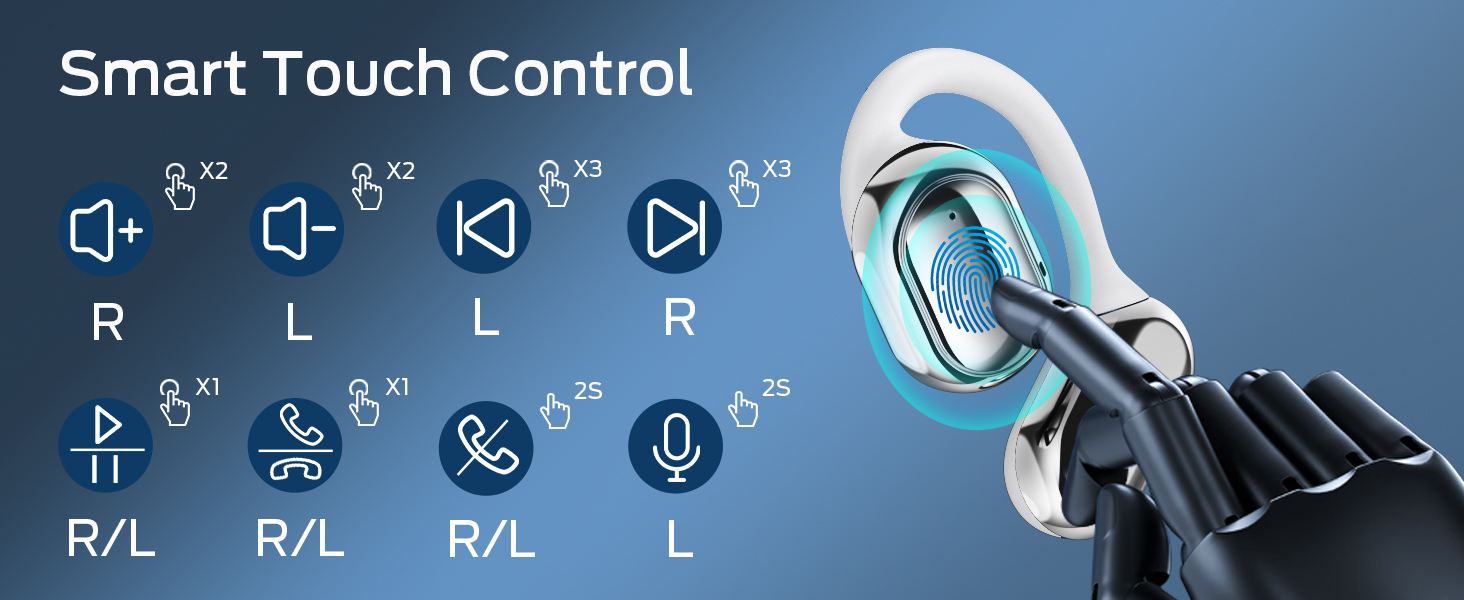
Image: A visual guide to the smart touch controls on the BUGANI Open Ear Headphones, detailing single, double, triple taps, and long presses for various functions.
6.3 Ịkpọ na ịnata oku
The built-in dual microphones with environmental noise reduction technology ensure clear calls.
- Oku azaa: Kpatụ ntị ntị otu ugboro.
- Oku ngwụcha: Pịa ma jide otu ntị ntị maka sekọnd 2.
- Jụ oku: Pịa ma jide otu ntị ntị maka sekọnd 2.

Image: A man using the BUGANI Open Ear Headphones to make a phone call, emphasizing the clear call feature.
7. Nlekọta
7.1 Nhicha
- Jiri akwa dị nro, kpọrọ nkụ, hichaa akpa ntị na ihe nchaji.
- Ejila ihe mkpocha abrasive, mmanya, ma ọ bụ ihe mgbaze kemịkal.
- Hụ na kọntaktị chaja dị ọcha ma kpọọ nkụ.
7.2 Nchekwa
- Chekwaa ekweisi n'ime akpa chaja ha mgbe ọ naghị eji ya iji chekwaa ya ma debe ya chajị.
- Store in a cool, dry place, away from extreme temperatures.
7.3 Mgbochi mmiri (IPX5)
The headphones are rated IPX5, meaning they are protected against low-pressure water jets from any direction. This makes them suitable for sports and running, protecting against sweat and light rain. They are not designed for swimming or submersion in water.
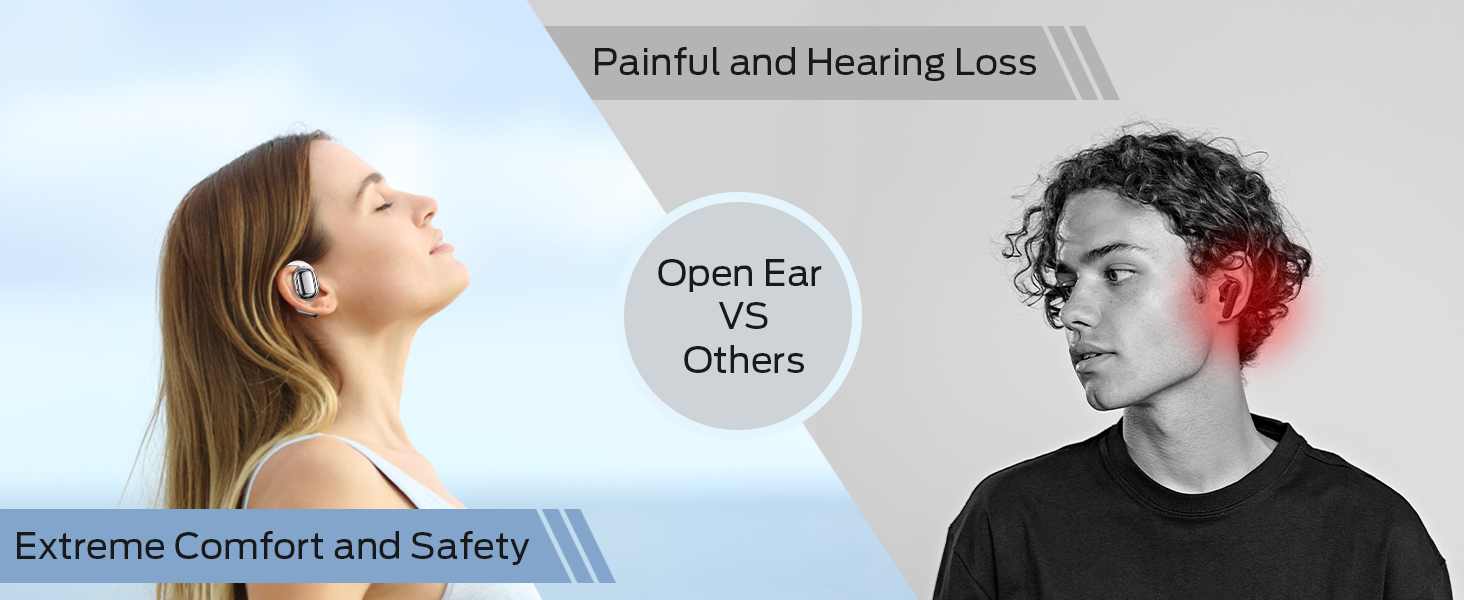
Image: A man running with water splashing on him, demonstrating the IPX5 waterproof feature of the headphones, suitable for active use.
8. Nchọpụta nsogbu
If you encounter issues with your BUGANI Open Ear Headphones, please refer to the following common solutions:
- Enweghị ụda: Ensure the headphones are charged, paired correctly, and the volume on both the headphones and your device is turned up.
- Okwu ijikọ: Turn off Bluetooth on your device, then turn it back on. Place the earbuds back in the case, close it, then open it again to re-enter pairing mode. Try pairing again.
- Njikọ na-adịte aka: Ensure you are within the Bluetooth range (up to 10 meters) and there are no significant obstacles between the headphones and your device. Avoid strong electromagnetic interference.
- Earbuds anaghị akwụ ụgwọ: Check that the charging cable is securely connected and the charging contacts on the earbuds and case are clean. Ensure the charging case itself has power.
- Otu ntị anaghị arụ ọrụ: Try placing both earbuds back in the case, closing it, and then taking them out again to reset the connection. If the issue persists, try re-pairing.
9. Nkọwapụta
| Njirimara | Nkọwapụta |
|---|---|
| Aha Nlereanya | BUGANI OpenFit |
| Nọmba nlereanya | MH22109 |
| Teknụzụ Njikọta | Ikuku (Bluetooth) |
| Ụdị Bluetooth | 5.3 |
| Oke Bluetooth | 10 mita |
| Ntinye ntị | Mepee Ntị |
| Nha ọkwọ ụgbọ ala | 16mm (Dual Large Driver) |
| Ndụ batrị (Otu chaja) | Ruo awa 6 |
| Ngụkọta oge egwuregwu (ya na igbe nchaji) | Ruo awa 30 |
| Nchaji ọdụ ụgbọ mmiri | Ụdị-C |
| Ogo Nguzogide Mmiri | IPX5 |
| Igwe okwu | Built-in Dual Microphones with Environmental Noise Reduction |
| Ngwa dakọtara | Bluetooth-enabled devices (smartphones, computers, TVs) |
| Ihe onwunwe | Plastic |
| Ibu Ibu | 6.4 ounces |
10. Akwụkwọ ikike na nkwado
BUGANI products are designed for reliability and performance. For warranty information, please refer to the warranty card included with your purchase or visit the official BUGANI website. If you require technical support or have questions not covered in this manual, please contact BUGANI customer service through their official channels.
You can often find support contact information on the BUGANI brand store page: Ụlọ Ahịa BUGANI dị na Amazon


