Okwu mmalite
This manual provides essential information for the safe and efficient operation of your TECNO Pova 5 Pro 5G smartphone. Please read it thoroughly before using your device to ensure optimal performance and longevity.

Image: The TECNO Pova 5 Pro 5G smartphone, showcasing its design and key feature of 68W Ultra Fast Charging.
Kedu ihe dị na Igbe ahụ
Chọpụta na ihe niile dị na nkwakọ ngwaahịa:
- Ekwentị mkpanaaka
- 68 W Ihe nkwụnye ọkụ
- Ụdị-C USB
- TPU Cover
- Ngwaọrụ SIM Ejector

Image: A flat lay of the TECNO Pova 5 Pro 5G packaging contents, showing the smartphone, 68W power adapter, USB-C cable, TPU protective cover, and the SIM ejector tool.
Melite
Ntọlite mbụ
- Fanye SIM/SD Kaadị: Locate the SIM tray on the side of the device. Use the provided SIM ejector tool to open the tray. Insert your Nano-SIM card(s) and/or microSD card into the designated slots. Ensure the tray is fully reinserted.
- Ike Na: Press and hold the Power button (located on the right side) until the TECNO logo appears.
- Soro ngwa ngwa na ihuenyo: The device will guide you through initial setup, including language selection, Wi-Fi connection, Google account setup, and security settings.
Ịchaji ngwaọrụ
The TECNO Pova 5 Pro 5G supports 68W Ultra Fast Charging.
- Jikọọ eriri Type-C na ọdụ ụgbọ mmiri dị na ala ekwentị.
- Jikọọ nsọtụ nke ọzọ nke eriri ahụ na ihe nkwụnye ike 68W.
- Tinye nkwụnye ọkụ n'ime oghere mgbidi.
- A full charge typically takes approximately 45 minutes, with 50% charge achievable in about 15 minutes.
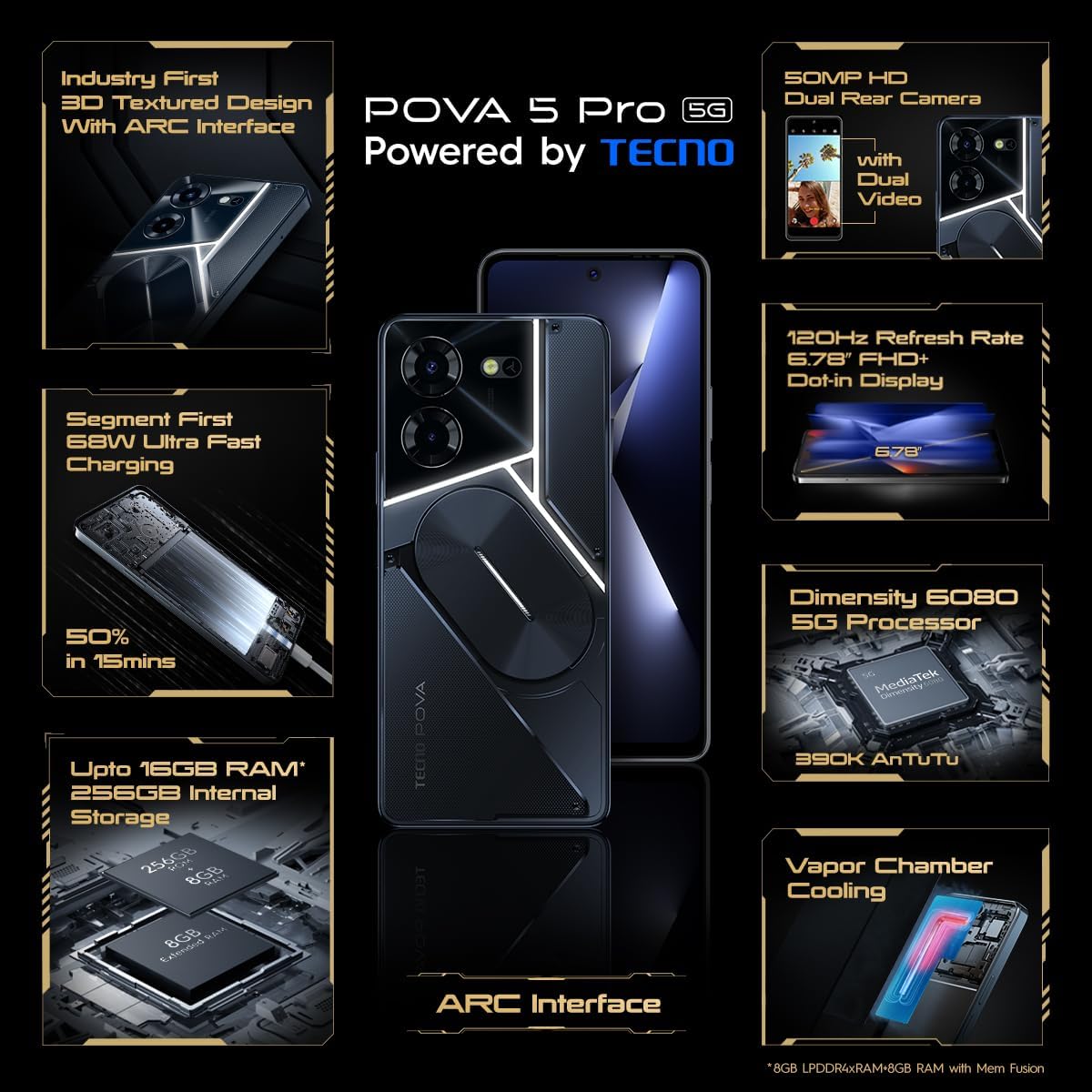
Foto: ihu doro anya view of the TECNO Pova 5 Pro 5G smartphone, highlighting its display and front camera.
Na-arụ ọrụ ngwaọrụ
Nsoro ụzọ
- Ihuenyo mmetụ aka: Pịa ka ịhọrọ, pia ka ịpịgharịa, tuo ka mbugharị.
- Bọtịnụ ike: Pịa iji teta/hie ụra na ihuenyo ahụ. Pịa ma jide iji gbanyụọ ma ọ bụ malitegharịa.
- Bọtịnụ olu: Adjust media volume, call volume, or ringtone volume.
Ojiji igwefoto
The device features a 50MP AI Dual Rear Camera and a 16MP Selfie Camera.
- Mepee ngwa igwefoto site na ihuenyo mbụ ma ọ bụ drọwa ngwa.
- Họrọ ụdị achọrọ (Foto, Vidiyo, Foto, wdg).
- Pịa bọtịnụ mkpọchi iji seta foto ma ọ bụ malite/kwụsị ndekọ vidiyo.
- Utilize AI enhancements for optimized scene recognition and image quality.
ARC Interface and Notifications
The TECNO Pova 5 Pro 5G features a unique multi-color ARC interface with backlighting.
- The ARC interface provides customizable light effects for notifications, incoming calls, gaming, and music playback.
- Access settings to personalize the light patterns and colors for different alerts.

Foto: N'azụ view of the TECNO Pova 5 Pro 5G, showcasing its distinctive 3D textured design and the illuminated ARC interface.

Foto: nkọwa zuru ezu view of the TECNO Pova 5 Pro 5G's ARC interface, illustrating the multi-color backlighting feature.
Nlekọta
- Nlekọta batrị: To prolong battery life, avoid exposing the device to extreme temperatures. Do not fully discharge the battery regularly.
- Nhicha: Use a soft, lint-free cloth to clean the screen and body. Avoid using harsh chemicals or abrasive materials.
- Mmelite ngwanrọ: Na-enyocha ma wụnye mmelite sistemụ mgbe niile iji hụ na arụmọrụ kachasị mma, nchekwa, na ohere ịnweta atụmatụ ọhụrụ. Gaa na Ntọala > Sistemụ > Mmelite sistemụ.
- Njikwa nchekwa: Na-ekpochapụ oge ụfọdụ na-adịghị mkpa files na ngwa iji dowe ohere nchekwa zuru oke yana ọsọ ngwaọrụ.
Nchọpụta nsogbu
- Ngwaọrụ anaghị agba ọkụ: Ensure the battery is charged. Connect the device to the charger for at least 15 minutes before attempting to power on again. If the issue persists, perform a forced restart by holding the Power button for 10-15 seconds.
- Okwu ịchaji: Verify that the charging cable and adapter are securely connected and undamaged. Try using a different outlet.
- Ngwa na-emebi/oyi: Mechie ngwa nsogbu ahụ wee meghee ya. Ọ bụrụ na nsogbu ahụ agaa n'ihu, hichapụ ebe nchekwa na data nke ngwa ahụ na Ntọala > Ngwa. Dịka ihe ikpeazụ, wepụ ma tinyegharịa ngwa ahụ.
- Njikọ netwọk adịghị mma: Check if Airplane Mode is off. Restart the device. If using mobile data, ensure your SIM card is properly inserted and your data plan is active.
- ekpo oke ọkụ: Avoid using the device in direct sunlight or during intensive tasks for extended periods. Close background applications.
Nkọwapụta
| Njirimara | Nkọwapụta |
|---|---|
| Aha Nlereanya | Pova 5 Pro 5G |
| Sistemụ nrụọrụ | Android 13.0 |
| Nhazi | Dimensity 6080 (2.4 GHz Octa-Core) |
| RAM | 8 GB (expandable up to 16 GB with Memory Fusion) |
| Nchekwa nke ime | 256 GB (UMCP) |
| Ngosipụta | 6.78-inch FHD+ Dot-in Display |
| Ọnụego ume ọhụrụ | 120 Hz |
| Igwefoto azụ | 50 MP AI Dual Camera |
| Igwefoto ihu | 16 MP Selfie Camera |
| Batrị | 5000mAh Lithium-Polymer |
| Ịchaji | 68W Ultra Fast Charging |
| Akụkụ | 16.9 x 7.7 x 16.9 cm |
| Ibu | 214 grams |
| Njikọta | 5G (10 bands supported), NFC, Bluetooth 5.1 |

Image: An internal diagram or view of the TECNO Pova 5 Pro 5G, illustrating its vapor chamber cooling system for efficient heat dissipation.
Akwụkwọ ikike na nkwado
Your TECNO Pova 5 Pro 5G comes with a manufacturer's warranty. Please refer to the warranty card included in your product packaging for specific terms and conditions.
For technical support, service, or warranty claims, please contact TECNO customer service. TECNO maintains a large service network with over 1200 service centers in India.
You can find more information and support resources by visiting the official Tecno store on Amazon: Tecno Store


